


The assist system in RGMercs was updated on 3 Sep 2025. The changes are large enough that I felt a guide was warranted:
The Changes:
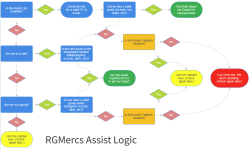
To summarize, if the Assist List is activated, we use it, falling back to ourselves (if that is enabled).
If it is not, we will check our raid/group roles for Assists and use their targets if found, falling back to ourselves (again, if that is enabled).
The important thing to understand is that are are constantly revalidating the assist. As soon as the situation changes, our assigned assist may change as well.
The Instructions... RTFM!
How to set assists for my (non-raid) GROUP:
Set the "Main Assist" Role in your Group Window. You are done. That easy.
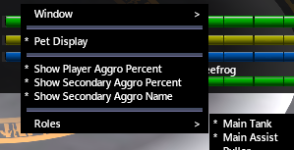
If you don't wish to assign the role, or wish to choose someone else, use the assist list (see below for the assist list tutorial).
Forgot to set your roles? We got you, fam:
Main Window >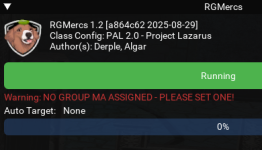
 < Startup message.
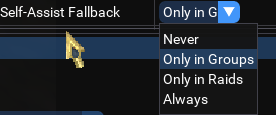
Main Assist ranger-gates back to GL or PoK? We will fallback to ourselves, if you set "Self-Assist Fallback" (This option is enabled in groups by default, and can be found in the main options on the Engage tab, or changed with
Fallback Setting>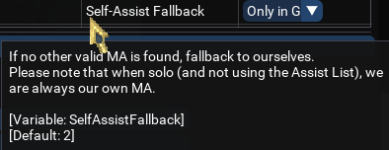
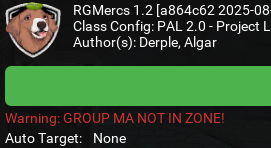 < We will also let you know!
While everyone doing their own thing may sound odd, in testing, it works pretty durn okay! Everyone uses the same logic, and largely ends up on the same target (Usually the one your tank was already fighting). Coding to fallback to some other arbitrary party member is possible, but I've deemed it not feasible at this time. Once the Group MA is assigned, or back in-zone, we will seamless use them as the assist again.
How to set assists for my RAID:
Using raid assists is very similar to setting group roles above.
Again, if you don't wish to assign the raid roles, or wish to choose someone that isn't assigned to them, please use the assist list (see below for the assist list tutorial).
Raids can have up to three assists*. First, choose which assist you would like to use. This is also in the main config settings, on the engage tab (the default is to use the first).
You can change between them on the fly in the UI, or with the command
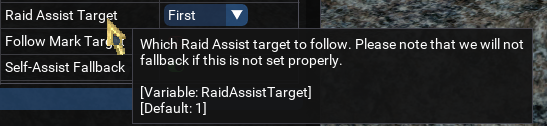 Raid Assist Target Setting.
Again, warnings are set up if the roles are not set:
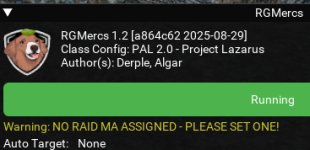
The "Self-Assist Fallback" setting is disabled by default for raids, to avoid someone going rogue and causing wipes. For instructions on changing the setting (location, pictures, etc), see the group how-to above.
Special Note: Mercs will only check for the raid assist that you have designated... it does not check the others! Please ensure the value is correct.
Also note that MQ may report the name of the first raid assist in every position, based on raid leadership AA or assigned assists, so a quasi-fallback exists.
* Some EMU servers do not allow leadership AA, or do not grant leadership AA by default. In this situation, please use the assist list.
How to set assists using the Assist List:
First, be aware that enabling the Assist List locks out any check of Raid or Group roles! If we fail to find a valid assist on the Assist List, fallback to self is the only option, depending on your current Self-Assist Fallback settings, and whether you are currently in a raid or group (see explanations above).
Secondly, as mentioned in Changes, the assist list can be (mostly) fully controlled via the UI or a CLI (Command-Line Interface). This allows you to create hotkeys, multilines, or integrate this list into other scripts as desired.
We will process the list in numerical order. The first valid target will be used. As with group/raid roles, the assist is constantly being revalidated; actions such as adjusting the list (by adding, or removing) or adjusting the order, or factors such as death or abscence of a target may cause a new assist to be selected. This can be leveraged to quickly change your desired assist in fluid encounters. The list can also be cleared entirely, if desired.
The Assist List can be accessed from the main RGMercs window:
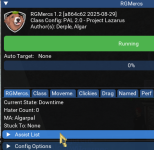 <Click the collapsing header as show to display the Assist List.
Turning the list on:
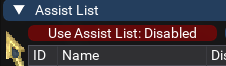
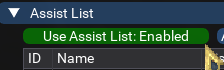 < Command:
Adding a character: Adding via CLI does not confirm that the name used is a valid spawn, so typos are possible. I have added YourMom to my assist list many times during my tests.
 < Command:
Deleting a character: Use the trash can icon which is how I removed YourMom.
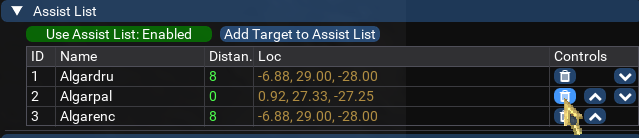 < Command:
Moving a character's position in the list: Use the up or down arrows.
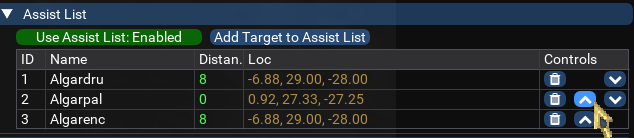 < Command:
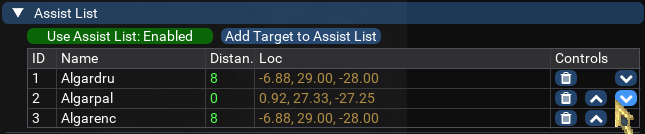 < Command:
Clearing the list:
Breaking my own rules, this is currently not implemented in the UI. My major concern is accidental button presses. Perhaps, in the future, if we provide the ability to save and load custom lists, this will be added.
Command:
Final thoughts: minor details, unsolicited advice:
Adding yourself to the assist list seems awkward, but is probably best if you are designating yourself as the driver. At least, until I suppress the warning messages when you haven't done that! Coding around whether we are the MA because we are falling back vs we are the MA because we *want* to be could be tricky. As a beneficial side effect, it may be easier to set up buttons or scripts that interface with the Assist List.
Adding non-peers (read: outside parties) to the assist list has had only rudimentary testing. I will endeavor to test this better as time goes on. While the code will instruct your PC to target your selected assist to get the target-of-target, I can see possibilities for this breaking down without a good recourse.
If you find issues with this, I would advise you to consider remaining the MA on your driver, and simply determining the targets yourself, by disabling auto target in the tanks engage settings... Or, leaving everyone else assisting you with your driver being the one person assisting the outside party.
Finally... further improvements are always on the horizon, and feedback is always requested! Feel free to hit us up here, or find is in our living room (the #rg-mercs channel on the RG discord)!
The Changes:
- The "Outside Assist List" is now simply the "Assist List". Many times, we aren't "outside" at all, and the term could be misleading.
- Any time we want to assist someone that does not carry the appropriate EQ main assist role (in our raid/group), this list will/must be used.
- Please note that commands related to managing the list have changed along with the name. I apologize for the changes, and possit that the pros outweigh the cons here.
- The logic of how we assist has been adjusted, to include fallbacks. Additionally, fallback to self is now a possibility.
- Commands have been added to handle the Assist List on the fly in buttons or via CLI. This keeps with the "Mercs standard": Anything you can do in the UI, you can do via CLI... and vice versa.
To summarize, if the Assist List is activated, we use it, falling back to ourselves (if that is enabled).
If it is not, we will check our raid/group roles for Assists and use their targets if found, falling back to ourselves (again, if that is enabled).
The important thing to understand is that are are constantly revalidating the assist. As soon as the situation changes, our assigned assist may change as well.
The Instructions... RTFM!
How to set assists for my (non-raid) GROUP:
Set the "Main Assist" Role in your Group Window. You are done. That easy.
If you don't wish to assign the role, or wish to choose someone else, use the assist list (see below for the assist list tutorial).
Forgot to set your roles? We got you, fam:
Main Window >
< Startup message.Main Assist ranger-gates back to GL or PoK? We will fallback to ourselves, if you set "Self-Assist Fallback" (This option is enabled in groups by default, and can be found in the main options on the Engage tab, or changed with
/rgl set).Fallback Setting>
< We will also let you know!While everyone doing their own thing may sound odd, in testing, it works pretty durn okay! Everyone uses the same logic, and largely ends up on the same target (Usually the one your tank was already fighting). Coding to fallback to some other arbitrary party member is possible, but I've deemed it not feasible at this time. Once the Group MA is assigned, or back in-zone, we will seamless use them as the assist again.
How to set assists for my RAID:
Using raid assists is very similar to setting group roles above.
Again, if you don't wish to assign the raid roles, or wish to choose someone that isn't assigned to them, please use the assist list (see below for the assist list tutorial).
Raids can have up to three assists*. First, choose which assist you would like to use. This is also in the main config settings, on the engage tab (the default is to use the first).
You can change between them on the fly in the UI, or with the command
/rgl set RaidAssistTarget #, where # is 1, 2, or 3.Raid Assist Target Setting.Again, warnings are set up if the roles are not set:
The "Self-Assist Fallback" setting is disabled by default for raids, to avoid someone going rogue and causing wipes. For instructions on changing the setting (location, pictures, etc), see the group how-to above.
Special Note: Mercs will only check for the raid assist that you have designated... it does not check the others! Please ensure the value is correct.
Also note that MQ may report the name of the first raid assist in every position, based on raid leadership AA or assigned assists, so a quasi-fallback exists.
* Some EMU servers do not allow leadership AA, or do not grant leadership AA by default. In this situation, please use the assist list.
How to set assists using the Assist List:
First, be aware that enabling the Assist List locks out any check of Raid or Group roles! If we fail to find a valid assist on the Assist List, fallback to self is the only option, depending on your current Self-Assist Fallback settings, and whether you are currently in a raid or group (see explanations above).
Secondly, as mentioned in Changes, the assist list can be (mostly) fully controlled via the UI or a CLI (Command-Line Interface). This allows you to create hotkeys, multilines, or integrate this list into other scripts as desired.
We will process the list in numerical order. The first valid target will be used. As with group/raid roles, the assist is constantly being revalidated; actions such as adjusting the list (by adding, or removing) or adjusting the order, or factors such as death or abscence of a target may cause a new assist to be selected. This can be leveraged to quickly change your desired assist in fluid encounters. The list can also be cleared entirely, if desired.
The Assist List can be accessed from the main RGMercs window:
<Click the collapsing header as show to display the Assist List.Turning the list on:
< Command: /rgl set UseAssistList true Valid Arguments: true/false, off/on, 1/0Adding a character: Adding via CLI does not confirm that the name used is a valid spawn, so typos are possible. I have added YourMom to my assist list many times during my tests.
< Command: /rgl assistadd algar If a name is not specified, your current target is added.Deleting a character: Use the trash can icon which is how I removed YourMom.
< Command: /rgl assistdelete algarpal or /rgl assistdelete 2 Both of these will remove "Algarpal" from the list, as he is currently in position 2.Moving a character's position in the list: Use the up or down arrows.
< Command: /rgl assistup algarpal or /rgl assistup 2 Both of these will move "Algarpal" up one position, as he is currently in position 2.< Command: /rgl assistdown algarpal or /rgl assistdown 2 Both of these will move "Algarpal" down one position, as he is currently in position 2.Clearing the list:
Breaking my own rules, this is currently not implemented in the UI. My major concern is accidental button presses. Perhaps, in the future, if we provide the ability to save and load custom lists, this will be added.
Command:
/rgl assistclearFinal thoughts: minor details, unsolicited advice:
Adding yourself to the assist list seems awkward, but is probably best if you are designating yourself as the driver. At least, until I suppress the warning messages when you haven't done that! Coding around whether we are the MA because we are falling back vs we are the MA because we *want* to be could be tricky. As a beneficial side effect, it may be easier to set up buttons or scripts that interface with the Assist List.
Adding non-peers (read: outside parties) to the assist list has had only rudimentary testing. I will endeavor to test this better as time goes on. While the code will instruct your PC to target your selected assist to get the target-of-target, I can see possibilities for this breaking down without a good recourse.
If you find issues with this, I would advise you to consider remaining the MA on your driver, and simply determining the targets yourself, by disabling auto target in the tanks engage settings... Or, leaving everyone else assisting you with your driver being the one person assisting the outside party.
Finally... further improvements are always on the horizon, and feedback is always requested! Feel free to hit us up here, or find is in our living room (the #rg-mercs channel on the RG discord)!
Last edited:


