• You've discovered RedGuides, an EverQuest multi-boxing and scripting community 🧙‍♀️⚙️. We want you to play several EQ characters at once, come join us and say hello! 👋

  • A TLP without truebox has thawed (Very Vanilla ready)
    Frostreaver

Problem - Repeatedly crashing

Myysterio

Myysterio
Creator
Joined
Jun 13, 2020
RedCents
1,761¢
---------------------------
EverQuest Crash Detected
---------------------------
MacroQuest caught a crash:

Process ID: 15624
Version: 3.1.1.3206
Location: RaiseException+0 (C:\WINDOWS\System32\KERNELBASE.dll+00000000000C7F10)

CrashID: d75b12d9-d604-4cbc-8e43-6a897490ae31

You can either:
* [RETRY] Continue execution and hope for the best.
* [CANCEL] Write a crash dump and terminate EverQuest.

Copy the contents of this dialog to your clipboard by pressing Ctrl+C

---------------------------
Retry Cancel
---------------------------


I got this crash like 4-5 times today after imgui locked up.
 
First thing is first. Antivirus exclusions to your MQ and EQ folders for protection? Make sure antivirus isn't auto borking your files by making sure it never stops activity from those folders / directories. It will randomly happen even if it never happened before.

Also, what OS version?
 
First thing is first. Antivirus exclusions to your MQ and EQ folders for protection? Make sure antivirus isn't auto borking your files by making sure it never stops activity from those folders / directories. It will randomly happen even if it never happened before.

Also, what OS version?
i have windows 11 with ms defender, antivirus hasnt caused problems before that im aware of
 
---------------------------
EverQuest Crash Detected
---------------------------
MacroQuest caught a crash:

Process ID: 43592
Version: 3.1.1.3206
Location: D:\RedGuides\Plugins\mq2paladin.DLL+000000000009DE5A

CrashID: 54c5e049-c684-4e6c-a9db-8de334346d29

You can either:
* [RETRY] Continue execution and hope for the best.
* [CANCEL] Write a crash dump and terminate EverQuest.

Copy the contents of this dialog to your clipboard by pressing Ctrl+C

---------------------------
Retry Cancel
---------------------------
 
---------------------------
EverQuest Crash Detected
---------------------------
MacroQuest caught a crash:

Process ID: 43592
Version: 3.1.1.3206
Location: D:\RedGuides\Plugins\mq2paladin.DLL+000000000009DE5A

CrashID: 54c5e049-c684-4e6c-a9db-8de334346d29

You can either:
* [RETRY] Continue execution and hope for the best.
* [CANCEL] Write a crash dump and terminate EverQuest.

Copy the contents of this dialog to your clipboard by pressing Ctrl+C

---------------------------
Retry Cancel
---------------------------
I'm not convinced this is an mq2paladin problem - the crash reads as if your memory was smashed


I got this crash like 4-5 times today after imgui locked up.

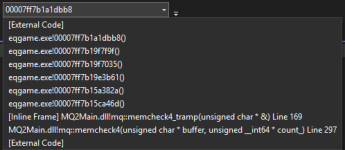
this one doesn't give much good information either. shows there was a bad memory allocation
1752070180747.png

without having enough credentials to tell you with anything other than contextual guess - have you done a memtest yet?
 
i have windows 11 with ms defender, antivirus hasnt caused problems before that im aware of
Like I said, sometimes AV will start causing issues when it never has before. Your response is very common when it comes to this suggestion, which is why I said what I said about it.

In fact it has happened to me before. AV was playing nice, and then it wasn't.

Add the exclusions whether or not it is the culprit. It's just good practice to avoid potential future issues.
 
I would format the computer and fresh install of Everquest and MQ.

Don't use the computer for anything else if possible. Worms and bugs effect PC and this game
 
Problem - Repeatedly crashing

Users who are viewing this thread

Back
Top
Cart