• You've discovered RedGuides, an EverQuest multi-boxing and scripting community 🧙‍♀️⚙️. We want you to play several EQ characters at once, come join us and say hello! 👋

  • A TLP without truebox has thawed (Very Vanilla ready)
    Frostreaver

Problem - Pull Function Not Working

warrencody1

Member
Joined
Jun 13, 2024
RedCents
70¢
RGMercs Build?
Latest version
What level is the character?
13
Hey guys, new to the scene. Just fired up my first 3 characters. SK, Bard, Enchanter. The bard and enchanter work great, however when I try and turn pulling on my SK, it turns on, the turns off right away saying Pull Radius set to 0. I tried turning debug mode on, but it doesn't really seem to say anything helpful regarding pulling. I've tried adjusting the various options - no luck. I tried reinstalling RGMercs, no luck.

anyone have any insight or suggestions? Appreciated very much
 
I've tried both hunt mode, and camp mode. It sets up camp properly, but when I try and turn pull on, it will say pull radius set to 300. pull radius set to 0. It also randomly assigns and unassigns a puller, even after it's turned pulls off. Just tried removing everything with "RG" in it from my folder and re-downloading. It wiped the settings but the same issue persists.

*edit. Just noticed, when I turn it on with mobs attacking my group, it just spams dropping target too.

Thanks, any help is appreciated.
 
It should be set by default to auto assign the role, for posterity.

If you haven't messed with anything, I would ask what you have set as your pull ability I guess? The fact that it is changing your radius (rather than just standing there idle, which would be the case if there were no valid targets, your group was under the default pull threshold for mana, etc, etc) seems odd to me, but I'm not 100% sure I'm understanding what you are saying.

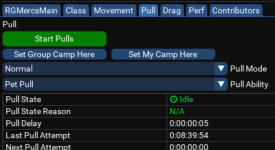
What is the Pull State and Reason listed when this happens? The more info you can give, the better.

Photo attached for reference.

1718504758480.png
 
It should be set by default to auto assign the role, for posterity.

If you haven't messed with anything, I would ask what you have set as your pull ability I guess? The fact that it is changing your radius (rather than just standing there idle, which would be the case if there were no valid targets, your group was under the default pull threshold for mana, etc, etc) seems odd to me, but I'm not 100% sure I'm understanding what you are saying.

What is the Pull State and Reason listed when this happens? The more info you can give, the better.

Photo attached for reference.

View attachment 62489
Thanks for your response.

I've tried face pull, pull with auto attack and taunt. Same outcome with each. When I hit start pulls, its at and stays at Idle and N/A for reason. It just instantly sets radius to what I have it set to pull at, then to 0. It does quicky change the Hunt X,Y,Z radius to something, then back to 0,0,0 very quickly.

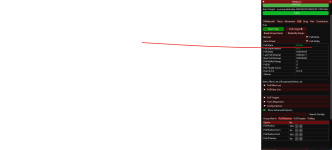
To clarify, the pull function doesn't work for me. When I try and turn it on, it just instantly turns off. It sets pull radius to what I have it set to, then instantly to 0. This happens with any pull mode or pull ability.
Screenshot 2024-06-15 223458.png
 
Thanks for your response.

I've tried face pull, pull with auto attack and taunt. Same outcome with each. When I hit start pulls, its at and stays at Idle and N/A for reason. It just instantly sets radius to what I have it set to pull at, then to 0. It does quicky change the Hunt X,Y,Z radius to something, then back to 0,0,0 very quickly.

To clarify, the pull function doesn't work for me. When I try and turn it on, it just instantly turns off. It sets pull radius to what I have it set to, then instantly to 0. This happens with any pull mode or pull ability.
View attachment 62490
You looked at debug text earlier, if I was having the problem myself I'd go a tiny bit deeper personally. (Disclaimer: I'm largely just a power-user, and I make no guarantees that this is anything more than an academic waste of time).

Pop back over to your RGMercsMain Tab and go to the output at the bottom
Click "log to file", move to verbose (super-verbose? I'm guessing which is necessary here)
Turn pulls on, turn off log, and super-verbose
The file should be "Macroquest.log", found in your VV/logs/ folder

Maybe it'll point you or someone else in the right direction.
 
You looked at debug text earlier, if I was having the problem myself I'd go a tiny bit deeper personally. (Disclaimer: I'm largely just a power-user, and I make no guarantees that this is anything more than an academic waste of time).

Pop back over to your RGMercsMain Tab and go to the output at the bottom
Click "log to file", move to verbose (super-verbose? I'm guessing which is necessary here)
Turn pulls on, turn off log, and super-verbose
The file should be "Macroquest.log", found in your VV/logs/ folder

Maybe it'll point you or someone else in the right direction.
Appreciate the comment.

I did as you suggested and it seemed to generate this related to turning pull on;

[2024/06/0015 22:56:44] [x:DEBUG (rgmercs_utils.Lua::DoCmd():1957)] <135015.950> RGMercs sent MQ Command: >> /mapfilter pullradius 450 <<
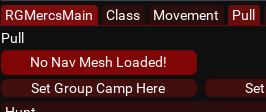
[2024/06/0015 22:56:44] [x:DEBUG (pull.Lua::unknown_func():1156)] <135015.952> ERROR: There's no mesh for this zone. Can't pull.
[2024/06/0015 22:56:44] [x:DEBUG (pull.Lua::unknown_func():1157)] <135015.953> Disabling Pulling.

I ran the mesh updater previously but obviously I did something wrong. Thanks for your help.
 
Appreciate the comment.

I did as you suggested and it seemed to generate this related to turning pull on;

[2024/06/0015 22:56:44] [x:DEBUG (rgmercs_utils.lua::DoCmd():1957)] <135015.950> RGMercs sent MQ Command: >> /mapfilter pullradius 450 <<
[2024/06/0015 22:56:44] [x:DEBUG (pull.lua::unknown_func():1156)] <135015.952> ERROR: There's no mesh for this zone. Can't pull.
[2024/06/0015 22:56:44] [x:DEBUG (pull.lua::unknown_func():1157)] <135015.953> Disabling Pulling.

I ran the mesh updater previously but obviously I did something wrong. Thanks for your help.
Happy it helped!

Check that your meshes are in the proper folder (VV/resources/MQ2Nav afaik)
 
Problem - Pull Function Not Working

Users who are viewing this thread

Back
Top
Cart