• You've discovered RedGuides, an EverQuest multi-boxing and scripting community 🧙‍♀️⚙️. We want you to play several EQ characters at once, come join us and say hello! 👋

  • A TLP without truebox has thawed (Very Vanilla ready)
    Frostreaver

Question - PC exchanging parts

Joined
Feb 19, 2018
RedCents
456¢
I do not want to beat a dead horse, but haven't been able to fix my issues pertaining to https://www.redguides.com/community/threads/crashing.94218/ . I am done with it. I going to bring back my old pc which worked until I got this new POS. But, I would like to scavenge parts of new pc. What should I transfer first? Second? And so forth, I'm hoping by process of elimination to fix this issue. I'm just so burnt. I can post old pc info when I get back online. TIA
 
You have stated in the other thread that all other games work fine. Why would you think it's faulty hardware? I am having the same shit happening rightnow. I have narrowed it down to what I believe is my custom UI. When I hit play as you stated, the game just vanishes yet the toon logs in successfully. Once removing my UI it starts fine but looks ugly as all hell. I honestly think you have an EQ issue and not hardware.
 
You have stated in the other thread that all other games work fine. Why would you think it's faulty hardware? I am having the same shit happening rightnow. I have narrowed it down to what I believe is my custom UI. When I hit play as you stated, the game just vanishes yet the toon logs in successfully. Once removing my UI it starts fine but looks ugly as all hell. I honestly think you have an EQ issue and not hardware.
I dont get to log in, I get to server selection, then when pick server POOF haha.
 
I do not want to beat a dead horse, but haven't been able to fix my issues pertaining to https://www.redguides.com/community/threads/crashing.94218/ . I am done with it. I going to bring back my old pc which worked until I got this new POS. But, I would like to scavenge parts of new pc. What should I transfer first? Second? And so forth, I'm hoping by process of elimination to fix this issue. I'm just so burnt. I can post old pc info when I get back online. TIA
I know you don't want to hear this, but if you suspect a faulty part in your new PC, then it may be better to scrap the whole thing and call it a day if you cannot isolate the faulty part.

This is why. If the faulty part in the new PC has caused a systemic fault thereby involving many parts, then transferring that faulty part to another PC may also cause a systemic fault with the other PC's parts as well. This happens all the time with CPU and RAM modules that cause some sort of on-board short. This then causes damage to the mainboard. Or the other way around. The mainboard has a fault that then causes damage to the CPU, Memory, Graphics Card. Transfer faulty parts to another environment, then contaminate the new environment by causing the same damage with the faulty part.

I cannot count how many times I have been burned with systemic faults where the faulty parts are transferred to another PC only to blow things up there too. Then it's a huge mess. Not to mention the costs keep going up when you unwittingly damage other good parts with a faulty part.
 
I know you don't want to hear this, but if you suspect a faulty part in your new PC, then it may be better to scrap the whole thing and call it a day if you cannot isolate the faulty part.

You are correct but ...

Its also possible that he has:

#1 - The intel over volt self destruct issue.

- or -

#2 - Hardware is fine but has an EQ comparability issue.


If its #1 then simply flashing the bios and replacing the CPU fixes the problem.
if its #2 then simply getting the drivers and/or eq client setup for his system fixes the problem.


So far the only thing I've seen from the OP is crashing after the login screen, which seems to indicate a driver ( sound or GFX ) issue.

That's why I suggested the various stress tests to see if he can force the system to crash outside of EQ.
 
Everquest loves RAM, settle for 64GB RAM or more.. 2 sticks to run em at higher speed with tight timings, if you gonna use 6+ toons at once.

My 24 raid force eats 50GB RAM, and I need more soldiers so my 64GB RAM aren't enough... 128GB is my go to for my next rigg update.. and that will be:

Ryzen 9XXX-3D
RX-uDNA-GPU
Faster nvme
128GB CL30 6000mhz RAM


All white build :3
 
Everquest loves RAM, settle for 64GB RAM or more.. 2 sticks to run em at higher speed with tight timings, if you gonna use 6+ toons at once.

My 24 raid force eats 50GB RAM, and I need more soldiers so my 64GB RAM aren't enough... 128GB is my go to for my next rigg update.. and that will be:

Ryzen 9XXX-3D
RX-uDNA-GPU
Faster nvme
128GB CL30 6000mhz RAM


All white build :3
Turn your graphics down and frame rates down to 32 ish and turning off new ui will lower this dramatically and improve your overall performance
 
Turn your graphics down and frame rates down to 32 ish and turning off new ui will lower this dramatically and improve your overall performance


I do have all my background EQ's at 30FPS, lower than this and MQ is not following.

The window I play on is set to 120FPS, 32fps is way to laggy for me to game on. I'll get a massive headache fast with such low FPS.

I got most of the settings off or at low, tho my res is 1440P.

But yes, that would release some RAM :P

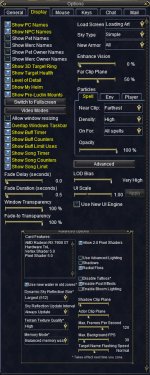
This is how I run the game.
 

Attachments

  • dddddd.jpg
    dddddd.jpg
    376.8 KB · Views: 0
I’m guessing you didn’t follow up on the issue I told about and didn’t get your cpu replaced. The cpu bug is covered under the warranty.

Oh well
@brainiac following up on hardware issue...

Follow...my...instructions!

the avengers fighting GIF by hoppip
 
I do have all my background EQ's at 30FPS, lower than this and MQ is not following.

The window I play on is set to 120FPS, 32fps is way to laggy for me to game on. I'll get a massive headache fast with such low FPS.

I got most of the settings off or at low, tho my res is 1440P.

But yes, that would release some RAM :P

This is how I run the game.
personally I wouldn't use the ingame frame limiter and would set those settings to unlimited.
then use MQ Frame Limiter which will give you much better results and can simulate a higher fps to the client.

using the game one might fight with MQ's frame limiter and cause more problems than help.
 
personally I wouldn't use the ingame frame limiter and would set those settings to unlimited.
then use MQ Frame Limiter which will give you much better results and can simulate a higher fps to the client.

using the game one might fight with MQ's frame limiter and cause more problems than help.

MQ disables the in game frame limiter so it doesn't matter.
 
I do have all my background EQ's at 30FPS, lower than this and MQ is not following.
The window I play on is set to 120FPS, 32fps is way to laggy for me to game on. I'll get a massive headache fast with such low FPS.

Generally people who are boxing are only looking at their main character. All the 'support' characters are stacked 'behind' the main EQ screen.

In this case you want your EQ client set to unlimited in the foreground and background, and set the MQ frame limiter for background characters to something low like 0-1 FPS.

This way the game clients are still running 30-60+ "FPS" but they don't waste time processing pixels you aren't going to see.


Couple key concepts:

MQ Frame Limiter:
- Can be used to 'skip' frame rendering. If set to zero. No frames will be generated which lowers CPU/GPU a LOT.
- Can select different rates for the foreground / background EQ clients.
- The main game loop is still running fast, its just not rendering video you can't see because they are tabed out.

On the other hand EQ's in game FPS limiting just "pauses" the client every so often to lower the FPS. This is why follow fails when you set it lower than 20-30 fps.
 
As brainiac (and i) mention frequently, framelimiter bypasses the EQ max/min alt-o eq options settings.

So assuming:
- you're using framelimiter
- you're not using the new equipment engine

You don't need to worry about those frame settings in EQ options
 
Generally people who are boxing are only looking at their main character. All the 'support' characters are stacked 'behind' the main EQ screen.

In this case you want your EQ client set to unlimited in the foreground and background, and set the MQ frame limiter for background characters to something low like 0-1 FPS.

This way the game clients are still running 30-60+ "FPS" but they don't waste time processing pixels you aren't going to see.


Couple key concepts:

MQ Frame Limiter:
- Can be used to 'skip' frame rendering. If set to zero. No frames will be generated which lowers CPU/GPU a LOT.
- Can select different rates for the foreground / background EQ clients.
- The main game loop is still running fast, its just not rendering video you can't see because they are tabed out.

On the other hand EQ's in game FPS limiting just "pauses" the client every so often to lower the FPS. This is why follow fails when you set it lower than 20-30 fps.


MQ does not follow very well if below 30FPS, it will fall behind and miss commands. I tried it and it did not go well.
 
Ok, I do not want to jinx myself, but referring back to my original post about game just poofing or crashing, I think I got it fixed without swapping parts. I disabled Intel Dynamic tuning in my bios and turned of overclocking and for the last 2 days has been working seamlessly. I hope I didn't just invite Murphy to my pc now. Thanks for help and hope I am not changing this in the future. Tons of great advice and I tried them all..
 
Question - PC exchanging parts

Users who are viewing this thread

Back
Top
Cart