
-
 Hail, we're RedGuides. We want you to play six (yes, 6!) EverQuest characters at once. We have scripts and a friendly community to help, please join our playstyle and say hello! 👋
You are using an out of date browser. It may not display this or other websites correctly.
You should upgrade or use an alternative browser.
You should upgrade or use an alternative browser.
Resource icon
Release Overseer 04/27/2026
- Thread starter GoldenFrog
- Start date

it just crashes game to desktop after it is doneCan you share a screenshot of the messages that are in the MQ window?
Is this something that started... today? recently?
started once something changed with Lua overseer recently and have not been able to use it
- Commits
- 6
I'm really sorry for any issues.started once something changed with lua overseer recently and have not been able to use it
A week or two ago there were some systemic changes that did have this result. Things got updated, however.
Can you make sure you are fully updated to latest and give it one more try. And if you aren't, make sure to [Watch] this resource so it will get automatically updated whenever you patch VV
thank you

- Commits
- 6
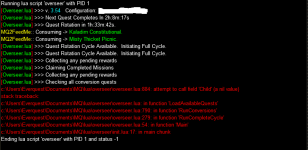
Thank you, MacQ. I actually saw this once or twice yesterday - and hadn't tracked it down.I've been using this script for a few days, and it looks good. I did, however, have this error message pop up today that caused the script to terminate.
Sometimes if you - the user - are clicking or doing things during the process, odd UI out-of-sync errors like this can happen.
But I don't think that's what this is. I'll give it a stronger look-see today.

I deleted the overseer_charactername.Lua and overseer_charactername.ini files. Then reran overseer. Its fine now. Need version information in the file?12/5/2023 10:00 P.M. Getting the following error. The overlay is paused do to a ImGui error. Please fix the error before resuming.
.
[Overseer.lua] >>> v. 3.50 Configuration: Overseer_xxx
[Overseer.lua] >>> Next Quest Completes In 1h:53m:47s
[Overseer.lua] >>> Quest Rotation in 2h:53m:31s.
ImGui Failure:...stalled Games\Redguides\Next\lua\overseer\overseerui.lua:391: sol: no matching function call takes this number of arguments and the specified typesstack traceback: [C]: in function 'InputInt' ...stalled Games\Redguides\Next\lua\overseer\overseerui.lua:391: in function 'RenderSettingsGeneralTab' ...stalled Games\Redguides\Next\lua\overseer\overseerui.lua:254: in function 'RenderSettingsTab' ...stalled Games\Redguides\Next\lua\overseer\overseerui.lua:107: in function 'RenderTabBar' ...stalled Games\Redguides\Next\lua\overseer\overseerui.lua:97: in function <...stalled Games\Redguides\Next\lua\overseer\overseerui.lua:77>
ImGui Critical Failure: Mismatched Begin/BeginChild vs End/EndChild calls: did you forget to call End/EndChild?
Plugin ImGui has been temporarily paused. To resume imgui, run: /mqoverlay resume
Ending lua script 'overseer' with PID 6 and status -1
I was in the overseer gui and pressed the seetings tab. The above is the error message. Does this have something to do with the new UI engine?
I use the Steel UI but get the same message with the default UI.
Windows 11 64 bit version 23H2
If your interested, attached are the two files I deleted to fix the problem. The Lua is probably the one causing the error.I deleted the overseer_charactername.lua and overseer_charactername.ini files. Then reran overseer. Its fine now. Need version information in the file?
Attachments

I think it's good practice at times to just delete everything Overseer (Lua) related, re-download it, re-install it, let it create new config files!
Get one character working the way you want, then copy and paste and rename as many character-specific config files as you need.
Get one character working the way you want, then copy and paste and rename as many character-specific config files as you need.
I had the same issue. See my post on page 18. Basically, go to ..\config\overseer\overseer_charactername.Lua and overseer_charactername.ini and delete them. Restart overseer.lau.I get this error now on 2 accounts, the second i click the settings tab it closes the overseer tab and opens a window to restart the overlay,View attachment 54289

Is there a way to set the quest rotation timer to include 3h quests first? 6h is the lowest I can get the Lua to go and don't know how to make it select the 3h as the priority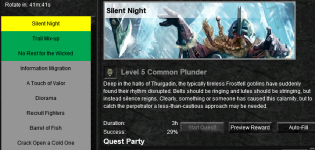
- Commits
- 6
We can add 3 hour time slots to the priority list. Those didn't exist previously.Is there a way to set the quest rotation timer to include 3h quests first? 6h is the lowest I can get the lua to go and don't know how to make it select the 3h as the priorityView attachment 54510
However, "Silent Night" is one of the Achievement>Overseer>Holiday quests. Those should automatically be run first.
I am not on the EQ system to send a screen shot but if you look at the MQOverseer UI: Settings > Specific
This will specify the system to run these quests first every time they are seen
- Commits
- 6
GoldenFrog updated Overseer with a new update entry:
3.55 Honor Alternate Persona
Read the rest of this update entry...
3.55 Honor Alternate Persona
- INI files now include class name to work more nicely with Alternate Persona
- All else should work like previously when dealing with normal alts
- Overseer_MyName.lua -> Overseer_MyName_WAR.lua
Read the rest of this update entry...
- Commits
- 6
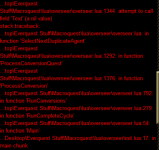
An agent claim before shouldn't cause an issue (that I can see).happened today, may have been because I did an agents claim on the cycle before. not sure. might be a one time thing
Did the error happen on re-run of the script - or were you saying it did run successfully the next time.

Kuhle
Sergeant
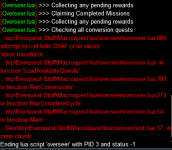
everything runs fine now. it was a one time instance. just wanted to be informative just in case anyone else runs into the issue. it looks like it was after this hit.An agent claim before shouldn't cause an issue (that I can see).
Did the error happen on re-run of the script - or were you saying it did run successfully the next time.
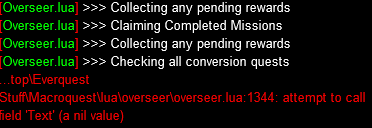
I wouldn't stress about it too much unless it happens again.
edit: as I typed it out... I got an error but it looks like a different error
- Commits
- 6
Were your character(s) otherwise active - such as camping or fighting?
(And definitely thank you for the reporting. I don't play as much as I used to so don't see as many situations)
(And definitely thank you for the reporting. I don't play as much as I used to so don't see as many situations)
Kuhle
Sergeant
no, he was chilling in the guild hall, no windows were upWere your character(s) otherwise active - such as camping or fighting?
(And definitely thank you for the reporting. I don't play as much as I used to so don't see as many situations)

Mattheux
Member
I have a lvl 123 SK. Created a lvl 1 MAG persona to run with a group of friends through older content. When I switch from the MAG back to SHD, then run the Lua, it brings up an error that says:
1. EQ Message: Your Overseer data hasn't been loaded yet, please wait and try again. If you are still unable to open the Overseer Window after a few minutes, please try zoning or relogging.
2. Overseer GUI: Shows that I have not even done the tutorial yet.
If I type /reload, this does not fix the issue. If I zone, however, as the EQ message suggests, then I can run the Lua.
Hope this information helps. Merry Christmas and etc.
1. EQ Message: Your Overseer data hasn't been loaded yet, please wait and try again. If you are still unable to open the Overseer Window after a few minutes, please try zoning or relogging.
2. Overseer GUI: Shows that I have not even done the tutorial yet.
If I type /reload, this does not fix the issue. If I zone, however, as the EQ message suggests, then I can run the Lua.
Hope this information helps. Merry Christmas and etc.
- Commits
- 6
Thanks, Mattheux.I have a lvl 123 SK. Created a lvl 1 MAG persona to run with a group of friends through older content. When I switch from the MAG back to SHD, then run the lua, it brings up an error ...
The script (optionally) tracks if your main that launched logs/switches over to another. Prevent your bazaar mule or alt from running Overseer if not desired.
You're talking about the opposite.
- So to check, this is a new "Alt Persona"?
- Who was logged in when you first ran the overseer script that session?
Mattheux
Member
Yes, it is a Persona, not an alt.
When I logged in this morning, it was as the MAG because I was twinking him in the Bazaar. After I got my items and returned to the PGH, I switched back to the SHD.
I have already noticed that the CWTN window does not reappear when switching, nor do the nav elements work, so have to /reload. I did so to get my Eskay window up and working, then started the Lua. That is when the messages started repeating. I zoned to Sunrise and back in to PGH. Then the Lua worked.
When I logged in this morning, it was as the MAG because I was twinking him in the Bazaar. After I got my items and returned to the PGH, I switched back to the SHD.
I have already noticed that the CWTN window does not reappear when switching, nor do the nav elements work, so have to /reload. I did so to get my Eskay window up and working, then started the Lua. That is when the messages started repeating. I zoned to Sunrise and back in to PGH. Then the Lua worked.
- Commits
- 6
GoldenFrog updated Overseer with a new update entry:
3.56: Possible Fix For Reported Crash; Logger Cleanup
Read the rest of this update entry...
3.56: Possible Fix For Reported Crash; Logger Cleanup
- Small update to possibly fix some reported crashes
- If correct, was due to recent "Improve Overseer Performance" changes by DBG
- Some clean-up of logging mechanism
Read the rest of this update entry...
This fix hit me with this error if I try to start it on more than one toon at once (/dgga /Lua run overseer):GoldenFrog updated Overseer with a new update entry:
3.56: Possible Fix For Reported Crash; Logger Cleanup
Read the rest of this update entry...

Logging in a view minutes ago, I saw an update available, which I downloaded.
I cam,e here to post the error message I got, when I saw @Joaakhan's post.
Have seemingly the same effect ... all but 1 accout showing error, when I start to run overseer on my 6 chars contemporary with "/dgae /Lua run overseer":
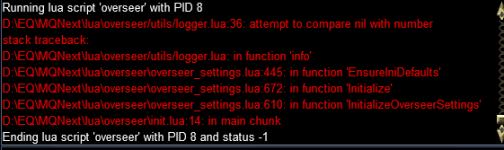
launching one by one manually typing "Lua run overseer" made them start and run all, despite starting overseer one by one as fast as I could switch between the windows.
So running contemporary doesn't have issues, as long as they are not start all at the same moment.
I cam,e here to post the error message I got, when I saw @Joaakhan's post.
Have seemingly the same effect ... all but 1 accout showing error, when I start to run overseer on my 6 chars contemporary with "/dgae /Lua run overseer":
launching one by one manually typing "Lua run overseer" made them start and run all, despite starting overseer one by one as fast as I could switch between the windows.
So running contemporary doesn't have issues, as long as they are not start all at the same moment.
Last edited:
- Commits
- 6
GoldenFrog updated Overseer with a new update entry:
3.57: Correct Issue with Logging (Hopefully)
Read the rest of this update entry...
3.57: Correct Issue with Logging (Hopefully)
- Hopefully addresses errors being reported
- Hadn't seen nor was able to reproduce error directly
Read the rest of this update entry...
- Commits
- 6
I was running 12 at once and hadn't seen this - but think I see what it could have been.This fix hit me with this error if I try to start it on more than one toon at once (/dgga /lua run overseer):
View attachment 54629
Please let me know if the latest update corrects your problem.
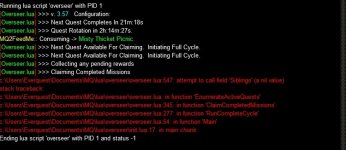
Thanks! just checked this AM, and it runs just fine happy as can be with simultaneous startup on 24 toons.I was running 12 at once and hadn't seen this - but think I see what it could have been.
Please let me know if the latest update corrects your problem.
Cheers!
Last edited:
- Commits
- 6
Thanks for that, MQ.Unfortunately, I am still seeing the errors/crash even with version 3.57
Moving on to next guesses/testing.
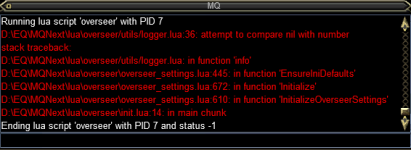
The error attempting to start overseer contemporary on 6 chars still occurs.
My workaround: "/dgga /multiline ; /docommand /timed $\{Math.Rand[10, 90]} /Lua run overseer" ... start the overseer with randomized starttime
- Commits
- 6
Thanks. Spending time on this today. I'm not seeing any of these so it is tricky.
Have multiple characters running under different circumstances.
Have multiple characters running under different circumstances.

I see in the commands section there is only the command to run the Lua; is there a way to get the overseer display the ui again? 2 of my characters somehow dont have the window that opens to show the settings that you can change. Even on a fresh start up i turn on the Lua but no window opens, the Lua task manager shows it running but i have no way to modify what the Lua does.
I also have a few characters that have the accept rewards checked but they never do and it crashes when the rewards list gets to 11, it will store 10 rewards but if i don't manually claim all the rewards it crashes.
I also have a few characters that have the accept rewards checked but they never do and it crashes when the rewards list gets to 11, it will store 10 rewards but if i don't manually claim all the rewards it crashes.

I see in the commands section there is only the command to run the lua; is there a way to get the overseer display the ui again? 2 of my characters somehow dont have the window that opens to show the settings that you can change. Even on a fresh start up i turn on the lua but no window opens, the lua task manager shows it running but i have no way to modify what the lua does.
I also have a few characters that have the accept rewards checked but they never do and it crashes when the rewards list gets to 11, it will store 10 rewards but if i don't manually claim all the rewards it crashes.
- Command-line "/mqoverseer [show/hide]" says so on first page to show it. also a ton of config options..
I have been running some load testing with Lua Overseer on a group of 15 characters and one character did experience a problem collecting certain rewards. So, I deleted then created a new configuration file for that character and the problem seems to have disappeared. You might try the same.I also have a few characters that have the accept rewards checked but they never do and it crashes when the rewards list gets to 11, it will store 10 rewards but if i don't manually claim all the rewards it crashes.
- Commits
- 6
Are you saying that some characters do claim rewards and some do not?I also have a few characters that have the accept rewards checked but they never do and it crashes when the rewards list gets to 11, it will store 10 rewards but if i don't manually claim all the rewards it crashes.
If possible, if you screen shot the MQ output for a character that didn't claim. Should say what is happening at each phase. "Claiming X", "Skipping Rewards", etc...
- Commits
- 6
That definitely can fix issues.I have been running some load testing with LUA Overseer on a group of 15 characters and one character did experience a problem collecting certain rewards. So, I deleted then created a new configuration file for that character and the problem seems to have disappeared. You might try the same.
I would be very curious to see any files where that is the case - if anyone wants to save the pre-deleted file and PM it to me. Make sure to rename to remove the character name.
I think I figured out why some weren't claiming.Are you saying that some characters do claim rewards and some do not?
If possible, if you screen shot the MQ output for a character that didn't claim. Should say what is happening at each phase. "Claiming X", "Skipping Rewards", etc...
They were the characters that had the crash bug when you try to select what rewards they should claim.
So they didn't have what to claim set up yet, i.e. player exp or collections fragment etc.
But now that they don't immediately crash when I select what to claim they are collecting rewards now.
Crisis averted!

hey Goldenfrog, amazing Lua, superb and functions smoothly.. thank you so much.. 
Here is a small change that I would find very cool if possible to implement:
An option that I can select to only claim rewards on recovery missions if there is actually an agent that is incapacitated and can be recovered.
To make sure the reward does not fill up, it would also need an option to select how many recovery rewards should be kept open and unclaimed.
Also a nice option to add would be, that I can chose to do recovery quests with a duration of 3h or 6h. Either to get recovery saving up in the reward window, or because the missions give extra agents as bonus when they crit.. So the 3h recovery missions is a nice way to get extra agents because they are fast.
Just some ideas Im throwing out there.
Thanx again for the amazing work!
Here is a small change that I would find very cool if possible to implement:
An option that I can select to only claim rewards on recovery missions if there is actually an agent that is incapacitated and can be recovered.
To make sure the reward does not fill up, it would also need an option to select how many recovery rewards should be kept open and unclaimed.
Also a nice option to add would be, that I can chose to do recovery quests with a duration of 3h or 6h. Either to get recovery saving up in the reward window, or because the missions give extra agents as bonus when they crit.. So the 3h recovery missions is a nice way to get extra agents because they are fast.
Just some ideas Im throwing out there.
Thanx again for the amazing work!
Users who are viewing this thread
Total: 1 (members: 0, guests: 1)
Share: