• You've discovered RedGuides, an EverQuest multi-boxing and scripting community 🧙‍♀️⚙️. We want you to play several EQ characters at once, come join us and say hello! 👋

  • A TLP without truebox has thawed (Very Vanilla ready)
    Frostreaver

Problem - Nord VPN bugs "Follow Me" "Come to Me" "Mimic Me" functions

Joined
Apr 2, 2020
RedCents
434¢
Hey all boxers,

As many of you, I am using a VPN which is in my case Nord VPN. Everything works fine with MQ2 Very Vanilla, including KissAssist, except one thing which is bugged : the "Follow Me", "Come to Me", "Mimic Me" functions. They do nothing despite having the correct chat/messages displayed in the MQ2 window. Autofollow works fine however. EQBC works fine.

When I unload Nord VPN from my machine, the three functions work perfectly normally.

I have tried to isolate the problem by split tunneling. One by one, I added the executables of the release folder to exceptions. Didn't work. Then I added all exes of the folder and eqgame.exe, didn't work either.

Anyone encountering a similar issue ?
 
It's because those buttons are using Dannet or EQBCS and those aren't available when on your vpn. You can setup meshnet in the nordvpn client to get around it, which is rather difficult and takes medium level networking knowledge. Or you can choose to use dannet. do /dnet interface then look at the list and find the name of your vpn interface in list and do /dnet interface vpnname

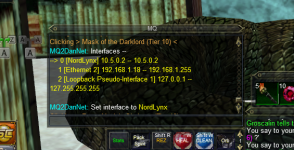
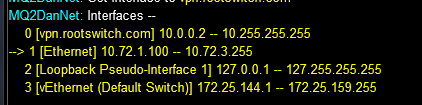
My /dnet interface looks like this:

1679377099818.png

therefore my command would be /dnet interface vpn.rootswitch.com

If they are all on the same machine you could technically use the loopback interface. If they aren't you might still need meshnet depending on your setup.
 
Last edited:
Ok thanks for your advises, will try that. But why didn't split tunneling work then, I tried with EQBCS exes and it didn't fix the issue ? Anyhow I'll follow your tech lead, thanks again !
 
EQBCS isn't like dannet in that it doesn't connect to a mutual system automatically. When using two machines you need to choose one of them to be the "server" which is the one you run the EQBCS.exe (or whatever scrambled variant name) on, the other will connect to the "server" computer via that computers local IP address.

On the server computer you will want to run "Cmd.exe" and then type "ipconfig" which will spit out a bunch of information. The information you're interested in is the IPv4 then you would use /bccmd connect 192.168.x.x 2112
where the 192.168.x.x is the IP address of the server computer you would have gotten from ipconfig run on it.

Dannet is designed to work automatically on the same network across multiple computers, where-as EQBC works by default only on the same computer, unless you specify the IP address that the server is on.

Computer1: /bccmd connect this by default without anything input will connect to /bccmd connect 127.0.0.1 2112 which is the local computer.
Computer2: /bccmd connect 192.186.1.1 2112 this will connect to the ip address and port provided. So long as both computers are local to the network you will not need to mess with any port forwarding or anything like that. Please remember to do the cmd, ipconfig on Computer1 and replace the 192.168.x.x with the ip address shown as the IPv4 shown.

It is worth mentioning that unless you assign a static ip address to the computer that is acting as the server that you will need to verify the ip address hasn't changed on the router if you fail to connect. All routers are different and instructions for setting this up will vary by device, or I'd provide information on how to do that. If you get the model number/name of your router you can typically google "how to assign a static ip on "device name here"" to get information to avoid this as an issue in the future. With that said, once you assign the ip address to connect to the specific IP address of the server computer you shouldn't need to use the entire command every time you connect.
 
Thank you, this is quite clear even for a non specialist. I use only one computer. The local server is provided by my internet provider, which is Orange in my case, and the internet box acts as server and router (the router is always 192.168.1.1. in local IP); Local IP adresses are given by DHCP distribution, but I know how to assign a fixed one through the Box's interface. Three questions though if it's not too much to ask :

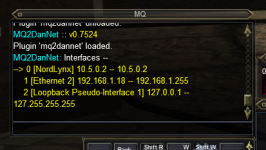
1° When using the /dnet interface comand, the VPN displays only the name of its protocol (NordLynx) but doesn't give an URL like in Wired's example :
Nordlynx1.png
If I compare to Wired's example, what would then be the URL to give to Dannet ? I suppose /dnet interface NordLynx doesn't make sense ; I just did and the three buttons are still broken, but that was foreseeable even for me. Should I give the numerical IP adresse ? 10.5.0.2

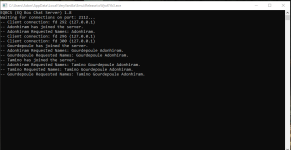
2° As I use only one computer, would sticking to EQCBS and assigning a fixed local IP to the computer solve the issue ? The EQCBS server itself works fine, my three characters connected without any difficulty to it and everything works fine with MQ2 except the three buttons we spoke about. But I can issue /bca and /bcaa commands with no problems.
EQCBS connected.png

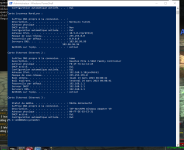
3° Here are my ipconfig /all results in a PowerShell cmd window :
ipconfigall.png


As you can see, Livebox (the brand name of Orange's internet box) is 192.168.1.1, the PC is where the Ethernet 2 is located (192.168.1.18 assigned by DHCP), and there is an adresse provided for the Nordlynx tunnel which is 10.5.0.2. Ethernet 3 refers to an unused Gigabite port, therefore it is empty. There stops my network knowledge however, but can I stick to EQCBS without passing through the Mesh system of Nord VPN as I use only one PC and what steps should I follow ?
 
I use NordVPN, but not their software. I purchased a 3rd party router that was capable of routing all my network traffic through the VPN directly. My PC doesn't "know" it's even on a VPN since all the traffic is routed to through the VPN on the network level.
 
I use NordVPN, but not their software. I purchased a 3rd party router that was capable of routing all my network traffic through the VPN directly. My PC doesn't "know" it's even on a VPN since all the traffic is routed to through the VPN on the network level.

I hear good things about Nord and I do use them for the password manager, but after seeing this thread I am getting gun shy about the VPN. Unfortunately, my router is a Netgear RAX48 so it doesn't support OpenVPN so I could not connect it to the VPN directly even if I wanted to.

Are the issues between MQ and the NordVPN client regardless of country? I might need to bookmark this thread for future reference in case I take the plunge.

Be well.
 
Since you only use one computer, you can just use interface 2 there for dannet (your loopback adapter) and it will work with NordVPN.

Similarly, for EQBCS you can use 127.0.0.1 as your address and it will work.
 
Since you only use one computer, you can just use interface 2 there for dannet (your loopback adapter) and it will work with NordVPN.

Similarly, for EQBCS you can use 127.0.0.1 as your address and it will work.
Thnak you. I'll try this solution for Dannet. As for EQBCS, the server already connects to 127.0.0.1 on port 2112. Is the port wrong or something ?
 
Hey all boxers,

As many of you, I am using a VPN which is in my case Nord VPN. Everything works fine with MQ2 Very Vanilla, including KissAssist, except one thing which is bugged : the "Follow Me", "Come to Me", "Mimic Me" functions. They do nothing despite having the correct chat/messages displayed in the MQ2 window. Autofollow works fine however. EQBC works fine.

When I unload Nord VPN from my machine, the three functions work perfectly normally.

I have tried to isolate the problem by split tunneling. One by one, I added the executables of the release folder to exceptions. Didn't work. Then I added all exes of the folder and eqgame.exe, didn't work either.

Anyone encountering a similar issue ?
My brother, I was literally coming to the forums to figure out why my buttons were not working. I turned off Nord VPN and it works like a charm. I was going to make a post and you saved me hours if not days of frustration and confusion. I owe you one Adonhiram!
 
My brother, I was literally coming to the forums to figure out why my buttons were not working. I turned off Nord VPN and it works like a charm. I was going to make a post and you saved me hours if not days of frustration and confusion. I owe you one Adonhiram!
Oh I feel flattered, thank you, but I haven't yet solved my own issue :)

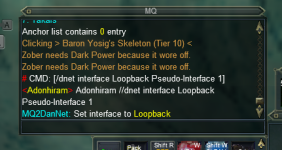
So, before I go further and break things, this is what I did on all three characters issuing a /bcaa command :
Dannet interface Loopback.png
Is that correct ? If not why ? And if yes, what is the next step, do I need MQ2 and KA to tell using Dannet instead of EQBCS (are the two mutually exclusive ?) ?
 
Not sure if you have seen this guide, but it shows Dannet vs EQBCS coomands and talks about converting to Dannet.

Here is the link. EQBCS to Dannet Guide
Thanks I will look into this, I have read the first paragraphs and tbh I was a bir worried about the change in command syntaxes (no more /bct // etc.), but I suppose it is a question of getting used to it. Reading the intro I understood I can have a transition phase where I use both EQBCS and Dannet. But I will do that only if Dannet fixes our "Follow Me" etc. button issue.
 
You can use both at the same time, they don’t conflict with each other.

If you’re using EQBCS you need to edit the MQ2GroupInfo.ini and set it to the EQBC version of the commands. The default for RG is dannet.
 
Not sure if you have seen this guide, but it shows Dannet vs EQBCS coomands and talks about converting to Dannet.

Here is the link. EQBCS to Dannet Guide
I have read the guide, many thanks. I am also switching to Dannet after reading it and unchecked "start EQBCS with MQ2" and the KA ini files are now all set to Dannet only. This week-end I played without VPN as I did only EQ and RG forum browsing to improve my knowledge, will start to look into the VPN issue in the next days. Thank you very much, that guide was very helpful and convinced me to do the move :)
 
I have read the guide, many thanks. I am also switching to Dannet after reading it and unchecked "start EQBCS with MQ2" and the KA ini files are now all set to Dannet only. This week-end I played without VPN as I did only EQ and RG forum browsing to improve my knowledge, will start to look into the VPN issue in the next days. Thank you very much, that guide was very helpful and convinced me to do the move :)

No worries. That guide helped me out last year so just wanted to pass along the info.

Be well. Happy boxing.
 
By switching entirely to Dannet, unloading EQBCS and setting interface to Loopback, as of today, with VPN on, the three buttons "Follow Me", "Come to Me" and "Mimic Me" work flawlessly - tested in Guild Hall running around each of my party's boxes and using the buttons, but this looks very promising.
THANK YOU ALL :toot:
 
Well, now after relogging it won't work again. Dannet doesn't recognize the other characters in group, /des /dgge commands are not received by alts, and /dgga only by the character issuing it. I need to dig further into, it, this morning it worked - right now, Dannet runs but doesn't connect the characters together.

:worship:
 
It seems I am able to connect Dannet only to the NordLynx tunnel interface (I get the little arrow), but Dannet sees only me and not the other characters (same zone, sampe group !) and /dex /dgge won't work.

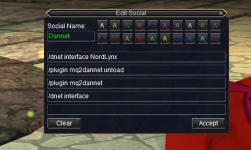
I made a hotkey to try different interface names, using brackets or not, for quick testing :
Dannet2.png

Dannet is successfull in switching to NordLynx :
Dannet3.png

I did this also on the other characters, but Dannet can't find the goup (as said same zone, and grouped)
Dannet4.png

I am unable to force Dannet to switch to Loopback or Ethernet (I have tried different ways to write them, modifying the hotkey accordingly), no little arrow :
Dannet5.png

Why am I cursed !!!???
 
It seems I am able to connect Dannet only to the NordLynx tunnel interface (I get the little arrow), but Dannet sees only me and not the other characters (same zone, sampe group !) and /dex /dgge won't work.

I made a hotkey to try different interface names, using brackets or not, for quick testing :
View attachment 47416

Dannet is successfull in switching to NordLynx :
View attachment 47417

I did this also on the other characters, but Dannet can't find the goup (as said same zone, and grouped)
View attachment 47418

I am unable to force Dannet to switch to Loopback or Ethernet (I have tried different ways to write them, modifying the hotkey accordingly), no little arrow :
View attachment 47419

Why am I cursed !!!???
Please see the mq2dannet instructions page.
If you have no arrow you don't have an interface.

Slap the interface name in quotes for multi words
 
Please see the mq2dannet instructions page.
If you have no arrow you don't have an interface.

Slap the interface name in quotes for multi words
IT WORKED. I can't believe it, weeks of trying everything (I started by splittunneling every exe I found in the release folder...) and a simple " solved the problem in the blink of an eye. THANK YOU !
 
==============FOR NORD VPN USERS================

Dannet will at first connect itself to the NordLynx interface which prevents Dannet commands to reach your other characters. /dex, /dgge, /dgga won't work as, won't the "Follow Me" "Come to Me" and "Mimic Me" buttons, even if you use EQBC (EQBC will work while NordVPN is active, but the three buttons require Dannet).
If you encounter that issue, you need to tell Dannet to NOT use the NordLynx interface but to switch to the Loopback interface, which will allow communications between all your characters.
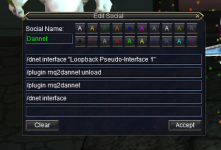
Make yourself an ingame macro (or type all manually, as you wish) to do that :

NordVPNSolution.png

Notice the quotes ? That solved my issue, if you type Loopback Pseudo-Interface 1 without them, Dannet thinks you mean just Loopback and it won't connect.

Check of course the exact name of your Loopback interface, but should be the same as me if you use NordVPN and Windows 10. Just don't forget the quotes.

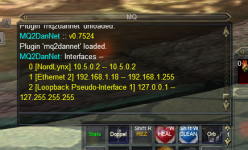
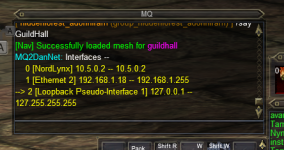
You'll know if it works when a little arrow will be in front of the name after typing

/dnet interface
NordVPNSolution2.png

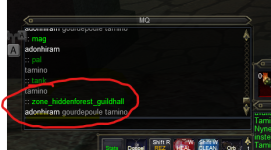
Now you can check that all your characters are recognized and given tags by Dannet, type

/dnet info
and you should see your characters listed and tagged by Dannet
NordVPNSolution3.png


=======================PROBLEM SOLVED========================(thanks again Sic)
 
It seems I am able to connect Dannet only to the NordLynx tunnel interface (I get the little arrow), but Dannet sees only me and not the other characters (same zone, sampe group !) and /dex /dgge won't work.

I made a hotkey to try different interface names, using brackets or not, for quick testing :
View attachment 47416

Dannet is successfull in switching to NordLynx :
View attachment 47417

I did this also on the other characters, but Dannet can't find the goup (as said same zone, and grouped)
View attachment 47418

I am unable to force Dannet to switch to Loopback or Ethernet (I have tried different ways to write them, modifying the hotkey accordingly), no little arrow :
use the number. /dnet interface 2 /plugin mq2dannet unload /plugin mq2dannet load
Just finally tested it the other day. Works fine.
 
lol, even simpler, well done and thanks !
yep. which is in the "instructions" tab of mq2dannet, there is a link in that instructions page to take you to > here <

/dnet interface "Loopback Pseudo-Interface 1" with quotes is what i would do

you can use the number as well, but dannuic (who is the namesake, says to use the name when you can)
 
Problem - Nord VPN bugs "Follow Me" "Come to Me" "Mimic Me" functions

Users who are viewing this thread

Back
Top
Cart