• You've discovered RedGuides, an EverQuest multi-boxing and scripting community 🧙‍♀️⚙️. We want you to play several EQ characters at once, come join us and say hello! 👋

  • A TLP without truebox has thawed (Very Vanilla ready)
    Frostreaver
Ninjadvloot.inc

Release Ninjadvloot.inc 2022-06-23

No permission to download
I figured I would add this here since it works with Ninjaloot.

To create in game loot filters. You will need to go to youruserdata folder inside EQ game location, something like:
Rich (BB code):
C:\Users\Public\Daybreak Game Company\Installed Games\EverQuest\userdata
Once in there you should see some files like LF_AG_Charname and LF_AN_Charname. The LF means loot filter and AN = Always Need, AG = Always Greed and so on. Inside those files it will have a header specifying how the file is laid out. It will have the item ID first, followed by the items icon ID, and lastly the item name its self. It will have the carrot symbol ^ separating them. To create your own filter list for one of your toons, simply search for the item(s) on Lucy. Click on the RAW link on the top right hand corner of the item listing. That will display all the raw data. Find about mid way down the ID=XXXXX and Icon=XXXXX. Put those items into any one of the files accordingly. AN for an item you need, and AG for an item you want to greed on.

An Example of the Kunark t1 armor:
Rich (BB code):
148853^5137^Amorphous Cohort's Boots
148857^5136^Amorphous Cohort's Breastplate
148856^5141^Amorphous Cohort's Leggings
148855^5142^Amorphous Cohort's Sleeves
148851^5138^Amorphous Cohort's Wristguard
148854^5140^Amorphous Cohort's Helm
148852^5139^Amorphous Cohort's Gauntlets

Once you have it on 1 character you can copy it to other characters in game by opening the advanced loot window. Click the Edit Filters > Merge / Replace Filters. From there it will display a list of other toons filters that you can merge with the current character your on. Once you do this you can search for the item in the Edit Loot Filters window. Keep in mind that just because the item doesn't imidietly show up doesn't mean its not in your loot list. You will have to search for the name or partial name to make it display in the loot filter window. It will only show 10 items at a time. Once you can see them you can change to auto need, greed, never and so forth.


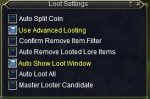
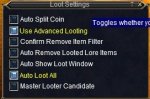
****Please make sure you mark "Auto Remove Looted Lore Items" in the Loot settings window in game****
Also if you use this setup for non ninjaadvloot macros, mark your char to NOT be a master looter candidate and auto loot all.

Feel free to PM with questions.
 
Last edited:
The advloot filter 'Never' will always override ninjadvloot. An item filtered 'Never' simple can NOT be looted by that particular character.
The always need / always greed filters only effect ninjadvloot when the item is autorolled. If the item is flagged loot, sell, ignore, or destroy in the loot.ini file the masterlooter will loot/ignore/destroy the item regardless of the advloot filters always greed / always need.

Items flagged quest in the loot.ini file will be effected by advloot 'always need/greed' filters. the character with 'always need/greed' filter will continue to try to loot the item even after he has collected the amount indicated by the quest flag.

LORE items are the biggest problem. If the LORE item goes to autoroll and a character with the item filtered 'always need/greed' wins the roll but can't loot the item because he already has one, the item will most likely be left on the corpse and lost. However, ninjadvloot could get stuck in a loop trying to loot the item when it can't and lock up, potentially causing the affected character to fail to react to combat.

I strongly recommend using either ninjadvloot or the in-game advloot system, not both. Attempts to use both have produced unsatisfactory results. Most of the difficulty with coding ninjadvloot is preventing conflict between ninjadvloot and the in-game system.

The one situation where using both is useful is powerleveling / gearing an alt. Setting up your primary character with the advloot filter 'never' will stop the primary character from trying to loot gear / items needed for the alt.
 
I posted what I did so that when people are using the ninja loot and other macs that don't use ninja. I use autowar and autocleric. Neither of which will use Ninja loot. I had to create filters for my toons to be able to loot armor and gear. There is another setting that I forgot to mention though. The Auto Remove Looted Lore Items. When your characters auto loots an item. This check box will remove it from your need / greed list. Preventing that character from rolling in the future and you missing out on loot. I also flagged my war / cleric to auto loot all. That way anytime a loot item is given to them, they will loot / inventory it.


I also use the above so that when I mark items as Quest|1 and its for SK/PAL only the zerker doesn't loot it. I mark it NVR on the other non SK/PAL toons.
 
I posted what I did so that when people are using the ninja loot and other macs that don't use ninja. I use autowar and autocleric. Neither of which will use Ninja loot. I had to create filters for my toons to be able to loot armor and gear. There is another setting that I forgot to mention though. The Auto Remove Looted Lore Items. When your characters auto loots an item. This check box will remove it from your need / greed list. Preventing that character from rolling in the future and you missing out on loot. I also flagged my war / cleric to auto loot all. That way anytime a loot item is given to them, they will loot / inventory it.

I also use the above so that when I mark items as Quest|1 and its for SK/PAL only the zerker doesn't loot it. I mark it NVR on the other non SK/PAL toons.

Is all good, I only responded to more fully inform folks. BTW, You can add ninjadvloot to any macro.
 
You can add ninjadvloot to any macro.

You finally convinced me to edit auto macs and see if I can integrate it. :)


Will be the first time I've actually changed someone else mac with out them telling me what to change.


And I failed. I added the code into mac, #include and the code you listed before for the main loop. It went to loot and started spamming non stop something about inv slots and something else. It was going by so fast I couldn't read it. It also persisted even when I hit /endmac lol. I rolled back and turned it off for now. Later on I'll add it again and see what the spam was so I can capture it and see if I can make senses of it.
*edit*
Was able to capture on cleric I think.
Capture.PNGCapture2.PNG

I failed, care to explain how?
 
Wow, it appears I forgot a very important step in my post about adding ninjadvloot to any macro.

at the very beginning of the macro enter #include ninadvloot.inc
after the line Sub Main but before the main loop add the command /call SetupAdvLootVars
somewhere in the main loop add the command /if ((${AdvLoot.SCount}||${AdvLoot.PCount}) && !${LootTimer} && ${Me.CombatState.NotEqual[combat]}) /call UseAdvLoot

I forgot the second step to initialize the variables. If you PM me the macro's you are using I'll edit them for you.
 
I cannot get /lootquest to work in game.
i have Amorphous Cohort's Boots on my cursor, then click an in game macro with /lootquest in it,
it says "that is not a valid command, please use /help" in the group window, not mq2 window

thoughts?

--edit--
my other macros work, /lootdestroy and /lootkeep
when an item is on cursor, and changes it in the ini.

--edit #2--
lootdestry does not seem to work either.
I have Writing Ink=Destroy, but will not destroy when another is picked up.
[2017/02/24 20:53:11] [MQ2] NINJADVLOOT: SharedList: Writing Ink is marked Destroy. Que item to personal list.
its not destroyed in the inventory.

Version=6.05
AddNewSales=1
LootForage=1
LootMobs=TRUE
CorpseRadius=100
MobsTooClose=40
ReportLoot=TRUE
LootChannel=bc
SpamLootInfo=1
LootForageSpam=1
GlobalLootOn=1
CombatLooting=1
GMLSelect=0
ExcludeBag1=Extraplanar Trade Satchel
ExcludeBag2=NULL
QuestKeep=10
StackPlatValue=0
NoDropDefault=Keep
LootLagDelay=0
SaveBagSlots=3

--edit3--
I strongly recommend using either ninjadvloot or the in-game advloot system, not both. Attempts to use both have produced unsatisfactory results. Most of the difficulty with coding ninjadvloot is preventing conflict between ninjadvloot and the in-game system.

So if I unchecked /advloot in game and just use ninja, the =quest|1 and autoroll feature will not work? My mainlooter will just pick up loot and no one gets anything regardless if it's a duplicate?
 
Last edited:
I cannot get /lootquest to work in game.
i have Amorphous Cohort's Boots on my cursor, then click an in game macro with /lootquest in it,
it says "that is not a valid command, please use /help" in the group window, not mq2 window

thoughts?

--edit--
my other macros work, /lootdestroy and /lootkeep
when an item is on cursor, and changes it in the ini.

For =quest to work properly everyone in the group must be checking the shared list. It mostly sounds like ninjadvloot is not included in all your macro's or possibly you have an older version of ninjadvloot. Make sure you have the latest version 6.05 from the original post. Also make sure it is included in your macro. Let me know if still having problems with this.


--edit #2--
lootdestry does not seem to work either.
I have Writing Ink=Destroy, but will not destroy when another is picked up.
[2017/02/24 20:53:11] [MQ2] NINJADVLOOT: SharedList: Writing Ink is marked Destroy. Que item to personal list.
its not destroyed in the inventory.


=destroy will only destroy new loot, it does not go back and clear anything already inventoried.
There should be another line after the one you posted saying >> [MQ2] NINJADVLOOT: Destroying 1 of 1 Writing Ink <<

What is QuestKeep=10 for then?

Allows you to select how many of the quest item will be marked for keeping by default, when using the command /lootquest. You can always edit the loot.ini file for a different amount for each item.

Nodropdefault=
this allows you to choose how NoDrop items are entered into the loot.ini file the first time they are encountered. options are Quest|Keep|Ignore
FYI if you select Quest it will default to keeping only 1 per group member
 
I reinstalled mq2 using the installer, I then redownloaded /autocleric,/autowarrior, and the newest ninja loot v.6.05 I believe it is, the rest of my 6 man group is using the fresh install of kissassist. It still does it.
Thoughts?
 
I reinstalled mq2 using the installer, I then redownloaded /autocleric,/autowarrior, and the newest ninja loot v.6.05 I believe it is, the rest of my 6 man group is using the fresh install of kissassist. It still does it.
Thoughts?

You need to add ninjadvloot to all your macro's the auto macro's don't have any looting in them and kissassist only loots with the masterlooter. See this post for details, read both the first two posts click here
 
Ya, my looter is using kiss and has loot=1, and set as masterlooter by the leader of group in game

Do I still need to add ninja to autocleric and autowarrior?
 
in order for =quest and nodrop items to work properly all group members have to checked the shared list. You need to make changes to every macro, even kissassist.
 
in order for =quest and nodrop items to work properly all group members have to checked the shared list. You need to make changes to every macro, even kissassist.

Oh, ok , all macros used ,(masterlooter or not), no matter what macro , needs the ninja code so it can access the loot.ini to figure out where to send the loot and what to do with it.

I would have to change code in kissassist to newer version of ninja and add the code to autowarrior and autocleric . Do I have this correct? Then the deleting of loot will work proper and distribution of loot will work also?! According to the =quest|1 tag set behind the loot name in the loot.ini file.

--edit--
I just added ninjaloot to said auto macros, but i cannot find, using the find feature, "/if ((${AdvLoot.SCount}||${AdvLoot.PCount}) && !${LootTimer} && ${Me.CombatState.NotEqual[combat]}) /call UseAdvLoot" in kissassist, do i need to add it? i thought kissassist had ninjaloot code already?
 
Last edited:
The code in kissassist has been limited to just the group masterlooter. I have not checked the latest kissassist for the newest compile, but I also have not seen anything to make me think it has been changed, so yes kissassist requires a slight modification to use the newest features in ninjadvloot, particularly the =quest flag.

Loot flagged =delete should be immediately deleted, that function has long been part of ninjaloot. I suspect the same problem with /sellstuff is affecting the sub to destroy. It appears to be a problem with the /itemnotify leftmouseup command. That part may not work until the MQ2 source is corrected or I have to find another way to get the item on the cursor.

My modifications to kissassit are attached. This modification has NOT been sanctioned by the author of kissassit
 

Attachments

something is up, i do not get this: >> [MQ2] NINJADVLOOT: Destroying 1 of 1 Writing Ink <<

i just get : [MQ2] NINJADVLOOT: SharedList: Writing Ink is marked Destroy. Que item to personal list.

:bang:
 
something is up, i do not get this: >> [MQ2] NINJADVLOOT: Destroying 1 of 1 Writing Ink <<

i just get : [MQ2] NINJADVLOOT: SharedList: Writing Ink is marked Destroy. Que item to personal list.

:bang:

I suspect the same problem with /sellstuff is affecting the sub to destroy. It appears to be a problem with the /itemnotify leftmouseup command. That part may not work until the MQ2 source is corrected or I have to find another way to get the item on the cursor.
 
I suspect the same problem with /sellstuff is affecting the sub to destroy. It appears to be a problem with the /itemnotify leftmouseup command. That part may not work until the MQ2 source is corrected or I have to find another way to get the item on the cursor.

ok, thanks

--edit--
after observing , it looks like as soon as the NPC dies ninjaloot loots and the loot goes to personal list (almost instantly), looks like there is no processing time
maybe it is executing the code to fast and skips steps? is there a way to slow it down?
 
Last edited:
In your loot.ini file settings section (at the top)

LootLagDelay=0

delay is in 1/10ths seconds.... so a value of 10 equals one second


Try this, find the code below in ninjadvloot

Rich (BB code):
Sub HandleItem(ItemName, DoWhat, HowMany)
    /if (${Debugloot}) /echo DEBUGLOOT Enter Sub HandleItem ${ItemName} ${DoWhat} ${HowMany}, line# ${Macro.CurLine}
	/declare dc int local
	/declare Bag int local
	/for dc 1 to ${HowMany}
    /declare HandleTimer timer local 5s
    /if (${DoWhat.Equal[Destroy]} && ${FindItem[=${ItemName}].ID}) {
        :GetItem
            /nomodkey /ctrl /itemnotify "${ItemName}" leftmouseup
            /delay 1s ${Cursor.ID}
        /if (!${Cursor.ID} && ${HandleTimer}) /goto :GetItem
        /if (${Cursor.ID}==${FindItem[=${ItemName}].ID}) {
            /if (${Debugloot}||${SpamLootInfo}) /echo NINJADVLOOT: Destroying ${dc} of ${HowMany} ${Cursor.Name}   
            /destroy 
            /delay ${Math.Calc[${LootLagDelay}+5]}
            /if (${Window[ConfirmationDialogBox].Open}) {
                /nomodkey /notify ConfirmationDialogBox Yes_Button leftmouseup
				/delay ${Math.Calc[${LootLagDelay}+10]}
            }
            /delay 1s !${Cursor.ID}
        }
    }
	/next dc
	|Close any packs left open
	/for Bag 1 to 10
	/if (${Window[Pack${Bag}].Open}) /itemnotify pack${Bag} rightmouseup
	/next Bag

    /if (${Debugloot}) /echo DEBUGLOOT Leave Sub HandleItem, line# ${Macro.CurLine}
/return

add the two lines in red

Rich (BB code):
Sub HandleItem(ItemName, DoWhat, HowMany)
/echo DEBUGLOOT Enter Sub HandleItem ${ItemName} ${DoWhat} ${HowMany}, line# ${Macro.CurLine}
/keypress OPEN_INV_BAGS
    /if (${Debugloot}) /echo DEBUGLOOT Enter Sub HandleItem ${ItemName} ${DoWhat} ${HowMany}, line# ${Macro.CurLine}
	/declare dc int local
	/declare Bag int local
	/for dc 1 to ${HowMany}
    /declare HandleTimer timer local 5s
    /if (${DoWhat.Equal[Destroy]} && ${FindItem[=${ItemName}].ID}) {
        :GetItem
            /nomodkey /ctrl /itemnotify "${ItemName}" leftmouseup
            /delay 1s ${Cursor.ID}
        /if (!${Cursor.ID} && ${HandleTimer}) /goto :GetItem
        /if (${Cursor.ID}==${FindItem[=${ItemName}].ID}) {
            /if (${Debugloot}||${SpamLootInfo}) /echo NINJADVLOOT: Destroying ${dc} of ${HowMany} ${Cursor.Name}   
            /destroy 
            /delay ${Math.Calc[${LootLagDelay}+5]}
            /if (${Window[ConfirmationDialogBox].Open}) {
                /nomodkey /notify ConfirmationDialogBox Yes_Button leftmouseup
				/delay ${Math.Calc[${LootLagDelay}+10]}
            }
            /delay 1s !${Cursor.ID}
        }
    }
	/next dc
	|Close any packs left open
	/for Bag 1 to 10
	/if (${Window[Pack${Bag}].Open}) /itemnotify pack${Bag} rightmouseup
	/next Bag

    /if (${Debugloot}) /echo DEBUGLOOT Leave Sub HandleItem, line# ${Macro.CurLine}
/return

The first line will tell you the destroy sub was properly called.
The second line will open your bags so the item can be placed on the cursor, I hope.
 
In your loot.ini file settings section (at the top)

LootLagDelay=0

delay is in 1/10ths seconds.... so a value of 10 equals one second


Try this, find the code below in ninjadvloot

Rich (BB code):
Sub HandleItem(ItemName, DoWhat, HowMany)
    /if (${Debugloot}) /echo DEBUGLOOT Enter Sub HandleItem ${ItemName} ${DoWhat} ${HowMany}, line# ${Macro.CurLine}
	/declare dc int local
	/declare Bag int local
	/for dc 1 to ${HowMany}
    /declare HandleTimer timer local 5s
    /if (${DoWhat.Equal[Destroy]} && ${FindItem[=${ItemName}].ID}) {
        :GetItem
            /nomodkey /ctrl /itemnotify "${ItemName}" leftmouseup
            /delay 1s ${Cursor.ID}
        /if (!${Cursor.ID} && ${HandleTimer}) /goto :GetItem
        /if (${Cursor.ID}==${FindItem[=${ItemName}].ID}) {
            /if (${Debugloot}||${SpamLootInfo}) /echo NINJADVLOOT: Destroying ${dc} of ${HowMany} ${Cursor.Name}   
            /destroy 
            /delay ${Math.Calc[${LootLagDelay}+5]}
            /if (${Window[ConfirmationDialogBox].Open}) {
                /nomodkey /notify ConfirmationDialogBox Yes_Button leftmouseup
				/delay ${Math.Calc[${LootLagDelay}+10]}
            }
            /delay 1s !${Cursor.ID}
        }
    }
	/next dc
	|Close any packs left open
	/for Bag 1 to 10
	/if (${Window[Pack${Bag}].Open}) /itemnotify pack${Bag} rightmouseup
	/next Bag

    /if (${Debugloot}) /echo DEBUGLOOT Leave Sub HandleItem, line# ${Macro.CurLine}
/return

add the two lines in red

Rich (BB code):
Sub HandleItem(ItemName, DoWhat, HowMany)
/echo DEBUGLOOT Enter Sub HandleItem ${ItemName} ${DoWhat} ${HowMany}, line# ${Macro.CurLine}
/keypress OPEN_INV_BAGS
    /if (${Debugloot}) /echo DEBUGLOOT Enter Sub HandleItem ${ItemName} ${DoWhat} ${HowMany}, line# ${Macro.CurLine}
	/declare dc int local
	/declare Bag int local
	/for dc 1 to ${HowMany}
    /declare HandleTimer timer local 5s
    /if (${DoWhat.Equal[Destroy]} && ${FindItem[=${ItemName}].ID}) {
        :GetItem
            /nomodkey /ctrl /itemnotify "${ItemName}" leftmouseup
            /delay 1s ${Cursor.ID}
        /if (!${Cursor.ID} && ${HandleTimer}) /goto :GetItem
        /if (${Cursor.ID}==${FindItem[=${ItemName}].ID}) {
            /if (${Debugloot}||${SpamLootInfo}) /echo NINJADVLOOT: Destroying ${dc} of ${HowMany} ${Cursor.Name}   
            /destroy 
            /delay ${Math.Calc[${LootLagDelay}+5]}
            /if (${Window[ConfirmationDialogBox].Open}) {
                /nomodkey /notify ConfirmationDialogBox Yes_Button leftmouseup
				/delay ${Math.Calc[${LootLagDelay}+10]}
            }
            /delay 1s !${Cursor.ID}
        }
    }
	/next dc
	|Close any packs left open
	/for Bag 1 to 10
	/if (${Window[Pack${Bag}].Open}) /itemnotify pack${Bag} rightmouseup
	/next Bag

    /if (${Debugloot}) /echo DEBUGLOOT Leave Sub HandleItem, line# ${Macro.CurLine}
/return

The first line will tell you the destroy sub was properly called.
The second line will open your bags so the item can be placed on the cursor, I hope.

Must be a deeper issue, it still does it, it is better , but still misses deletions. I say damn you writing ink , damn you!!!!! I even put a 5 sec delay on it. /shrug
 
Must be a deeper issue, it still does it, it is better , but still misses deletions. I say damn you writing ink , damn you!!!!! I even put a 5 sec delay on it. /shrug

Are you using the in-game advanced loot feature, as well? Until I completely disabled autolooting, the advloot feature didn't leave enough time for ninjaadvloot to do its thing. I recommend unchecking the box that enables autolooting.
 
Are you using the in-game advanced loot feature, as well? Until I completely disabled autolooting, the advloot feature didn't leave enough time for ninjaadvloot to do its thing. I recommend unchecking the box that enables autolooting.

looter screeny:
looter_advloot.jpg

rest of group:
rest_of_group.jpg

if I turn off advloot and not use it all , will ninjaloot give lore and nodrop items to other group members according to what the loot.ini says?
=quest|1 , all group gets one
=quest|2 , all group gets two
=keep , just the in game assigned looter get loots?
 
Last edited:
You need to be using advanced looting. Your settings should be ok, though the 'Auto Loot All' setting is tricky, especially if the masterlooter has it checked. Auto Loot All happens so fast ninjadvloot does not have time to process items. Also check your in-game advloot filters, in particular, if anyone has an item filtered 'never' they can not loot that item.

I use the following settings for everyone:
Auto Split Coin, on or off
Use Advanced Looting, on
Confirm remove item filter, on or off
Auto remove looted lore items, OFF
Auto show loot window, on
Auto loot all, OFF
Master Looter Candidate, on or off

Are you seeing the DEBUGLOOT echo I told you to add above when looting something that should be destroy and are your bags all opening?
 
I'm having trouble looting LORE items on other group members other than the master looter. I swear this was working in the past, but I could be wrong.

The behavior in the past was the master looter would get the first drop of the LORE item then once another dropped it would pass it down to the other toons in group. The passing part seems to be working, but the ToonA, ToonB don't seem to actually loot it when its moved to their Personal Loot list.

Do I need to mark LORE items as AN or N in the in-game loot filter for this to work on all group members that want it?

For example, I have

Courageous Diamondel=Keep

Rich (BB code):
[Settings]
LootMobs=TRUE
CorpseRadius=100
MobsTooClose=50
CorpseRotTime=440s
ReportLoot=FALSE
LootChannel=echo
Version=6.04
AddNewSales=1
LootForage=1
SpamLootInfo=1
LootForageSpam=1
GlobalLootOn=1
CombatLooting=1
GMLSelect=1
ExcludeBag1=Extraplanar Trade Satchel
ExcludeBag2=NULL
QuestKeep=10
StackPlatValue=0
NoDropDefault=Quest|Keep|Ignore
LootLagDelay=0
SaveBagSlots=3

Also, what should my settings be to do the same for NO DROP items that were set to Quest|1 to be passed to other group members as well and be looted. For example,

Cudgel of the Stranger=Quest|1
 
I'm having trouble looting LORE items on other group members other than the master looter. I swear this was working in the past, but I could be wrong.

The behavior in the past was the master looter would get the first drop of the LORE item then once another dropped it would pass it down to the other toons in group. The passing part seems to be working, but the ToonA, ToonB don't seem to actually loot it when its moved to their Personal Loot list.

Do I need to mark LORE items as AN or N in the in-game loot filter for this to work on all group members that want it?

For example, I have

Courageous Diamondel=Keep

Rich (BB code):
[Settings]
LootMobs=TRUE
CorpseRadius=100
MobsTooClose=50
CorpseRotTime=440s
ReportLoot=FALSE
LootChannel=echo
Version=6.04
AddNewSales=1
LootForage=1
SpamLootInfo=1
LootForageSpam=1
GlobalLootOn=1
CombatLooting=1
GMLSelect=1
ExcludeBag1=Extraplanar Trade Satchel
ExcludeBag2=NULL
QuestKeep=10
StackPlatValue=0
NoDropDefault=Quest|Keep|Ignore
LootLagDelay=0
SaveBagSlots=3

Also, what should my settings be to do the same for NO DROP items that were set to Quest|1 to be passed to other group members as well and be looted. For example,

Cudgel of the Stranger=Quest|1

Sounds like your macro's are not checking loot. You need to make sure all macro's you are using have ninjadvloot included and that somewhere in the main loop is a check for loot. Please read the several posts above as this issue has been addressed.
Note: kissassist is not setup for all characters to loot using the new ninjadvloot features the time I last checked.
 
Hmm, I thought I only need the ninjadvloot.inc for the macro that I run the Masterlooter on, which I'm using kissassist for that. The master looter loots everything, and then does pass the stuff to the next GroupMember1 if it doesn't have the lore item, which gets put into GroupMember1's Personal Loot list, but the GroupMember1 doesn't loot it, it just stays in the Personal Loot list.

So does that mean I will need to add the relevant ninjadvloot lines of code to all my macros and all group members in general, even if I'm not setting them up as master looter? I may need some help with that if so.
 
Last edited:
You need to be using advanced looting. Your settings should be ok, though the 'Auto Loot All' setting is tricky, especially if the masterlooter has it checked. Auto Loot All happens so fast ninjadvloot does not have time to process items. Also check your in-game advloot filters, in particular, if anyone has an item filtered 'never' they can not loot that item.

I use the following settings for everyone:
Auto Split Coin, on or off
Use Advanced Looting, on
Confirm remove item filter, on or off
Auto remove looted lore items, OFF
Auto show loot window, on
Auto loot all, OFF
Master Looter Candidate, on or off

Are you seeing the DEBUGLOOT echo I told you to add above when looting something that should be destroy and are your bags all opening?

it funny, some times it destroys it and shows the delete message but most time it does not destroy it and not show any message but:
[MQ2] NINJADVLOOT: SharedList: Writing Ink is marked Destroy. Que item to personal list.
 
Hmm, I thought I only need the ninjadvloot.inc for the macro that I run the Masterlooter on, which I'm using kissassist for that. The master looter loots everything, and then does pass the stuff to the next GroupMember1 if it doesn't have the lore item, which gets put into GroupMember1's Personal Loot list, but the GroupMember1 doesn't loot it, it just stays in the Personal Loot list.

So does that mean I will need to add the relevant ninjadvloot lines of code to all my macros and all group members in general, even if I'm not setting them up as master looter? I may need some help with that if so.

short answer... YES
to take advantage of the improved features of ninjadvloot all group members must be checking the loot.

There is a modified kissassist file a few post back in this thread. If you send me a PM with any other macros you are using I will fix them for you. I don't have much free time so it might take a day or three.

- - - Updated - - -

it funny, some times it destroys it and shows the delete message but most time it does not destroy it and not show any message but:
[MQ2] NINJADVLOOT: SharedList: Writing Ink is marked Destroy. Que item to personal list.

open your /advloot window
click on the view/modify filters button to open the filters window
search for writing ink, if found delete the filter, whatever it is

also make certain you don't have auto loot all turned on anywhere.


Just for the sake of curiosity find the following code:
Rich (BB code):
			/if (${Select[${IniEntry},Keep,Destroy,Sell,Barter]}) {
				/if (${Debugloot}||${SpamLootInfo}) /echo NINJADVLOOT: PList: Looting Item# ${k}, ${ITPName}=${IniEntry}
				/delay 3s !${AdvLoot.LootInProgress}
				/advloot personal ${k} loot
				/delay 3s !${AdvLoot.LootInProgress}
				/delay ${Math.Calc[${LootLagDelay}+5]}
				/if (${Window[ConfirmationDialogBox].Open}) {
					/nomodkey /notify ConfirmationDialogBox Yes_Button leftmouseup
					/delay ${Math.Calc[${LootLagDelay}+10]}
				}
				/if (${Select[${IniEntry},Destroy]}) {
					/if (${LootLagDelay}) /delay ${LootLagDelay}
					/call HandleItem "${ITPName}" Destroy "${ITStackSize}"
				}
				/if (${Select[${IniEntry},Sell]}) {
					/varcalc NALootValue ${NALootValue}+((${FindItem[=${ITPName}].Value}/1000)*${ITStackSize})
				}
			}

and add the line in red

Rich (BB code):
			/if (${Select[${IniEntry},Keep,Destroy,Sell,Barter]}) {
/echo NINJADVLOOT: PList: Looting Item# ${k}, ${ITPName}=${IniEntry}
				/if (${Debugloot}||${SpamLootInfo}) /echo NINJADVLOOT: PList: Looting Item# ${k}, ${ITPName}=${IniEntry}
				/delay 3s !${AdvLoot.LootInProgress}
				/advloot personal ${k} loot
				/delay 3s !${AdvLoot.LootInProgress}
				/delay ${Math.Calc[${LootLagDelay}+5]}
				/if (${Window[ConfirmationDialogBox].Open}) {
					/nomodkey /notify ConfirmationDialogBox Yes_Button leftmouseup
					/delay ${Math.Calc[${LootLagDelay}+10]}
				}
				/if (${Select[${IniEntry},Destroy]}) {
					/if (${LootLagDelay}) /delay ${LootLagDelay}
					/call HandleItem "${ITPName}" Destroy "${ITStackSize}"
				}
				/if (${Select[${IniEntry},Sell]}) {
					/varcalc NALootValue ${NALootValue}+((${FindItem[=${ITPName}].Value}/1000)*${ITStackSize})
				}
			}

If you are not seeing the new line you most likely have auto loot all turned on.
 
For some reason its saying Extra Planar potential shard is lore and leaves it on the corpse. I turned loot all off and have me as master looter
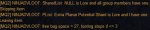
bandicam 2017-03-13 13-59-08-141.jpg

here is loot ini

[Settings]
|======================================================================|
Version=6.05
AddNewSales=1
LootForage=1
LootMobs=TRUE
CorpseRadius=100
MobsTooClose=40
ReportLoot=FALSE
LootChannel=g
LootForageSpam=1
GlobalLootOn=1
CombatLooting=0
SpamLootInfo=1
GMLSelect=1
ExcludeBag1=Extraplanar Trade Satchel
ExcludeBag2=NULL
QuestKeep=10
StackPlatValue=0
NoDropDefault=Quest|Keep|Ignore
LootLagDelay=0
SaveBagSlots=3
[Global]
|======================================================================|
Global1=Item Name|Ignore/Destroy/Keep/Sell
Global2=Item Name|Ignore/Destroy/Keep/Sell
Global3=Item Name|Ignore/Destroy/Keep/Sell
Global4=Item Name|Ignore/Destroy/Keep/Sell
Global5=Item Name|Ignore/Destroy/Keep/Sell
[A]
|======================================================================|
Aderirse Bur=Ignore
Animal Fearbone=Ignore
Auburn Hero's Forge Cloth Hands Ornament=Destroy
Aq' touz Glow=Quest|1
ArcOre Mantle=Quest|1
Astral Phantom Mask=Quest|1
Auburn Hero's Forge Cloth Wrist Ornament=Destroy
Auburn Hero's Forge Chain Feet Ornament=Destroy
Animal Venom=Destroy
Amorphous Cohort's Boots=Ignore
Amorphous Cohort's Breastplate=Ignore
Amorphous Cohort's Gauntlets=Ignore
Amorphous Cohort's Helm=Ignore
Amorphous Cohort's Leggings=Ignore
Amorphous Cohort's Sleeves=Ignore
Amorphous Cohort's Wristguard=Ignore
Amorphous Selrach's Boots=Ignore
Amorphous Selrach's Breastplate=Ignore
Amorphous Selrach's Gauntlets=Ignore
Amorphous Selrach's Helm=Ignore
Amorphous Selrach's Leggings=Ignore
Amorphous Selrach's Sleeves=Ignore
Amorphous Selrach's Wristguard=Ignore
Auburn Wizard Hat Ornament=Destroy
Auburn Hero's Forge Leather Legs Ornament=Destroy
Auburn Hero's Forge Cloth Arms Ornament=Destroy
Auburn Hero's Forge Leather Wrist Ornament=Destroy
Auburn Hero's Forge Chain Legs Ornament=Destroy
Assassin's Extravagant Earring=Keep
Auburn Hero's Forge Cloth Legs Ornament=Keep
Assassin's Extravagant Pauldrons=Keep
Auburn Hero's Forge Plate Legs Ornament=Keep
Assassin's Extravagant Necklace=Keep
Assassin's Extravagant Belt=Keep
Auburn Hero's Forge Cloth Chest Ornament=Keep
August Animal Pelt=Sell
Ancient Poison Gland=Quest|1
Ancient Sarnak Bones=Keep

|======================================================================|
Blue Diamond=Sell
Bard's Golden Mask=Keep
Biarn's Blue=Quest|1
Blade of Defense=Keep
Blade of Protection=Keep
Bloodhammered Earstud=Quest|2
Bloodlaced Blade=Keep
Bloodlaced Dagger Piercing=Keep
Blue Brute=Quest|1
Bone Earring=Quest|2
Bore Brisk Outbreaker=Quest|1
Bronzewood Mindstaff=Quest|1
Burnt Cloak=Keep
Burnt Effigy of Tsaph Katta=Keep
Burnt Scale Ring=Quest|1
Black Sapphire=Ignore
Bone Chips=Ignore
Black Powder Pouch=Sell
Bloodforged Leather Hands Ornament=Ignore
Befouled Silk=Ignore
Befouled Marrow=Ignore
Befouled Spinneret Fluid=Ignore
Befouled Animal Pelt=Ignore
Bloodforged Leather Legs Ornament=destroy
Bloodforged Chain Arms Ornament=destroy
Bloodforged Plate Wrist Ornament=destroy
Bloodforged Plate Arms Ornament=destroy
Bloodforged Leather Chest Ornament=destroy
Bloodforged Leather Feet Ornament=destroy
Bloodforged Cloth Chest Ornament=destroy
Bloodforged Leather Wrist Ornament=destroy
Bloodforged Leather Helm Ornament=destroy
Bloodforged Chain Feet Ornament=destroy
Bloodforged Plate Hands Ornament=destroy
Bloodforged Cloth Robe Ornament=Keep
Bloodforged Cloth Feet Ornament=Keep
Bloodforged Chain Helm Ornament=Keep
Burning Carcass=Keep
Bloodforged Plate Chest Ornament=Keep
[C]
|======================================================================|
Crystallized Sulfur=Ignore
Cloth Bolt=Ignore
Crocodile Tooth=Ignore
Corrupted Shissar Fang=Ignore
Corrupted Loam=Ignore
Consigned Bite of the Shissar XVIII=Quest|1
Consigned Bite of the Shissar XVI=Quest|1
Calcium-Crusted Ring=Quest|2
Captain's Fang=Quest|1
Charming Reese=Quest|1
Chert=Quest|1
Chieftain Deliverance Sword=Quest|1
Chokadai Scale Cloak=Quest|1
Chokidai Eye=Quest|1
Claim of the Warbringer=Quest|1
Collector's Heirloom Necklace=Keep
Crackjaw Cinch=Quest|1
Crush=Keep
Cryptic Storm Buckler=Quest|1
[D]
|======================================================================|
Diamond=Sell
Dervish Essence=Sell
Dream Sapphire=Ignore
Dream Dust=Ignore
Doomfire Sash=Sell
Distilled Grade A Mamba Venom=Ignore
Desiccated Dungeon Rot Spores=Quest|1
Dusty Rusted Shackles=Quest|1
Dusty Iksar Skull=Quest|1
Dungeon Rot Spores of Stones=Quest|1
Distilled Grade A Taipan Venom=Ignore
Distilled Grade C Nigriventer Venom=Ignore
Distilled Grade A Nigriventer Venom=Ignore
Dal'guur Velvet Wrap=Quest|1
Deathfang Vision=Quest|1
Dirt Dauber Staff=Quest|1
Divergent Acrimony Wand=Quest|1
Di'Zok Bow=Keep
Dove's Cry=Quest|1
Drachnid Clawpoint=Quest|1
Draconic Outburst Hammer=Quest|1
Dreams of Goodwill Bangle=Quest|2
Driven Dragon Belt=Quest|1
Drolvarg Cape=Quest|1
Dust Cloak Armor=Keep
Dreadland Bone Dust=Quest|1
Defender's Extravagant Earring=Keep
Defender's Extravagant Belt=Keep
Distilled Grade A Gormar Venom=Keep
Defender's Extravagant Necklace=Keep
Distilled Grade A Choresine Sample=Keep
[E]
|======================================================================|
Ensorcelled Breastplate=Ignore
Exquisite Animal Pelt=Ignore
Exotic Marrow=Ignore
Ethernere Diamond=Sell
Enchanted Werebone=Quest|1
Elder Spiritist's Boots=Ignore
Enshrouded Veil=Ignore
Ebon Wizard Hat Ornament=Ignore
Energized Gemstone=Ignore
Exquisite Silk=Ignore
Exotic Animal Pelt=Ignore
Exotic Silk=Ignore
Erollisi's Arrow Head Ornament=destroy
Emblem of Adroitness=Quest|1
Emblem of Combine Diplomacy=Quest|1
Emblem of Finesse=Quest|1
Emblem of Lcea Katta's Insight=Quest|1
Emblem of Tenacity=Quest|1
Emblem of Tsaph Katta's Wisdom=Quest|1
Emblem of Vigor=Quest|1
Embracing Soul Gorget=Quest|1
Engraved Bone Earring=Quest|2
Envy of the Dead=Quest|1
Everburning Cinder=Quest|1
Exquisite Barrager Club=Quest|1
Earring of the Grove=Quest|1
Ebon Hero's Forge Chain Feet Ornament=Keep
Ebon Hero's Forge Plate Chest Ornament=Keep
Extra Planar Potential Shard=Keep
Ebon Hero's Forge Plate Hands Ornament=Keep
Erollisi's Twin Hearts Head Ornament=Keep
Ebon Hero's Forge Plate Legs Ornament=Keep
Ebon Hero's Forge Cloth Helm Ornament=Keep
Ebon Hero's Forge Chain Chest Ornament=Keep
Ebon Hero's Forge Plate Wrist Ornament=Keep
Ebon Hero's Forge Cloth Feet Ornament=Keep
Enchanted Runestone=Quest|1
[F]
|======================================================================|
Face of the Drillmaster=Quest|1
Fatedealer=Quest|1
Feathered Mask=Quest|1
Fiend Club of Terror=Quest|1
Fleecy Amice of Eepvibles=Quest|1
Fog Herb Totem=Quest|1
Forest Band=Quest|2
Flaming Wizard Hat Ornament=Keep
Flawless Laburnum=Sell
Flawless Delphinium=Sell
Fiery Essence=Keep
[G]
|======================================================================|
Guardian's staff=Ignore
Greater Writ of the Combine=Keep
Giant Lord's Cinch=Quest|1
Gigantic Tattered Cloak=Quest|1
Glorious Belt of Darkness=Quest|1
Glowing Writ of the Combine=Keep
Golden Knight's Belt Armor=Keep
Golden Minstrel's Belt Armor=Keep
Golden Rogue's Belt Armor=Keep
Golden Sage's Choker Armor=Keep
Golden Soldier's Belt Armor=Keep
Golden Soldier's Neck Guard Armor=Keep
Green Glory=Quest|1
Grey Cloak=Keep
Grey Dawn=Quest|1
Guardian's staff=Quest|1
Goblin Token Game=Keep
Goblin Tally Counter=Keep
Goblin Brawler's Accolade=Keep
Golden Minstrel's Belt=Keep
Goblin Cadence Breaker=Keep
Golden Knight's Belt=Keep
Glowing Meteorite Shard=Keep
[H]
|======================================================================|

|======================================================================|
Innoruuk's Black Arrow Head Ornament=Destroy
Innoruuk's Black Rose Head Ornament=Destroy
Intact White Dragon Scale=Keep
Immaculate Muscimol=Sell
Immaculate Laburnum=Sell
[J]
|======================================================================|
[K]
|======================================================================|
Kaznak's Bulwark Emblem=Quest|1
Kizzixik Lordship Blade=Quest|1
Knight's Golden Ring=Keep
Korshan Buckler=Quest|1
Krassex Cloak of Bond=Quest|1
[L]
|======================================================================|
Lifecleaver=Keep
Limb-Chopper=Quest|1
Lesser Writ of the Combine=Keep
Lumber Plank=Sell
Lcea Katta Chain Feet Ornament=Destroy
Lcea Katta Plate Wrist Ornament=Keep
Leather Roll=Sell
Lcea Katta Chain Hands Ornament=Keep
Lcea Katta Leather Hands Ornament=Keep
Lcea Katta Chain Chest Ornament=Keep
Lcea Katta Cloth Legs Ornament=Keep
Lcea Katta Chain Wrist Ornament=Keep
Lcea Katta Cloth Wrist Ornament=Keep
Lcea Katta Cloth Robe Ornament=Keep
Lcea Katta Plate Arms Ornament=Keep
Lcea Katta Plate Helm Ornament=Keep
[M]
|======================================================================|
Mace of Spiteful Retribution=Quest|1
Majestic Centurion Mallet=Quest|1
MakTak Attack=Quest|1
Mantle of Delirium=Quest|1
Mantle of the Rhino=Quest|1
Mask of Diamond Dust=Quest|1
Mask of Dust=Quest|1
Master of Dusks=Quest|1
Master's Sharp=Quest|1
Master's Token of Command=Quest|1
Matron's Wedding Ring=Quest|2
Median Writ of the Combine=Keep
Meteorite Fragment Stud=Quest|2
Midnight Captain=Quest|1
Might and Madness Studs=Quest|2
Minor Writ of the Combine=Keep
Minstrel's Golden Ring=Keep
Mosscovered Great Sword=Quest|1
Mosscovered Longbow=Quest|1
Moss-Crusted Axe=Quest|1
Mountain Ale=Quest|1
Medicinal Herbs=Sell
[N]
|======================================================================|
Nefarious Detaining Dagger=Quest|1
Natural Spices=Sell

[O]
|======================================================================|
Orb of Tormented Rage=Quest|1
Ornate Brass Shield=Quest|1
Overlord Dangle of Kizzixik=Quest|2
Osmium Ore=Sell
[P]
|======================================================================|
Pale Cloak=Keep
Pauldron of the Hero=Keep
Petrified Chokidai Bone Claws=Quest|1
Petrified Egg=Keep
Plaguebringer's Vertebrae=Quest|1
Poised Brace Ring=Quest|2
Portent Haunting Mantle=Quest|1
Prince's Rainment=Quest|1
Pulsing Meteorite Fragment=Quest|1
Pure Emerald Trade Gem=Sell
Pure Sapphire Trade Gem=Sell
Pure Diamond Trade Gem=Sell
Primitive Sarnak Cogworks=Keep
[Q]
|======================================================================|
[R]
|======================================================================|
Ring of the Gypsy=Keep
Rogue's Golden Mask=Keep
Rotting Drop of Dusk=Quest|1
Runic Gouger=Quest|1
Raw Wild Meat=Quest|1
Runner's Waterpouch=Keep

|======================================================================|
Sage's Golden Mask=Keep
Satchel of the Combine Hero=Quest|1
Searstinger Claws=Quest|1
Sebilisian Brilliance=Quest|1
Sebilisian Celerity=Quest|1
Sebilisian Harmony=Quest|1
Sebilisian Prudence=Quest|1
Shark's Tooth Club=Keep
Shattered Blade=Keep
Simple Secrets of the Combine Hero=Keep
Ska'Tu Doom=Quest|1
Skull Crusher Staff=Quest|1
Skullsplitter of Doom=Quest|1
Skybreaker=Keep
Skycleaver=Keep
Skycrusher=Keep
Skycutter=Keep
Skygouger=Keep
Skyiron Heater=Keep
Skyiron Kite=Keep
Skylance=Keep
Skymaul=Keep
Skypiercer=Keep
Skyreach=Keep
Skyripper=Keep
Skywrack=Keep
Staurolite=Sell
Simple Secrets of the Combine Hero=destroy
Sylvan Plate Feet Ornament=destroy
Sylvan Cloth Chest Ornament=destroy
Sylvan Leather Helm Ornament=destroy
Stone of Tranquility=destroy
Sylvan Cloth Wrist Ornament=destroy
Sylvan Chain Arms Ornament=destroy
Soldier's Golden Mask=Keep
Spear of Vindictive Judgement=Quest|1
Spectral Ghoul Cloak=Quest|1
Spectre's Choke=Quest|1
Spirit Darkened Dagger=Quest|1
Spy's Gem of Stealth=Quest|1
Staff of the Shai'din=Keep
Star Plate=Quest|1
Staunch Tyranny Axe=Quest|1
Stone Feather=Quest|1
Stone of Dragon Tolls=Quest|1
Storm Activated Choker=Quest|1
Succulent Familiar=Quest|1
Swift Pauldron=Keep
Scale Ore=Sell
Sylvan Plate Wrist Ornament=Destroy
Sarnak Signaler=Keep
Steel Ingot=Sell
Scroll: Illusion: Goblin Shaman=Destroy
Sylvan Leather Feet Ornament=Destroy
Sylvan Cloth Hands Ornament=Destroy
Sylvan Plate Helm Ornament=Destroy
Sylvan Cloth Robe Ornament=Destroy
Sibilisan Viridian Pigment=Keep
Sylvan Leather Legs Ornament=Destroy
Sylvan Plate Arms Ornament=Destroy
Sylvan Chain Helm Ornament=Destroy
Sylvan Chain Feet Ornament=Destroy
Skull Charm Wizard Hat Ornament=Destroy
Sorcerer's Extravagant Belt=Keep
Sylvan Chain Chest Ornament=destroy
Sylvan Chain Legs Ornament=Keep
Sorcerer's Extravagant Pauldrons=Keep
Sylvan Leather Arms Ornament=Keep
Sorcerer's Extravagant Earring=Keep
Sylvan Cloth Arms Ornament=Keep
Soother's Extravagant Pauldrons=Keep
Sarnak Captain's Signet=Keep
Soother's Extravagant Necklace=Keep
Sooty Sortilege Sheet=Sell
Stump Stalker=Keep
Sarnak Foot=Keep
Sylvan Cloth Legs Ornament=Keep
Scorched Rune=Keep
Sebilisian Intensity=Keep
Sylvan Cloth Helm Ornament=Keep
[T]
|======================================================================|
Tainted Larkspur=destroy
Tainted Delphinium=destroy
Tainted Oleander=destroy
Tainted Caladium=destroy
Tainted Privit=destroy
Tainted Laburnum=Sell
Traditional Wizard Hat Ornament=Keep
Tainted Muscimol=Sell
Trusik Blood=Sell

|======================================================================|
Unspoiled Flying Monkey Paw=Sell
Urticaceae=Sell
Unleashed Vengeance Staff=Quest|1
[V]
|======================================================================|
Viridian Hero's Forge Cloth Robe Ornament=Destroy
Viridian Hero's Forge Plate Legs Ornament=Destroy
Viridian Hero's Forge Cloth Helm Ornament=Destroy
Viridian Hero's Forge Chain Helm Ornament=Destroy
Viridian Hero's Forge Chain Feet Ornament=Destroy
Viridian Hero's Forge Cloth Arms Ornament=Destroy
Viridian Wizard Hat Ornament=Keep
Viridian Hero's Forge Chain Legs Ornament=Keep
Viridian Hero's Forge Plate Hands Ornament=Keep
Viridian Hero's Forge Plate Feet Ornament=Keep
Viridian Hero's Forge Cloth Wrist Ornament=Keep
[W]
|======================================================================|
Writing Ink=Sell
Woven Plaguebraid Cord=Quest|1
[X]
|======================================================================|
[Y]
|======================================================================|
Yeti Toenails=Quest|1
Yeti Tick=Quest|1
[Z]
Zev'ran's Bauble of Might=Quest|1

 
MQ2 can not detect augs after they are inserted into equipment. This was causing ninjadvloot to lock up when trying to loot an aug that actually was LORE. The only way I could get around this issue was to treat all augs as LORE.
 
Added support for fishing items.
Ninjadvloot can now be included to fishing macros for full looting functions; =keep, =sell, =destroy, =ignore, =quest|xx
=ignore will result in the item being destroyed.
 
All of a sudden my looter is leaving random loot on mobs. Most of the time, he loots everything, but randomly I'll see a corpse in camp and manually loot it to find out he left a diamond on the corpse or something. I'll sit there and watch him to see if he'll ever get around to looting the item, but he never does and the corpse just poofs with the loot still on it. From what I've observed so far, these items being left on the corpse are general vendor loot, not Lore/No Drop items.

I've been using NinjAdvLoot for months without problems. I know there were issues awhile back with the macro not always looting No Drop/Lore items and, awhile back, I added hoosierbilly's suggestion to the KA code:

Rich (BB code):
| -------------------------------------------------------------------------------------
| Main Loop
| -------------------------------------------------------------------------------------
        :MainLoop
            /doevents
	    /if ((${AdvLoot.SCount}||${AdvLoot.PCount}) && !${LootTimer}) /call UseAdvLoot

This issue started a week or so ago, before I updated to KA 10.0.4. Out of curiosity, I removed the aforementioned code, but I still get the same problem.

Master Looter role in group is set before I run KA, my loot.ini has diamonds set to =keep, my advloot filer in-game has diamonds set to AN ... I'm at a loss. Any ideas?
 
In the main release thread hoosierbilly says,

WARNING:
Attempting to use both the in-game advanced loot filters and Ninjadvloot 6.x will cause strange behavior. It is strongly recommended you ensure the following in-game advloot settings:
1. LOOT ALL is turned off in the advloot window.
2. Don't say I didn't warn you. Attempts to get both system to work together have not been entirely successful
 
Yes, in a post from 3/1/17, hoosierbilly said he uses the following settings, which I have for my toons as well:

You need to be using advanced looting. Your settings should be ok, though the 'Auto Loot All' setting is tricky, especially if the masterlooter has it checked. Auto Loot All happens so fast ninjadvloot does not have time to process items. Also check your in-game advloot filters, in particular, if anyone has an item filtered 'never' they can not loot that item.

I use the following settings for everyone:
Auto Split Coin, on or off
Use Advanced Looting, on
Confirm remove item filter, on or off
Auto remove looted lore items, OFF
Auto show loot window, on
Auto loot all, OFF
Master Looter Candidate, on or off
 
He is saying that the advanced loot filter system and Ninjadvloot sometimes don't play nice. You are using the advanced loot filter when you set diamonds to AN.
 
I know it wont loot diamonds if any aug you have equiped or in your inventory or bank has diamond in the name. Its like that with dozens of items if you have planar shards (purity augs) in your gear it wont loot them either.
 
Release Ninjadvloot.inc

Users who are viewing this thread

Back
Top
Cart