As the title says this is the first time i have used MQ or played on emu server that has allowed it. My issue is my game wasn’t saving AAs or macros on my hot bar after completely closing client. After some searching I seen someone said it was because because of permissions so I put eq launcher and MQ as run in administrator and it would save. Now the issue is that MQ won’t auto launch my accounts (unless I load to login) but works when I take admin back off.

Install the app
How to install the app on iOS
Follow along with the video below to see how to install our site as a web app on your home screen.
Note: This feature may not be available in some browsers.
-
 You've discovered RedGuides, an EverQuest multi-boxing and scripting community 🧙♀️⚙️. We want you to play several EQ characters at once, come join us and say hello! 👋
You are using an out of date browser. It may not display this or other websites correctly.
You should upgrade or use an alternative browser.
You should upgrade or use an alternative browser.
Problem - New to MQ, issues w/ auto start and buttons.
- Thread starter Jkline410
- Start date

Please don't run mq as admin.
Whoever told you to do that sucks.
Random hacking software on the internet should not have admin rights to your whole PC.
Re eq not saving hotkeys and such, double check you don't have something file locking your eq directory - one drive, or maybe antivirus
Whoever told you to do that sucks.
Random hacking software on the internet should not have admin rights to your whole PC.
Re eq not saving hotkeys and such, double check you don't have something file locking your eq directory - one drive, or maybe antivirus
Ok will change and see what I can find in the directory.Please don't run mq as admin.
Whoever told you to do that sucks.
Random hacking software on the internet should not have admin rights to your whole PC.
Re eq not saving hotkeys and such, double check you don't have something file locking your eq directory - one drive, or maybe antivirus
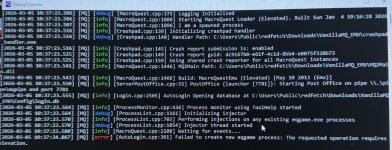
you are launching things as adminGoing to try and do a fresh install of everything and see if I can get everything synced up. I got to where the hot buttons save but MQ is telling me I need to elevate permissions in order to auto start.

double check you're not launching *anything* as admin. mq, eq, rglauncher (should use redfetch)
Please see this sticky
It’s making me launch redfetch as admin or else it fails to launch MQ. I’m at work right now so can’t get the error but I will try it in the morning when I get off.you are launching things as admin
View attachment 75931
double check you're not launching *anything* as admin. mq, eq, rglauncher (should use redfetch)
Please see this sticky
i dont know what "it" is. but no, don't launch redfetch as admin, don't launch mq as admin, don't launch eq as admin - if you're using something like isboxer - don't launch that as adminIt’s making me launch redfetch as admin or else it fails to launch MQ. I’m at work right now so can’t get the error but I will try it in the morning when I get off.
launch anything as admin -> launches anything it launches as admin -> dont do this
if you need to, right click on everything and check that you don't have it set to launch as admin
you want ***nothing*** launching as admin

Users who are viewing this thread
Total: 1 (members: 0, guests: 1)
Share: