• You've discovered RedGuides, an EverQuest multi-boxing and scripting community 🧙‍♀️⚙️. We want you to play several EQ characters at once, come join us and say hello! 👋

  • A TLP without truebox has thawed (Very Vanilla ready)
    Frostreaver

Question - Multibox Traveling - Toon Control

Joined
Jan 14, 2016
RedCents
1,418¢
What is the recommended way to move your multi-boxed group around?

I have tried various methods. I modified my HUD so group leader can always tell at a glance via color coding whether grp members are in range (not stuck), invis'd (still), and in zone (dead/not dead, or hasn't zoned yet). That helps. I have found however that a grp member always lags behind, or gets stuck anyway, it seems a management nightmare. Stick only goes so far and is hard to over-ride if you need to attack something without manually touching each toon. I only have 3 monitors as well (and don't really want more thx) so 3 are always behind the 3 in front.

I have also found I need to be able to engage in battle quickly and efficiently since sooner or later I am gonna get ganked en-route. I have wanted to have KA running on all toons so if we need to fight everyone is primed and ready. I tried Chase, which works well most of the time (as long as I am steering the MA - which is NOT my preferred control toon) , but I was wondering if ppl traveled with KA running. If not, how do you engage quickly and efficiently in battle en-route? I mean we spend all the time keeping DPS, Burn, Heal updated according to new levels and spells/discs/abilities/AA's why not leverage that even if not 'camping'? Frankly I can't manually control the 6 toons as well as KA does.

Lastly, how do you deal with the lack of Perm Invis? I mean my main grp does not have a robe caster. I lean more hybrids and priests, and tanks. My SHM, who is one of my oldest toons and the one I identify with and see EQ through the eyes of, has invis, and Perm Lev, but not Grp Perm Invis yet. Invariably someone takes .00001 falling dmg and invis wears off causing aggro, or it just wears off, etc. Is it actually imperative to replace a member of my grp for a robe? Oh and don't suggest the bard, have one, and we were leving down the slope out of the mouth of Loping Plains using the bard's travel/invis song and the bard gets stuck in a tree, the rest of the grp continued out of range and fell to our deaths. Comical, but not a viable option.

I have found that a lot of the odd behavior of MQ2 or KA et al I report is caused by my using the tools outside what they were intended for. So I ask these things in an effort to find out what is in the box before I decide to venture outside it.

As always, thx for your input in advance.
 
A group without a wizards is just lame ;)

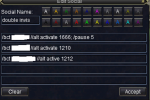
Capture.PNG

That gets my group most places.. with a command to the wiz, and the cleric


Just noticed the typo.. still works though
 
So, I use a couple of hotkeys... I'm not at home, so I can't give you the specific strings, but I can tell you what they do. I also only run one group at a time doing one thing, so I can use /bcaa liberally without issues. If you have other groups doing shit in different areas you may need to be more specific (bcg or bcga or whatever).

1. I have one hotkey that (with /bct) has all toons target the MA/MT and start their respective macros (I use a combination of Dev's class macros and KA). This hotkey also does a /melee on, and I sometimes edit it to make a /bcga //makecamp, as well.

2. For travel/movement, I use a hotkey that has /bcaa //makecamp off, /bcaa //mqpause on, and then I do a /bcaa //moveto <insert the string for my location>

This causes my group to pause their macros, free themselves from the /makecamp function, and run to me.

Now, at this point they will NOT attack anything, even if its beating on their sorry asses. Which is why I do the next thing.

3. I have another hotkey that combines the alias from Dev's macros to stay in a location and camp (/g stay) and the /makecamp on function. I also /mqpause off. At this point, all toons start acting normally as if I had just started the macros in that spot.

That might not be the cleanest way to do it, but it works well for me. I also don't manually control my tank/MA, so I'm able to drag the group around using my main and force them to respond quickly if need be by using the eqbc commands to unpause the macros.

4. Regarding your invis issue... rangers get group invis (at max AA level its permanent), and bards get a 16-ish min set duration group invis and lev AA clicky, as well. It's not a song, nor does it wear off. Re-think the bard thing.

Hope that helps. The mqpause command has been very powerful for me... took me forever to learn about it, though!
 
I still use the chase function quite a bit too in tandem with mqpause to ensure if I'm near a ledge when I turn them back on that they dont run back to the old camp if I happen to forget to turn return to camp off. But other than that I do just about the same as Sum1 is doing.

Depending on the difficulty of the zone for travel I use a combo of /moveto and /stick. ( "/moveto ${Me.Name}" will break stick for use which I utilize)

I too had a recent fall with my bards team but also wasn't using "/stick 12 uw" so they were staying in Z range of the bard. But I play on TLP so not many options for invis. Cloudy potions and a downshit for them works well. Just make a hotkey to turn that flag on or off or youll burn them up in a hurry.
 
Last edited:
I use a combo of /moveto and /stick. ( "/moveto ${Me.Name}" will break stick for use which I utilize)

How does /moveto ${Me.Name} function, exactly? If you're moving when you click that will all your bots follow you continuously, or do they just go to whatever location you're at when you click it?

I play the puller (bard) full time, so I like using (the syntax here will be wrong) /moveto ${Me.X}&&{Me.Y}

What mine does is have all my bots run to the location I was at when I clicked the hotkey. My bard, 0.0001 seconds later, is off running to pull or something and no longer in that location, but the homeboys all stop at the loc easy peasy. I then hit the /g stay, /makecamp, /mqpause off hotkey, which unpauses the running macro. By the time I'm bringing a mob back into camp the guys are all set.
 
It picks up your current x , y and tells them to move to that loc. If you hit it again it will cancel the last location and update to the newest. So when I'm running a puller manually I can drag and drop my team and never stop running while they move to the new spot.

Another reason /moveto is nice, is that you can leave the macro running. Say the wizard just harvested and is stunned, once the stun wears he will move to catch up.

You dont need the && just a comma if you x,y (also dont try to add a Z in underwater, it doesnt like it lol.)


Edit: I am going to have to go back and look at my buttons tonight, I just had a thought that it is possible the /moveto had more to it than that and it is X,Y coords. Will update when I can get back in access range.
 
Last edited:
Good stuff so far guys, thx!!!

It's good to know I wasn't completely off base (which happens lol), meaning traveling with mac running. Some KA commands don't like coming from EQBC, /chaseon being one of them. Perhaps /bct would work rather than /bcg I will experiment more. Pausing is a great idea for movement, I have got away from pausing for a number of reasons but mixed with /moveto in a hotkey would solve myriad problems (like buff routines refreshing buffs and thus dropping invis etc).

Regarding invis, the bard is 90 so will have to check when it gets the AA's mentioned above. I have a ranger, my 2nd oldest toon, but I run him in the b-team, he's only 86. If his perm invis is available in the next few lvls I will consider swapping him into my main grp. My SHM might get the grp perm invis coming up here shortly (maybe 95, have to check) and then that problem becomes moot. Thank you macroquester, that was essentially what I was asking (if it is indeed lame to try to traverse Norath without a wizard). I have a 86 wizzy which could be brought up to the main grp and swapped in if deemed necessary.

I will play around with it some more and implement the various suggestions. Thx again all!
 
My follow or chase key looks like this...

/bca //target (toon to follow name)
/pause 5
/bca //stick 15

..then my stop follow key is simply...

/bca //stick off

(I know there must be better more reliable and efficient ways out there,...I'm still learning)
 
I use a few different ones.
/bca //stick id ${Me.ID} 10 uw for my default stick command
/bca //afollow spawn ${Me.ID} for those windy tight lights require your toons to walk the same path you did.
/bca //stick off
/bca //afol off
for stopping.
 
My follow or chase key looks like this...

/bca //target (toon to follow name)
/pause 5
/bca //stick 15

..then my stop follow key is simply...

/bca //stick off

(I know there must be better more reliable and efficient ways out there,...I'm still learning)

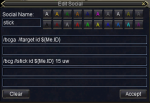
Capture.PNG

I am still learning too. That's what my stick key is. And my stick off is the same as yours.
 
I've looked through the various EQ Command lists, and the macro list, to no avail. Do we know of a way to automate the acceptance of a group invite? I suppose I could write something that would left-click the follow button if I could identify it...

- - - Updated - - -

I've also not been able to get /dosocial to work from a EQBC cmd, anyone had any luck there? In fact I'm not even sure the /dosocial cmd is still valid.
 
Try out the AutoAccept plugin.

http://www.redguides.com/community/showthread.php/24734-MQ2AutoAccept

I've looked through the various EQ Command lists, and the macro list, to no avail. Do we know of a way to automate the acceptance of a group invite? I suppose I could write something that would left-click the follow button if I could identify it...


- - - Updated - - -

I've also not been able to get /dosocial to work from a EQBC cmd, anyone had any luck there? In fact I'm not even sure the /dosocial cmd is still valid.
 
I've looked through the various EQ Command lists, and the macro list, to no avail. Do we know of a way to automate the acceptance of a group invite? I suppose I could write something that would left-click the follow button if I could identify it...

- - - Updated - - -

I've also not been able to get /dosocial to work from a EQBC cmd, anyone had any luck there? In fact I'm not even sure the /dosocial cmd is still valid.

As far as autoinvite is concerned ... Use the Autoaccept plugin as suggested by Wink


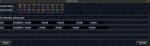
Capture.PNG

The first line is the first choice toons, second line ... second choice. It can be tweaked as you need it. The first bct 'tell' is of course from the invitER.

Not sure about anything to do with socials.
 
DOH! Dint think of plugins, that works great, thx!

- - - Updated - - -

For those running KA and using MQ2MoveUtils /makecamp function, I assume you have KA's ReturnToCamp off and don't use the /camphere function?
 
I have a hotkey that does /invite "toon a", then "invite toon b" etc for all the chars and then /bca //invite which has them all accept the invite
 
LOL I thought I had tried that, or was it /accept... thx, that works!

- - - Updated - - -

What I like about going the plugin route is it also automates trade acceptance (and others) which makes doling out items fast between pulls.
 
My follow or chase key looks like this...

/bca //target (toon to follow name)
/pause 5
/bca //stick 15

..then my stop follow key is simply...

/bca //stick off

(I know there must be better more reliable and efficient ways out there,...I'm still learning)

First off the easiest way to move is with a mage and COH group, but when i do adventures or tasks that require a lot of moving I use the same commands as above. I never turn KA or my macros off. In your .ini file make sure you mark return to camp as off. If you use custom macros like auto cleric or AF nuke they have commands to turn off return to camp.

I like to play my bard and have everyone follow him. He can quickly turn on and off invis and he can buff everyone with run speed. When trying to quest or enter adventures it is nice to be able to drop invis on the group quickly so they can all talk to a NPC. Then i use /bcg //assist (bards name) -->>> /bcg //say enter (or what ever the phrase you need is). Playing the bard is also nice because if i get jumped i can quickly cast AOE mez. Because i never turn KA or macros off all the other toons jump into action any time there is an aggressive mob in range of the tank.
 
Rich (BB code):
#Event Invite         	"#1# invites you to join a group."

Sub Event_Invite(Line,Inviter)
	/if (${MasterList.Find[${Inviter}]}) /invite
	/if (${Window[ConfirmationDialogBox].Open}) {
		/delay 1s
		/notify ConfirmationDialogBox CD_Yes_Button leftmouseup
		}
	/return

From a macro that uses a master list to accept commands. Can just remove if you want to accept any invite (incase you still wanted a macro version)

As for moving, I find in difficult places, running a mage and CoHing to be the best option. Otherwise, if stick if giving me issues and it is a common run path, I make a path using MQ2AdvPath. Otherwise I simply pop open the ingame map with the appropriate mapfilters on so I can see when someone is lagging.
 
I use a few different ones.
/bca //stick id ${Me.ID} 10 uw for my default stick command
/bca //afollow spawn ${Me.ID} for those windy tight lights require your toons to walk the same path you did.
/bca //stick off
/bca //afol off
for stopping.

ok, i love the hot keys here guys...will make my life SO much easier.
Question....what's the "10 uw" for on the stick command (10 is distance, but what's the uw?)?
 
uw is UnderWater used for the ZAxis: If I had used that one my grp wouldn't have died when out of range of the bard using Lev/Invis song (as posted above).

afollow works substantially better than I had anticipated!!! Thx for that one guys. I had seen it before but wrongly dismissed it as another stick. It isn't perfect, but better than stick (and seems to auto-handle ZAxis). I tested running various paths in PoK that I knew woulda tripped up stick, and it performed great. I then tested it running up the spiral stairs to Library and it only worked if I stopped a second at each landing. I really didn't expect it to work even that well.
 
Lol it DOES auto handle ZAxis. This will work when going down the swimming spiral thing in Ssra Temple for camping Soriz Pouch!

- - - Updated - - -

Kokopelli2014 that'll work right outa the box, its generic.
 
Is that generic where I need to replace any variables or do I enter it just as you wrote it and it works like it's written?


Sent from my iPhone using Tapatalk

It works perfectly without replacing anything, but you can replace the numerals for the z axis stick distance you prefer.
 
Lol it DOES auto handle ZAxis. This will work when going down the swimming spiral thing in Ssra Temple for camping Soriz Pouch!

- - - Updated - - -

Kokopelli2014 that'll work right outa the box, its generic.

When I mentioned it wasnt handling Z axis that was for /moveto, the uw always works with stick. When I first saw someone dive their team into the tunnel to enter sirens grotto without skipping a beat I started investigating ... how. I use it out of water still for keeping the crew close to the bard when up in the air.
 
Had I known about "uw" the portion of TDS flagging I had to do in that stupid fuckin water zone would have been MUCH less aggravating.
 
Water still sucks, but the uw switch in my opinion makes dealing with water much better. Before I was moving my toons manually and wouldn't even consider using melee dps.
 
My entire box team is melee dps, so doing the progression missions in the TDS water zone was hell.
 
Yeah, I have heard uw sux in the water (although may be better than without *shrug*). I intend to use it now out of water for the reasons posted: To keep the grp within ZAxis range of the bard.

- - - Updated - - -

When I mentioned it wasnt handling Z axis that was for /moveto, the uw always works with stick. When I first saw someone dive their team into the tunnel to enter sirens grotto without skipping a beat I started investigating ... how. I use it out of water still for keeping the crew close to the bard when up in the air.

I was commenting on afol, I was merely rejoicing that it auto-handles ZAxis. I hadn't known, nor had I tried it before thinking it was just another /stick command.

- - - Updated - - -

In testing, I had conflicts due to overlap of Chase, Stick and AFollow so now all my hotkeys have a stop to all 3 so I don't have to remember which one I might have been using. Odd behavior can ensue when one or more are already invoked and you issue another of the 3...
 
I always issue as many of the possible "stop" commands as I can before I transition to a different task or place. I have /end, /bot off, /melee off, /makecamp off .... I think that's it lol
 
I had made a post about this a week ago but it went ignored, luckily people are sharing ideas now!

From my post:

So with the newest compile I have noticed that Advanced pathing comes defaultly on and even /plugin unloading it wouldn't disable it as far as follow is concerned. For all I know I am probably the only person who still uses the old /follow since I have only been using Mq2 for a few short months of my 3 year boxing life. Old habits die hard.

This thread isn't to QQ but rather I would like to see how others manage with the Advpathing and/or /stick for follow. My biggest issue when boxing is if I use /stick and I have a mob jump me when I am moving my raid; when I switch to target the mob, obviously, they all /stick to it. Also if I use the basic /follow AdvPathing follow now turns on and they will hug my follow character until I /afollow off (had to google the command cause logging out the boxes got annoying quick).

Ultimately here is the idea I came up with to solve both issues, since I actually really like this /afollow more than regular follow. It doesn't break with distance and from what I see they try their best to follow the exact footsteps of my tank, which is amazing.

I have switched my follow macros to /pause 5, /target <Tank> and /afollow on.

My target macros now look like this:

/pause 5, /assist <Tank>
/stand
/afollow off
/stick off

That way when/if I have stick on (which I usually use to catch up on chars that fall way behind) or if I have Afollow on, both of which get turned off whenever I go to target a mob and DPS it. If anyone out there would like to share what they do too I find the best way to learn new tricks is to compare your ideas to others and have a healthy discussion on why you do what you do.

No EQ BC for me, just isboxer + mq2
 
Question - Multibox Traveling - Toon Control

Users who are viewing this thread

Back
Top
Cart