I have watched the videos and have tried posted suggestions but since loaded mqnext nothing much seems to work that use to. I really need someone to communicate to me as am just average on computer. I usually can figure stuff out in a couple hours but are so many things am overwhelmed. I even tried to uninstall but that seems impossible also. I have no map meshes anymore and my bots will not follow or come to me. these are just a few of the things plagueing me. I have ventrillo, team speak or messenger If anyone as some time to help I would appriciate it. I will write everything dow. or at least tell me how to wipe kissassist and mqnext off computer so can start over again. I am sure this is probably in the wrong area but not sure how to pick that either.

-
 Hail, we're RedGuides. We want you to play six (yes, 6!) EverQuest characters at once. We have scripts and a friendly community to help, please join our playstyle and say hello! 👋
You are using an out of date browser. It may not display this or other websites correctly.
You should upgrade or use an alternative browser.
You should upgrade or use an alternative browser.
Problem - MQNEXT Frustation level through the roof
- Thread starter Grrizz
- Start date
- Status
- Not open for further replies.

1. Rename your old MQ install folder. I renamed mine to MQ2.old.
2. Install Next into a fresh and shiny MQ2 folder. (or whatever you want to call it)
3. Run the migrator utility. Point it at your .old folder and your new install.
4. Copy all the meshes from your old installs Mesh folder to the MQ2\Resources\MQ2Nav folder.
5. Start it up, kick ass, take names!
2. Install Next into a fresh and shiny MQ2 folder. (or whatever you want to call it)
3. Run the migrator utility. Point it at your .old folder and your new install.
4. Copy all the meshes from your old installs Mesh folder to the MQ2\Resources\MQ2Nav folder.
5. Start it up, kick ass, take names!

I'm not sure if it still happens but when i used migrator a while back i had a funky name for my MQ2 folder, i think it was EQ[space]MQ2 and migrator wouldn't copy it over, took me a few minutes to figure it out and i just renamed the folder and used it
the Mule UI also doesn't work in MQnext if you are tyring to use that, there is a Lua version but itsn't as flushed out yet
the Mule UI also doesn't work in MQnext if you are tyring to use that, there is a Lua version but itsn't as flushed out yet
Help!!!!
1. Rename your old MQ install folder. I renamed mine to MQ2.old. Did this!
2. Install Next into a fresh and shiny MQ2 folder. (or whatever you want to call it) Did This! Prior to install I checked for updates on launcher.
3. Run the migrator utility. Point it at your .old folder and your new install. Did this, Got Spectacular!
4. Copy all the meshes from your old installs Mesh folder to the MQ2\Resources\MQ2Nav folder. Did this!
4a. went to live and updated all plugins.
5. Start it up, kick ass, Didn't do this.
Problem: My plugins have not moved over to next. I have waited six hours to cover plus or minus on the every 4 hour update. On the launcher under the tab for plugin it reads: All available plugins for test, emu, and beta servers are currently contained in very vanilla, for test, emu, beta server installations and cannot be managed for this utility. However when I swap from live to next on the bottom right I get the message "Plugins Loaded Successfully".
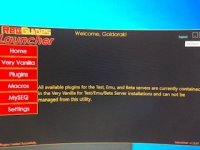
When I load my characters the dps meter and mq server screen load correctly. All of my profile information transferred correctly. I have all character plugins available: war, sham, bst, clr, berserker, monk, rouge, enchanter, mage and grind. None of the control panels show up on any character.
Any clue what the problem may be?
1. Rename your old MQ install folder. I renamed mine to MQ2.old. Did this!
2. Install Next into a fresh and shiny MQ2 folder. (or whatever you want to call it) Did This! Prior to install I checked for updates on launcher.
3. Run the migrator utility. Point it at your .old folder and your new install. Did this, Got Spectacular!
4. Copy all the meshes from your old installs Mesh folder to the MQ2\Resources\MQ2Nav folder. Did this!
4a. went to live and updated all plugins.
5. Start it up, kick ass, Didn't do this.
Problem: My plugins have not moved over to next. I have waited six hours to cover plus or minus on the every 4 hour update. On the launcher under the tab for plugin it reads: All available plugins for test, emu, and beta servers are currently contained in very vanilla, for test, emu, beta server installations and cannot be managed for this utility. However when I swap from live to next on the bottom right I get the message "Plugins Loaded Successfully".
When I load my characters the dps meter and mq server screen load correctly. All of my profile information transferred correctly. I have all character plugins available: war, sham, bst, clr, berserker, monk, rouge, enchanter, mage and grind. None of the control panels show up on any character.
Any clue what the problem may be?

uninstall and reinstall the launcher > launcher <Help!!!!
1. Rename your old MQ install folder. I renamed mine to MQ2.old. Did this!
2. Install Next into a fresh and shiny MQ2 folder. (or whatever you want to call it) Did This! Prior to install I checked for updates on launcher.
3. Run the migrator utility. Point it at your .old folder and your new install. Did this, Got Spectacular!
4. Copy all the meshes from your old installs Mesh folder to the MQ2\Resources\MQ2Nav folder. Did this!
4a. went to live and updated all plugins.
5. Start it up, kick ass, Didn't do this.
Problem: My plugins have not moved over to next. I have waited six hours to cover plus or minus on the every 4 hour update. On the launcher under the tab for plugin it reads: All available plugins for test, emu, and beta servers are currently contained in very vanilla, for test, emu, beta server installations and cannot be managed for this utility. However when I swap from live to next on the bottom right I get the message "Plugins Loaded Successfully".
View attachment 36830
When I load my characters the dps meter and mq server screen load correctly. All of my profile information transferred correctly. I have all character plugins available: war, sham, bst, clr, berserker, monk, rouge, enchanter, mage and grind. None of the control panels show up on any character.
Any clue what the problem may be?
you *are* actually downloading them, there is just something wrong with your launcher
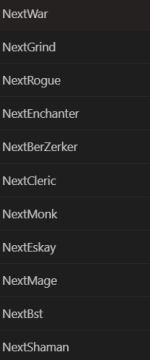
Thank you so much!!!uninstall and reinstall the launcher > launcher <
you *are* actually downloading them, there is just something wrong with your launcher
View attachment 36831

SomeTester
Well-known member
tell me you’re an old school gamer without saying you’re an old school gamer.I have ventrillo, team speak
- Status
- Not open for further replies.
Users who are viewing this thread
Total: 1 (members: 0, guests: 1)
Share: