• You've discovered RedGuides, an EverQuest multi-boxing and scripting community 🧙‍♀️⚙️. We want you to play several EQ characters at once, come join us and say hello! 👋

  • A TLP without truebox has thawed (Very Vanilla ready)
    Frostreaver
Resource icon

Release MQ2SpawnSort

Joined
Jan 13, 2018
RedCents
3,352¢
Plugin to add a TLO similar to NearestSpawn, but lets you sort by (almost) anything. Syntax is:

Rich (BB code):
${SpawnSort[<n>,<asc|desc>,<member>,<spawn search string>]}

It returns the nth spawn that matches your spawn search string, sorting in ascending or descending order by whatever member you like (Level, PctHPs, etc). The member to sort by can be anything on a spawn type, so if you can do ${Spawn[something].<member>}, it'll work. A notable exception is "sub-members", like Class.ShortName. If there's a period in there, it won't work :(.

Some random examples:

The lowest level player within 100 yards:

Rich (BB code):
${SpawnSort[1,asc,Level,pc radius 100]}

The 2nd highest level npc in the zone:

Rich (BB code):
${SpawnSort[2,desc,Level,npc]}

Lowest HP group member:

Rich (BB code):
${SpawnSort[1,asc,PctHPs,group]}

It handles a a special case for MQ2Nav as well, you can do:

Rich (BB code):
/varset closestNPCID ${SpawnSort[1,asc,PathLength,npc radius 1000].ID}

Which will give you the closest NPC within 1000 yards, but using MQ2Nav path length instead of just straight line distance. PathExists works too, in case you just want to find the first spawn you can navigate to but don't care about distance.

The returned type is spawn, so if ${Spawn[].Whatever} works, so will ${SpawnSort[].Whatever}.

If the spawn search string restricts it to NPCs on your xtarget (i.e. includes xtarhater), you can sort by xtarget members, e.g. PctAggro, and it will return XTargetType instead of SpawnType. E.g.

Rich (BB code):
# if any npcs on xtarget have less than 100% aggro
/if (${SpawnSort[1,asc,PctAggro,xtarhater].PctAggro} < 100) {
    /varset npcIDontHaveAggroOnID ${SpawnSort[1,asc,PctAggro,xtarhater].ID}
    # stuff to get aggro back
}

You can also use "group" in spawn search, and sort by something on groupmember (probably the most useful is PctAggro again). It'll return GroupMemberType too. e.g.

Rich (BB code):
# if the highest aggro player in the group isn't the main assist
/if (!${SpawnSort[1,desc,PctAggro,group].MainAssist}) {
    /varset playerWithAggroID ${SpawnSort[1,desc,PctAggro,group].ID}
    # heal them or whatever
}

Thanks toots for the idea and donating for development!
 
Plugin to add a TLO similar to NearestSpawn, but lets you sort by (almost) anything. Syntax is:

Rich (BB code):
${SpawnSort[<n>,<asc|desc>,<member>,<spawn search string>]}

It returns the nth spawn that matches your spawn search string, sorting in ascending or descending order by whatever member you like (Level, PctHPs, etc). The member to sort by can be anything on a spawn type, so if you can do ${Spawn[something].<member>}, it'll work. A notable exception is "sub-members", like Class.ShortName. If there's a period in there, it won't work :(.

Some random examples:

The lowest level player within 100 yards:

Rich (BB code):
${SpawnSort[1,asc,Level,pc radius 100]}

The 2nd highest level npc in the zone:

Rich (BB code):
${SpawnSort[2,desc,Level,npc]}

Lowest HP group member:

Rich (BB code):
${SpawnSort[1,asc,PctHPs,group]}

It handles a a special case for MQ2Nav as well, you can do:

Rich (BB code):
/varset closestNPCID ${SpawnSort[1,asc,PathLength,npc radius 1000].ID}

Which will give you the closest NPC within 1000 yards, but using MQ2Nav path length instead of just straight line distance. PathExists works too, in case you just want to find the first spawn you can navigate to but don't care about distance.

The returned type is spawn, so if ${Spawn[].Whatever} works, so will ${SpawnSort[].Whatever}.

If the spawn search string restricts it to NPCs on your xtarget (i.e. includes xtarhater), you can sort by xtarget members, e.g. PctAggro, and it will return XTargetType instead of SpawnType. E.g.

Rich (BB code):
# if any npcs on xtarget have less than 100% aggro
/if (${SpawnSort[1,asc,PctAggro,xtarhater].PctAggro} < 100) {
    /varset npcIDontHaveAggroOnID ${SpawnSort[1,asc,PctAggro,xtarhater].ID}
    # stuff to get aggro back
}

You can also use "group" in spawn search, and sort by something on groupmember (probably the most useful is PctAggro again). It'll return GroupMemberType too. e.g.

Rich (BB code):
# if the highest aggro player in the group isn't the main assist
/if (!${SpawnSort[1,desc,PctAggro,group].MainAssist}) {
    /varset playerWithAggroID ${SpawnSort[1,desc,PctAggro,group].ID}
    # heal them or whatever
}

Thanks toots for the idea and donating for development!

discussion here:
https://www.redguides.com/community/threads/65087-MQ2SpawnSort
 
Last edited by a moderator:
Plugin to add a TLO similar to NearestSpawn, but lets you sort by (almost) anything. Syntax is:

Rich (BB code):
${SpawnSort[<n>,<asc|desc>,<member>,<spawn search string>]}

It returns the nth spawn that matches your spawn search string, sorting in ascending or descending order by whatever member you like (Level, PctHPs, etc). The member to sort by can be anything on a spawn type, so if you can do ${Spawn[something].<member>}, it'll work. A notable exception is "sub-members", like Class.ShortName. If there's a period in there, it won't work :(.

Some random examples:

The lowest level player within 100 yards:

Rich (BB code):
${SpawnSort[1,asc,Level,pc radius 100]}

The 2nd highest level npc in the zone:

Rich (BB code):
${SpawnSort[2,desc,Level,npc]}

Lowest HP group member:

Rich (BB code):
${SpawnSort[1,asc,PctHPs,group]}

It handles a a special case for MQ2Nav as well, you can do:

Rich (BB code):
/varset closestNPCID ${SpawnSort[1,asc,PathLength,npc radius 1000].ID}

Which will give you the closest NPC within 1000 yards, but using MQ2Nav path length instead of just straight line distance. PathExists works too, in case you just want to find the first spawn you can navigate to but don't care about distance.

The returned type is spawn, so if ${Spawn[].Whatever} works, so will ${SpawnSort[].Whatever}.

If the spawn search string restricts it to NPCs on your xtarget (i.e. includes xtarhater), you can sort by xtarget members, e.g. PctAggro, and it will return XTargetType instead of SpawnType. E.g.

Rich (BB code):
# if any npcs on xtarget have less than 100% aggro
/if (${SpawnSort[1,asc,PctAggro,xtarhater].PctAggro} < 100) {
    /varset npcIDontHaveAggroOnID ${SpawnSort[1,asc,PctAggro,xtarhater].ID}
    # stuff to get aggro back
}

You can also use "group" in spawn search, and sort by something on groupmember (probably the most useful is PctAggro again). It'll return GroupMemberType too. e.g.

Rich (BB code):
# if the highest aggro player in the group isn't the main assist
/if (!${SpawnSort[1,desc,PctAggro,group].MainAssist}) {
    /varset playerWithAggroID ${SpawnSort[1,desc,PctAggro,group].ID}
    # heal them or whatever
}

Thanks toots for the idea and donating for development!

Wow this is fantastic for some macro!! Thank you!


KA
 
@alynel Thanks again for this great plugin!

Somehow I found some part is broken

TLO like
Code:
${SpawnSort[1,asc,PctHPs,group]}
will cause an instant CTD

in fact any search that related to group will cause an instant CTD too..
Could you look into that please? Thank you!
 
Last edited:
This is caused by this line:

Code:
if (GetCharInfo()->pGroupInfo->pMember[i]->pSpawn == pSpawn)

In the loop that doesn't check if those are available (and they're not).
 
I recently found a bug of this:
${SpawnSort[${i},asc,PathLength,npc radius 600]}
Returns NULL since i==2, that means when
${SpawnSort[1,asc,PathLength,npc radius 600]}
always correct, but then nothing is getting sorted, all following number is null.

@alynel could you please check that? thank you very much.
 
This is great! Thanks for the hard work. I am in the process of integrating this into my stuff and it truly makes things much easier.
 
By the way, how does this handle corpses? I got some crashes today on the clr when there were dead members in group
 
Looks like they're accessing the MQ2Type directly. all that typeVar.type->GetMember(typeVar.VarPtr, thing, stuff, gibberish) is pretty incoherant to me. But they seem to have been nice enough to leave a comment.

Code:
// If we're not using PathLength, or we are but result isn't -1, use function determined above to add to a list
            else if (_stricmp(member, "PathLength") || ret.Float != -1.0f)

To say that if the returned value is -1.0f then it would fail out and not interpret the path length. But that's my best guess. It's possible that since the plugin was made that -1.0f isn't returned on a failure to find a path. They don't appear to get PathExists explicitly, they use the same chunk of code for both PathExists and PathLength with PathLength getting additional information, so it would stand to reason that if PathExists uses the same logic, it would fail out if the path didn't exist prior to PathLength being evaluated. Which is likely the purpose of the check for it to be -1.0f
 
Any word on fixing what KingArthur found, ${SpawnSort[i,asc,PathLength,npc radius 600]} not working where i >= 2? I don't want to "fix" it in my code and then this one gets fixed :)
 
Last edited:
Sort by shortest nav path to target, yes please.

(I'm aware we could do this in a macro but still... It'd be nice to have it in a single line TLO.)
 
Sort by shortest nav path to target, yes please.

(I'm aware we could do this in a macro but still... It'd be nice to have it in a single line TLO.)

nav path distance requires generating a navigation path. Sorting all spawns by navigation path would be a MASSIVELY expensive operation. easily capable of burning all of your cpu time.
Filtering by "path exists" would additionally require generating the path twice.

if you want spawn sorting from me it'll have to be done right.
 
Last edited:
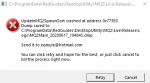
1592423357589.png


Anyone getting this error? I cant use mq on riz but all other servers it works fine - this is with all 6 of my toons too
 
Release MQ2SpawnSort

Users who are viewing this thread

Back
Top
Cart