
-
 Hail, we're RedGuides. We want you to play six (yes, 6!) EverQuest characters at once. We have scripts and a friendly community to help, please join our playstyle and say hello! 👋
You are using an out of date browser. It may not display this or other websites correctly.
You should upgrade or use an alternative browser.
You should upgrade or use an alternative browser.

Plugin - MQ2Necro (1 Viewer) 3.1.52471.42
- Thread starter Sic
- Start date

- Seller
- #642
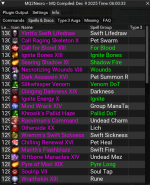
this is a scroll bar - if you scroll down there are more spells

Could you scroll the rest of your spells in that list until you see *anything* listed for "2 Highest Pyre Short"
even easier so you grab all 3 -
Could you scroll the rest of your spells in that list until you see *anything* listed for "2 Highest Pyre Short"
even easier so you grab all 3 -
/multiline ; /plugin necro toggle; /timed 5 /plugin necro toggle and then snip this equivalent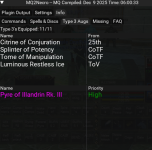
- Seller
- #644
this is also not a: scrolling down on the same thing i mentioned nor b: doing the command and then snipping the output i showedonly thing I see it this for high priority
Let's just do the command line and get the plugin loading output please
even easier so you grab all 3 -
/multiline ; /plugin necro toggle; /timed 5 /plugin necro toggle and then snip this equivalent- Seller
- #646
i deleted your image because i can read your guild member's names through the window.
a: you're in Info -> Type 3 augs --- which is NOT what im asking for
b: you're not doing the command
please do the following
- Left click "Plugin Output"
- copy and paste this next line into the mqconsole or your mqchatwnd window
- - /multiline ; /plugin necro toggle; /timed 5 /plugin necro toggle
- look in the plugin output for the section that looks like the following screensnip

- screensnip it just like the above im showing here
- paste in a reply
a: you're in Info -> Type 3 augs --- which is NOT what im asking for
b: you're not doing the command
please do the following
- Left click "Plugin Output"
- copy and paste this next line into the mqconsole or your mqchatwnd window
- - /multiline ; /plugin necro toggle; /timed 5 /plugin necro toggle
- look in the plugin output for the section that looks like the following screensnip
- screensnip it just like the above im showing here
- paste in a reply
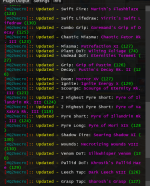
- Seller
- #648
k thankshere
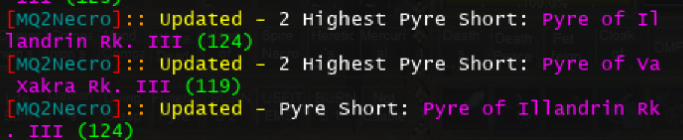
yeah for some reason the new spell isn't showing up - which is why it isn't working. I'll look into it
- Seller
- #649
@Draekink thanks
View attachment 73550
yeah for some reason the new spell isn't showing up - which is why it isn't working. I'll look into it
for clarity - can you take off your bp and then do the snip again (you'll need to either a: swap to a different bp, or reload the plugin without a bp) - I'm not seeing anything jumping out in spelldata as to why it wouldn't (i'll change it so if you remove your robe entirely and have no robe, that you'll recheck your spells as well)
- Seller
- #650
Sic updated MQ2Necro with a new update entry:
12/11/2025b
Read the rest of this update entry...
12/11/2025b
- Update our discs if for some reason we were wearing a chest piece and are no longer
Read the rest of this update entry...
this weird and not I remove the robe and unload from clicky Dread Pyre VIII shows update and it worked, but as soon as I place it back on it changes to show Pyre of Illander. So logged off i removed the robe once again then logged off restart the program over, Once again it show Dread Pyre VIII as update a priority short. Then I put on a old robe abd once again it reverted back tp Prye of Illander as the high priority short.
- Seller
- #652
yeah ok, so this is *exactly* as i originally mentioned and all the rest of the back and forth was a complete waste of timethis weird and not I remove the robe and unload from clicky Dread Pyre VIII shows update and it worked, but as soon as I place it back on it changes to show Pyre of Illander. So logged off i removed the robe once again then logged off restart the program over, Once again it show Dread Pyre VIII as update a priority short. Then I put on a old robe abd once again it reverted back tp Prye of Illander as the high priority short.
 there is nothing wrong with the spell/plugin it is working as intended and designed. it is also not "weird", it is on purpose.
Q. I seem to be using a different PyreShort than is available to me?
A. We try and match the PyreShort focus from your Robe. We keep track of the 2 best pyre's you have available, and use whichever one of those matches your robe focus.
also as previously mentioned, using the focus on your robe to match is better unless you have rank 3 of your new spell (which obviously you don't since that isn't a thing yet), and then it is mostly a wash
they changed the name from Pyre of Illander to Dread Pyre what am I going to do Since all my robes are raid gear and they uses Pyre of Illander go around with out wearing a robe until new robe drops
if this help on the new robe it has slot 2 *Dread Pure VIII*, slot 3 *Pyre of Illander*, slot 4 *Pyre of Va Xakra*
if this help on the new robe it has slot 2 *Dread Pure VIII*, slot 3 *Pyre of Illander*, slot 4 *Pyre of Va Xakra*
- Seller
- #654
no they didn't "change the name" they added a new spell in the spell lineup. they didn't change the name of pyre of illander to dread pyre xiiithey changed the name from Pyre of Illander to Dread Pyre what am I going to do Since all my robes are raid gear and they uses Pyre of Illander go around with out wearing a robe until new robe drops
you use your robe that makes your pyre of illander BETTER than your new pyre spell. Using Dread Pyre XIII over your FOCUSED Pyre of Illander is a dps LOSS
I'm happy to be corrected if that is not the case any longer (i haven't plugged in the math yet) - but i think you're fundamentally misunderstanding what is happening here.
your robe has a focus - it makes your pyre spell big dick energy
your new dread pyre is not focused until you have a new xpac robe
either a: use the more powerful focused illander, or b: get a robe that focuses your Dread Pyre XIII
Group Tier 1 necro BP that focuses Dread Pyre XIII
Group Tier 2 necro BP that focuses Dread Pyre XIII
Group Tier 3 necro BP that focuses Dread Pyre XIII
- Seller
- #656
yeah here's a couple of other points:i understand i just have to for those robes to drop, I am sorry I cause all this head. I get
- sor got huge bumps in new spells, which means dread might be worth over focused spell
- - if we assume that is the case, it *should also encourage you to go get a t1/t2/t3 robe as an absolute priority*
as i posted about before the xpac, I don't plan on making substantial mechanical changes until after the january patch, many folks suspect some spells will get changed around
- Seller
- #658
yep, and we do on purpose - especially last few xpacs have been pretty shitty with npcs under the world. the summon companion helps ensure our pet is engaged and not just standing like a derp cause it is undergroundMy apologies if this is covered elsewhere, I noticed even in tank mode that the AA summon companion is used. Which drops all pet aggro. Is there a way to turn this off or is it covered in some other way? ( most notable whenever there is more than one mob on aggro. )
/nec usesummoncompanion offyep, and we do on purpose - especially last few xpacs have been pretty shitty with npcs under the world. the summon companion helps ensure our pet is engaged and not just standing like a derp cause it is underground
/nec usesummoncompanion off
Thank You!
- Seller
- #660
You're welcome dudeThank You!
- Seller
- #661
Sic updated MQ2Necro with a new update entry:
12/17/2025
Read the rest of this update entry...
12/17/2025
- Temporarily disable checking for robe focus if we're 129+ (Dread Pyre XIII is 129)
- - this will likely get changed when dbg catches up with their unfinished stuff
Read the rest of this update entry...
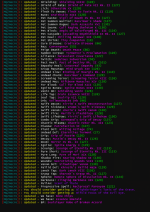
- Seller
- #663
Lol that's gotta definitely be a fuck up on my part. Dunno how I didn't notice either.Hello Again, I updated to the newest plugin and now the necro is identifying the undead dot line as the pyre short, I have a robe with the current focus, a Rank 2 Dread pyre.
Will fix and patch tonight when I get home
- Seller
- #664
Sic updated MQ2Necro with a new update entry:
12/20/2025
Read the rest of this update entry...
12/20/2025
- PyreShort is no longer Pyre"Lost"
Read the rest of this update entry...
Is there any way to stop my pet from saying "Sorry, Master... calming down."? I've removed almost all my macros, have turned things on an off to only realize it is 100% the plugin. I even asked chatgpt to troubleshoot and after everything its still doing it and said it is the Dec 2025 build and I should find an older version to use instead.
- Seller
- #666
you asked chatgpt. ok lol - we'll that is not going to help you. at allIs there any way to stop my pet from saying "Sorry, Master... calming down."? I've removed almost all my macros, have turned things on an off to only realize it is 100% the plugin. I even asked chatgpt to troubleshoot and after everything its still doing it and said it is the Dec 2025 build and I should find an older version to use instead.
sorry master calming down means we're backing it off - and we're backing it off when it is doing something that *seems* like it might be not doing what it is supposed to.
if you dont have greater hold, we'll try and back your pet off if it is outside of your campradius while you're pulling
or if your MA doesn't have a target or they're targeting themselves and your pet is fighting something
or if you dont have something that matches your conditions to fight but your pet is fighting something
no you can't turn it off - if your pet is out willy nilly doing stuff, we're going to try and prevent you from wiping
- Seller
- #668
make sure you mark yourself as group ma/tank - and you should probably use sictank mode with a "resetcamp" when you get to something you want to fight. (can check out the sticky and the guides for that info)To be fair, I'm afraid to ask questions because of how people like to respond on this forum so I thought I would try everything I could think of before posting.
Anyways, my necro is only level 20 and I'm just soloing with a healer merc while on manual.
re: asking questions - yeah asking questions can be scary, especially if you don't know what to ask --- unfortunately chatgpt and other LLMs are just designed to be *agreeable*, not to give you objectively correct information. telling you to try a previous build or whatever just adds a lot of additional layers to your struggles. firstly - chatgpt doesn't know shit about shit, it has no concept of the behaviors or the reasons for the behaviors or when that behavior was introduced, secondly - a .dll only works for the version of mq/eq it is compiled for - so a version before december eq build wouldn't work with the eq of december onward
if you run into something and you're feeling nervous or vulnerable - just PM me (and feel free to mention that i told you to/why)
make sure you familiarize yourself with the sticky - in this case specially including the part about the "how to ask for help" - it means much less guessing on mine and chat's part to try and give assistance
Please see >>> Getting Started with CWTN plugins! (Movement, UI Window, Clickies, Pulling, ETC) Check Here First! <<<

right now is a great time to fire up an SK, an enchanter, a cleric, a wizard, and a mage to go with your necro
and rock with a full group- Seller
- #669
Sic updated MQ2Necro with a new update entry:
1/13/2026
Read the rest of this update entry...
1/13/2026
- Fixed an issue with LoS and "Wake the Dead"
- Corrected issue with illusion from Arch Lich
Read the rest of this update entry...
- Seller
- #671
howdy Draekin sorry to hear about your troublesI don't know what to or look at but necro combatsummonpet is not working in group mode or BYOS, I have looked in mq2 necro and everything seems to be on, I even have combatsummonpet on in control panel. I am at lose
Each resource on RG has an Overview / Discussion Thread and either a link to their wiki or tabs with FAQ, Commands, Etc.
Please make sure to post in the respective discussion thread, and check the FAQ/Commands/Wiki for information before posting.
so mq2necro questions go in the mq2necro discussion thread
yes, combatsummonpet needs to be turned on
you need to not be invis
usecharm needs to be off
you need the reagent to summon your pet
you want to NOT be in byos, unless you are byos custom (unless you're keeping your pet memorized fulltime (this should be the pet spell that the plugin says you're using, based on what pet you're choosing)
you can
/nec debugcombatsummonpet and it will walk you through all that
- Commits
- 191
ChatWithThisName updated MQ2Necro with a new update entry:
02/06/2026:
Read the rest of this update entry...
02/06/2026:
MQ2Necro: |
- removed Trucidation from the lifetap group
- - this thing consumes an EE when cast
- - thanks Klavs34500
Read the rest of this update entry...
- Seller
- #673
Sic updated MQ2Necro with a new update entry:
02/12/2026
Read the rest of this update entry...
02/12/2026
- will charm with just 1 mob
- - if you're usecharm then we assume you want a charm pet, and probably don't want to wait for a bigger pull
- if your last charm pet is too far away or you dont have los, we're gonna find you a new one
Read the rest of this update entry...
- Seller
- #674
Sic updated MQ2Necro with a new update entry:
02/23/2026
Read the rest of this update entry...
02/23/2026
- If UseFeign is off, will now autostandonfeign regardless of health.
- If UseFeign is on, they will continue to operate as they have been.
Read the rest of this update entry...
Malveillant
New member
Wrong forum
Hello,
I wasn't sure if I should post this in the CWTN forum or here. I humbly apologize. I purchased the mq2necro CWTN. I've recently purchased 5 others, and they work great, but I am receiving an error message when I try to load the mq2necro. I checked to see if the error was already on this site, but I couldn't find it. I'm sure it's a super easy fix, but I'm new to this and still ignorant. I deleted all my characters in MacroQuest, and reset the accounts, profiles, etc, but I'm still getting the error. The error is below:
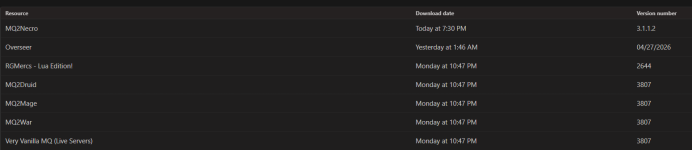
Plugin 'mq2necro' could not be loaded: Plugin was not built for this version of EverQuest (was built for Apr 30 2026 15:25:53)
Any help is appreciated. Thank you.
I wasn't sure if I should post this in the CWTN forum or here. I humbly apologize. I purchased the mq2necro CWTN. I've recently purchased 5 others, and they work great, but I am receiving an error message when I try to load the mq2necro. I checked to see if the error was already on this site, but I couldn't find it. I'm sure it's a super easy fix, but I'm new to this and still ignorant. I deleted all my characters in MacroQuest, and reset the accounts, profiles, etc, but I'm still getting the error. The error is below:
Plugin 'mq2necro' could not be loaded: Plugin was not built for this version of EverQuest (was built for Apr 30 2026 15:25:53)
Any help is appreciated. Thank you.
- Seller
- #676
> Here's how to find out where to post in the right area :) <
try patching again
you downloaded an mq2necro from today - but you are using the VV from monday - so they don't match
it also means you likely need to completely log out, (exit mq), patch eq, then run redfetch again
try patching again
you downloaded an mq2necro from today - but you are using the VV from monday - so they don't match
it also means you likely need to completely log out, (exit mq), patch eq, then run redfetch again
Lordchamp55
Member
Any guesstimate when mq2necro will be usable on emu? Just purchased it but forgot the 32/64bit difference between live and emu before I did but sure do want it.
- Seller
- #679
yeah I never put servant of bones in - it is because it is a monk instead of a warrior or assassin class, it is the "outlier" of their pet archetypes.Plugin doesn't seem to recognize Servant of Bones (56 pet) when set to Highest Level, preferring instead the level 44 Cackling Bones I have scribed.
the way we select "Highest Level" is just comparing between our available pet categories. I guess i could add it so it compares the other two and would use it if highest was selected, but not give it a group
having an entire category for "monk" seems silly since it is just the 1 pet - so silly that dbg has both "Necro Rogue Pet" and "Necro Warrior Pet" for their spell groups, but Servant of Bones they didn't give a spell line since it is a 1-off
View attachment 77364
View attachment 77365
- Seller
- #680
there is no eta on when the plugins will be available on emu, no - would you like a refund?Any guesstimate when mq2necro will be usable on emu? Just purchased it but forgot the 32/64bit difference between live and emu before I did but sure do want it.
Users who are viewing this thread
Total: 2 (members: 0, guests: 2)
Share: