• You've discovered RedGuides, an EverQuest multi-boxing and scripting community 🧙‍♀️⚙️. We want you to play several EQ characters at once, come join us and say hello! 👋

  • A TLP without truebox has thawed (Very Vanilla ready)
    Frostreaver

Problem - MQ2Nav issue on EMU

Joined
Sep 11, 2020
RedCents
110¢
Hey guys, needing a bit of help.

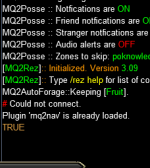
I have been trying to get KA/MAto work for at least 3 weeks on the emu server i'm playing on. Others on the server have no issues and i've driven my self mad searching forums for a solution. Below is a screen shot of the error i'm getting when i try to load KA or MA. MQ2Nav is loaded and meshes have all been updated multiple times from the RG launcher. None of the /nav commands are working which leads me to believe something is borked within mq2nav. Please let me know if you have an idea that might help get this straightened out. Please let me know what additional information may be helpful as well!

Thanks!
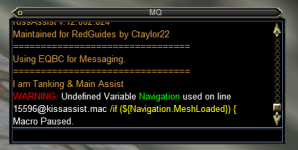


1672783523428.png
 
Hey guys, needing a bit of help.

I have been trying to get KA/MAto work for at least 3 weeks on the emu server i'm playing on. Others on the server have no issues and i've driven my self mad searching forums for a solution. Below is a screen shot of the error i'm getting when i try to load KA or MA. MQ2Nav is loaded and meshes have all been updated multiple times from the RG launcher. None of the /nav commands are working which leads me to believe something is borked within mq2nav. Please let me know if you have an idea that might help get this straightened out. Please let me know what additional information may be helpful as well!

Thanks!


View attachment 44897
that would point to mq2nav not being loaded

can you do:
/plugin mq2nav
/nav ui
/echo ${Plugin[MQ2Nav].IsLoaded}
and show us the output
 
unloaded and reloaded same thing

Restarted EQ and same thing

I have also reinstalled MQ from the launcher previously and still getting the same thing
what msg did you get when you did /plugin mq2nav unload? did you get that it was unloaded, or a message that it didn't exist?
 
that it was unloaded
couple things you will need/want to check

a: check your antivirus doesn't have any files being held hostage - consider whitelisting your mq/eq/rg folders/subfolders
b: check your compat layers and delete anything MQ related
Check these locations in your registry for anything eq/mq related and delete.
Less:
HKEY_CURRENT_USER\Software\Microsoft\WindowsNT\CurrentVersion\AppCompatFlags\Layers
and 
HKEY_LOCAL_MACHINE\Software\Microsoft\WindowsNT\CurrentVersion\AppCompatFlags\Layers
 
Howdy,
Does the rest of your macros and/or communication commands work? that is, does EQBCS/DANNET work? Seems like I had a few different issues on Laz in my early days (May/June last year). One of the issues I recall I had, EQBCS issues and my mesh file location was not correctly... located.
 
App compatibility should warn if there's an issue there -- but you can also double check it by right clicking on the tray and using Advanced --> Check App Compatibility. The registry keys for 32 bit and 64 bit are different locations, I believe. Regardless, I don't think that's the issue.

If you type this in the MQ console window (CTRL+`) does it work?
Code:
/plugin mq2nav
/nav ui
 
Howdy,
Does the rest of your macros and/or communication commands work? that is, does EQBCS/DANNET work? Seems like I had a few different issues on Laz in my early days (May/June last year). One of the issues I recall I had, EQBCS issues and my mesh file location was not correctly... located.
EQBCS works fine, most other plugins work fine that i have been able to ascertain. Without KA or MA working i haven‘t spent a ton of time in game to find out if anything else is wonky.
 
App compatibility should warn if there's an issue there -- but you can also double check it by right clicking on the tray and using Advanced --> Check App Compatibility. The registry keys for 32 bit and 64 bit are different locations, I believe. Regardless, I don't think that's the issue.

If you type this in the MQ console window (CTRL+`) does it work?
Code:
/plugin mq2nav
/nav ui
I will try this out when i get home this evening.
 
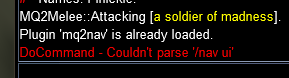
This is what i got when doing the command from the console window

View attachment 44940
Just started happening to me as well. Was working fine, until i #zone to dragon scale hills. Two toons crashed they were the first two it started with after loading them back into game. The others worked fine until i logged them off back on. Now Nav shows loaded but none of the /nav commands work.

[Update]
Restarted PC fixed the problem.
 
Last edited:
Same issue on emu The Hidden Forest server/ /nav target won't work. Can load and unload mq2nav normally but when trying to reach a target, it says

[Nav] Invalid nav destination:

This wherever I use it on PCs or NPCs and I tested several different zones.
I checked the register entries, nothing.
I already whitelisted on antivirus as installing Very Vanilla made Bitdefender become mad

I checked the whole emu thread and my eqclient.ini files has WindowedMode=TRUE
 
Same issue on emu The Hidden Forest server/ /nav target won't work. Can load and unload mq2nav normally but when trying to reach a target, it says


This wherever I use it on PCs or NPCs and I tested several different zones.
I checked the register entries, nothing.
I already whitelisted on antivirus as installing Very Vanilla made Bitdefender become mad

I checked the whole emu thread and my eqclient.ini files has WindowedMode=TRUE
not the same issue
 
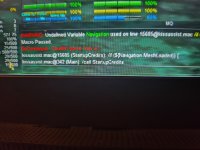
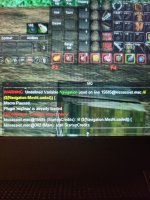
That screenshot shows you not being able to use /nav ui. Also shows Navigation as undefined variable. Both of those together just suggests you don't have mq2nav plugin loaded, so do
/plugin nav
mq2nav was loaded none of the /nav commands worked. I reinstalled MQ and which solved the issue initially but after a few times logging in and out it started happening again. Deleting the .INI files for the characters does nothing. Unloading and reloading does nothing.
 

Attachments

  • 20230727_005738.jpg
    20230727_005738.jpg
    2.1 MB · Views: 2
Last edited:
mq2nav was loaded none of the /nav commands worked. I reinstalled MQ and which solved the issue initially but after a few times logging in and out it started happening again. Deleting the .INI files for the characters does nothing. Unloading and reloading does nothing.
Update: Thank you aquietone, changing to windowed did the trick everything is working as it should. Not sure why it makes a difference if your in windowed or full screen but I guess it worked so.
 
Problem - MQ2Nav issue on EMU

Users who are viewing this thread

Back
Top
Cart