
Edited your post to remove your channel IDs, not a big deal but I'm a big believer in no identifying information randomly on the internet. Glad you figured it out. You can use the same channel for multiple filters though. Like, you could combine tells you and Deaths into a single channel.

-
 Hail, we're RedGuides. We want you to play six (yes, 6!) EverQuest characters at once. We have scripts and a friendly community to help, please join our playstyle and say hello! 👋
You are using an out of date browser. It may not display this or other websites correctly.
You should upgrade or use an alternative browser.
You should upgrade or use an alternative browser.

Release MQ2Discord (1 Viewer)
- Thread starter alynel
- Start date

Using the following config for 2 characters on the same server. For some reason, on the second character when I load MQ2Discord in game it give me an error that channels aren't set up even though I copy/pasted info from character one. Any ideas? Did I miss anything?
# This is your bot's token, see guide here for how to get one and it to your server:
# https://github.com/reactiflux/discord-irc/wiki/Creating-a-discord-bot-&-getting-a-token
token: asdfasdfasdfasdfasdfasdf.asdfas.asdfasdfasdfasdfasdfasdfasd
# A list of users that are allowed to send commands
# To get your user id, right click it in a channel in discord and select Copy ID
# You will need to enable developer mode via Settings -> Appearance
user_ids:
- 123456789456123789
characters:
# Individual character settings
server_Character1:
# A list of channels for this character to join
# Name is ignored, it's just for your reference
- name: server_Character1
# To get a channel's id, right click it and select Copy ID
id: 123456789456123789
# A chat message (anything that appears in your chat window or your MQ2 window) will be sent to this channel if it:
# * Matches anything in the allowed or notify section, AND
# * Doesn't match anything in the blocked section
allowed:
# A list of things to match on, in MQ2 event format
# A "#*#" (wildcard) will automatically be added to the start and end of whatever you put here, unless you have one at either end
# e.g. since this has #*# at the end, it won't be added at the start. This means it will only match a line beginning with [MQ2], i.e. a /echo
- "#*#MQ2SpawnMaster::SPAWN#*#"
- "#*#MQ2Say#*#"
- "#*#tells you#*#"
- "#*#tells the guild#*#"
- "#*#tells general#*#"
blocked:
# See tells channel for example usage
- "#*#s familiar tells you,#*#"
- "#*#corpse tells you,#*#"
- "#*#MQ2Paranoid#*#"
notify:
# See tells channel for example usage
- "[AlertMaster]#*#"
# See deaths channel for example usage
prefix: ""
# True or false to enable sending commands from discord
# To send a command, just type it in discord as you would in game e.g. /echo hello from discord
allow_commands: true
# After sending a command from discord, all in game messages will be sent to the channel for this many milliseconds, ignoring whatever allow/block filters you have
# Allows you to see the result of your commands
show_command_response: 2000
# Next character(s), as above.
server_Character2:
- name: server_Character2
id: 123456789456123789
allowed:
- "#*#MQ2SpawnMaster::SPAWN#*#"
- "#*#MQ2Say#*#"
- "#*#tells you#*#"
- "#*#tells the guild#*#"
- "#*#tells general#*#"
blocked:
- "#*#s familiar tells you,#*#"
- "#*#corpse tells you,#*#"
- "#*#MQ2Paranoid#*#"
notify:
- "[AlertMaster]#*#"
prefix: ""
allow_commands: true
show_command_response: 2000
# This is your bot's token, see guide here for how to get one and it to your server:
# https://github.com/reactiflux/discord-irc/wiki/Creating-a-discord-bot-&-getting-a-token
token: asdfasdfasdfasdfasdfasdf.asdfas.asdfasdfasdfasdfasdfasdfasd
# A list of users that are allowed to send commands
# To get your user id, right click it in a channel in discord and select Copy ID
# You will need to enable developer mode via Settings -> Appearance
user_ids:
- 123456789456123789
characters:
# Individual character settings
server_Character1:
# A list of channels for this character to join
# Name is ignored, it's just for your reference
- name: server_Character1
# To get a channel's id, right click it and select Copy ID
id: 123456789456123789
# A chat message (anything that appears in your chat window or your MQ2 window) will be sent to this channel if it:
# * Matches anything in the allowed or notify section, AND
# * Doesn't match anything in the blocked section
allowed:
# A list of things to match on, in MQ2 event format
# A "#*#" (wildcard) will automatically be added to the start and end of whatever you put here, unless you have one at either end
# e.g. since this has #*# at the end, it won't be added at the start. This means it will only match a line beginning with [MQ2], i.e. a /echo
- "#*#MQ2SpawnMaster::SPAWN#*#"
- "#*#MQ2Say#*#"
- "#*#tells you#*#"
- "#*#tells the guild#*#"
- "#*#tells general#*#"
blocked:
# See tells channel for example usage
- "#*#s familiar tells you,#*#"
- "#*#corpse tells you,#*#"
- "#*#MQ2Paranoid#*#"
notify:
# See tells channel for example usage
- "[AlertMaster]#*#"
# See deaths channel for example usage
prefix: ""
# True or false to enable sending commands from discord
# To send a command, just type it in discord as you would in game e.g. /echo hello from discord
allow_commands: true
# After sending a command from discord, all in game messages will be sent to the channel for this many milliseconds, ignoring whatever allow/block filters you have
# Allows you to see the result of your commands
show_command_response: 2000
# Next character(s), as above.
server_Character2:
- name: server_Character2
id: 123456789456123789
allowed:
- "#*#MQ2SpawnMaster::SPAWN#*#"
- "#*#MQ2Say#*#"
- "#*#tells you#*#"
- "#*#tells the guild#*#"
- "#*#tells general#*#"
blocked:
- "#*#s familiar tells you,#*#"
- "#*#corpse tells you,#*#"
- "#*#MQ2Paranoid#*#"
notify:
- "[AlertMaster]#*#"
prefix: ""
allow_commands: true
show_command_response: 2000
Here's the actual file itselfFormat it in code blocks so we can see the spacing, yaml is space sensitive~
Attachments

I see some extra spaces at the end of some of your lines, but the rest looks fine to me.Here's the actual file itself
Yes, it's talking about line 31, 11 characters in -- but it could also be that something in the previous line is wrong and causing a read issue.is it talking about line 31 of MQ2Discord.yaml? If so its the same I've always had- "|${Me.Pet.DisplayName}| tells you#*#"
I followed the step by step process. When I type /discord reload I get an error.
[MQ2][MQ2Discord] Error:Failed to load config, yaml-cpp: error at line 53, column 30: illedal map value
This is line 53 from MQ2Discord.yaml file:
show_command_response: 0e: 2000
What am I doing wrong?
[MQ2][MQ2Discord] Error:Failed to load config, yaml-cpp: error at line 53, column 30: illedal map value
This is line 53 from MQ2Discord.yaml file:
show_command_response: 0e: 2000
What am I doing wrong?

Drognir
Member
I followed the step by step process. When I type /discord reload I get an error.
[MQ2][MQ2Discord] Error:Failed to load config, yaml-cpp: error at line 53, column 30: illedal map value
This is line 53 from MQ2Discord.yaml file:
show_command_response: 0e: 2000
What am I doing wrong?
It should read like this:
Code:
show_command_response: 2000That "0e:" is what's messing it up. Remove that, and make sure that the lines above and below aren't malformed somehow, and you should be good to go.

Berkz
Well-known member
Anyone seeing any issues with this plugin? Getting error messages failed to send discord message since recent update on RG
I've been having the same issues. When I access Discord, it shows that my bot is offline, which is why I am getting the error messages are happenings. I am still searching for an answer, so if you find the reason for this behavior, please let me know.

wizman1
Active member
I made two new bots and continue to get same error so I am at a loss. Hopefully Knightly can look into it when he gets a chanceI've been having the same issues. When I access Discord, it shows that my bot is offline, which is why I am getting the error messages are happenings. I am still searching for an answer, so if you find the reason for this behavior, please let me know.

wizman1
Active member
Thank you Knightly!Sorry, yeah, I already know what this is and I already fixed it locally. I didn't want to push up big changes before the patch because it would be a nightmare for brainiac merging them, but I'm trying to get my changes pushed today.
was this pushed/merged to the master repo? I saw the changes to the v143 branch but wasnt sure if this fixed the message fail issue or not.Sorry, yeah, I already know what this is and I already fixed it locally. I didn't want to push up big changes before the patch because it would be a nightmare for brainiac merging them, but I'm trying to get my changes pushed today.
wizman1
Active member
still not fixed- hopefully soon!was this pushed/merged to the master repo? I saw the changes to the v143 branch but wasnt sure if this fixed the message fail issue or not.
That PR does fix it but we haven't merged it yet.was this pushed/merged to the master repo? I saw the changes to the v143 branch but wasnt sure if this fixed the message fail issue or not.
Knightly updated MQ2Discord with a new update entry:
20230219
Read the rest of this update entry...
20230219
 Commits
Read the rest of this update entry...
Knightly updated MQ2Discord with a new update entry:
20230219
Read the rest of this update entry...
20230219
Read the rest of this update entry...
All patched up, but still unable to send messages to discord.
Error: Failed to send Discord message to: xxxxxxxxxxx
Error: Failed to send Discord message to: xxxxxxxxxxx
It will be fixed in the next build. The build with this fix was rolled back due to other (larger) issues.All patched up, but still unable to send messages to discord.
Error: Failed to send Discord message to: xxxxxxxxxxx
wizman1
Active member
Works awesome! Thx for the fixAlright, try now.
I am having problems getting it to work, not sure what I am doing wrong but getting following errors: Warning: YourUseridHere looks wrong Error:Channel id YourChannelForTellsHere in all looks wrong: Channel id....... the list goes on then could not load due to errors, please fix them and /discord reload
Basically what and how do I fix?
Basically what and how do I fix?

you posted in mq2grind thread, did you mean to post in mq2discord thread?I am having problems getting it to work, not sure what I am doing wrong but getting following errors: Warning: YourUseridHere looks wrong Error:Channel id YourChannelForTellsHere in all looks wrong: Channel id....... the list goes on then could not load due to errors, please fix them and /discord reload
Basically what and how do I fix?

hushed
Well-known member
prackers, did you go through the steps listed on the Overview?
Your YourUseridHere error is addressed in item 6 of the Overview. If you completed the prior steps correctly, retrieving the User ID to put in that part of the yaml should look like this:
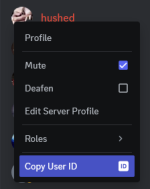
If it doesn't, you missed a step. If so, go back and retrack your steps, you might have missed some other steps.
The alternate quick start guide at the bottom of the Overview might also be helpful. It's phrased differently and you might find that more helpful.
Your YourUseridHere error is addressed in item 6 of the Overview. If you completed the prior steps correctly, retrieving the User ID to put in that part of the yaml should look like this:
If it doesn't, you missed a step. If so, go back and retrack your steps, you might have missed some other steps.
The alternate quick start guide at the bottom of the Overview might also be helpful. It's phrased differently and you might find that more helpful.
hushed
Well-known member
Why not turn on notification for only that channel on your discord server? I think that will give you the same results.Is there a way to @ myself on discord when sending a message? i.e. "@foobar [MQ2] You died." and I get a notification on my phone.
NormArcher
New member
I'm receiving messages, but currently unable to send any commands. Verified user ID (long format) in yaml. Can someone confirm this is working?
Edit: Turned debug on and confirmed messages are being received. Regardless of command type nothing happens however.
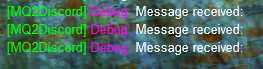
Edit: Turned debug on and confirmed messages are being received. Regardless of command type nothing happens however.
Last edited:
hushed
Well-known member
For me, I had to ensure I completed step 12 listed by Knightly here: https://gitlab.com/alynel/mq2discord/-/blob/master/docs/Create_Bot_Account.md.I'm receiving messages, but currently unable to send any commands. Verified user ID (long format) in yaml. Can someone confirm this is working?
Edit: Turned debug on and confirmed messages are being received. Regardless of command type nothing happens however.
View attachment 49255
NormArcher
New member
That was it. Thanks a ton! I've been using the same bot since November, but I just created a new token yesterday and I guess it disabled that Message Content Intent.For me, I had to ensure I completed step 12 listed by Knightly here: https://gitlab.com/alynel/mq2discord/-/blob/master/docs/Create_Bot_Account.md.
hushed
Well-known member
I block that message using the following:When I zone I keep getting '[server_charname] Disconnecting, no longer in game' - I've tried various blocked: filters without success at blocking it. I have 'send_connected: false', and I don't have anything in the allowed: that this would match.
Code:
"#*#Disconnecting, no longer in game"Users who are viewing this thread
Total: 2 (members: 0, guests: 2)
Share: