
-
 Hail, we're RedGuides. We want you to play six (yes, 6!) EverQuest characters at once. We have scripts and a friendly community to help, please join our playstyle and say hello! 👋
You are using an out of date browser. It may not display this or other websites correctly.
You should upgrade or use an alternative browser.
You should upgrade or use an alternative browser.

Release MQ2Discord (2 Viewers)
- Thread starter alynel
- Start date


Was having same problems with the pre-compiled plugins that came with the update. I pulled the source to see if I could fix it, but didn't make any changes and it's working fine now after a simple rebuild of the plugin. Not sure if there was maybe just something that got corrupted with the pre-compile/update since there hasn't been any source changes for MQ2Discord in 2 months.
It’s not actually MQ2Discord that is the problem. It’s the underlying library (sleepy-discord). So you wouldn’t see a code change in MQ2Discord, you’d see it in vcpkg. What commit are you on for your vcpkg submodule?Was having same problems with the pre-compiled plugins that came with the update. I pulled the source to see if I could fix it, but didn't make any changes and it's working fine now after a simple rebuild of the plugin. Not sure if there was maybe just something that got corrupted with the pre-compile/update since there hasn't been any source changes for MQ2Discord in 2 months.
Last time the issue was with curl, but that also impacted the launcher (not the RG one) since the non-RG one checks for updates. This time I tested that and it wasn’t a problem so I assumed Discord wouldn’t be an issue either, but I haven’t had a chance to test Discord.
Running off the latest commit for vcpkg from 21 Apr 22 for the ZeroMQ MSVC fix.It’s not actually MQ2Discord that is the problem. It’s the underlying library (sleepy-discord). So you wouldn’t see a code change in MQ2Discord, you’d see it in vcpkg. What commit are you on for your vcpkg submodule?
Last time the issue was with curl, but that also impacted the launcher (not the RG one) since the non-RG one checks for updates. This time I tested that and it wasn’t a problem so I assumed Discord wouldn’t be an issue either, but I haven’t had a chance to test Discord.
I did have the issue with python-2.7.18.amd64 in vcpkg from this last update but got around it by building the vcpkg on my laptop vs desktop both updated to the latest sources.

Thanks for fixing this, Knightly. Even before it broke, I was getting an error message "You are not authorized to issue commands on this channel," sent by the bot, whenever I try to send a message or command to a toon via their corresponding Discord channel. This was never the case when I used MQ2Discord prior, and I haven't changed any settings or anything. I have given my account full admin privileges over the channels and tried tweaking other settings, but have had no luck. Anyone encountered this before or have any ideas? Thanks.
I would say make sure you follow the guide here: https://gitlab.com/alynel/mq2discord/-/blob/master/docs/Create_Bot_Account.md
Anyone tried setting this up recently?
I've had it working before, and I've tried every "example yaml" that I could find and just inserted my tokens, chanel ids, and discord id's and I'm still getting the "Token Invalid" on /discord reload.
Any one else experiencing this?

edit:
reading some chatter around the web that the discord bot maker changed the token format, and this is causing scripts to break on multiple games/platforms.
Could that be the issue with those of us who haven't set it up until recently?
I've had it working before, and I've tried every "example yaml" that I could find and just inserted my tokens, chanel ids, and discord id's and I'm still getting the "Token Invalid" on /discord reload.
Any one else experiencing this?
edit:
reading some chatter around the web that the discord bot maker changed the token format, and this is causing scripts to break on multiple games/platforms.
Could that be the issue with those of us who haven't set it up until recently?
Last edited:
You followed this guide? https://gitlab.com/alynel/mq2discord/-/blob/master/docs/Create_Bot_Account.md
Discord did indeed update their token format -- they lengthened it and changed some of the earlier formats. I've changed the regex for how MQ2Discord checks for tokens so that it matches both old and new. But if it happens again, I'll just remove that check entirely.
Recently, Discord has stopped working with /bct commands. The text "Plugin mq2discord could not be loaded. Plugin failed to unload from a previous instance, cannot load" pops up whenever I issue /bct commands for a toon to unload or load MQ2discord. It works just fine if I go to that toon and load it that way.
Am I doing something wrong? Thanks.
Am I doing something wrong? Thanks.
So I noticed the IRC plugin is gone and has been replaced with the Discord plugin? I followed the setup guides on how to create the bot etc, but still getting Error: Invalid token. Kinda kicking my @#$@.
Im pretty sure im getting the token from the correct place:
Thanks for the help!
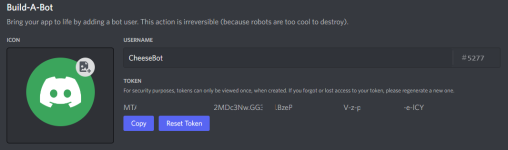
Im pretty sure im getting the token from the correct place:
Thanks for the help!
Hi Knightly, I followed this guide: https://gitlab.com/alynel/mq2discord/-/blob/master/docs/Create_Bot_Account.mdWhich setup guide did you follow? The one in the git repo?
That's the right guide... they probably changed their token again and I really should just remove the token validator and let the chips fall where they may. But, just in case...paste your code here:Hi Knightly, I followed this guide: https://gitlab.com/alynel/mq2discord/-/blob/master/docs/Create_Bot_Account.md
regex101: JavaScript Match Workspace
Explore and test this JavaScript regular expression online. Understand the pattern with regex explanations, generate code, and export matches to CSV or JSON.
 regex101.com
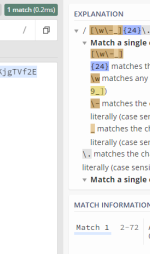
Does it match?
looks like it doesThat's the right guide... they probably changed their token again and I really should just remove the token validator and let the chips fall where they may. But, just in case...paste your code here:
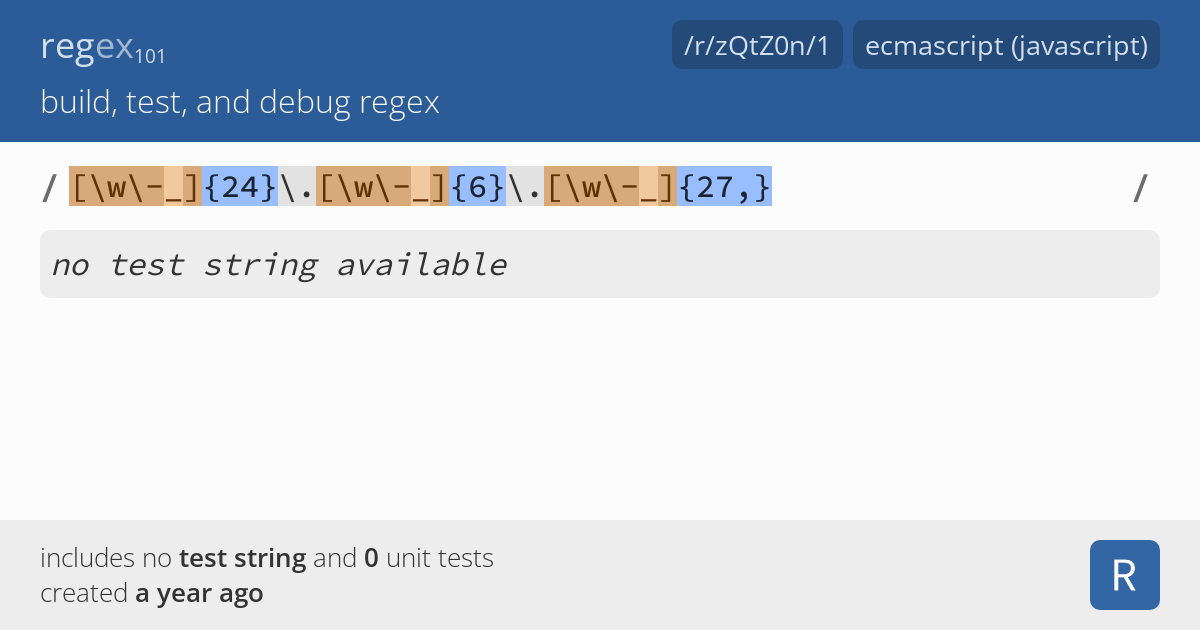
regex101: JavaScript Match Workspace
Explore and test this JavaScript regular expression online. Understand the pattern with regex explanations, generate code, and export matches to CSV or JSON.
Does it match?
In that case, make sure your yaml file is formatted properly. You can use this example: https://gitlab.com/alynel/mq2discord/-/blob/master/docs/MQ2Discord.example.yaml
I copied and pasted the YAML config from the wiki https://www.redguides.com/docs/projects/mq2discord/. Then just changed the toekn and user_ids. Thanks for your help im sure im missing something sillyIn that case, make sure your yaml file is formatted properly. You can use this example: https://gitlab.com/alynel/mq2discord/-/blob/master/docs/MQ2Discord.example.yaml
RedMan updated MQ2Discord with a new update entry:
20220920
Read the rest of this update entry...
20220920
Commits
- Update Regex & Connected message
- Update regex for new discord token string (but remove regex check)
- Since the regex check is removed, change connected message to "ready"
(c86d31d)
Read the rest of this update entry...

scs85
New member
Discord recently made security changes in regards to bot permissions. Old bots shouldn't be affected but the new ones you'll need to go into your Discord Developer Portal and make an update.
Once you're there select the bot you're using then enable "Message Content Intent". Once that's enabled you will be prompted to save your changes. Maybe go ahead and `/reload discord` for good measure.
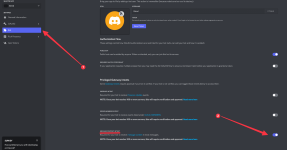
Once you're there select the bot you're using then enable "Message Content Intent". Once that's enabled you will be prompted to save your changes. Maybe go ahead and `/reload discord` for good measure.
Discord recently made security changes in regards to bot permissions. Old bots shouldn't be affected but the new ones you'll need to go into your Discord Developer Portal and make an update.
Once you're there select the bot you're using then enable "Message Content Intent". Once that's enabled you will be prompted to save your changes. Maybe go ahead and `/reload discord` for good measure.
This worked for me! I could send outgoing messages but couldn't see anything incoming from Discord until I set this!

Coldblooded posted some Lua code in Discord that might be easier than dealing with this plugin:
 discord.com
Discord - Group Chat That’s All Fun & Games
Discord is great for playing games and chilling with friends, or even building a worldwide community. Customize your own space to talk, play, and hang out.
Code:
5:34 AM]Coldblooded: Depending on what you want to do with discord, with a dozen lines of lua you can broadcast anything you want to discord.


local mq = require('mq')
local http = require("socket.http")
local ltn12 = require("ltn12")
local webhookUrl = "insert your webhook url here"

local function sendMessage(line)
   local body = string.format('{ \"content\" : \"%s\" }', line)
   http.request {
      url = webhookUrl,
      method = "POST",
      headers = {
         ["Content-Type"] = "application/json",
         ["Content-Length"] = #body
      },
      source = ltn12.source.string(body)
   }
end

mq.event('Everything', '#*#', sendMessage)

while true do
   mq.doevents()
   mq.delay(250)
end
Berkz
Well-known member
I decided to give this a whirl but is kicking my butt!! Can you folks see what is wrong here? I have a total of 7 toons in this yaml. I followed (I think) all the instructions and use the example.yaml to populate mine. When I run
I get a ready message, but in the debug I see

Here is my yaml
yaml
Code:
/discord reloadHere is my yaml
yaml
YAML:
token: mytoken
user_ids:
  - my actual user id on Discord
characters:
  firiona_blahblah
    - name: CharChannel (This field is ignored)
      id: bot id
      allowed:
        - "[MQ2Discord]#*#"
        - "[MQ2]#*#"
        - "#*# tells you,#*#"
        - "#*#out of character#*#"
        - "#*#shouts,#*#"
      blocked:
        []
      notify:
        - "[AlertMaster]#*#"
      prefix: ""
      send_connected: true
      allow_commands: true
      show_command_response: 2000
  firiona_blahblah2
    - name: CharChannel (This field is ignored)
      id: bot id
      allowed:
        - "[MQ2Discord]#*#"
        - "[MQ2]#*#"
        - "#*# tells you,#*#"
        - "#*#out of character#*#"
        - "#*#shouts,#*#"
      blocked:
        []
      notify:
        - "[AlertMaster]#*#"
      prefix: ""
      send_connected: true
      allow_commands: true
      show_command_response: 2000

 servers:
  {}
classes:
  {}
groups:
  - name: YourGroup
    characters:
      - firiona_1
      - firiona_2
      - firiona_3
      - etc - have 7 chars here
    channels:
      - name: Deaths
        id: channel id
        allowed:
          - You have been slain by
        blocked:
          []
        notify:
          []
        prefix: "[${Me.Name}]"
        send_connected: true
        allow_commands: false
        show_command_response: 0
all:
  - name: TellsChannel
    id: channel id
    allowed:
      - tells you
    blocked:
      - "|${Me.Pet.DisplayName}| tells you#*#"
    notify:
      []
    prefix: "[${EverQuest.Server}_${Me.Name}]"
    send_connected: true
    allow_commands: false
    show_command_response: 0
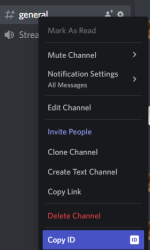
i think you are using the wrong ids for your channel, since you put bot id, that should be channel id, the id you get from when you right click your channels, in your discordI decided to give this a whirl but is kicking my butt!! Can you folks see what is wrong here? I have a total of 7 toons in this yaml. I followed (I think) all the instructions and use the example.yaml to populate mine. When I runI get a ready message, but in the debug I seeCode:/discord reload
View attachment 43429
Here is my yaml
yaml
YAML:token: mytoken user_ids: - my actual user id on Discord characters: firiona_blahblah - name: CharChannel (This field is ignored) id: bot id allowed: - "[MQ2Discord]#*#" - "[MQ2]#*#" - "#*# tells you,#*#" - "#*#out of character#*#" - "#*#shouts,#*#" blocked: [] notify: - "[AlertMaster]#*#" prefix: "" send_connected: true allow_commands: true show_command_response: 2000 firiona_blahblah2 - name: CharChannel (This field is ignored) id: bot id allowed: - "[MQ2Discord]#*#" - "[MQ2]#*#" - "#*# tells you,#*#" - "#*#out of character#*#" - "#*#shouts,#*#" blocked: [] notify: - "[AlertMaster]#*#" prefix: "" send_connected: true allow_commands: true show_command_response: 2000 servers: {} classes: {} groups: - name: YourGroup characters: - firiona_1 - firiona_2 - firiona_3 - etc - have 7 chars here channels: - name: Deaths id: channel id allowed: - You have been slain by blocked: [] notify: [] prefix: "[${Me.Name}]" send_connected: true allow_commands: false show_command_response: 0 all: - name: TellsChannel id: channel id allowed: - tells you blocked: - "|${Me.Pet.DisplayName}| tells you#*#" notify: [] prefix: "[${EverQuest.Server}_${Me.Name}]" send_connected: true allow_commands: false show_command_response: 0
Berkz
Well-known member
Thank you for your help kaen. I updated the ids and when I launched MQ the bot came online as expected. However, I am not getting any notifications from in-game whether is tells or shout. Also when I send a command from Discord it does not show in-game.i think you are using the wrong ids for your channel, since you put bot id, that should be channel id, the id you get from when you right click your channels, in your discord
View attachment 43441
Here is the updated .yaml in case you are able to spot something else. If not, no worries!
discord.yaml
YAML:
token: my bot token
user_ids:
  - my personal discord user id
characters:
  firiona_ :
    - name: CharChannel (This field is ignored)
      id: discord channel
      allowed:
        - "[MQ2Discord]#*#"
        - "[MQ2]#*#"
        - "#*# tells you,#*#"
        - "#*#out of character#*#"
        - "#*#shouts,#*#"
      blocked:
        []
      notify:
        - "[AlertMaster]#*#"
      prefix: ""
      send_connected: true
      allow_commands: true
      show_command_response: 2000
  firiona_:
    - name: CharChannel (This field is ignored)
      id: disc channel
      allowed:
        - "[MQ2Discord]#*#"
        - "[MQ2]#*#"
        - "#*# tells you,#*#"
        - "#*#out of character#*#"
        - "#*#shouts,#*#"
      blocked:
        []
      notify:
        - "[AlertMaster]#*#"
      prefix: ""
      send_connected: true
      allow_commands: true
      show_command_response: 2000
  firiona_:
    - name: CharChannel (This field is ignored)
      id: disc channel
      allowed:
        - "[MQ2Discord]#*#"
        - "[MQ2]#*#"
        - "#*# tells you,#*#"
        - "#*#out of character#*#"
        - "#*#shouts,#*#"
      blocked:
        []
      notify:
        - "[AlertMaster]#*#"
      prefix: ""
      send_connected: true
      allow_commands: true
      show_command_response: 2000
  firiona_:
    - name: CharChannel (This field is ignored)
      id: disc channel
      allowed:
        - "[MQ2Discord]#*#"
        - "[MQ2]#*#"
        - "#*# tells you,#*#"
        - "#*#out of character#*#"
        - "#*#shouts,#*#"
      blocked:
        []
      notify:
        - "[AlertMaster]#*#"
      prefix: ""
      send_connected: true
      allow_commands: true
      show_command_response: 2000
  firiona_:
    - name: CharChannel (This field is ignored)
      id: disc channel
      allowed:
        - "[MQ2Discord]#*#"
        - "[MQ2]#*#"
        - "#*# tells you,#*#"
        - "#*#out of character#*#"
        - "#*#shouts,#*#"
      blocked:
        []
      notify:
        - "[AlertMaster]#*#"
      prefix: ""
      send_connected: true
      allow_commands: true
      show_command_response: 2000
  firiona_:
    - name: CharChannel (This field is ignored)
      id: disc channel
      allowed:
        - "[MQ2Discord]#*#"
        - "[MQ2]#*#"
        - "#*# tells you,#*#"
        - "#*#out of character#*#"
        - "#*#shouts,#*#"
      blocked:
        []
      notify:
        - "[AlertMaster]#*#"
      prefix: ""
      send_connected: true
      allow_commands: true
      show_command_response: 2000

servers:
  {}
classes:
  {}
groups:
  - name: YourGroup
    characters:
      - firiona_
      - firiona_
      - firiona_
      - firiona_
      - firiona_
      - firiona_

  channels:
      - name: Deaths
        id: disc channel
        allowed:
          - You have been slain by
        blocked:
          []
        notify:
          []
        prefix: "[${Me.Name}]"
        send_connected: true
        allow_commands: false
        show_command_response: 0
all:
  - name: TellsChannel
    id: disc channel
    allowed:
      - tells you
    blocked:
      - "|${Me.Pet.DisplayName}| tells you#*#"
    notify:
      []
    prefix: "[${EverQuest.Server}_${Me.Name}]"
    send_connected: true
    allow_commands: false
show_command_response: 0Berkz
Well-known member
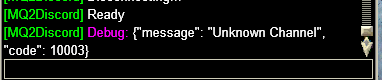
That didn't do it. For some reason it is not liking something about the channels. Debug keeps giving me the "Unknown Channel" message. I am Googling and searching RG Forums it but not coming up with anythingfor some of your channels you have:
i think you need to make them more likeCode:send_connected: true allow_commands: false show_command_response: 0
Code:send_connected: true allow_commands: true show_command_response: 2000
Berkz
Well-known member
Hey Knightly, I just re-read this example you posted and I think that may have to do something with the issue I am encountering. When setting up your characters, do you use your actual Discord User ID for all of them, or do you have to create users for them in Discord and get their IDs? For example, I have this for my yaml but I keep getting the error message I posted aboveHere's one example:
You can send characters to the same channel or different channels, using the channel ID. You can also have one character send things to multiple channels, but I didn't make an example for that, I just did a basic one to get people started.
Discord is fixed, I let Redbot know to pull the submodule so it can be in the next build.

discord.yaml
Code:
token: token
user_ids:
- My Discord User ID
characters:
firiona_char1:
- name: char1
id: channel ID
allowed:
- "[MQ2Discord]#*#"
- "[MQ2]#*#"
- "#*# tells you,#*#"
- "#*#out of character#*#"
- "#*#shouts,#*#"
blocked:
[]
notify:
- "[AlertMaster]#*#"
prefix: ""
send_connected: true
allow_commands: true
show_command_response: 2000
firiona_char2:
- name: char2
id: channel ID
allowed:
- "[MQ2Discord]#*#"
- "[MQ2]#*#"
- "#*# tells you,#*#"
- "#*#out of character#*#"
- "#*#shouts,#*#"
blocked:
[]
notify:
- "[AlertMaster]#*#"
prefix: ""
send_connected: true
allow_commands: true
show_command_response: 2000Berkz
Well-known member
Ha! figured one part of it down  What was not clear is that you have to create channels for each thing you want to get. So create a channel in Discord for tells, one for say, etc. Use those IDs for your channels. So for example now I have
discord.yaml
What was not clear is that you have to create channels for each thing you want to get. So create a channel in Discord for tells, one for say, etc. Use those IDs for your channels. So for example now I havediscord.yaml
Code:
all:
  - name: TellsChannel
    id: 86753098675309
    allowed:
      - tells you
    blocked:
      - "|${Me.Pet.DisplayName}| tells you#*#"
    notify:
      []
    prefix: "[${EverQuest.Server}_${Me.Name}]"
    send_connected: true
    allow_commands: true
    show_command_response: 0
  - name: Deaths
    id: 8675309867530999
    allowed:
      - You have been slain by
    blocked:
      []
    notify:
      []
    prefix: "[${Me.Name}]"
    send_connected: true
    allow_commands: true
    show_command_response: 0
Last edited by a moderator:
Users who are viewing this thread
Total: 3 (members: 0, guests: 3)
Share: