
Fix your allow and notify so you don’t include that.I keep getting combat spam on mine it's going pingpingpingpingping what can I do to stop the combat spam ;-;

-
 Hail, we're RedGuides. We want you to play six (yes, 6!) EverQuest characters at once. We have scripts and a friendly community to help, please join our playstyle and say hello! 👋
You are using an out of date browser. It may not display this or other websites correctly.
You should upgrade or use an alternative browser.
You should upgrade or use an alternative browser.

Release MQ2Discord (1 Viewer)
- Thread starter alynel
- Start date
YAML:
    - name:
      id:
      allowed:
        - "[MQ2Discord]#*#"
        - "[MQ2]#*#"
        - "#*# tells you,#*#"
        - "#*#out of character#*#"
        - "#*#shouts,#*#"
      blocked:
        - "#*#|${Me.CleanName}|`s pet#*#"
        - "#*#|${Me.Pet.CleanName}| says,#*#"
        - "#*#|${Me.Pet.CleanName}| tells you,#*#"
        - "#*#|${Me.Pet.CleanName}| told you,#*#"
        - "#*# #*# says,#*#"
        - "#*# #*# tells you,#*#"
        - "#*# #*# told you,#*#"
        - "#*#You will not evade me#*#"

      notify:
        []
      prefix: ""
      send_connected: true
      allow_commands: true
      show_command_response: 2000
I still get combat spam from group, any idea why?
YAML:- name: id: allowed: - "[MQ2Discord]#*#" - "[MQ2]#*#" - "#*# tells you,#*#" - "#*#out of character#*#" - "#*#shouts,#*#" blocked: - "#*#|${Me.CleanName}|`s pet#*#" - "#*#|${Me.Pet.CleanName}| says,#*#" - "#*#|${Me.Pet.CleanName}| tells you,#*#" - "#*#|${Me.Pet.CleanName}| told you,#*#" - "#*# #*# says,#*#" - "#*# #*# tells you,#*#" - "#*# #*# told you,#*#" - "#*#You will not evade me#*#" notify: [] prefix: "" send_connected: true allow_commands: true show_command_response: 2000
I still get combat spam from group, any idea why?
Do you mean you get combat spam if you type something into discord following the command? If so I believe lowering that show_command_response figure is what you want.
Thanks Knightly but i was loading and unloading the whole plugin all the time.When you update your config file make sure you issue /discord reload
Otherwise it won’t take effect until the next time you log in.
Do you mean you get combat spam if you type something into discord following the command? If so I believe lowering that show_command_response figure is what you want.
Oh is that it? what if i place it at zero?
Oh is that it? what if i place it at zero?
Give it a try. I like the spam so I leave it. It let's me know I'm alive.
Hello !
I know this is unsupported but I was just wondering if anyone had an idea and could help with my issue.
So I can load the plugin just fine. I set it up and it works flawlessly the first time around. However, when I exit the game and try to reload my toons, I get this error ;
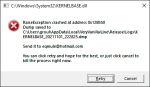
I'm obviously willing to provide more information if someone wants to look into things.
It would seem that the only way to make it work again is to change Macroquest.ini line to ; "mq2discord=1" so it does not load the plugin.
I can then redo the setup from inside the game.
Really annoying because its working wonderfully otherwise
Thanks
I know this is unsupported but I was just wondering if anyone had an idea and could help with my issue.
So I can load the plugin just fine. I set it up and it works flawlessly the first time around. However, when I exit the game and try to reload my toons, I get this error ;
I'm obviously willing to provide more information if someone wants to look into things.
It would seem that the only way to make it work again is to change Macroquest.ini line to ; "mq2discord=1" so it does not load the plugin.
I can then redo the setup from inside the game.
Really annoying because its working wonderfully otherwise
Thanks

/discord token is not a valid command. I did the /discord reload command and that did nothing, I did /discord process and my clients all crashed. There weren't other commands available to try.6. Enter your the token for your bot (see linked guide earlier) withRich (BB code):/discord token <token>

So I guess my question is, how do you set this up for the first time? I am using 'Next' currently. I see some folks using this on Next, so... yeah. The plugin doesn't have the token command available to it.
It looks like there was a MQ2Discord.yaml file generated in the config folder. Inside is only 1 character of the 3 that all crashed when I was trying setup commands. So... something worked-ish, but the command method for filling this file out doesn't exist.
Last edited:
This is probably an issue in your json file. But switch to MQNext and I'll help you troubleshoot it. There's been a lot of work done on this in Next.I know this is unsupported but I was just wondering if anyone had an idea and could help with my issue.
If you had a json file, it'll convert. The MQ version is based on alynel's updated work though, so the old steps might not be useful. I personally just edited the yaml file, I don't think I've ever tried to set it up from scratch, but the file it generates should work. Start with the file that was generated and fill in the blanks.So I guess my question is, how do you set this up for the first time? I am using 'Next' currently. I see some folks using this on Next, so... yeah. The plugin doesn't have the token command available to it.
If you had a json file, it'll convert. The MQ version is based on alynel's updated work though, so the old steps might not be useful. I personally just edited the yaml file, I don't think I've ever tried to set it up from scratch, but the file it generates should work. Start with the file that was generated and fill in the blanks.
Thanks, I'll fiddle around with it.

wymranar
I <3 SKs *kissy face*
This is one of my favorite plugins by far. Just fired it up after migrating over to next and it appears that I'm receiving incoming messages just fine. However, when I type a command it tells me, "You are not authorized to issue commands on this channel". Anyone run into this problem or know what might have broken?

- Commits
- 1
Did you update the yaml file to allow allow_commands?
Redbot updated MQ2Discord with a new update entry:
July 17, 2021
Read the rest of this update entry...
July 17, 2021
- The /discord command will now be parsed
- Added /discord debug which will toggle debug mode on or off
- Added /discord process which will allow you to send a command to be processed by your config
- Added an OutputDebug function
- Updated the token check function to include new Discord token formats (and extend to Z)
- Rearranged code a bit
- Still working on the unload issue
Read the rest of this update entry...
Anyone else having issues with Mq2Discord using Next?
I think I've got everything set up correctly, everything looks ok in the yaml file. But no messages come through to my toons. /discord process crashes the client, similar to a previous user.
The token is correct and the channels for the toons are correct, am I possibly missing something or are other people having issues too?
Thanks.
I think I've got everything set up correctly, everything looks ok in the yaml file. But no messages come through to my toons. /discord process crashes the client, similar to a previous user.
The token is correct and the channels for the toons are correct, am I possibly missing something or are other people having issues too?
Thanks.
My MQ2Discorde is compiling just fine and able to load it in game. I have my YAML correct and get no errors when I /discord reload, however mine are not actually connecting to my discord server either. Might be something with the 64-bit switchover. Mine was working perfect as of the patch before 64-bit (very appreciative for the app btw!)
Issuing /discord process crashes immediately. Issuing /discord reload just gives an error message..
I've been trying to get this setup for over an hour and no luck. I even made a fresh .yaml file. With debug on I can see the plugin is giving errors out. For example line 16 column #, removing the space between connected: & true (connected:true) will give the next error.
I've been trying to get this setup for over an hour and no luck. I even made a fresh .yaml file. With debug on I can see the plugin is giving errors out. For example line 16 column #, removing the space between connected: & true (connected:true) will give the next error.
Is on my list. If I don’t get to it today I’ll get to it on the weekend for sure.
Edit: “for sure” meaning “probably” in this case
 /hug
/hugIt’s a single yaml, but the move to 64 bit broke the connection. MQ2Discord believes it is connected but Discord is not receiving the messages.
I spent some time yesterday unwinding it and then got sidetracked because I was trying to replace sleepy-discord which was several hours of time.
The sleepy discord demo doesn’t seem to be working in 64 bit so I need to spend some time figuring out why.
I spent some time yesterday unwinding it and then got sidetracked because I was trying to replace sleepy-discord which was several hours of time.
The sleepy discord demo doesn’t seem to be working in 64 bit so I need to spend some time figuring out why.

RedQueen
Member
Oh! I see, interesting.It’s a single yaml, but the move to 64 bit broke the connection. MQ2Discord believes it is connected but Discord is not receiving the messages.
I spent some time yesterday unwinding it and then got sidetracked because I was trying to replace sleepy-discord which was several hours of time.
The sleepy discord demo doesn’t seem to be working in 64 bit so I need to spend some time figuring out why.
When possible, do you think you could show an example of a multiple character setup in the single YAML?
Also, thanks for all you do. xx
Here's one example:When possible, do you think you could show an example of a multiple character setup in the single YAML?


You can send characters to the same channel or different channels, using the channel ID. You can also have one character send things to multiple channels, but I didn't make an example for that, I just did a basic one to get people started.
Discord is fixed, I let Redbot know to pull the submodule so it can be in the next build.
If you ever want to do that, you can grab the build from the MQ Discord. I don’t really like sending DLLs around randomly.
Thanks Knightly, assuming the source at
What compiler you guys using? or maybe you can point me at some docs to read?
Redbot updated MQ2Discord with a new update entry:
Add Docs/Debug - Fix Crash in process
Read the rest of this update entry...
Add Docs/Debug - Fix Crash in process
- /discord process will no longer crash if no arguments are sent
- Added docs with images showing how to setup an Create_Bot_Account
- Added example yaml
- Added additional error reporting and debug output for sending messages
- Need to check connection still rather than assuming connected
Read the rest of this update entry...
Tried updating to latest build and even pulling source/compiling myself, but am still not connecting properly.
Even went as far as to rebuild a whole new bot just in case it was an issue there and still nada.
Tried the /discord process command and it is still crashing as well
Even went as far as to rebuild a whole new bot just in case it was an issue there and still nada.
Tried the /discord process command and it is still crashing as well
If /discord process is still crashing for you, are you sure you’re on latest source?
The process command was just something I added in so I could test things, the actual format of the command is
But the last update should have fixed it so it will give you an error if you send it nothing.
You can also
The process command was just something I added in so I could test things, the actual format of the command is
/discord process Some Text HereBut the last update should have fixed it so it will give you an error if you send it nothing.
You can also
/discord debug and it will echo back output.Got it figured out. For some reason it is requiring me to have MQ run as admin in compatibility for it to connect. I'll weave through my internal stuff, probably something on my end with my own code additions.
- Commits
- 1
Generally if you run with IsBoxer you need to run MQ as admin.
Have not looked if that has changed recently.
Have not looked if that has changed recently.
I'm getting a message, "Failed to send Discord message to (Channel ID ####)" whenever a message is sent. I tried to reset the token, but no dice on that.If it is, it's because I need to fix SSL in curl.
Good news, the error message I added last time there was an issue is working!
Progress

Users who are viewing this thread
Total: 2 (members: 0, guests: 2)
Share: