
-
 Hail, we're RedGuides. We want you to play six (yes, 6!) EverQuest characters at once. We have scripts and a friendly community to help, please join our playstyle and say hello! 👋
You are using an out of date browser. It may not display this or other websites correctly.
You should upgrade or use an alternative browser.
You should upgrade or use an alternative browser.

Release MQ2Discord (1 Viewer)
- Thread starter alynel
- Start date

airsupport
Member
Will the newer version of this be included in VV?
To use the newer version do we just drop the .dll in and change the configs?
To use the newer version do we just drop the .dll in and change the configs?

"allow": [Got it i f'd up somewhere. However I have another question. How do I filter out all the MQ2 banter and say I only want push notifications if I get a /tell or /say from someone?
"##tells you##"
],
havent used it in a while though

@alynel Is it possible to use TLO variables in the allow / block expressions?
I want to do this, which did not work, and I keep getting Overthere Sarnaks telling me that they want a promotion.
I know I can block each monster, but that is getting annoying
As a backup I did this, which filters out most of the say spam, except name mobs saying stuff.
I want to do this, which did not work, and I keep getting Overthere Sarnaks telling me that they want a promotion.
I know I can block each monster, but that is getting annoying
INI:
    "block": [
        "${Target.CleanName} says#*#"
    ],
As a backup I did this, which filters out most of the say spam, except name mobs saying stuff.
INI:
    "block": [
        "A #*# says#*#",
        "An #*# says#*#"
    ],
Last edited:
Ok, got this badboy functional. Very kewl. I'm only logged in my tank for now, but I'd ideally like any chat, so tells, say, guild etc. to any of my toons to get relayed to discord. I'm using EQBC.
Anyone have an example of that configuration he or she wouldn't mind sharing? Also, would like to kill all the casting this and that spam. By default I think I just get everything in the MQ window.
Thanks!
Anyone have an example of that configuration he or she wouldn't mind sharing? Also, would like to kill all the casting this and that spam. By default I think I just get everything in the MQ window.
Thanks!


I believe the yaml version has that, but it hasn't been kept up to date. What I do is just put them in different channels.
The thing that I don't like about that is, I am going to miss camp checks. Right now I see a camp check, and check all my tank's chat windows. If they are in different channels I am going to miss them all the time.

braedo
Member
So this works great for sending notifications to Discord, which i have a channel set up for each individual toon. however, I cannot get any commands sent. Here is my ini. im using the Old version. What am I doing wrong???
{
"allow": [
"[MQ2Discord]#*#",
"#*#tells you,#*#",
"#*#sent a tell#*#",
"#*#out of character#*#",
"#*#shouts,#*#"
],
"autoconnect": true,
"block": [
"#*#tells you, 'Attacking#*#",
"#*#warder says,#*#",
"#*#pet says,#*#",
"#*#warder tells you,#*#",
"#*#pet tells you,#*#",
"#*#You will not evade me,#*#",
"#*#Sorry, Master... calming down#*#"
],
"channel": "***************",
"token": "********",
"user": "***************"
}
{
"allow": [
"[MQ2Discord]#*#",
"#*#tells you,#*#",
"#*#sent a tell#*#",
"#*#out of character#*#",
"#*#shouts,#*#"
],
"autoconnect": true,
"block": [
"#*#tells you, 'Attacking#*#",
"#*#warder says,#*#",
"#*#pet says,#*#",
"#*#warder tells you,#*#",
"#*#pet tells you,#*#",
"#*#You will not evade me,#*#",
"#*#Sorry, Master... calming down#*#"
],
"channel": "***************",
"token": "********",
"user": "***************"
}
golfball12
New member
Same issue as Braedo.

Having the same issue here. I have separate channels for all characters and everything with my allows and blocks is reporting fine, but when I type a normal command (like "/say hello") in discord, in that character's channel, the character does not repeat it in eq. Obviously I missed something somewhere for that anyone have a clue? Here is my iniWe aren't talking about rocket science here. We are talking about simply using discord... You know how to chat on discord right? Boom that is all there is too it. Use your phone to issue a "/say omfg what am I doing" into the characters channel. Assuming you set it up properly that character is going to /say omfg what am I doing.
{
"allow": [
"[MQ2Discord]#*#",
"#*#tells you,#*#",
"#*#sent a tell#*#",
"#*#out of character#*#",
"#*#shouts,#*#",
"#*#says,#*#",
"#*#tells general#*#"
],
"autoconnect": true,
"block": [
"#*#tells you, 'Attacking#*#",
"#*#warder says,#*#",
"#*#pet says,#*#",
"#*#warder tells you,#*#",
"#*#pet tells you,#*#",
"#*#You will not evade me,#*#",
"A cold screamer says,#*#",
"#*#Sorry, Master... calming down#*#"
without my token/chan/user of course.
Is this a bot permission thing? For those I have the following checked:
Send Messages
Embed Links
Attach Files
Read Message History
Mention Everyone
Add Reactions
Thanks in advance for any feedback.

Sum1
Warriors are inferior (read: crybaby) tanks
Having the same issue here. I have separate channels for all characters and everything with my allows and blocks is reporting fine, but when I type a normal command (like "/say hello") in discord, in that character's channel, the character does not repeat it in eq. Obviously I missed something somewhere for that anyone have a clue? Here is my ini
{
"allow": [
"[MQ2Discord]#*#",
"#*#tells you,#*#",
"#*#sent a tell#*#",
"#*#out of character#*#",
"#*#shouts,#*#",
"#*#says,#*#",
"#*#tells general#*#"
],
"autoconnect": true,
"block": [
"#*#tells you, 'Attacking#*#",
"#*#warder says,#*#",
"#*#pet says,#*#",
"#*#warder tells you,#*#",
"#*#pet tells you,#*#",
"#*#You will not evade me,#*#",
"A cold screamer says,#*#",
"#*#Sorry, Master... calming down#*#"
without my token/chan/user of course.
Is this a bot permission thing? For those I have the following checked:
Send Messages
Embed Links
Attach Files
Read Message History
Mention Everyone
Add Reactions
Thanks in advance for any feedback.
I experienced the same thing when I tried to set this up. I haven't gone back to try again.
Dang, had my hopes on this one, seemed like such a cool plugin.I experienced the same thing when I tried to set this up. I haven't gone back to try again.

I figured out my problem all who were having the same issues maybe it will be the same for you.
If your filters are relaying fine from EQ to Discord, but you cannot type commands and be seen in EQ then your issue is probably your "user": "Numbersgohere" setting in your characters ini
Personally I mistakenly copied my user ID Name####… what you have to do is type something into discord, and where your name is to the left of your text, right click on that and copy your id. It should be a string of all numbers. Once I changed that in all my inis I was able to send commands from each characters channel I had setup like I was doing it from that character. Obviously once it is working if you are using EQBC you can command from discord the same way.
Hope this helps those of you with the same problem as me!
*fist pump*
If your filters are relaying fine from EQ to Discord, but you cannot type commands and be seen in EQ then your issue is probably your "user": "Numbersgohere" setting in your characters ini
Personally I mistakenly copied my user ID Name####… what you have to do is type something into discord, and where your name is to the left of your text, right click on that and copy your id. It should be a string of all numbers. Once I changed that in all my inis I was able to send commands from each characters channel I had setup like I was doing it from that character. Obviously once it is working if you are using EQBC you can command from discord the same way.
Hope this helps those of you with the same problem as me!
*fist pump*
I figured the same so just went back through everything super carefully and targeted the areas I know had to be an impact on command sending since the rest was fine.Hmm, not had the above issue at all. My bot has 0 permissions. I created it exactly, line-by-line as the instructions for the plugin state. It seemed like one of those things were if one thing is slightly off the house of cards comes down.
braedo
Member
I figured out my problem all who were having the same issues maybe it will be the same for you.
If your filters are relaying fine from EQ to Discord, but you cannot type commands and be seen in EQ then your issue is probably your "user": "Numbersgohere" setting in your characters ini
Personally I mistakenly copied my user ID Name####… what you have to do is type something into discord, and where your name is to the left of your text, right click on that and copy your id. It should be a string of all numbers. Once I changed that in all my inis I was able to send commands from each characters channel I had setup like I was doing it from that character. Obviously once it is working if you are using EQBC you can command from discord the same way.
Hope this helps those of you with the same problem as me!
*fist pump*
I followed your suggestion, and it works now!! Thanks a BILLION!!

notoriouskeef
Active member
working on setting this up.
I'm getting a repeating error sent to discord.
[MQ2Discord] [MQ2Discord] [MQ2Discord] [MQ2Discord] [MQ2Discord] [MQ2Discord] [MQ2Discord] [MQ2Discord] [MQ2Discord] [MQ2Discord] [MQ2Discord] [MQ2Discord] [MQ2Discord] [MQ2Discord] Error, response text: {"message": "Unauthorized", "code": 40001}
any ideas?
I'm getting a repeating error sent to discord.
[MQ2Discord] [MQ2Discord] [MQ2Discord] [MQ2Discord] [MQ2Discord] [MQ2Discord] [MQ2Discord] [MQ2Discord] [MQ2Discord] [MQ2Discord] [MQ2Discord] [MQ2Discord] [MQ2Discord] [MQ2Discord] Error, response text: {"message": "Unauthorized", "code": 40001}
any ideas?

- Commits
- 1
I had to add this to my block list to stop it:working on setting this up.
I'm getting a repeating error sent to discord.
[MQ2Discord] [MQ2Discord] [MQ2Discord] [MQ2Discord] [MQ2Discord] [MQ2Discord] [MQ2Discord] [MQ2Discord] [MQ2Discord] [MQ2Discord] [MQ2Discord] [MQ2Discord] [MQ2Discord] [MQ2Discord] Error, response text: {"message": "Unauthorized", "code": 40001}
any ideas?
"[MQ2Discord] [MQ2Discord]#*#",
Not sure if that's the best way, but it works.
Will the newer version of this be included in VV?
To use the newer version do we just drop the .dll in and change the configs?
Interested in this also. As I noticed the 2019 version supports multiple Discord users issuing commands whereas the VV one does not? I don't think you can just drop in .dll's though as it needs to be compiled with everything else I'm pretty sure?
But yeah would love the users being an array of ID's instead of a single ID.

Kasino7
Well-known member
Bit of a feature request... I have mine set up to log looting, and it adds some kind of link info e.g. 000000000000000000055E4CD45Diamond when sending to Discord.
I was wondering... if that could be interpreted and made into Magelo links somehow? That would be most awesome! I'm pretty sure the same thing happens with item links in other channels too.
To do this, you'd simply cut off all the Digits prior to the first letter (all the hex related stuff that makes the link in game), then strip the item name down to a string, and parse it as "https://eq.magelo.com/items?q=<ITEM_NAME_STRING>". But I don't honestly see the usefulness in a feature like that.
Hi guys,
Following up on this. Is there is a way to modify what part of the message gets relayed to Discord? Right now it is doing the ENTIRE message
For example, in game, I would like to do:
.bidbot startbids Wurmslayer 3
This ties into BIDBOT in Discord. In discord, that exact line results in posting an item up for bid.
What gets relayed is the ENTIRE Text line:
`You told xxx, '.bidbot startbids Wurmslayer 1'`
I would like to remove anything preceeding .bidbot, and anything after the number.
Additionally, what vsab was referring to appears to the hexidecimal item number given to a linked item in game. This would need to be filtered out (or have users manually type item names for bids if unable).
Is anybody else having problems after the last update where Discord claims your Discord Bot has connected over 1,000 times in a short period and resets your token? I certainly don't have anywhere near that many characters, so something has to be making them disconnect/reconnect rapidly but it's just from logging in and letting it automatically connect with the same JSON files I've had for a long time.

So, I got this set up.
I'm receiving messages from MQ2 in my Discord channel.
However, I cannot figure out how to send messages from Discord to EQ.
Someone above said I should set my /discord user to just the number. I tried that.
Typing, for example "/group hello" in Discord doesn't result in my character saying hello to the group.
What am I doing wrong?
I'm receiving messages from MQ2 in my Discord channel.
However, I cannot figure out how to send messages from Discord to EQ.
Someone above said I should set my /discord user to just the number. I tried that.
- I tried /discord user Name#1234
- I tried /discord user #1234
- And I tried just /discord user 1234
Typing, for example "/group hello" in Discord doesn't result in my character saying hello to the group.
What am I doing wrong?
So, I got this set up.
I'm receiving messages from MQ2 in my Discord channel.
However, I cannot figure out how to send messages from Discord to EQ.
Someone above said I should set my /discord user to just the number. I tried that.
None of those work.
- I tried /discord user Name#1234
- I tried /discord user #1234
- And I tried just /discord user 1234
Typing, for example "/group hello" in Discord doesn't result in my character saying hello to the group.
What am I doing wrong?
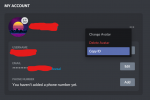
Ahhhh. I figured it out. The user ID you need to set up is not the Discord name you usually us, as in "Name#1234". It's a much longer code.
You access it via settings here:
Has anyone else experienced invalid stoi argument errors while using MQ2Discord
I just setit up last night and and noticed acouple dozen over the corse of the day
[5:55 PM] BOT Hyena: [MQ2Discord] Reconnected: Fxxxxxxx
[MQ2Discord] Exception: invalid stoi argument
[5:55 PM] BOT Hyena: [MQ2Discord] Reconnected: Fxxxxx
[5:55 PM] BOT Hyena: 1xxxxx says, 'Hail, Magus Alaria'
[5:55 PM] BOT Hyena: xxxxxxr says, 'Hail, Magus Alaria'
[5:56 PM] BOT Hyena: 1xxxxx says, 'Hail, Magus Alaria'
[5:56 PM] BOT Hyena: 1xxxxxr says, 'Butcherblock'
[5:56 PM] BOT Hyena: [MQ2Discord] Exception: invalid stoi argument
[5:56 PM] BOT Hyena: [MQ2Discord] Exception: invalid stoi argument
[5:56 PM] BOT Hyena: [MQ2Discord] Reconnected: Hxxxxx
[5:56 PM] BOT Hyena: [MQ2Discord] Reconnected: Fxxxx
Love the plugin
I just setit up last night and and noticed acouple dozen over the corse of the day
[5:55 PM] BOT Hyena: [MQ2Discord] Reconnected: Fxxxxxxx
[MQ2Discord] Exception: invalid stoi argument
[5:55 PM] BOT Hyena: [MQ2Discord] Reconnected: Fxxxxx
[5:55 PM] BOT Hyena: 1xxxxx says, 'Hail, Magus Alaria'
[5:55 PM] BOT Hyena: xxxxxxr says, 'Hail, Magus Alaria'
[5:56 PM] BOT Hyena: 1xxxxx says, 'Hail, Magus Alaria'
[5:56 PM] BOT Hyena: 1xxxxxr says, 'Butcherblock'
[5:56 PM] BOT Hyena: [MQ2Discord] Exception: invalid stoi argument
[5:56 PM] BOT Hyena: [MQ2Discord] Exception: invalid stoi argument
[5:56 PM] BOT Hyena: [MQ2Discord] Reconnected: Hxxxxx
[5:56 PM] BOT Hyena: [MQ2Discord] Reconnected: Fxxxx
Love the plugin

EQChick
Watch out for the poop!
Oh wow! This plugin is awesome!
I finally got it to work after hours and hours of trying to figure out how to get my stupid bot to work. -I "cheated" and went to Discord Bot Maker and Hosting | BotGhost . Works like a charm now!
I got too frustrated trying to host my own bot, etc., etc.
I finally got it to work after hours and hours of trying to figure out how to get my stupid bot to work. -I "cheated" and went to Discord Bot Maker and Hosting | BotGhost . Works like a charm now!
I got too frustrated trying to host my own bot, etc., etc.

Users who are viewing this thread
Total: 2 (members: 0, guests: 2)
Share: