

DakotaRanch
Member
Very new to MQ:
Build new P99 Linux server at home.
Installed new titanium Eq instance on Windows 11 pc
Log in and playing around with new characters just fine. (iskars rule!)
Find out about MQ
Install MQ and launch MQ
Launch EQ
MQ GUI windows doesn't show up once I log in.
I see in the MQ UI that it sees the eq process running but no Key/Server/Character/etc info.
Delete/Reinstall MQ a few times. No joy
I'm assuming I need to somehow point MQ to my eq login server or some other setting but I can't find it.
Maybe there is a private server setup guide I'm just not seeing?
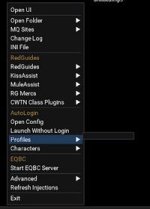
Also maybe related I can't create new profiles. (see jpg) All the other pop-ups work fine just not profile/characters.
Thanks a ton for any help.
Build new P99 Linux server at home.
Installed new titanium Eq instance on Windows 11 pc
Log in and playing around with new characters just fine. (iskars rule!)
Find out about MQ
Install MQ and launch MQ
Launch EQ
MQ GUI windows doesn't show up once I log in.
I see in the MQ UI that it sees the eq process running but no Key/Server/Character/etc info.
Delete/Reinstall MQ a few times. No joy
I'm assuming I need to somehow point MQ to my eq login server or some other setting but I can't find it.
Maybe there is a private server setup guide I'm just not seeing?
Also maybe related I can't create new profiles. (see jpg) All the other pop-ups work fine just not profile/characters.
Thanks a ton for any help.


 I might swtich to PoF client and see if that helps but if not maybe I build a different server that does support MQ.