
-
 Hail, we're RedGuides. We want you to play six (yes, 6!) EverQuest characters at once. We have scripts and a friendly community to help, please join our playstyle and say hello! 👋
You are using an out of date browser. It may not display this or other websites correctly.
You should upgrade or use an alternative browser.
You should upgrade or use an alternative browser.
Resource icon
Guide - MeshGenerator.exe tutorial
- Thread starter ChatWithThisName
- Start date


How does one submit them? I'm always afraid of running the updater in fear of losing all of my changes, some of which took *hours* to complete in both current and older zones.And if you do improve on them, be sure to submit them to the mesh repo!

- Commits
- 191
We don't really have an easy way to submit them. If possible you can try the discussion thread over at https://www.redguides.com/community/resources/meshupdater-mq2nav-meshes.1270/


I had a similar issue. For me it was that the file paths were not setup correctly. If I remember right, it has to point to the main mq folder, not the mqnav folder.can anyone help me out a bit: if i click ctrl+s it doesn't save anything in my folder but a "nameofthezone_doors.json" file. i cannot get the mesh generator to save a navmesh file. what am i doing wrong? thanks for your help

I found in the rg discord some talk about the mesh generator eventually being able to hide objects.
But I don't see that that's been done. If it has I'm not finding what I need to do to hide them.
What I'm trying to do is create a navigable mesh on the floor that is under the pillar objects in
The Gilded Spire control room area.
During the control room raid the pillars disappear occasionally and when bots are punted into the space where the pillar
used to be they just stand there off mesh.
Using the followme button will force them to move out.
Maybe a /moveto command would force them out too.
But it would be nice to be able to just build a mesh underneath the objects for when they disappear instead.
Is that possible?
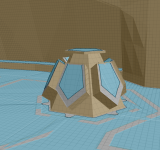
One of the smaller pillars in question is shown in the picture.
But I don't see that that's been done. If it has I'm not finding what I need to do to hide them.
What I'm trying to do is create a navigable mesh on the floor that is under the pillar objects in
The Gilded Spire control room area.
During the control room raid the pillars disappear occasionally and when bots are punted into the space where the pillar
used to be they just stand there off mesh.
Using the followme button will force them to move out.
Maybe a /moveto command would force them out too.
But it would be nice to be able to just build a mesh underneath the objects for when they disappear instead.
Is that possible?
One of the smaller pillars in question is shown in the picture.
Attachments

You bumped a post on a out a tutorial using the mesh generator.I found in the rg discord some talk about the mesh generator eventually being able to hide objects.
But I don't see that that's been done. If it has I'm not finding what I need to do to hide them.
What I'm trying to do is create a navigable mesh on the floor that is under the pillar objects in
The Gilded Spire control room area.
During the control room raid the pillars disappear occasionally and when bots are punted into the space where the pillar
used to be they just stand there off mesh.
Using the followme button will force them to move out.
Maybe a /moveto command would force them out too.
But it would be nice to be able to just build a mesh underneath the objects for when they disappear instead.
Is that possible?
One of the smaller pillars in question is shown in the picture.
I don't think the new version that allows hiding certain objects is completed
Yeah, I'm sorry about the bump on the out of date post, I wasn't sure whereYou bumped a post on a out a tutorial using the mesh generator.
I don't think the new version that allows hiding certain objects is completed
the best place to post would be, so I tried to keep it "mesh generator"
related vs posting on mesh updater or mq2navmesh discussions

Thank you for the reply Sic much appreciated.
- Commits
- 191
I would try making a one-way offmesh connection allowing you to get out, but not go in. This should get your guys to move out of the area when they find themselves inside of it. However there is no "sometimes it is available, sometimes it isn't option" and it would be up to you to make it do what you want.Yeah, I'm sorry about the bump on the out of date post, I wasn't sure where
the best place to post would be, so I tried to keep it "mesh generator"
related vs posting on mesh updater or mq2navmesh discussions
Thank you for the reply Sic much appreciated.
If they are in a chase type mode and you're manually operating someone you could get them to follow someone else out of the area. Then since it's only one way they wouldn't try to re-enter the area and would instead go around it when creating a new path around the area. Alternately using a hotkey to demand everyone navigate to a specific location outside of the pillar area. /nav loc blah blah blah
While I have not personally done this mechanic you're discussing in theory something like that would work and has worked in places like Tainted EW for example.
Offmesh links are not covered in my video. But it shouldn't be hard to find them or use them. The idea is that you can create a link from one section of mesh to another section of mesh where there is a gap between them.
Offmesh links can be used in situations like this or to make your character do thinks like jump off a ledge as a valid method of creating a path. I commonly use that sort of logic when there are no railings and getting down is much faster if you just drop down. You can also make it so you don't navigate the way other characters do by using them. Generally speaking Navigation will for example walk the full length around small ledges and cut corners as tight as possible. So using off mesh links, while not completely ridding you of the appearance of automated navigation, will make you appear less bot like when doing things like one way drop downs.
Solid, I will learn how to setup offmesh links and see how that helps.I would try making a one-way offmesh connection allowing you to get out, but not go in. This should get your guys to move out of the area when they find themselves inside of it. However there is no "sometimes it is available, sometimes it isn't option" and it would be up to you to make it do what you want.
If they are in a chase type mode and you're manually operating someone you could get them to follow someone else out of the area. Then since it's only one way they wouldn't try to re-enter the area and would instead go around it when creating a new path around the area. Alternately using a hotkey to demand everyone navigate to a specific location outside of the pillar area. /nav loc blah blah blah
While I have not personally done this mechanic you're discussing in theory something like that would work and has worked in places like Tainted EW for example.
Offmesh links are not covered in my video. But it shouldn't be hard to find them or use them. The idea is that you can create a link from one section of mesh to another section of mesh where there is a gap between them.
Offmesh links can be used in situations like this or to make your character do thinks like jump off a ledge as a valid method of creating a path. I commonly use that sort of logic when there are no railings and getting down is much faster if you just drop down. You can also make it so you don't navigate the way other characters do by using them. Generally speaking Navigation will for example walk the full length around small ledges and cut corners as tight as possible. So using off mesh links, while not completely ridding you of the appearance of automated navigation, will make you appear less bot like when doing things like one way drop downs.
Still very new to toying around with the mesh generator.
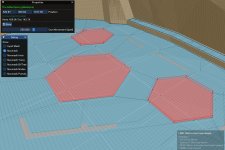
Awesome Nerp! Can't wait to try it out!I ended up building a version of meshgenerator.exe that ignores non-terrain objects for that raid. It's a half ass hack, but hey it works.
biggysmalls999
Active member
Is there anywhere I can download MeshGenerator.exe? All of the old links seem to be dead.
biggysmalls999
Active member
N/m I found it, I swear it wasn't there before
Users who are viewing this thread
Total: 1 (members: 0, guests: 1)
Share: