• You've discovered RedGuides, an EverQuest multi-boxing and scripting community 🧙‍♀️⚙️. We want you to play several EQ characters at once, come join us and say hello! 👋

  • A TLP without truebox has thawed (Very Vanilla ready)
    Frostreaver
Resource icon

Release MAUI (MuleAssist UI) (1 Viewer) 03/26/2024

No permission to download
I'm trying to get MAUI to work the way I like for a druid and I must have messed something up that I can't figure out. when I start the script it auto loads an old set of spells that I had setup. i can't find anything in the INI and the spell set that I created in Maui is the one I want. i just have to start the script and then hit mem spells. anyone know where this list of spells is coming from?
Make sure the INI you're editing and the INI you're running with are the same. Also make sure the INI you're editing is in your config folder, not macros.

If you're using MAUI to launch the macro then also note that the start command isn't passing in the INI file name unless you edit it to do so. If the macro is for some reason defaulting to a different INI file than what MAUI is editing, then you would want to load the correct INI into MAUI or edit the start command.
 
Thanks. i think i figured it out. turns out I had 'loadspellset:1" and "spellsetname:combat" it looks like that loads the spellset I have saved on the spell bar which didn't get updated like I thought because the confirm window was behind the MAUI window.
 
This script is pretty awesome, great work!

I was pretty curious how the spell upgrade match logic and took a quick, haven't totally figured it out, but looked interesting. I have seen it struggle occasionally (ie shaman mending and reckless heals), but worked 99% of the time which is super nice. Curious if adding RecastTimerID would break more than it helps.
 
Really love the new Red theme wondering if we could get more on that end i know its just silly little things but i kinda like it :) as always keep up the great work
 
I thought I would share my experience on (EMU). I had issue loading MA. I was getting:

Running lua script 'ma/start' with PID 1 D:\RedGuides\newmacroquest\lua\ma/start.lua:20: attempt to index local 'PackageMan' (a nil value) stack traceback: D:\RedGuides\newmacroquest\lua\ma/start.lua: in main chunk Ending lua script 'ma/start' with PID 1 and status 2

I had all the correct files in the right location. Including the lfs.dll. What it turned out to be was version of rock file. I instinctively download the x86_64 version as soon as I switch to just the x86 version the lau loaded no issue.

I am guess that is because the RoF client is 32bit and live is now 64bit.
 
I thought I would share my experience on (EMU). I had issue loading MA. I was getting:

Running lua script 'ma/start' with PID 1 D:\RedGuides\newmacroquest\lua\ma/start.lua:20: attempt to index local 'PackageMan' (a nil value) stack traceback: D:\RedGuides\newmacroquest\lua\ma/start.lua: in main chunk Ending lua script 'ma/start' with PID 1 and status 2

I had all the correct files in the right location. Including the lfs.dll. What it turned out to be was version of rock file. I instinctively download the x86_64 version as soon as I switch to just the x86 version the lau loaded no issue.

I am guess that is because the RoF client is 32bit and live is now 64bit.
The script downloads the correct architecture version of the library for you automatically into your modules folder. You shouldn't have any x64 versions of DLL files in your Lua folder or modules folder if you're running MQ for EMU. If you had been running on live and copied your Lua folder to emu and had a x64 version in there, then yeah that would cause it to break.
Failing to find PackageMan and not LFS means you must for some reason be missing mq/PackageMan.lua which comes by default from the RG launcher install of MQ.
 
I hope this is the right place for this. I just recently switch to MuleAssist from Kissassist. The ingame UI sold me to try switching. I have question about how muleassist handles buffs though(i know it uses same file as kissassist).

I 9-box in a raid all on same computer. When using kissassist there is no need for extra options, whether my toons are all solo, in a group, in a raid or a mixture KA is able to tell what buffs each person has and applies. With Muleassist unless they are in the same group MA will not buff even though all of them are reporting into the KissAssist_buff.ini. I had to add the OGG:raid option to each spell, but this doesn't solve the none group part for me. Is there a possible global option that I missing? Adding my shaman ini as reference.

Note:
I am running on a EMU server.


[CODE lang="ini" title="Shaman InI"][General]
CheerPeople=0
MedStart=20
ChaseAssist=0
AcceptInvitesOn=1
TravelOnHorse=0
BuffWhileChasing=1
SwitchWithMA=0
GroupEscapeOn=0
DPSMeter=1
CampRadiusExceed=400
EQBCOn=1
DanNetOn=1
Scatter=1
CampfireOn=0
CastingInterruptOn=0
MiscGem=9
MiscGemRemem=1
ReturnToCamp=0
DanNetDelay=20
MiscGemLW=9
ReturnToCampAccuracy=5
TwistOn=0
CampRadius=30
CastRetries=0
ChaseDistance=25
MedOn=1
SitToMed=0
RezAcceptOn=1|90
GroupWatchOn=0
LootOn=0
MuleAssistVer=15.3.2
CharInfo=Shaman|60|GOLD
DefaultUI=TRUE

[DPS]
DPSOn=1
DPSCOn=0
DebuffAllOn=0
DPSSkip=20
StayAwayToCast=0
DPSSize=10
DPS1=Malo|98|malo
DPSCond1=TRUE
DPS2=Plague of Insects|95|slow
DPSCond2=TRUE
DPS3=Cripple|93
DPSCond3=TRUE
DPS4=Pox of Bertoxxulous|75
DPSCond4=TRUE
DPS5=Anathema|65
DPSCond5=TRUE
DPS6=Bane of Nife|60
DPSCond6=TRUE
DPS7=Artifact of the Jaguar|99|MAOnce
DPSCond7=TRUE
DPS8=
DPSCond8=TRUE
DPS9=
DPSCond9=TRUE
DPS10=
DPSCond10=TRUE
DPSInterval=2

[Heals]
HealsOn=1
HealsCOn=0
AutoRezOn=0
HealGroupPetsOn=0
HealsSize=10
Heals1=Kragg's Mending|65
HealsCond1=TRUE
Heals2=
HealsCond2=TRUE
Heals3=
HealsCond3=TRUE
Heals4=
HealsCond4=TRUE
Heals5=
HealsCond5=TRUE
Heals6=
HealsCond6=TRUE
Heals7=
HealsCond7=TRUE
Heals8=
HealsCond8=TRUE
Heals9=
HealsCond9=TRUE
Heals10=
HealsCond10=TRUE
XTarHeal=11|12|13
InterruptHeals=90

[Buffs]
BuffsOn=1
BuffsCOn=1
BegOn=0
RebuffOn=1
BuffsSize=20
Buffs1=Spirit of Bih`Li|OOG:raid
BuffsCond1=TRUE
Buffs2=Cannibalize IV|mana|90|20
BuffsCond2=TRUE
Buffs3=Khura's Focusing|OOG:raid
BuffsCond3=TRUE
Buffs4=Regrowth of Dar Khura|OOG:raid
BuffsCond4=TRUE
Buffs5=Talisman of the Cat|OOG:raid
BuffsCond5=TRUE
Buffs6=Talisman of the Rhino|OOG:raid
BuffsCond6=TRUE
Buffs7=Talisman of the Raptor|OOG:raid
BuffsCond7=TRUE
Buffs8=Talisman of the Brute|OOG:raid
BuffsCond8=TRUE
Buffs9=Celerity|melee|OOG:raid
BuffsCond9=TRUE
Buffs10=Maniacal Strength|melee|OOG:raid
BuffsCond10=TRUE
Buffs11=Infusion of Spirit|OOG:raid
BuffsCond11=TRUE
Buffs12=Form of the Great bear
BuffsCond12=TRUE
Buffs13=command:/useitem 0
BuffsCond13=!${Me.Buff[Shield of Torment].ID} && ${Math.Calc[${Me.MaxBuffSlots}-${Me.CountBuffs}]} > 0
Buffs14=
BuffsCond14=TRUE
Buffs15=
BuffsCond15=TRUE
Buffs16=
BuffsCond16=TRUE
Buffs17=
BuffsCond17=TRUE
Buffs18=
BuffsCond18=TRUE
Buffs19=
BuffsCond19=TRUE
Buffs20=
BuffsCond20=TRUE
CheckBuffsTimer=10
BegSize=0

[Melee]
MeleeOn=1
TargetSwitchingOn=0
MeleeDistance=75
StickHow=snaproll
Autohide=0
DismountDuringFights=0
MeleeTwistOn=0
TankAllMobs=0
AssistAt=95
FaceMobOn=1
AutoFireOn=0
UseMQ2Melee=1

[Burn]
BurnCOn=0
BurnSize=15
BurnCond1=TRUE
BurnCond2=TRUE
BurnCond3=TRUE
BurnCond4=TRUE
BurnCond5=TRUE
BurnCond6=TRUE
BurnCond7=TRUE
BurnCond8=TRUE
BurnCond9=TRUE
BurnCond10=TRUE
BurnCond11=TRUE
BurnCond12=TRUE
BurnCond13=TRUE
BurnCond14=TRUE
BurnCond15=TRUE
BurnAllNamed=0
UseTribute=0

[Mez]
MezOn=0
MezStopHPs=80
MezRadius=35
MezMaxLevel=1
MezMinLevel=1

[AE]
AEOn=0
AESize=3
AERadius=50
AECOn=0

[OhShit]
OhShitOn=0
OhShitCOn=0
OhShitSize=1
OhShit1=
OhShitCond1=TRUE
OhShitCond5=TRUE
OhShitCond8=TRUE
OhShitCond10=TRUE
OhShitCond3=TRUE
OhShitCond6=TRUE
OhShitCond9=TRUE
OhShitCond4=TRUE
OhShitCond7=TRUE
OhShitCond2=TRUE

[Pet]
PetOn=1
PetToysSize=6
PetToys1=
PetToys2=
PetToys3=
PetToys4=
PetToys5=
PetToys6=
PetRampPullWait=0
PetCombatOn=1
PetBuffsOn=1
PetBuffsSize=8
PetBuffs1=Celerity
PetBuffs2=Spirit Quickening
PetBuffs3=
PetBuffs4=
PetBuffs5=
PetBuffs6=
PetBuffs7=
PetBuffs8=
PetShrinkSpell=Tiny Companion
PetSuspend=0
PetSpell=Spirit of the Howler
PetToysOn=0
PetShrinkOn=0
MoveWhenHit=0
PetAssistAt=95
PetHoldOn=1
PetCOn=0

[Pull]
PullLevel=0|0
MaxZRange=50
ChainPullHP=90
ChainPull=0
PullRoleToggle=0
PullArcWidth=0
PullTwistOn=0
PullWait=5
PullWith=Melee
PullMeleeStick=0
UseWayPointZ=0
MaxRadius=350

[Aggro]
AggroOn=0
AggroCOn=0
AggroSize=5
Aggro1=
AggroCond1=TRUE
Aggro2=
AggroCond2=TRUE
Aggro3=
AggroCond3=TRUE
Aggro4=
AggroCond4=TRUE
Aggro5=
AggroCond5=TRUE

[Bandolier]
BandolierOn=0
BandolierCOn=0
BandolierSize=1
Bandolier1=
BandolierCond1=TRUE
BandolierCond2=TRUE

[Cures]
CuresOn=1
CuresSize=5
Cures1=Radiant Cure
CuresCond1=TRUE
Cures2=
CuresCond2=TRUE
Cures3=
CuresCond3=TRUE
Cures4=
CuresCond4=TRUE
Cures5=
CuresCond5=TRUE
CuresCOn=0

[GoM]
GoMOn=0
GoMCOn=0
GoMSize=3
GoM1=
GoMCond1=TRUE
GoM2=
GoMCond2=TRUE
GoM3=
GoMCond3=TRUE

[Merc]
MercOn=0
AutoRevive=0
MercAssistAt=92

[AFKTools]
AFKToolsOn=0
AFKPCRadius=500
CampOnDeath=0
BeepOnNamed=0
AFKGMAction=0
ClickBackToCamp=0

[MySpells]
Gem12=
Gem6=Bane of Nife
Gem7=Kragg's Mending
Gem2=Plague of Insects
Gem3=Cripple
Gem4=Pox of Bertoxxulous
Gem13=
Gem8=Cannibalize IV
Gem5=Anathema
Gem10=
Gem1=Malo
Gem11=
Gem9=Blood of Nadox

[SpellSet]
SpellSetName=MuleAssist
LoadSpellSet=2


[/CODE]
 
Having the hardest time getting the lfs.dll file. The link in the instructions section takes me to a place that only has .rock files. I downloaded what I thought was the right file "luafilesystem-1.8.0-1.win32-x86.rock" but I don't know how to convert that to lfs.dll.
 
Having the hardest time getting the lfs.dll file. The link in the instructions section takes me to a place that only has .rock files. I downloaded what I thought was the right file "luafilesystem-1.8.0-1.win32-x86.rock" but I don't know how to convert that to lfs.dll.
You can use 7-zip to open it and and then you will see some folders and files and it is in one of the folders. Also I believe now if you run the Lua without the file it will leverage packman to install it for you, but don't quote me on that. Maybe try running the Lua command first and if that doesn't work then unzip the rock file with 7zip.
 
Would it be possible to add a clicky feature To turn on and off buffs and DPS as well as the rest of the tabs and also automatically write the the true or false conditions in the INI file? That would be helpful and also if there was an available upgrade or downgrade of a spell , maybe if there was an upgrade it would highlight green and downgrade would be red.
 
I am not sure what to do here. I get this failure when I try to update certain buffs most buffs come up normally. I am listing 2 buffs known to cause this crash. Word of Persistance and Divine Guardian when I click on then to bring up screen to make changes is when it crashes.This is message it get and have no clue as to what to do. I looked for basic ImGUI and can not find where it is?


Will provide any additional info needed.

Thank You in advance
 
I deleted your image as it had toon names in it.

You can just copy the error msg from the console window and paste it in the forums.

Is this for Maui?
 
ok seem to have it working Did a search for MYSEQ and only had a dll file so loaded it then had to reload Maui as updates from launcher did not work. but now seems to be working on spells that would not before. I still can not find how to save srceen in console have looked thru it front to back and back again must be missing something.
 
ok seem to have it working Did a search for MYSEQ and only had a dll file so loaded it then had to reload Maui as updates from launcher did not work. but now seems to be working on spells that would not before. I still can not find how to save srceen in console have looked thru it front to back and back again must be missing something.
huh?

Gonna guess that means you don't have the resource watched.
1. Go to https://www.redguides.com/community/resources/maui-muleassist-ui.2207/
2. Click watch 1674749968322.png
3. Open RG launcher and go to Lua tab
4. Install / Update MAUI as updates are available
1674750032266.png
 
Last edited:
Aquietone

Got a technical question for ya. I use Muleassist and Maui to run my group. (works great btw) But I just bought one of CWTN's plugins for my cleric. And I am in the process of getting it setup. My question is, how do I get rid of all references to MAUI? I commented out the lines in my char ini file and I do NOT have it setup in the cfg file but when I login the MAUI banner still comes up. Now I know MAUI doesn't do anything without Muleassist running (which it is not on this char) but I still like to know how to disable MAUI from running on this char at login.

Thanks in advance for any help you can provide.

Vrak
 
Aquietone

Got a technical question for ya. I use Muleassist and Maui to run my group. (works great btw) But I just bought one of CWTN's plugins for my cleric. And I am in the process of getting it setup. My question is, how do I get rid of all references to MAUI? I commented out the lines in my char ini file and I do NOT have it setup in the cfg file but when I login the MAUI banner still comes up. Now I know MAUI doesn't do anything without Muleassist running (which it is not on this char) but I still like to know how to disable MAUI from running on this char at login.

Thanks in advance for any help you can provide.

Vrak
you probably have it in your ingame.cfg file
you can either move /Lua run maui into class or character specific cfg files, or put some kind of /if statement around running it from ingame.cfg like /if (${Select[${Me.Class.ShortName},BRD,WIZ,RNG]}) /Lua run maui
 
The link provided to download the lfs.dll file returns with a 404 error. I attempted to source that .dll from elsewhere but it didn't work with the plugin. Is there another location where I can download the file from?
 
Anyone ever had the issue where the spell icons are all wrong? The Macro and everything runs fine, but the Icons in the MAUI are all wrong.


Untitled.png
 
The link provided to download the lfs.dll file returns with a 404 error. I attempted to source that .dll from elsewhere but it didn't work with the plugin. Is there another location where I can download the file from?
I am also trying to find this dll
 
Trying to get it running. Tried reinstalling Visual C++ from the link on the Overview page. I get this set of errors. Any ideas?

1688531639924.png
 
For anyone updating, you can (and may need to) deletemaui.lua and the ma folder. There should just be a maui folder now. The command is still /lua run maui
If you were using /lua run ma/start then switch to use /lua run maui
 
/Lua run ma/start expects there to be a file called start.Lua in a folder called ma. /Lua run Maui expects there to be something called Maui. If you read like 2-3 replies above, there is no longer a file ma/start.Lua
 
/Lua run ma/start expects there to be a file called start.lua in a folder called ma. /Lua run Maui expects there to be something called Maui. If you read like 2-3 replies above, there is no longer a file ma/start.lua
I must've missed the reply a few posts up but thank you for clarifying that
 
My Bard doesn't switch targets while in raids (possibly in group as well I'll be monitoring it better to find out for sure).
Status is /mac muleassist.
TargetSwitchingOn is Checked.
MQ2Melee is Unchecked.
Often in raids he'll be assisting someone outside of his group.
Someone who uses KA instead said they have a /switchnow command.
Is there a similar command I can use with MAUI? I didn't see one listed and I didn't see this issue in the discussion either.
 
My Bard doesn't switch targets while in raids (possibly in group as well I'll be monitoring it better to find out for sure).
Status is /mac muleassist.
TargetSwitchingOn is Checked.
MQ2Melee is Unchecked.
Often in raids he'll be assisting someone outside of his group.
Someone who uses KA instead said they have a /switchnow command.
Is there a similar command I can use with MAUI? I didn't see one listed and I didn't see this issue in the discussion either.
MAUI is just a UI for muleassist (MuleAssistUserInterface). It doesn't have any commands to control your toons. You'll want to ask over on the muleassist macro discussion probably.
 
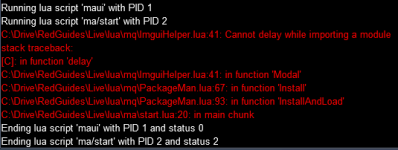
Been a while since I've been by here. I just stood up my own emu server as a sort of hobby. I wanted to toy around with MQ2 on it with MAUI and when I try to load up maui, I'm getting en error within the Lua/mq/ImguiHelper.Lua (line 41) saying Cannot delay while importing a module. I tried looking at the Lua script to determine what was happening and couldn't really come to a conclusion. Any thoughts?
 
Nevermind, hand an older version of the plugin. New version downloaded properly in game.
 
@aquietone A situation came up on discord where @Flip32 had concerns due to LuaRocks install asking for permission to install.
@Flip32 was explained that since it is downloading a package from *elsewhere* that it was asking permission to do so, but that was insufficient.

@brainiac pointed out that the FAQ instructions with regards to the luarocks command instructions are also out of date
 
Just wanted to say PUller tank is awesome, just target yourself hit start and sit back and enjoy the magic.
Nice job aqueitone
 
Release MAUI (MuleAssist UI)

Users who are viewing this thread

Back
Top
Cart