If the file is actually there, then not sure what the deal is with that.. maybe check for any odd settings in /mqsettings > plugins > Luaokay, so I removed the files I manually downloaded. I don't know where I got the ma.lua file from. Went back to RGlauncher and reinstalled muleassist ui script. now when running
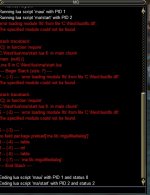
Either of those I get the following parse
- /lua run ma/start
- /lua run maui
View attachment 38277
C:\Mq2Next\lua\lfs.dll file is there and was written there when I reinstalled from RGlauncher. Do I need to clear the lua folder completely and reinstall? I am also using alertmaster.

-
 Hail, we're RedGuides. We want you to play six (yes, 6!) EverQuest characters at once. We have scripts and a friendly community to help, please join our playstyle and say hello! 👋
You are using an out of date browser. It may not display this or other websites correctly.
You should upgrade or use an alternative browser.
You should upgrade or use an alternative browser.
Resource icon
Release MAUI (MuleAssist UI) 03/26/2024
- Thread starter aquietone
- Start date
Its LFS, stands for LuaFileSystemquestion. still troubleshooting. is the spelling of the file lfs.dll with an "i" or "L"?
I tried to troubleshoot MAUI module for Lua in the MuleAssist UI thread but couldn't find a resolution there. I was referred to look into /mqsettings > plugins > Lua which I finally found and could make no sense of it. I can say that I didn't see many settings in that menu but that may be the point. I presume that there is a lack of settings there of.
I have no issues using muleassist and muleassist ini's. But when I tried to start up MAUI with either command
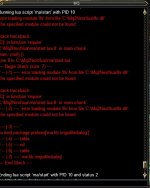
Which tells me that it can't find the lfs.dll
I can confirm that the file is there. I thought it could mean a spelling error with a difference of ifs.dll or Lfs.dll but couldn't prove that anywhere. I imagine if that was the issue there would be a lot more players affected.
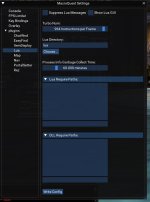
Here is what I see when looking at /mqsettings > plugins > lua
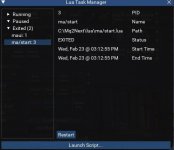
I have tried manually downloading the maui zip file and extracting in the Lua directory. I removed all the files i extracted there and installed maui from the rglauncher. I have tried removing the only other Lua module I had. AlertManager. I finally removed all files and folders from the Lua directory and reinstalled MQnext which rebuilt the Lua folder. MuleAssist works for me and I have proofread the ini's on the two toons having the issue. I have backup these ini files and started up MA to recreate new ini's.
Those are the things I remember trying in order to resolve my issue. Please let me know if you need any further information in solving my problem. I am fairly computer literate. Though I don't have much knowledge in programing and coding. Humor me ;-)
I have no issues using muleassist and muleassist ini's. But when I tried to start up MAUI with either command
- /Lua run ma/start
- /Lua run maui
Which tells me that it can't find the lfs.dll
I can confirm that the file is there. I thought it could mean a spelling error with a difference of ifs.dll or Lfs.dll but couldn't prove that anywhere. I imagine if that was the issue there would be a lot more players affected.
Here is what I see when looking at /mqsettings > plugins > lua
I have tried manually downloading the maui zip file and extracting in the Lua directory. I removed all the files i extracted there and installed maui from the rglauncher. I have tried removing the only other Lua module I had. AlertManager. I finally removed all files and folders from the Lua directory and reinstalled MQnext which rebuilt the Lua folder. MuleAssist works for me and I have proofread the ini's on the two toons having the issue. I have backup these ini files and started up MA to recreate new ini's.
Those are the things I remember trying in order to resolve my issue. Please let me know if you need any further information in solving my problem. I am fairly computer literate. Though I don't have much knowledge in programing and coding. Humor me ;-)
Last edited:
another thing to try isI tried to troubleshoot MAUI module for Lua in the MuleAssist UI thread but couldn't find a resolution there. I was referred to look into /mqsettings > plugins > lua which I finally found and could make no sense of it. I can say that I didn't see many settings in that menu but that may be the point. I presume that there is a lack of settings there of.
I have no issues using muleassist and muleassist ini's. But when I tried to start up MAUI with either command
I get the following parse:
- /lua run ma/start
- /lua run maui
View attachment 38295
Which tells me that it can't find the lfs.dll
I can confirm that the file is there. I thought it could mean a spelling error with a difference of ifs.dll or Lfs.dll but couldn't prove that anywhere. I imagine if that was the issue there would be a lot more players affected.
Here is what I see when looking at /mqsettings > plugins > lua
View attachment 38296View attachment 38297
I have tried manually downloading the maui zip file and extracting in the lua directory. I removed all the files i extracted there and installed maui from the rglauncher. I have tried removing the only other lua module I had. AlertManager. I finally removed all files and folders from the lua directory and reinstalled MQnext which rebuilt the Lua folder. MuleAssist works for me and I have proofread the ini's on the two toons having the issue. I have backup these ini files and started up MA to recreate new ini's.
Those are the things I remember trying in order to resolve my issue. Please let me know if you need any further information in solving my problem. I am fairly computer illiterate. Though I don't have much knowledge in programing and coding. Humor me ;-)
/plugin mq2lua unload
delete config/mq2lua.yaml
/plugin mq2lua
/Lua run ma/start
Thanks. Just gave those commands a shot but received the same parse as before.another thing to try is
/plugin mq2lua unload
delete config/mq2lua.yaml
/plugin mq2lua
/lua run ma/start
Yeah I'm not sure what is going on there. Maybe MQ is just showing its offended at being placed in a folder called Mq2Next.Thanks. Just gave those commands a shot but received the same parse as before.
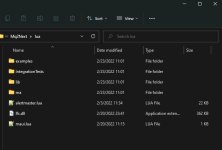
Can you share a screenshot of your Lua folder?
Yeah I'm not sure what is going on there. Maybe MQ is just showing its offended at being placed in a folder called Mq2Next.
Can you share a screenshot of your lua folder?
I have also been having problems with MAUI. I notice that my toons will be fighting with the macro started as normal, everything will be working just fine but All of a sudden 30 minutes later or so i will see that certain toons are not fighting or casting anymore.
I'll switch to that toon that isnt casting anymore and the macro has stopped. Why would this be ?
I'll switch to that toon that isnt casting anymore and the macro has stopped. Why would this be ?
that'd be a question for the macro. if the macro ended then there should be an error somewhere in the console hinting at why. best to post to the MA thread or the discord channel.I have also been having problems with MAUI. I notice that my toons will be fighting with the macro started as normal, everything will be working just fine but All of a sudden 30 minutes later or so i will see that certain toons are not fighting or casting anymore.
I'll switch to that toon that isnt casting anymore and the macro has stopped. Why would this be ?
Was there anything missing or is not supposed to be there? What should I name the directory MQ2next. I was trying to differentiate between the old redguides install and the new one I migrated to. will having a MQ2next directory cause any issued with any other plugins or macs if I do or don't change the name?
It sounds like that LFS DLL might depend on vcredist, https://www.microsoft.com/en-us/dow...145&e6b34bbe-475b-1abd-2c51-b5034bcdd6d2=True Installing this might fix it but no promises.Was there anything missing or is not supposed to be there? What should I name the directory MQ2next. I was trying to differentiate between the old redguides install and the new one I migrated to. will having a MQ2next directory cause any issued with any other plugins or macs if I do or don't change the name?
KK i will give that a shotIt sounds like that LFS DLL might depend on vcredist, https://www.microsoft.com/en-us/dow...145&e6b34bbe-475b-1abd-2c51-b5034bcdd6d2=True Installing this might fix it but no promises.
Great. Also, that is unfortunate. I didn't realize that DLL was going to require other dependencies.Eureka! That resolved the issue looks like. UI window comes up just like it used to. Thanks for working with me on this.
aquietone updated MAUI (MuleAssist UI) with a new update entry:
fix spell mem event
Read the rest of this update entry...
fix spell mem event
- Fix lua error when mem'ing a new spell.
- Buffs section will now include full rankname when selecting spells since the macro doesn't like buffs without ranks in the INI anymore
Read the rest of this update entry...
aquietone updated MAUI (MuleAssist UI) with a new update entry:
Fixes
Read the rest of this update entry...
Fixes
- Fix error left clicking spell icons on spell set tab
Read the rest of this update entry...
aquietone updated MAUI (MuleAssist UI) with a new update entry:
Handle INI load error
Read the rest of this update entry...
Handle INI load error
- Show error in MAUI when an INI file can't be loaded due to invalid syntax like a missing or broken section header
Read the rest of this update entry...
Don't think harmtouch appears anywhere in the muleassist INI options. You tried setting harmtouch=0 in your muleassist INI or your mq2melee settings? You probably want to just look at not using mq2melee if you're using muleassist, which there is a setting like usemq2melee=0 or something in the muleassist INI.shadowknight blows off harmtouch everytime its up theres not option to turn it off i tried in the raw ini Melee HarmTouch=0 but it wont save any chance you could add in an option for it? it causes him alot of exp loss as hes is not my current tank just yet.
If you do want to use mq2melee then you'd have to turn it off there instead, like /melee harmtouch=0

shearhack
Active member
sounds good i will give that a try its possible i didnt type it in right.Don't think harmtouch appears anywhere in the muleassist INI options. You tried setting harmtouch=0 in your muleassist INI or your mq2melee settings? You probably want to just look at not using mq2melee if you're using muleassist, which there is a setting like usemq2melee=0 or something in the muleassist INI.
If you do want to use mq2melee then you'd have to turn it off there instead, like /melee harmtouch=0

Just curious .. in the before times, there was an option in the gui that showed spells in the same line for upgrade (or if you didn't have the spell yet, downgrade)
ie- you have imported an ini, and it contains spells that you don't have, you could click, and it would show you the next lower spell in that spell line... Is there any option like this? or any plan to initiate an option like this in the future?
Asking for me and my Bard...
ie- you have imported an ini, and it contains spells that you don't have, you could click, and it would show you the next lower spell in that spell line... Is there any option like this? or any plan to initiate an option like this in the future?
Asking for me and my Bard...
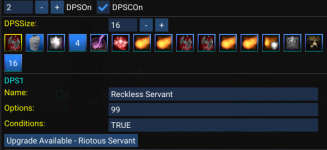
Its far from perfect, but there is something at least somewhat similar in there already -- If you have a spell in your INI and the code can detect that your spellbook contains an upgrade, you'll see an "upgrade available" button when you select that entry in the list. For example, if you had DPS1=aria of pli xin liako, but you only had aria of <some earlier version>, and you click on the DPS1 entry, you should see a button in there to suggest a downgrade.Just curious .. in the before times, there was an option in the gui that showed spells in the same line for upgrade (or if you didn't have the spell yet, downgrade)
ie- you have imported an ini, and it contains spells that you don't have, you could click, and it would show you the next lower spell in that spell line... Is there any option like this? or any plan to initiate an option like this in the future?
Asking for me and my Bard...
The code isn't exhaustive in the SPAs that it compares among spells, and doesn't handle various cases, but it tries.
aquietone updated MAUI (MuleAssist UI) with a new update entry:
Use PackageMan
Read the rest of this update entry...
Use PackageMan
Use the new scripts included in MQ so it can load the right dll on emu
Read the rest of this update entry...
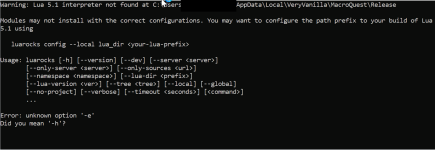
the exact window I get before that is "The script 'start.Lua' is asking for package 'luafilesystem' to be installed on your system from the 'MacroQuest' repository. If you trust this script, click install. otherwise click cancel." there also is no lfs.dll in there. I tried the 2015 redists and both x86 and 64 told me it was already installed.
Edited, tyi dont know the answer to your question but maybe you want to edit that screencap to take your name out of the file path?
Okay so I think I have an update, it looks like a syntax error in the PackageMan script for installing modules, started tracing from the start.Lua script looking for any signs of "-e" since that's where the issue is, led me to that script and now I'm lost since I know almost no Lua.
Deleted my MA install and lfs.dll and reloaded MQ, ran MAUI, got the popup to install luafilesystem. The same popup as your screenshot above shows the same error message, but luafilesystem still successfully installed and then MAUI loaded. And the lfs.dll appeared at the expected place:Okay so I think I have an update, it looks like a syntax error in the PackageMan script for installing modules, started tracing from the start.lua script looking for any signs of "-e" since that's where the issue is, led me to that script and now I'm lost since I know almost no lua.

You're trying this on live or a self compile of emu mq? (it should work in both)
I'm on FV with very vanilla, the file doesn't appear there and it fails on the dependency, my best guess is the Lua interpreter, I ran the install manually from the repo, and it made the dll under the exact same directory tree except for the fact it read "5.4" instead of 5.1 and in appdata so I copied it over and it still failed.
Could you possibly attach the DLL you got and I try putting it in there instead?
Could you possibly attach the DLL you got and I try putting it in there instead?

Good thought, but you can ignore that. The issue isn't in PackageMan (nor is it in any command passed from MQ to luarocks). The issue is that their interpreter inserts the -e in there when they compile the exe for luarocks. It's erroneous and meaningless and if you ran the same command from the command prompt you'd get the same notice. But it's not an error.Okay so I think I have an update, it looks like a syntax error in the PackageMan script for installing modules, started tracing from the start.lua script looking for any signs of "-e" since that's where the issue is, led me to that script and now I'm lost since I know almost no lua.
If you manually ran the install, you're missing some arguments that are added if you ended up with 5.4. But there's no reason that you would have to manually run the install. At that time frame, I would have just started by making sure your MQ was up to date (though it should be). Start with -- what do you have in your modules folder? Do you have a modules folder? Check to make sure your firewall isn't blocking it. But the popup box you got is expected (we're calling an external luarocks program for the install).
aquietone updated MAUI (MuleAssist UI) with a new update entry:
Fix some error on spellset tab
Read the rest of this update entry...
Fix some error on spellset tab
- left clicking spells on spellset tab doesn't do anything.
Read the rest of this update entry...
Just some Noob questions about Maui
1. I want my mage to summon some pre hunting items to give to the group before heading out. What is proper syntax for this so she only does it once and not all the time? I have tried a few different option lines but nothing seems to work. ex. |summon|Summon Food|30 in the Buff section. This didn't work, she just kept on summoning after 30.
2. Pet toys I changed from Daggers to Sword of Runes what is the syntax for granting Swords? ex. PetToys1=Sword of Runes|2|Grant Dagger|Grant Dagger, is it just Sword instead of Dagger? Also in this example it only gives 1 dagger to my pet? Do I have the syntax wrong to grant both dagger/sword? Also under the Pet section I see PetToysGave=Xantik|Summon Dagger, so it is only showing 1 given, so my syntax must be wrong.
Conditions - Do I need to have a Condition section in my ini for TRUE and FALSE? Was does NULL mean in this context? I noticed that I have to set the condition to "TRUE" to get the spell cast. But if I set it to "FALSE" it will still cast. Can you please briefly explain Conditions for me?
Any help would be much appreciated.
Thank
Vrak
1. I want my mage to summon some pre hunting items to give to the group before heading out. What is proper syntax for this so she only does it once and not all the time? I have tried a few different option lines but nothing seems to work. ex. |summon|Summon Food|30 in the Buff section. This didn't work, she just kept on summoning after 30.
2. Pet toys I changed from Daggers to Sword of Runes what is the syntax for granting Swords? ex. PetToys1=Sword of Runes|2|Grant Dagger|Grant Dagger, is it just Sword instead of Dagger? Also in this example it only gives 1 dagger to my pet? Do I have the syntax wrong to grant both dagger/sword? Also under the Pet section I see PetToysGave=Xantik|Summon Dagger, so it is only showing 1 given, so my syntax must be wrong.
Conditions - Do I need to have a Condition section in my ini for TRUE and FALSE? Was does NULL mean in this context? I noticed that I have to set the condition to "TRUE" to get the spell cast. But if I set it to "FALSE" it will still cast. Can you please briefly explain Conditions for me?
Any help would be much appreciated.
Thank
Vrak
These sound more like questions for the muleassist macro than maui which is just the UI for the macro, so you may get better answers on the macro resource.Just some Noob questions about Maui
1. I want my mage to summon some pre hunting items to give to the group before heading out. What is proper syntax for this so she only does it once and not all the time? I have tried a few different option lines but nothing seems to work. ex. |summon|Summon Food|30 in the Buff section. This didn't work, she just kept on summoning after 30.
2. Pet toys I changed from Daggers to Sword of Runes what is the syntax for granting Swords? ex. PetToys1=Sword of Runes|2|Grant Dagger|Grant Dagger, is it just Sword instead of Dagger? Also in this example it only gives 1 dagger to my pet? Do I have the syntax wrong to grant both dagger/sword? Also under the Pet section I see PetToysGave=Xantik|Summon Dagger, so it is only showing 1 given, so my syntax must be wrong.
Conditions - Do I need to have a Condition section in my ini for TRUE and FALSE? Was does NULL mean in this context? I noticed that I have to set the condition to "TRUE" to get the spell cast. But if I set it to "FALSE" it will still cast. Can you please briefly explain Conditions for me?
Any help would be much appreciated.
Thank
Vrak
There is no condition section in muleassist INIs like there is in kissassist, the conditions are in each of the sections the conditions relate to. For example, you have DPS1 and DPSCond1 or Heals1 and HealsCond1 so each entry has its own condition. Conditions are only evaluated if conditions are enabled for a given section like DPS section has DPSCOn. If DPSCOn=FALSE, then conditions would not be used for the DPS section. If conditions are on, then only TRUE should trigger the ability. FALSE and NULL should not.
@aquietone
Thanks for the response. I will ask my questions in the proper thread. Still not really understanding conditions, but will keep reading about them lol, that's all I do anymore is more reading.
Thanks
Vrak
MjolnirTech
Member
I'm trying to get MAUI to work the way I like for a druid and I must have messed something up that I can't figure out. when I start the script it auto loads an old set of spells that I had setup. i can't find anything in the INI and the spell set that I created in Maui is the one I want. i just have to start the script and then hit mem spells. anyone know where this list of spells is coming from?
Users who are viewing this thread
Total: 1 (members: 0, guests: 1)
Share: