@aquietone -- ok found something meatier. Not all KA cond were converted. Seems to affect lines with options:
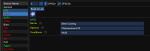
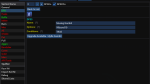


Thanks for the feedback. I'll look into something better to do than having to go to all the tabs. On the conditions not moving over, it looks like i specifically searched for@aquietone -- ok found something meatier. Not all KA cond were converted. Seems to affect lines with options:
View attachment 35090
View attachment 35089
Cond only, not cond. I'll need to make that case insensitive.Adds ability to import a KA INI and convert to MA.
- This is mostly a copy/paste job but will handle all the conversion of KConditions automagically.
- Only sets those keys which are common to both KA and MA. Any settings unique to MA will have no value set.
- After importing a KA INI, it would be best to then start muleassist to let it initialize any missing settings.
Also includes a couple small fixes to some property validation.
$Spell[Stormwall Stance].RankName}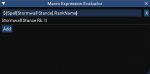
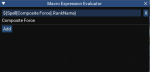
that is because it is always "composite force"Good morning! Being new to Redguides, I am experiencing the growing pains. I do keep making progress, thanks to all of you and the many information posts.
One of those growing pains is how assist requires the Rk part for most spells (It seems to not care about heals or at least some of them). The right click lookup tool does not fill in the appropriate rank for you. You have to remember to do that yourself. Now for the but... this method is better, as it automatically adjusts for the Rk:
$Spell[Stormwall Stance].RankName}
View attachment 35161
@aquietone If the right-click add would format this way, that would be so helpful.
It works fine for Rankless spells:
View attachment 35162
Happy turkey day and for the rest of you, hope your week goes well.
I didn't think any spots like dps, heals etc required the rank on the spell names, what spots are you finding that do?Good morning! Being new to Redguides, I am experiencing the growing pains. I do keep making progress, thanks to all of you and the many information posts.
One of those growing pains is how assist requires the Rk part for most spells (It seems to not care about heals or at least some of them). The right click lookup tool does not fill in the appropriate rank for you. You have to remember to do that yourself. Now for the but... this method is better, as it automatically adjusts for the Rk:
$Spell[Stormwall Stance].RankName}
View attachment 35161
@aquietone If the right-click add would format this way, that would be so helpful.
It works fine for Rankless spells:
View attachment 35162
Happy turkey day and for the rest of you, hope your week goes well.
- Add tostring in a couple spots where LIP might give us a number when we wanted a string
- Change LIP to write keys in a more user friendly order
- Prefer INI with no level over INI with level to match updates to the macro
- Fix spell list for duplicate spell names
Note that there is currently a bug with the buffs section requiring the full spell rank name. MAUI won't add rank names to spells, so until that's fixed you'll need to edit them in.
Add ability to drag and drop list entries within MAUI to rearrange them.
This is for doing something like swapping DPS1 with DPS2, not for dragging things from EQ into MAUI.
Adds ability to pickup an item from your bags and click a suitable entry in MAUI (DPS, Buffs, Heals, etc list entries, Pet focus spell, things like that) to insert the item name into that entry, so you don't have to type in item names.
I didn't think any spots like dps, heals etc required the rank on the spell names, what spots are you finding that do?
Sorry missed the response. I didn't thoroughly vett the 6 characters to see specifically what all were busted. Buffs for sure were broken if you did not use the Rk. Heals appeared to work ok. Some KissAssist inis mention specifically using Rk for DoTs. I know by using that code to wrap it in, it defeats the suggestions of MAUI/MuleAssist for potential upgrades (a few cases where it got it wrong, but usually does a good job). Any who, I think some of the conflict came into play if there happened to be an AA and a spell with very similar names too.
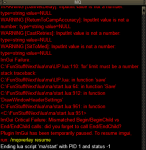
Got this error today with MAUI v0.7.1. I was working on getting a INI setup for a character. This happened when I clicked save (General tab). Lost everything. I was using a MuleAssist INI from the library: 90 Bard - The art of music is silence
View attachment 35252
Fix saving INI when a list size such as BegSize or PetToysSize isn't present in the INI.
Sorry missed the response. I didn't thoroughly vett the 6 characters to see specifically what all were busted. Buffs for sure were broken if you did not use the Rk. Heals appeared to work ok. Some KissAssist inis mention specifically using Rk for DoTs. I know by using that code to wrap it in, it defeats the suggestions of MAUI/MuleAssist for potential upgrades (a few cases where it got it wrong, but usually does a good job). Any who, I think some of the conflict came into play if there happened to be an AA and a spell with very similar names too.
Got this error today with MAUI v0.7.1. I was working on getting a INI setup for a character. This happened when I clicked save (General tab). Lost everything. I was using a MuleAssist INI from the library: 90 Bard - The art of music is silence
View attachment 35252
MuleAssist (the assist automation macro) and MQ2Mule (the plugin for configuring the macro) are 2 different things. The macro works fine standalone on next, the same as other automation macros like KissAssist.I don’t have MQNEXT yet, I currently like MuleAssist. Correct me if I am wrong, when switching to NEXT my MuleAssist won’t work? I’ll have to use this plugin which is similar to MuleAssist? Just load my old KA .ini files and press start and everything should work?
The window was part of the MQ2Mule plugin, which is not there. The macro which runs when you press start, and does all the actual work of automating your toon, is there.
MAUI (this resource) has a start button as well. and won't by default open on login, but you can set it up to do that.
Several things..Thank you for clarifying that. What is better about MQNEXT and MAUI? I’m kinda confused as to why we will have to make a switch? I’ve been doing some research but haven’t found the right information that makes me want to switch lol. My setup works so well now that I’m afraid I’ll mess it up while switching and then I’ll be stuck with a setup that doesn’t work properly.
Sorry for all the questions! Your help is much appreciated.
Several things..
1. MQ2 is barely maintained anymore. Its updated for patches but nobody is developing anything new for it.
2. Next has a whole bunch of bug fixes on top of things in MQ2. Maybe none of them are things that happen to impact your MQ2 use, that's possible.
3. Next has new features. MAUI is just here because no one has the source or the willingness to port the mq2mule plugin to next because reasons. But there are several other things which are just new and pretty neat. Lua scripts can run more than one at a time, unlike macros where you can only have 1 running. Many people run multiple different new lua things now that have been written for next.
4. Framelimiter. If you box, the performance benefits of frame limiter are just great.
5. Everyone just seems to say it performs so much better once they try it. It pretty much speaks for itself.
6. The migration is stupid easy. Sic has a video and guide on it and it just takes a few minutes, and the migrator makes it pretty painless.
7. Its just the direction which RG is moving in. There's no desire to keep maintaining MQ2 when there's next instead, what's the point.
Check out buttonmaster, lootly, framelimiter, new UIs for configuring all sorts of things, Also the new ImGui UI stuff can be dragged outside the EQ window to other monitors. Could probably think of a million more things.
MQ2Mule is one of the only things you will find that is not there on next. Everything else you use most likely is there.
Oh and the new easyfind is pretty great.
/plugin lua load. This should only need to be done once./lua run ma/start<server>_<Charactername>.cfg and then add a single line to it, /timed 100 /lua run ma/startingame.cfg instead.Yeah, you will need to do an extra step if you want to make MAUI launch automatically when you log in, but once you do that then you should be able to just hit start and use MA like you normally do.
So, if you migrated to next, you would have to do:
1. Download MAUI (this resource) and unzip it into the next/lua folder. (this needs to be done each time MAUI is updated. Lua scripts are not currently automatically updated by the RG launcher)
2. Ensure the lua plugin is loaded (i think it should be, but if it isn't, its just/plugin lua load. This should only need to be done once.
3a. You can manually launch MAUI using/lua run ma/start
3b. You can set it up to launch automatically on login using a configuration file.
4. Once its running, you can click the "Start Macro" button at the top.
You will want to make sure the INI file used and the start command match what you expect. MA now prefers INI files without the character level in the file name, like "MuleAssist_server_name.ini", and MAUI will load that if it finds it, otherwise look for an INI file with the level in the name.
For (3b), to automatically launch the UI, you would just do:
- Create a file in next/config folder called<server>_<Charactername>.cfgand then add a single line to it,/timed 100 /lua run ma/start
- Alternatively, if you wanted it to start for all toons, add that line toingame.cfginstead.

The discord is also super helpful in general. As you setup next, like 99.9% chance if you have a question, someone else has probably asked it and probably several people that can answer.Im gonna give this a shot. May need your help if I can’t figure it out! I might pay you to remote set this up for me!
- Now persists theStart Commandthat each character uses to start the MuleAssist macro.
- Also added End and Pause buttons.
What version of Kiss ini files does this convert?aquietone updated MAUI (MuleAssist UI) with a new update entry:
Import KA INIs
Read the rest of this update entry...
What version of Kiss ini files does this convert?
Does this convert the new conditions from Kiss 11/12 to the old ones in Kiss 10 version?
[DPS]
DPS1=spellname|cond1

[KConditions]
cond1=${Target.Named}[DPS]
DPS1=spellname
DPSCond1=${Target.Named}|cond in a given value.Are you importing a KA INI? or this is just an existing MA ini you're trying to load?Hey guys, I just added another toon and I'm trying to add an .ini file into MAUI. I go to import and it justkeeps saying Failure! File does not exist. Any insight would be greatly appreciated!
Are you importing a KA INI? or this is just an existing MA ini you're trying to load?
The Import KA INI option searches for the file in your next/config folder, so you would have to make sure the INI file is in there.
- Adds new /maui command:
- Display command usage: /maui
- Show the window: /maui show
- Hide the window: /maui hide
- Will now persist the INI file name
Despite me calling this 0.7.4, this technically includes 2 breaking changes, semantic versioning be damned:
- Pressing the X button on the window will no longer end the script. So, bring it back with /maui show, instead of /lua run ma/start
- Once MAUI has saved the INI file name in use, it won't try to determine a new level based...
Howdy! I need clarification on how to upgrade spells on the UI as you level? It's different than MuleAssist UI and I'm having trouble figuring it out. Thank you!
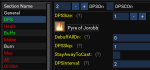
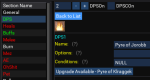
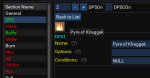
The main difference is that its per spell rather than just go through and upgrade all the things at once.
View attachment 35366
Select something from the list, like DPS1, DPS2, etc. In this case, pyre of jorobb.
View attachment 35367
Then it should show you the available upgrade for the spell. There might be some cases where it doesn't work, like composite spells.
View attachment 35368
So once you click upgrade, it should fill that in.
The main difference is that its per spell rather than just go through and upgrade all the things at once.
View attachment 35366
Select something from the list, like DPS1, DPS2, etc. In this case, pyre of jorobb.
View attachment 35367
Then it should show you the available upgrade for the spell. There might be some cases where it doesn't work, like composite spells.
View attachment 35368
So once you click upgrade, it should fill that in.
There's only upgrades right now. Haven't looked at downgrades. Did the plugin provide a list of all possible downgrades, or just the option to downgrade to your best available?Is there a downgrade function as well? I used to be able to take an .ini file and load it and then downgrade the spells in the event that an .ini was created for a higher character? Just curious.
There's only upgrades right now. Haven't looked at downgrades. Did the plugin provide a list of all possible downgrades, or just the option to downgrade to your best available?

