• You've discovered RedGuides, an EverQuest multi-boxing and scripting community 🧙‍♀️⚙️. We want you to play several EQ characters at once, come join us and say hello! 👋

  • A TLP without truebox has thawed (Very Vanilla ready)
    Frostreaver

Problem - LuaRocks/Packman/lsqlite3 not working correctly

rigo86

Active member
Joined
Jan 21, 2017
RedCents
690¢
Did a fresh install of RG/MQ, everything default. Got all my characters made and set up with autologin. Got into game, /Lua run rgmercs and I get a popup requesting to install lsqlite3. I hit yes and it hangs for a second, I see a command prompt open and close quickly then I get "Failed to load package lsqlite3 :: success" Error message and rgmercs doesn't work. I tried boxhud, same issue with luafilesystem (which is also required by rgmercs).

The .dll files for both libraries are in the modules/..../lib folder, created at the time of running the /Lua run, so it seems the packages are getting downloaded and compiled. I snooped around the forum and hit up people in discord and I did notice that it's pulling/compiling the 32 bit version but I don't see an option or anything in the luarocks command to specify 32 vs 64 bit versions. I don't know if the 64 bit version is what I need, I just kind of assume so.

I don't know, at this point, I've been debugging a default install for 5 hours and am about to give up on all of this and just take it as the universe telling me not to play EQ. Figured I'd post this in a last ditch effort of getting this working.
 
The 32 bit version would be used if you're on emu and the 64 bit version would be used if you're on live. We handle that detection automatically, but if you use the wrong execs, you might end up with the wrong versions. I think RG would handle that for you as long as you're not overwriting anything.

You can open up PackageMan.Lua in your Lua folder and set PackageMan.debug = true


Setting that to true will give you more output in the console (and also give you a command that you can run manually for testing purposes).

From there, start by running the luarocks.exe with --version and see what it outputs. then with --verbose.

Edit: This was a RG build issue. Wrong version of luarocks bundled with the live compile.
 
Last edited:
Thank you for finding this rigo86 and Knightly! It turned out to be a dirty variable on our build server. New version coming out now.
 
Thank you for finding this rigo86 and Knightly! It turned out to be a dirty variable on our build server. New version coming out now.
Fuck yea! I'm just glad we got it fixed! Glad to help where and when I can <3

Edit: and thanks to Sic for helping me out and getting me up and running with compiled libraries while we figured it out!
 
Using our latest emu version,

dumpbin.exe /headers luarocks.exe

Code:
File Type: EXECUTABLE IMAGE

FILE HEADER VALUES
             14C machine (x86)
              12 number of sections
        65A10B20 time date stamp Fri Jan 12 03:49:20 2024
          3C3400 file pointer to symbol table
            4CF3 number of symbols
              E0 size of optional header
             106 characteristics
                   Executable
                   Line numbers stripped
                   32 bit word machine

emu is 32 bit, so that's correct. Is the error word for word the same?
 
It says - "Failed to load package lsqlite3 :: success" all in red and then loops through that any time trying to run rgmercs on a new machine.
 
I just tried it and can't duplicate. Permission issue perhaps?


edit: working with sputnik in DM, same issue regardless of compile, so this one is not a RG-specific issue.


edit2: @sputnik was a champ and worked with me closely on this. The solution was to install the latest 32bit redistributable


(currently https://aka.ms/vs/17/release/vc_redist.x86.exe )
 
Last edited:
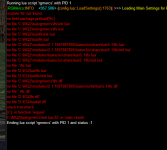
I Have done everything this post and appropriate links suggest. Cannot get rgmercs to run. Please understand im not savy in programming or anything like that

mercs.PNG
 
Last edited:
mercs1.PNG

mercs3.PNG

@Algar

Within the past year, I have used rgmercs successfully on the same PC. I just recently started playing again on a server where I can use it. Only now am I having this issue. Other than you normal updates I have not changed anything to my CPU.

I did reinstalled VS per the above link using the latest redistributable. Previous to posting this.
 
View attachment 73712

View attachment 73713

@Algar

Within the past year, I have used rgmercs successfully on the same PC. I just recently started playing again on a server where I can use it. Only now am I having this issue. Other than you normal updates I have not changed anything to my CPU.

I did reinstalled VS per the above link using the latest redistributable. Previous to posting this.

So what is happening when you click install? Be as specific as possible.

Second: there are like 5 or 6 different issues that could be tested for/worked around by the following:

Close any running versions of MQ in your system tray.

Copy your entire MQ directory to another (unprotected) location. Example:
C:\Games\MQ etc (not program files, etc).

Delete the "Modules" folder from that copied MQ install.

Run MQ from the copy (via the MacroQuest exe). Pay special attention to any AV or firewall popups.

A couple ways to do this from here, but the simplest is to log-in and try the script again.

The above works around a bunch of potential AV/Firewall/permission issues to rule them out.

Realize that just because you didn't actively change your environment, does not mean it was not changed through a combination of outside updates, such as windows, etc.
 
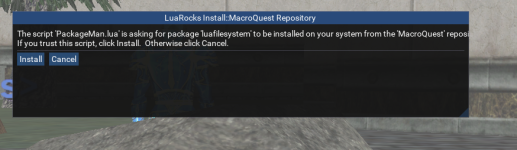
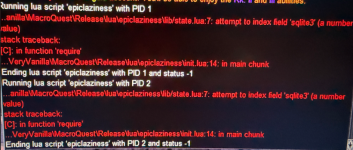
Bought epiclaziness. (First time using Lua). Clicked watch. Opened RG and updated and installed the Lua. Went in game and tried to run it and it pops up with wanting to install a script from Packageman. I say yes to install. My game freezes and unfreezes and nothing happens. I also tried on another computer and pretty much am getting the same error.


1766974594855.png
View attachment 73882
1766974554877.png
 
Well Sic. I am trying to find a fix. When you pay for something and it doesn't work, does that not make you want to find a solution? I honestly didn't think i had any names posted. I thought when you paid, watched and updated/installed its supposed to work. I understand there are bugs, but I cannot find anything on this Isqlite3. Like is it a separate file i need to download? Sorry im not a coder and sending me to other forums/posts with no answers doesnt help me either.
 
I deleted my previous reply - because im not going to argue with you - or have some negative back and forth.

I'm editing this to include that a few folks have had this same issue over the past couple of days, it IS a current issue that needs some resolution - hopefully we can start consolidating the issues/solutions into one place so we can figure out a root cause and a solution.

Since I'm not going to go through debugging or other steps to try and root-cause this current specific person's issue - I will say, however, that if you can get a copy of someone's "Modules" folder who has a working script utilizing the things packagemanager isnt downloading for you (epiclazy, tcn, etc) it will at least "work when you paid for something"
 
Someone sent me their "Modules" folder from 2024 and now it works. I am not sure how i would have downloaded the original file that was dated today and it didn't work.
 
Someone sent me their "Modules" folder from 2024 and now it works. I am not sure how i would have downloaded the original file that was dated today and it didn't work.

i don't think the Lua modules ever have changed, so this doens't really mean anything. They're all downloaded on demand.
 
its possible that you have some home wifi like xfinity xfi or something blocking the luarocks repo server. a couple things you can check to try and confirm:
try going to https://luarocks.macroquest.org and http://luarocks.macroquest.org in your browser. if they don't load / give you ssl errors / say its a risky site, your networks blocking it somewhere.
you can also open modules\2.1.1697887905\luarocks\cache\http___luarocks.macroquest.org_2.1.1697887905\manifest-5.1.status and check if it has an error like unknown protocol.
 
http doesn't matter, we don't use it, so just https://luarocks.macroquest.org should be enough. Then use xfi's tools to unblock the site. You can also report the problem here: https://spa.xfinity.com/report By choosing "I can't reach a site I want to go to" and entering in https://luarocks.macroquest.org

If you're not an xfinity customer, start by going to that luarocks URL and see what you get.
I just mentioned the http link in addition to https because the http link gave me that page about it being blocked while the https link just gave me a ssl error.
 
/waves

At a suggestion I would like to give this a try. How ever I seem to have the exact same issues the screenshots here show. (asking to install, pausing, asking a second time, pausing, then oodles of can't find this or that)

Seems the ultimate fix was:

Install VS (done, 3X over, with restarts)
Check firewall (turned off for testing, no change)
Check virus protection (turned off for testing, also no change)
Check if ISP is blocking (can see a page, but no download anything)
and lastly, beg for someone to send a copy of their "modules".

Unless another fix has come to light that I haven't found, would someone please send me a copy so I can give this a try =)

(attempting to use on EQ live, on one of the "relaxed" truebox TL servers.)

[email protected]
 
/waves

At a suggestion I would like to give this a try. How ever I seem to have the exact same issues the screenshots here show. (asking to install, pausing, asking a second time, pausing, then oodles of can't find this or that)

Seems the ultimate fix was:

Install VS (done, 3X over, with restarts)
Check firewall (turned off for testing, no change)
Check virus protection (turned off for testing, also no change)
Check if ISP is blocking (can see a page, but no download anything)
and lastly, beg for someone to send a copy of their "modules".

Unless another fix has come to light that I haven't found, would someone please send me a copy so I can give this a try =)

(attempting to use on EQ live, on one of the "relaxed" truebox TL servers.)
Sooo not solved, it will just come up again . Did you try the https suggestion ?
 
if you mean can I see the page, yes.

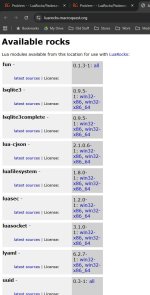
It appears I can directly download the "rocks", but I would be unsure on where to put them. (IE it seems I can see the page and have downloaded the files)

--update:

tried moving EQ to a different folder, no joy.
tried removing all plugin except mq2chatwnd, mq2lua, and mq2ice, no joy.
tried a reinstall of MQ, no joy.
tried a fresh install of EQ, no joy.
tried installing MQ on another drive, that worked. /boggle

Anyways, wanted to touch back incase this helps someone else.
 

Attachments

  • Example01.jpg
    Example01.jpg
    124.1 KB · Views: 0
  • Example02.jpg
    Example02.jpg
    81.9 KB · Views: 0
Last edited:
if you mean can I see the page, yes.

It appears I can directly download the "rocks", but I would be unsure on where to put them. (IE it seems I can see the page and have downloaded the files)

--update:

tried moving EQ to a different folder, no joy.
tried removing all plugin except mq2chatwnd, mq2lua, and mq2ice, no joy.
tried a reinstall of MQ, no joy.
tried a fresh install of EQ, no joy.
tried installing MQ on another drive, that worked. /boggle

Anyways, wanted to touch back incase this helps someone else.
I was getting the same errors, i managed to get those two files installed from that site listed. they went in modules folder. Are you using CWTN plugins at all? im about to just give up on mercs and go with them; but i don't want to get them and have issues with them calling the same files.

im also paying the "Linux tax" with this so ymmv
 
I was getting the same errors, i managed to get those two files installed from that site listed. they went in modules folder. Are you using CWTN plugins at all? im about to just give up on mercs and go with them; but i don't want to get them and have issues with them calling the same files.

im also paying the "Linux tax" with this so ymmv
Cwtn plugins don't rely on Luca rocks etc
 
if you mean can I see the page, yes.

It appears I can directly download the "rocks", but I would be unsure on where to put them. (IE it seems I can see the page and have downloaded the files)

--update:

tried moving EQ to a different folder, no joy.
tried removing all plugin except mq2chatwnd, mq2lua, and mq2ice, no joy.
tried a reinstall of MQ, no joy.
tried a fresh install of EQ, no joy.
tried installing MQ on another drive, that worked. /boggle

Anyways, wanted to touch back incase this helps someone else.
Thank you for the thought.

The fix for me was installing MQ in a different location. In other words a fresh install, not just an install over the top of the old.
 
Thank you for the thought.

The fix for me was installing MQ in a different location. In other words a fresh install, not just an install over the top of the old.
yea i havn't done a reinstall yet, i just installed it yesterday from redfetch. maybe ill nuke it and reinstall it and see what happens
 
reinstall didn't fix it for me, my issue is downloading the dlls which wine isn’t handling properly. Hopefully I don’t have issues with any of the other luas. I’m giving up, I planned on using ctwn anyway, this was more of a I need to make sure this works so other stuff isn’t broken. Thanks!
 
reinstall didn't fix it for me, my issue is downloading the dlls which wine isn’t handling properly. Hopefully I don’t have issues with any of the other luas. I’m giving up, I planned on using ctwn anyway, this was more of a I need to make sure this works so other stuff isn’t broken. Thanks!
Very possible that you will have an issue with some very popular scripts. You want to get this fixed, even if it means sourcing the files elsewhere.
 
reinstall didn't fix it for me, my issue is downloading the dlls which wine isn’t handling properly. Hopefully I don’t have issues with any of the other luas. I’m giving up, I planned on using ctwn anyway, this was more of a I need to make sure this works so other stuff isn’t broken. Thanks!
This post has a set of information for troubleshooting: https://www.redguides.com/community...ite3-not-working-correctly.93938/#post-641855 -- I'd like to see your debug output which you can get by "You can open up PackageMan.Lua in your Lua folder and set PackageMan.debug = true"
Very possible that you will have an issue with some very popular scripts. You want to get this fixed, even if it means sourcing the files elsewhere.
Sourcing files from somewhere else is just going to cause an issue on the next change.
 
This post has a set of information for troubleshooting: https://www.redguides.com/community...ite3-not-working-correctly.93938/#post-641855 -- I'd like to see your debug output which you can get by "You can open up PackageMan.Lua in your Lua folder and set PackageMan.debug = true"

Sourcing files from somewhere else is just going to cause an issue on the next change.
Awe man just when I was going to kick the can down the road for another day and actually play daddy shows up! I’ll have something for you soon.
 
This post has a set of information for troubleshooting: https://www.redguides.com/community...ite3-not-working-correctly.93938/#post-641855 -- I'd like to see your debug output which you can get by "You can open up PackageMan.Lua in your Lua folder and set PackageMan.debug = true"

Sourcing files from somewhere else is just going to cause an issue on the next change.
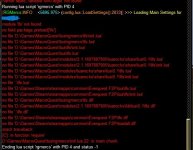
Ok I nuked my redguides folder and did a fresh redfetch so its starting from scratch. I just logged in and ran /Lua run rgmercs and here is the console output; also is this logged someplace so im not just sending screen shots that suck to read?

1772766158512.png
 
X: isn't a network share, is it?

oh this is a WINE install I think if I can read. I don't use WINE i'm probably of no help here.
 
Ok I nuked my redguides folder and did a fresh redfetch so its starting from scratch. I just logged in and ran /lua run rgmercs and here is the console output; also is this logged someplace so im not just sending screen shots that suck to read?
As brainiac said, you can use the console to copy and paste. I've added more debug output to this, but you'll need to flip debug back to true again after replacing it:
 
As brainiac said, you can use the console to copy and paste. I've added more debug output to this, but you'll need to flip debug back to true again after replacing it:
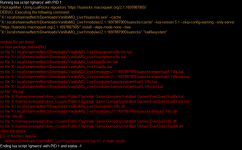
Ok here is the latest output


Running Lua script 'rgmercs' with PID 1
PackageMan: Using LuaRocks repository 'https://luarocks.macroquest.org/2.1.1697887905/'
DEBUG: Executing the following command:
"X:\.local\share\redfetch\Downloads\VanillaMQ_Live1\luarocks.exe" --cache "X:\.local\share\redfetch\Downloads\VanillaMQ_Live1\modules\2.1.1697887905\luarocks\cache" --Lua-version 5.1 --skip-config-warning --only-server "https://luarocks.macroquest.org/2.1.1697887905/" install --deps-mode none --tree "X:\.local\share\redfetch\Downloads\VanillaMQ_Live1\modules\2.1.1697887905\luarocks" "luafilesystem"
DEBUG: Command output:

DEBUG: Package install failed - 'is now installed' not found in output
module 'lfs' not found:
no field package.preload['lfs']
no file 'X:\.local\share\redfetch\Downloads\VanillaMQ_Live1\Lua\rgmercs\lfs\init.Lua'
no file 'X:\.local\share\redfetch\Downloads\VanillaMQ_Live1\Lua\rgmercs\lfs.Lua'
no file 'X:\.local\share\redfetch\Downloads\VanillaMQ_Live1\Lua\lfs\init.Lua'
no file 'X:\.local\share\redfetch\Downloads\VanillaMQ_Live1\Lua\lfs.Lua'
no file 'X:\.local\share\redfetch\Downloads\VanillaMQ_Live1\modules\2.1.1697887905\luarocks\share\Lua\5.1\lfs.Lua'
no file 'X:\.local\share\redfetch\Downloads\VanillaMQ_Live1\modules\2.1.1697887905\luarocks\share\Lua\5.1\lfs\init.Lua'
no file 'X:\.local\share\redfetch\Downloads\VanillaMQ_Live1\modules\luarocks\share\Lua\5.1\lfs.Lua'
no file 'X:\.local\share\redfetch\Downloads\VanillaMQ_Live1\modules\luarocks\share\Lua\5.1\lfs\init.Lua'
no file '.\lfs.Lua'
no file 'X:\Games\everquest\drive_c\users\Public\Daybreak Game Company\Installed Games\EverQuest\Lua\lfs.Lua'
no file 'X:\Games\everquest\drive_c\users\Public\Daybreak Game Company\Installed Games\EverQuest\Lua\lfs\init.Lua'
no file 'X:\.local\share\redfetch\Downloads\VanillaMQ_Live1\Lua\rgmercs\lfs.dll'
no file 'X:\.local\share\redfetch\Downloads\VanillaMQ_Live1\modules\2.1.1697887905\luarocks\lib\Lua\5.1\lfs.dll'
no file '.\lfs.dll'
no file 'X:\Games\everquest\drive_c\users\Public\Daybreak Game Company\Installed Games\EverQuest\lfs.dll'
no file 'X:\Games\everquest\drive_c\users\Public\Daybreak Game Company\Installed Games\EverQuest\loadall.dll'
stack traceback:
[C]: in function 'require'
...\redfetch\Downloads\VanillaMQ_Live1\Lua\rgmercs\init.Lua:15: in main chunk
Ending Lua script 'rgmercs' with PID 1 and status -1
 
This post has a set of information for troubleshooting: https://www.redguides.com/community...ite3-not-working-correctly.93938/#post-641855 -- I'd like to see your debug output which you can get by "You can open up PackageMan.Lua in your Lua folder and set PackageMan.debug = true"

Sourcing files from somewhere else is just going to cause an issue on the next change.
i did follow these steps initially. I even downloaded the .dlls directly from the site and tried that. I kept getting what appears to be a bit difference error, 64 vs 32 bit; i tried to chase that down but who knows what DLLs in wine might be causing the problem but everything i looked at was 64bit confirmed via CLI checks so im unsure if thats the real error or just a red herring
 
Problem - LuaRocks/Packman/lsqlite3 not working correctly

Users who are viewing this thread

Back
Top
Cart