• You've discovered RedGuides, an EverQuest multi-boxing and scripting community 🧙‍♀️⚙️. We want you to play several EQ characters at once, come join us and say hello! 👋

  • A TLP without truebox has thawed (Very Vanilla ready)
    Frostreaver

Problem - luarock missing in modules folder

Joined
Aug 15, 2020
RedCents
63¢
In one of the applications we ran into a problem connected not to the app, but to MQ/VV/Next install itself.

The Modules folder does not contain the Lua Rock package.
To be precise, there are no files at all in the Modules folder.
When the application tries to call on it, it produces an error.
As far as i understood its supposed to DL automatically on install.
A re-install of VV and the apps, didnt DL the content either.

Here some screenshots and further detail:

Is there any way to DL the supposed content of the Modules folder so i could put it in myself?
 
Last edited:
luarocks modules are installed automatically when they are required by a Lua script. you should have a pop-up in game that asks you if you want to install them. They won't be in the modules folder before that.
 
Hi Brainiac,

thanks for chiming in.

I get the pop up in game.

1694274985385-png.50681


After clicking install i get this error message.

1694884535143-png.50935
 
I get the pop up in game.

1694274985385-png.50681
If you ran VV as admin and then tried running it as non-admin, it's possible the modules folder was created elevated and your normal user account doesn't have permissions to write to it. You can just delete the modules folder, anything in it will redownload assuming the script writers have setup their packages properly. You'll know if this was the problem because you'll get a UAC prompt.

But since you've been running as admin/non-admin I'd recommend not doing that -- there's nothing you should need to run as admin for MQ or EQ (and in general you don't want MQ/EQ running as admin anyway). Alternating back and forth is going to cause you problems.

Once you've deleted the modules folder and restarted your computer, then try running from scratch and let's see what it does.

The other thing I would recommend is checking your firewall settings. luarocks.exe needs to be able to get out to the internet.
 
Last edited:
I have the same issue the Lua rocks command line throws error that the -e flag passed to it does not exist when any Lua try’s to install a dependency.
 
This happened to me on the RG update as well.

Couldn't say if im running it as admin or not, i've never checked. But it's all running from the RG launcher pinned to start menu, and I didn't change anything on my end. This was the first patch where it wanted to install luarocks, threw the no "-e flag dd you mean -h?" error. This only happened one time, subsequent launches seems like it installed?

Lua seems to be working but it was strange for this to suddenly pop up, and took a good while to download/install the luarocks via command prompt.
 
The issue I see is the script returns a -1, and causes the Lua resource to not be runnable. Any guide on how to debug the Lua rocks install failure? Is there a way to enable more logging? I tried cleaning out the folder and restarting same issue. It worked on my two pc, before patch after patch both hit this issue.
 
This happened to me on the RG update as well.

Couldn't say if im running it as admin or not, i've never checked. But it's all running from the RG launcher pinned to start menu, and I didn't change anything on my end. This was the first patch where it wanted to install luarocks, threw the no "-e flag dd you mean -h?" error. This only happened one time, subsequent launches seems like it installed?

Lua seems to be working but it was strange for this to suddenly pop up, and took a good while to download/install the luarocks via command prompt.
The -e is annoying but it’s actually part of the precompiled luarocks package and a bug in the way they pass arguments on windows. At some point I’m going to move it into C++ and hide that window completely because the output is not super relevant.

The reason it took a long time is because we moved the modules folder to account for the version, so it likely reinstalled the modules you had. As long as everything is running, you’re good.

For others having a problem, I will try to document some troubleshooting steps tonight that you can do and post back to me. But for now, which scripts are giving you problems (which modules is it saying it is missing?)
 
The -e is annoying but it’s actually part of the precompiled luarocks package and a bug in the way they pass arguments on windows. At some point I’m going to move it into C++ and hide that window completely because the output is not super relevant.

The reason it took a long time is because we moved the modules folder to account for the version, so it likely reinstalled the modules you had. As long as everything is running, you’re good.

For others having a problem, I will try to document some troubleshooting steps tonight that you can do and post back to me. But for now, which scripts are giving you problems (which modules is it saying it is missing?)
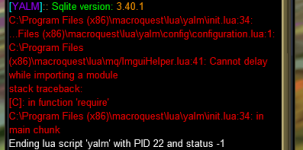
Mine is throwing an error on YALM. Worked properly before latest update, now wants to install the package on start up and errors out.

The exact error is:
1695358582712.png1695358621459.png

This is occuring on two machines. One Windows 11 and one Windows 10. The command prompt box closes too quickly for me to see the exact wording there.
 
Last edited:
I'm having the exact same issue as Gaelicboy since the update. I was out of town from Monday until today, updated RG a couple of hours ago and now running into the luarocks issue when trying to run YALM. I checked the Lua/mq/PackageMan.Lua file and mine also says version 1.1. If you need any more data, please let me know.
 
Okay, the YALM issue is specific to YALM, I don't know how it ever worked except that you used another script that installed lfs for you and then YALM used that install. It definitely wouldn't have worked by itself.
 
Okay, the YALM issue is specific to YALM, I don't know how it ever worked except that you used another script that installed lfs for you and then YALM used that install. It definitely wouldn't have worked by itself.
You are right, as usual. I just noticed boxhud wasn't running, so I accepted the option to install lfs and now everything is working fine. Looks like YALM isn't invoking the install correctly. Thanks for the pointer!
 
My issues was as you said above it was somehow running 1.0, once 1.1 was installed it works fine.
 
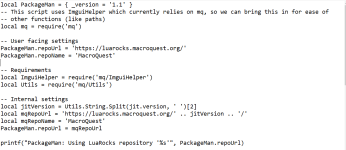
@Robahn It looks like you have an older version of PackageMan as well. You should be getting output that says what repo packageman is using and you're not getting that output according to your screenshots. Are you on live, test, or emu?
 
@Robahn It looks like you have an older version of PackageMan as well. You should be getting output that says what repo packageman is using and you're not getting that output according to your screenshots. Are you on live, test, or emu?
Hello Knightly. I am on live.

Is package man something i have to DL/install individually?
 
@Knightly
I checked the Lua/mq/packageman.Lua as described above in the thread and it shows i already have packageman 1.1
the luarocks path also appears to be correct

1696068600671.png


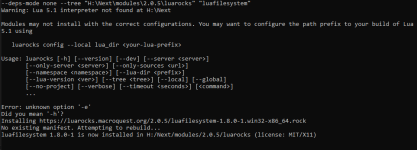
i am getting this error message now when i try to install lfs

1696068825397.png
 
Apologies, I was traveling for work. That output is more along the lines of what I would expect with the updated version of packageman. I've attached to this thread a copy of PackageMan with a couple debug statements in it, could you replace yours with this one then run it and take a look and see what it outputs? (Make sure to remove any private information if it shows it before pasting back).
 

Attachments

Apologies, I was traveling for work. That output is more along the lines of what I would expect with the updated version of packageman. I've attached to this thread a copy of PackageMan with a couple debug statements in it, could you replace yours with this one then run it and take a look and see what it outputs? (Make sure to remove any private information if it shows it before pasting back).

There no need for an apology at all. I am glad for every single minute you are willing to spend on my small individual inconvenience.

I did as you said and it returned this message this time.

1696589654471.png
 
following the path in packageman i found the source and downloaded the luafilesystem rocks file.

1696675415541.png

can i do by hand where require lfs fails?

@Knightly
 
can i do by hand where require lfs fails?
That command it outputs starting with H:\Next\luarocks.exe -- that whole line. Can you go to start --> run --> cmd

And then paste that whole line in and show me what the output is?
 
This same issue happened to one other person, where they were able to execute the command manually but passing it in wasn't able to execute it. I probably need to dig further into what scenarios that occurs.
 
@Robahn Hello sir, could you give a full guide of the solution to this problem please? I also ran into this problem (same popup) and just couldn't get it fixed
 
@Robahn Hello sir, could you give a full guide of the solution to this problem please? I also ran into this problem (same popup) and just couldn't get it fixed
See post 29. Knightly told me what i was supposed to do. I did that and it worked. If you have a different file structure, then the string you have to put into cmd would probably look different.
 
Why do i get this

Configuration files:
System : C:/Program Files/luarocks/config-5.4.Lua (not found)
User : C:/Users/mq/AppData/Roaming/luarocks/config-5.4.Lua (not found)

When i run it in CMD window. Also, while char logged in and i click the INSTALL in the pop-up window, toon just crashed to desktop.
 
Why do i get this

Configuration files:
System : C:/Program Files/luarocks/config-5.4.lua (not found)
User : C:/Users/mq/AppData/Roaming/luarocks/config-5.4.lua (not found)

When i run it in CMD window. Also, while char logged in and i click the INSTALL in the pop-up window, toon just crashed to desktop.
You don’t run laurocks directly.

Why did you crash? No idea. No info provided
 
Problem - luarock missing in modules folder

Users who are viewing this thread

Back
Top
Cart