
Install the app
How to install the app on iOS
Follow along with the video below to see how to install our site as a web app on your home screen.
Note: This feature may not be available in some browsers.
-
 You've discovered RedGuides, an EverQuest multi-boxing and scripting community 🧙♀️⚙️. We want you to play several EQ characters at once, come join us and say hello! 👋
You are using an out of date browser. It may not display this or other websites correctly.
You should upgrade or use an alternative browser.
You should upgrade or use an alternative browser.
Lua - Lua Snips and discussion
- Thread starter jb321
- Start date

is there any protection from this method?
--every once in a while it double buys..
it is in a do while but I thought the needcount < = 0 caught it and would return before buying again
more delay? or structure? and if more delay before or after the condition check?
Code:
    while (NeedCount > 0) do

        mq.doevents()

        mq.delay(100)
        NeedCount =ItemAmount- mq.TLO.FindItemCount(ItemID)()
        mq.delay(100)
        if (NeedCount <=0) then return end

    --Click Buy
        mq.cmd('/notify MerchantWnd MW_Buy_Button leftmouseup')

        mq.delay (500)
--every once in a while it double buys..
it is in a do while but I thought the needcount < = 0 caught it and would return before buying again
more delay? or structure? and if more delay before or after the condition check?
and this ain't even hard math..
and I screwed it up anyways.. PEMDAS
tv_cr * nc_1 - tv_hc
..ahem
local tv_nc = (nc_1 - tv_hc) * tv_cr

So, if this is gone..
mq.TLO.InvSlot('enviro"'..x..'"').Item.ID()
or is it really gone, or is it like Star Wars, no one is really ever gone?
Reference: https://docs.macroquest.org/macroquest/data-types-and-top-level-objects/top-level-objects/invslot
mq.TLO.InvSlot('enviro"'..x..'"').Item.ID()
or is it really gone, or is it like Star Wars, no one is really ever gone?
Reference: https://docs.macroquest.org/macroquest/data-types-and-top-level-objects/top-level-objects/invslot
Last edited:
return is for functions, break is for loops. But your logic looks like you have two different conditions determining what you should do (greater than zero versus zero inclusive).
I’d suggest reworking the logic.
I removed the if then and put a larger delay before the calculation that would trigger the condition.
Code:
        NeedCount=ItemAmount-mq.TLO.FindItemCount(ItemID)()

        while (NeedCount > 0) do

        mq.doevents()

      mq.delay(100)
      NeedCount = ItemAmount- mq.TLO.FindItemCount(ItemID)()
     mq.delay(100)

        --Click Buy
        mq.cmd('/notify MerchantWnd MW_Buy_Button leftmouseup')

        mq.delay (500)

    --change to break out..
        if (mq.TLO.Window('MerchantWnd').Child('MW_Buy_Button').Enabled() ~= true) then print ("out of cash") return false end

        mq.delay(500)

        if (NeedCount < 100) then

        --Use Quantity Slider
        mq.delay(500)
        --select qty..
        mq.cmd('/notify QuantityWnd QTYW_slider newvalue',NeedCount)
        mq.delay(500)
        end

        mq.delay(500)

        --Click Accept
        mq.cmd('/nomodkey /notify QuantityWnd QTYW_Accept_Button leftmouseup')

        mq.delay(1000)
        -- Calculate Remaining
        NeedCount =  ItemAmount  - mq.TLO.FindItemCount(ItemID)()

mq.delay(500)

mq.doevents()

end
--end do
I can only come up with a couple of conclusions..
a) the do while is unable to catch it until it cycles through again...
b) the accept button lags out and doubles up
Are there other possibilities?

So I found this very hard to read because the formatting is all over the place.
You should clean up your formatting. It really helps to understand whats going on. The indentation helps show you structure of things like while loops.
you could do something like this to check that the quantity actually changes
You should clean up your formatting. It really helps to understand whats going on. The indentation helps show you structure of things like while loops.
you could do something like this to check that the quantity actually changes
Lua:
local NeedCount = ItemAmount - mq.TLO.FindItemCount(ItemID)()
while NeedCount > 0 do
    mq.doevents()

    --Click Buy
    mq.cmd('/notify MerchantWnd MW_Buy_Button leftmouseup')
    mq.delay(500)

    --change to break out..
    if mq.TLO.Window('MerchantWnd').Child('MW_Buy_Button').Enabled() ~= true then
        print("out of cash")
        NeedCount = 0
    else
        if NeedCount < 100 then
            --Use Quantity Slider
            --select qty..
            mq.cmd('/notify QuantityWnd QTYW_slider newvalue', NeedCount)
        end

        --Click Accept
        mq.cmd('/nomodkey /notify QuantityWnd QTYW_Accept_Button leftmouseup')

        -- wait for quantity to change
        mq.delay(5000, function() return ItemAmount - mq.TLO.FindItemCount(ItemID)() ~= NeedCount end)

        -- Calculate Remaining
        local newNeedCount =  ItemAmount - mq.TLO.FindItemCount(ItemID)()
        if newNeedCount == NeedCount then
            NeedCount = 0
            print('Failed to update quantity?')
        else
            NeedCount = newNeedCount
        end
    end
end
--end doSo I found this very hard to read because the formatting is all over the place.
You should clean up your formatting. It really helps to understand whats going on. The indentation helps show you structure of things like while loops.
you could do something like this to check that the quantity actually changes
Lua:local NeedCount = ItemAmount - mq.TLO.FindItemCount(ItemID)() while NeedCount > 0 do mq.doevents() --Click Buy mq.cmd('/notify MerchantWnd MW_Buy_Button leftmouseup') mq.delay(500) --change to break out.. if mq.TLO.Window('MerchantWnd').Child('MW_Buy_Button').Enabled() ~= true then print("out of cash") NeedCount = 0 else if NeedCount < 100 then --Use Quantity Slider --select qty.. mq.cmd('/notify QuantityWnd QTYW_slider newvalue', NeedCount) end --Click Accept mq.cmd('/nomodkey /notify QuantityWnd QTYW_Accept_Button leftmouseup') -- wait for quantity to change mq.delay(5000, function() return ItemAmount - mq.TLO.FindItemCount(ItemID)() ~= NeedCount end) -- Calculate Remaining local newNeedCount = ItemAmount - mq.TLO.FindItemCount(ItemID)() if newNeedCount == NeedCount then NeedCount = 0 print('Failed to update quantity?') else NeedCount = newNeedCount end end end --end do
I appreciate the assistance.
as I understand it:
Code:
mq.delay(5000, function() return ItemAmount - mq.TLO.FindItemCount(ItemID)() ~= NeedCount end)This will wait 5 seconds or until it updates, whichever is faster of the two..
This is better than my wait 1 second or whatever and pray...
At which point the do while should break out.. If it takes longer than 5 seconds then it is a lag issue I surmise..
In other news, I am looking for a code formatter for Notepad++ for Lua.. the inefficient and current way is to put in comments so I know what is doing what and where..
Code:mq.delay(5000, function() return ItemAmount - mq.TLO.FindItemCount(ItemID)() ~= NeedCount end)
This will wait 5 seconds or until it updates, whichever is faster of the two..
This is better than my wait 1 second or whatever and pray...
At which point the do while should break out.. If it takes longer than 5 seconds then it is a lag issue I surmise..
Or bump it up to 30000 and let lag be lag. You'll still catch it with the condition and go on as soon as you can.
In other news, I am looking for a code formatter for Notepad++ for Lua.. the inefficient and current way is to put in comments so I know what is doing what and where..
Check out Visual Studio Code. It's free, you can add Lua syntax highlighting and debug support, and it'll help with the formatting.
Or bump it up to 30000 and let lag be lag. You'll still catch it with the condition and go on as soon as you can.
This was my thought.. because "damn the torpedoes full speed ahead"
Check out Visual Studio Code. It's free, you can add Lua syntax highlighting and debug support, and it'll help with the formatting.
I will take a look
I will take a look
Well, actually.. I want to do the negative of the statement to say
itemamount is not updated wait up to 30 seconds, not wait 30 seconds and then move on

So to clarify..
/delay 60s ${Merchant.ItemsReceived} something like this is what I am looking for with regards to this:
Code:
mq.delay (30000, function() return ItemAmount - mq.TLO.FindItemCount(ItemID)() ~= NeedCount end)Is there a page/site that goes into the detail about how to use mq.delay in that manner?
and because I am an engineer and can do anything:
--loop until the inventory updates
Code:
         start_inv = mq.TLO.Me.FreeInventory()

         mq.cmd('/nomodkey /notify QuantityWnd QTYW_Accept_Button leftmouseup')

    while start_inv == mq.TLO.Me.FreeInventory() do
               mq.delay(1000)

              end

start_inv =0
or does this not solve anything...
This seems to work for the count updating, however, it introduces a new issue. looping til the cows come home.. so there needs to be a counter component to quit after x amount of cycles..
This would differentiate between waiting for an update and insurmountable lag.. and the how can you possibly buy more dilemna..
Last edited:

You should use better variable names. Future you will thank past you in a few months once these are all working.
Code:
local pack = mq.TLO.FindItem('container name').ItemSlot() - 22

-- for each item in the recipe, put an item in the (next) pack slot
for pack_slot = 1, recipe_count do
    -- do something here to pick up the item
    -- mq.cmdf('/itemnotify "%s"', item_to_pickup)

    -- and then put the item in the container
    local cmd = string.format('/nomodkey /itemnotify in pack%s %s leftmouseup', pack, pack_slot)
    print(cmd)
    mq.cmd(cmd)
endYou should use better variable names. Future you will thank past you in a few months once these are all working.
Code:local pack = mq.TLO.FindItem('container name').ItemSlot() - 22 -- for each item in the recipe, put an item in the (next) pack slot for pack_slot = 1, recipe_count do -- do something here to pick up the item -- mq.cmdf('/itemnotify "%s"', item_to_pickup) -- and then put the item in the container local cmd = string.format('/nomodkey /itemnotify in pack%s %s leftmouseup', pack, pack_slot) print(cmd) mq.cmd(cmd) end
I actually just figured it out.. or at least a way.. but your way is fancy
My Way:
Code:
mq.cmd('/nomodkey /itemnotify in pack7 1 leftmouseup ')
Code:
mq.cmd('/nomodkey /itemnotify in pack'"..F.."' '"..X.."' leftmouseup ')
Last edited:
I actually just figured it out.. or at least a way.. but your way is fancy
My Way:
Code:mq.cmd('/nomodkey /itemnotify in pack7 1 leftmouseup ')
Code:for x = 0 , 3 do mq.cmd('/ctrl /itemnotify "${FindItem["'..scooby..'"]}" leftmouseup') local F = mq.TLO.FindItem(containername).ItemSlot() - 22 --local Z = mq.TLO.FindItem(containername).ItemSlot2() + 1 ev = x + 1 mq.cmd('/nomodkey /itemnotify in pack"'..F..'" "'..ev..'" leftmouseup') mq.delay(200) end
dig the scooby variable!
I hear you and these vars are from the past..
I am doing a lot more documenting this go around than I did last time.The caveat for this to work is the materials need to be in a bag or in a slot above or left of the portable container!
if we were using the UI this would not be a problem, heck you can even craft with stuff in the container already..
but we already know this, and also as a reminder the reason we are not using the UI was because of the custom UIs, but since I am tinkering I will revisit it and confirm.
The other part was typing with using the reagent name. An example is celestial essence (fruit loops) .. so we would have to type it in and it would have to be accurate..
Update: I think the type ,text and select is worked out.. I think maybe just the custom UIs. but I think that was because an option was set..
I am thinking to give the user the option or try to figure out how to determine if they are using a custom UI and if it is tested compatible for the trade-skill UI
Update to the update: Just like a bad celine dion song it's all coming back to me now.. The UIs would cause kaboom because it couldn't find a button/box.. now I know..
This code should be a quick and dirty way to find out if the components are above the container
Code:
local component = mq.TLO.FindItem(scooby).ItemSlot()
local container = mq.TLO.FindItem(containername).ItemSlot()

     if component > container then print "no workie" end
[code]
Last edited:

- Joined
- Mar 23, 2019
- RedCents
- 8,987¢
- Pronouns
- He/Him
That code is looking great!
I did see this

which could be written as
Code:
while not mq.TLO.Merchant.Open() do mq.delay(100) endor, if you don't like to think of negative conditionals you could use another Lua construct like this to make it more readable
INI:
repeat mq.delay(100) until mq.TLO.Merchant.Open()Looking very nice though - and I love the comments!
What about
Code:
mq.delay(10000, function() return mq.TLO.Merchant.Open() end)its supposed to wait until the number of items changes.
I am testing this:
Code:
mq.delay(30000, function() return ItemAmount - mq.TLO.FindItemCount(l_ItemID)() ~= NeedCount end)I think it works..
- Joined
- Mar 23, 2019
- RedCents
- 8,987¢
- Pronouns
- He/Him
I'm not a fan of the
If you use that pattern you have to say to yourself, well what if the time passes and what I expected to happen doesn't? Which means a bit more code to handle that gracefully or you'll just get a fat error about something not being there or whatnot.
mq.delay(<some giant number>, function() end) in most cases because I don't see a lot of folks actually accounting for the case where the delay times out and the "thing they were waiting on" didn't do what it was supposed to - be it a window refresh, some value changing, some item appearing, etc. If you use that pattern you have to say to yourself, well what if the time passes and what I expected to happen doesn't? Which means a bit more code to handle that gracefully or you'll just get a fat error about something not being there or whatnot.
my example somewhere in this thread where I introduced the delay did check for failure
Code:
        -- wait for quantity to change
        mq.delay(5000, function() return ItemAmount - mq.TLO.FindItemCount(ItemID)() ~= NeedCount end)

        -- Calculate Remaining
        local newNeedCount =  ItemAmount - mq.TLO.FindItemCount(ItemID)()
        if newNeedCount == NeedCount then
            NeedCount = 0
            print('Failed to update quantity?')
        else
            NeedCount = newNeedCount
endCode:-- wait for quantity to change mq.delay(5000, function() return ItemAmount - mq.TLO.FindItemCount(ItemID)() ~= NeedCount end) -- Calculate Remaining local newNeedCount = ItemAmount - mq.TLO.FindItemCount(ItemID)() if newNeedCount == NeedCount then NeedCount = 0 print('Failed to update quantity?') else NeedCount = newNeedCount end
from a logic standpoint we can wait a certain amount of time until a condition is met, and if it is never reached in that time, bail out..
or we can wait forever on a condition to be true and well.. wait forever..
In either case, a condition that may never be reached, nothing we can do about that..
which means in a perfect world, eventually whatever we were trying to attempt will happen and the flow will continue... the caveat being if it doesn't happen ,we try to force that condition to trigger by executing a line over and over and wait.
My goal ultimately is to put some structure to handle the occasional lag and sally forth..
If it were not for bad luck I would have none at all.. I can get the SQLite to do what I want, until I loop to it again..
I tell it to drop the table, create the table, and insert the values, but it doesn't seem to wipe and create the table over.
for you DBAs out there.. adding mq.delays seem to have no effect, opening closing and re-opening the db also does not seem to work.. db:busy_timeout. .. still reading up on that..
the flow is:
drop table
create table
insert values
wait until cycle has completed and then loop to the top to write a new table with changes..
the sqlite statements I am using..
because it's me, I am always doing something crazy.. so I am running this in the main program and trying to insert into in a called program. it always works the first time around but then conks out during subsequent runs.. as a test.. I provided an event that would cause it to update,, well it did,, about 10 seconds later.. weird
however.. I just tested using everything in the same program and it works like a champ ..
trying to wrap my head around prepared statements...
the plot congeals:
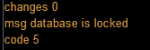
I tell it to drop the table, create the table, and insert the values, but it doesn't seem to wipe and create the table over.
for you DBAs out there.. adding mq.delays seem to have no effect, opening closing and re-opening the db also does not seem to work.. db:busy_timeout. .. still reading up on that..
the flow is:
drop table
create table
insert values
wait until cycle has completed and then loop to the top to write a new table with changes..
the sqlite statements I am using..
Code:
db_temp:exec("DROP TABLE IF EXISTS eTable")
Code:
  db_temp:exec [[
              CREATE TABLE IF NOT EXISTS eTable (
                  "ItemID"  INTEGER,
                  "ItemName"    TEXT,
                  "BuyCount"    INTEGER,
                  "RecipeID" INTEGER,
                  "MakeCount" INTEGER

              );]]
because it's me, I am always doing something crazy.. so I am running this in the main program and trying to insert into in a called program. it always works the first time around but then conks out during subsequent runs.. as a test.. I provided an event that would cause it to update,, well it did,, about 10 seconds later.. weird
however.. I just tested using everything in the same program and it works like a champ ..
trying to wrap my head around prepared statements...
the plot congeals:
Last edited:
I'm not a fan of themq.delay(<some giant number>, function() end)in most cases because I don't see a lot of folks actually accounting for the case where the delay times out and the "thing they were waiting on" didn't do what it was supposed to - be it a window refresh, some value changing, some item appearing, etc.
If you use that pattern you have to say to yourself, well what if the time passes and what I expected to happen doesn't? Which means a bit more code to handle that gracefully or you'll just get a fat error about something not being there or whatnot.
To be fair, I don't like waiting a long time either. But lag is going to happen. TSC (the macro version) sometimes fails on certain vendors in PoK just because it didn't wait long enough.
I've omitted error checking in discussion just to get an answer to the immediate issue. However, you are correct that error checking to insure the expected condition is met is also important and necessary.
To be fair, I don't like waiting a long time either. But lag is going to happen. TSC (the macro version) sometimes fails on certain vendors in PoK just because it didn't wait long enough.
I've omitted error checking in discussion just to get an answer to the immediate issue. However, you are correct that error checking to insure the expected condition is met is also important and necessary.
Was using buy.inc and then Saar made a custom version just for TCS, both seemed to have quirks from time to time, never got it figured out. My Lua version of buy also needs to be worked on.. more..
For SQL your pattern shouldn’t be to drop and recreate the table every time. The pattern for this should be something like storing metadata on your schema.
As an example, if the table doesn’t exist you create it and insert an entry telling you that it is version 1 (schema version 1). If it does exist, you query the version and see if you need to make changes to the table.
This allows you to continually update without breaking changes (or dropping the table).
All of that said it sounds like you are doing this transactionally and not ending your transaction.
As an example, if the table doesn’t exist you create it and insert an entry telling you that it is version 1 (schema version 1). If it does exist, you query the version and see if you need to make changes to the table.
This allows you to continually update without breaking changes (or dropping the table).
All of that said it sounds like you are doing this transactionally and not ending your transaction.
If it were not for bad luck I would have none at all.. I can get the SQLite to do what I want, until I loop to it again..
I tell it to drop the table, create the table, and insert the values, but it doesn't seem to wipe and create the table over.
for you DBAs out there.. adding mq.delays seem to have no effect, opening closing and re-opening the db also does not seem to work.. db:busy_timeout. .. still reading up on that..
the flow is:
drop table
create table
insert values
wait until cycle has completed and then loop to the top to write a new table with changes..
the sqlite statements I am using..
Code:db_temp:exec("DROP TABLE IF EXISTS eTable")
Code:db_temp:exec [[ CREATE TABLE IF NOT EXISTS eTable ( "ItemID" INTEGER, "ItemName" TEXT, "BuyCount" INTEGER, "RecipeID" INTEGER, "MakeCount" INTEGER );]]
because it's me, I am always doing something crazy.. so I am running this in the main program and trying to insert into in a called program. it always works the first time around but then conks out during subsequent runs.. as a test.. I provided an event that would cause it to update,, well it did,, about 10 seconds later.. weird
however.. I just tested using everything in the same program and it works like a champ ..
trying to wrap my head around prepared statements...
the plot congeals:
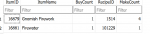
View attachment 32922
the command comes back correct:

buuut.. table remains unchanged after db:exec
For SQL your pattern shouldn’t be to drop and recreate the table every time. The pattern for this should be something like storing metadata on your schema.
As an example, if the table doesn’t exist you create it and insert an entry telling you that it is version 1 (schema version 1). If it does exist, you query the version and see if you need to make changes to the table.
This allows you to continually update without breaking changes (or dropping the table).
All of that said it sounds like you are doing this transactionally and not ending your transaction.
I see it as inefficient and a lazy way to avoid using an array for ephemeral data. I wanted to avoid multi-dims for the time being but it seems I may have to go that route, otherwise pounding sqlite to create a new table every few seconds is probably just plain silly
Avoiding multi dim could be just taking a string and parsing out the elements as well.. I am full of ideas, probably not good ones,.
SQLite in memory is a thought also..
My concern with arrays has always been size limitation. I could imagine a dataset having 50000 elements * 5 for each additional item in the multi-dim
The other side of that coin would be making a massive list and creating the table based on that list.. but this table would get updated every couple of minutes. So I need to pick and choose for how I want to proceed...
Lastly, using a SQL DB to write for multiple toons with the same table is no bueno... so make a bunch of tables with toon names (bad) or use arrays (good), this kills multi-toon running off the same Lua
Last edited:
For the saga watchers.. I opted to go back to arrays for shopping lists, I will reserve the right to use SQLite for more arduous endeavors..
My solution was to take a string and break it down..
1) Remove the quotes...
Example Sample String "'Tacos,'1','3332'"
Cleaned: Tacos,'1','3332'
2) Remove the ticks and return a specific element from the string (comma delimited)
3) get the value from that element in the string.
My solution was to take a string and break it down..
1) Remove the quotes...
Code:
local clean_string = string.gsub(p_raw_table[x], "'", '')Example Sample String "'Tacos,'1','3332'"
Cleaned: Tacos,'1','3332'
2) Remove the ticks and return a specific element from the string (comma delimited)
Code:
    function return_string(str, int)
        local counter = 0
        for word in string.gmatch(str, '([^,]+)') do
            counter = counter + 1
            if counter == int then return word end
        end
    end
3) get the value from that element in the string.
Code:
var_ItemCount = tonumber(return_string(clean_string, 3))
Last edited:
just another day... working on the trade-skill quest engine for delivery steps and re-makes
just noticed when I use ..code it removes CRs
all that.. gets you.. this:
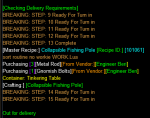
just noticed when I use ..code it removes CRs
Code:
       -- Determine delivery item need requirements
        local l_need_count = deliver_item_req - deliver_item_cur
        -- Determine On Hand Count
        local rii = quest_row.Quest_Item_ID
        local hc = mq.TLO.FindItemCount(rii)()
        -- Troubleshooting
        --  print("We have: ", hc, " We need: ", l_need_count, " Step: ",quest_row.Quest_Deliver_Step)
        -- Determine Completion Status
        if hc >= l_need_count then
            print("BREAKING: STEP: ", quest_row.Quest_Deliver_Step,
                  " Ready For Turn in")
            break
        end
        -- Check Recipe and Create Recipe List
        local recipe_list, s = crunch.items(quest_row.Quest_Recipe_ID,
                                            l_need_count, hc)
        -- Determine If We Can Make The Recipe
        soured = s
        if soured == 0 then
            print "BREAKING: Can't make it"
            break
        end
        -- Create Shopping List
        local raw_table = raw_item_list_table(recipe_list)
        local shopping_list = final_shopping_list_table(raw_table)
        -- Go Shopping
        go_shopping(shopping_list)
        mq.delay(500)
        mq.cmd('/cleanup')
        mq.delay(500)

        -- Go Crafting
        go_craft(recipe_list, 0)
all that.. gets you.. this:
The engine is solid, does the magic of the old TCS but with way better coding and efficiency and Lua-ey.
Refresher..
Tries to make trade-skill tasks - if it can it does, if it fails, it keeps trying, until it cannot anymore or it succeeds..
It also ignores what is in inventory and makes item count until the task updates - so if you have 1 compass in inventory already and the task has no update it will just ignore that inventory item.
If the steps are exhausted it checks the delivery status and counts for re-makes
If something got ate, drank-ed, or destroyed it will try to remake it, it will also go until it can go no further.. or die trying..
then.. you are ready to do the turn in for whatever cool quest reward
My old code in TCS MQ did the trick but boy was it clunky and a hot mess, some limitations, byzantine, also an undeniable work of art..
this is what I got so far for quests but am adding as I go:
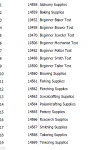
Refresher..
Tries to make trade-skill tasks - if it can it does, if it fails, it keeps trying, until it cannot anymore or it succeeds..
It also ignores what is in inventory and makes item count until the task updates - so if you have 1 compass in inventory already and the task has no update it will just ignore that inventory item.
If the steps are exhausted it checks the delivery status and counts for re-makes
If something got ate, drank-ed, or destroyed it will try to remake it, it will also go until it can go no further.. or die trying..
then.. you are ready to do the turn in for whatever cool quest reward
My old code in TCS MQ did the trick but boy was it clunky and a hot mess, some limitations, byzantine, also an undeniable work of art..
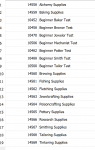
this is what I got so far for quests but am adding as I go:
Attachments
Last edited:
Great News.. the need to destroy in Abysmal Sea, seems to have vanished. Before you would not get any new items until you destroyed the left overs.. now it wipes the left overs! Well this works on pottery will check others..
I spoke too soon, there are instances during pottery where you can have left overs from unfired items and nothing to turn in.

Time to wear the dunce cap...
Why is this not working:
but this is:
pro-tip: don't do this:
print (mq.event())
nevermind..
the events wouldn't do anything until I got the blue trade skill text... which is why it worked for everything but the final text.. which is perplexing in itself..
I looked at the drunkard stein macro events and it seems pretty straight forward.. but I am unable to get text to trigger for me...
Why is this not working:
Code:
mq.event('RecipeWin', "#*#nuz says, 'You've#*#", ForceEnd)but this is:
Code:
mq.event('RecipeFan', "#*#nuz says, 'Fantastic#*#", ForceEnd)pro-tip: don't do this:
print (mq.event())
nevermind..
the events wouldn't do anything until I got the blue trade skill text... which is why it worked for everything but the final text.. which is perplexing in itself..
I looked at the drunkard stein macro events and it seems pretty straight forward.. but I am unable to get text to trigger for me...
Last edited:
Time to wear the dunce cap...
Why is this not working:
Code:mq.event('RecipeWin', "#*#nuz says, 'You've#*#", ForceEnd)
but this is:
Code:mq.event('RecipeFan', "#*#nuz says, 'Fantastic#*#", ForceEnd)
pro-tip: don't do this:
print (mq.event())
nevermind..
the events wouldn't do anything until I got the blue trade skill text... which is why it worked for everything but the final text.. which is perplexing in itself..
I looked at the drunkard stein macro events and it seems pretty straight forward.. but I am unable to get text to trigger for me...
So, if just starting out and not fooling with containers
Code:
while true do
    mq.cmd('/doevents flush')
    mq.delay(1000)
    mq.cmd('/say help')
    mq.doevents()
    mq.delay(1000)
end
This works..
To add more paint to the canvas..
the flow is craft, turn in or destroy items, and then ask for more..
So, until it completes a loop it wont work..
.. so I have to stop it and force it to loop and work off of the results..well.. because the text can be triggered by anyone, I am going back to the 'old way'.. which was to cycle through all components in all recipes.. and if there isn't anything left, obviously we have won!
Also while I am testing it is nice to see someone running the old TCS macro while I am testing the Lua.. :p
Last edited:
Users who are viewing this thread
Total: 1 (members: 0, guests: 1)
Share: