• You've discovered RedGuides, an EverQuest multi-boxing and scripting community 🧙‍♀️⚙️. We want you to play several EQ characters at once, come join us and say hello! 👋

  • A TLP without truebox has thawed (Very Vanilla ready)
    Frostreaver

Lua - Lua Snips and discussion

jb321

Captain Obvious
Creator
Joined
Mar 29, 2020
RedCents
7,705¢
I will be posting snips of common things that happened in MQ but do it in Lua. I will also take the Sic approach, if it can be done better, I either didn't know how, or didn't want to at the time. However, I am not opposed to better, faster, cheaper methods..

Also, if this is not the appropriate place or can be added to another list/forum please advise..

So without further Adieu ..

Behold -- Walk To NPC in Lua

local WalkToNPC = function(npcName)

--convert userdata to number
npc_up = tonumber(tostring(mq.TLO.SpawnCount(npcName)))

if (npc_up == 0) then
mq.cmd.echo("\ao[\atTCS\ao]: \ag"..npcName.. " not up, waiting 10s to try to walk to it")
--not true.. delay is bogus..or not in correct zone.
mq.delay(100)
return false
else
mq.cmd('/tar',npcName)
mq.delay(100)
mq.cmd('/nav spawn npc '..npcName.. '|dist=14 los=on log=off')

--how do we know we mades it there precious.. nasty luases
--if (Navigation.Active - dunno how to access this

--user_moving = mq.TLO.Me.Moving
mq.delay(100)

mvv= tostring(mq.TLO.Me.Moving)

-- If we are moving do not end execution
while mvv == "TRUE" do
mq.delay(10)
mvv= tostring(mq.TLO.Me.Moving)
end

end

end

Invoke by...

WalkToNPC("Chef Denrun")

and I still don't know how to put quotes around a variable to be passed to a function. I stink
 
Last edited:
I like this thread... You can wrap all that up in [CODE]...[/CODE] to get code formatting.

I hope you don't mind a little feedback, but you can make this far more Lua-ey:
  • prefer print to mq.cmd.echo
  • don't tostring and then compare it to boolean strings, just use booleans! while mq.TLO.Me.Moving() do mq.delay(10) end
  • brainiac will yell at you for doing this: local WalkToNPC = function (npcName), instead do this: local function WalkToNPC (npcName)
  • you don't need that tonumber, just evaluate the userdata: mq.TLO.SpawnCount(npcName)()
  • You're mixing returns in this function. In the fail case, you are returning false, otherwise you're not retuning anything (unit/void return)
  • I'm not sure what you mean by the last statement, why are trying to put quotes around a variable? If that's what you actually want, it's this: '"'..myVar..'"'
  • getting active navigation is just like any other TLO: mq.TLO.Navigation.Active()
 
A few notes -

Don't target stuff across the zone and then nav to it. Grab the spawn, run the nav using the spawn ID, and then target once you are in normal range.

You don't need to call tostring(mq.TLO.Me.Moving) - you can just do while mq.TLO.Me.Moving() do ... end. Even then, Me.Moving isn't ideal for navigation - if you break on keypress, the condition will be false and the script will carry on with whatever logic comes next (spamming translocator messages/quest text/turn-ins). Instead, use mq.TLO.Navigation.Active() - you can pause nav, do laps, go for a swim - pretty much anything but zone or /nav stop and your script will pick back up in the right place once you unpause nav.

Code:
local function nav_to_spawn(spawn, los, log)
    if spawn.ID() > 0 then
        mq.cmdf('/nav id %s | dist=12 los=%s log=%s', spawn.ID(), los and 'on' or 'off', log and 'on' or 'off')
        while mq.TLO.Navigation.Active() do
            mq.delay(100)
        end
    else
        print('nav_to_spawn: ' .. tostring(spawn.Name()) .. '(' .. tostring(id) .. ') does not exist. Not going to run /nav.')
      end
end

-- basic usage
local spawn = mq.TLO.Spawn('Chef Denrun')
nav_to_spawn(spawn) -- no los/logging
nav_to_spawn(spawn, true) -- los, no logging
nav_to_spawn(spawn, true, true) - los & logging

-- chaining it together

-- do the nav logic
nav_to_spawn(spawn)
-- after nav stops, target
mq.cmdf('/target id %s', spawn.ID())
-- wait for 10s or until our target is set as the spawn
mq.delay('10s', function() return mq.TLO.Target.ID() == spawn.ID() end)
-- other logic
do_the_things
 
actually, I recently did this (didn't make a function for it because it's short, but a function is a good idea:

Code:
local WalkToNPC = function(npcName)
    local npcID = mq.TLO.NearestSpawn(npcName).ID()
    if npcID then
        mq.cmdf('/nav id %d', npcID) -- use the id to avoid targeting across the zone
        while mq.TLO.Nav.Active() do
            mq.delay(100)
        end
    else
        print('\ao[\atTCS\ao]: \ag'..npcName..' not up, waiting 10s to try to walk to it')
    end
end

EDIT: damnit ed beat me to the punch
 
I like this thread... You can wrap all that up in [CODE]...[/CODE] to get code formatting.

I hope you don't mind a little feedback, but you can make this far more lua-ey:
  • prefer print to mq.cmd.echo - dunno how to print in color.. yet Heh.,. Found It!
  • don't tostring and then compare it to boolean strings, just use booleans! while mq.TLO.Me.Moving() do mq.delay(10) end - yep forgot about ()
  • brainiac will yell at you for doing this: local WalkToNPC = function (npcName), instead do this: local function WalkToNPC (npcName) /shrug dance monkey /shrug.. Resistance is futile?
  • you don't need that tonumber, just evaluate the userdata: mq.TLO.SpawnCount(npcName)() - yep forgot about ()
  • You're mixing returns in this function. In the fail case, you are returning false, otherwise you're not retuning anything (unit/void return) - Yeah need to get this squared away
  • I'm not sure what you mean by the last statement, why are trying to put quotes around a variable? If that's what you actually want, it's this: '"'..myVar..'"' - Will Try Again
  • getting active navigation is just like any other TLO: mq.TLO.Navigation.Active() - thanks - I have the TLO page up and still blind.. :)
Well https://docs.macroquest.org/macroquest/data-types-and-top-level-objects/top-level-objects this is why no nav I don't see it :P

Fail:

test_name=Chef Denrun

WalkToNPC('"'..test_name..'"')

test_name="Chef Boyardee" I am sure works but back to the same problem :P

The NPC name will be read from a sql file and will be returned as Alchemist Crazyroot.. this is where I haven't read enough yet..
 
Last edited:
actually, I recently did this (didn't make a function for it because it's short, but a function is a good idea:

Code:
local WalkToNPC = function(npcName)
    local npcID = mq.TLO.NearestSpawn(npcName).ID()
    if npcID then
        mq.cmdf('/nav id %d', npcID) -- use the id to avoid targeting across the zone
        while mq.TLO.Nav.Active() do
            mq.delay(100)
        end
    else
        print('\ao[\atTCS\ao]: \ag'..npcName..' not up, waiting 10s to try to walk to it')
    end
end

EDIT: damnit ed beat me to the punch

In the TCS world.. my WalkTONPC had a bit of code.. and the reason (then) was to operate differently based on NPCs in different zones.. If I remember correctly Abysmal Sea LOS was everywhere and I would nav directly to x y z or however it is.. based on the npc.. with a lot of helper navs here and there to get around the zone, I also did some nav to area to get to NPC in crescent reach as well..
 
Referencing this page: https://gitlab.com/macroquest/next/mqnext/-/wikis/Lua Events and Binds

Code:
local function callback (...)
  local args = {...}
  local str = ''
for i=1, #args, 1 do
    if i > 1 then str = str .. ' '
    str = str .. args[i]
  end
 
end
  mq.cmd.echo("\at",str)
  print (str)
end

mq.bind('/TCS', callback)

x=22
while x == 22 do
mq.delay(10)
end

What I am trying to do is create a Lua script that don't quit and waits for input.. something like "/tcs make tacos 20"

failing for me.. Ultimately the desire is to have multiple user input fields.. a good example is how pocketfarm does it
 
Last edited:
WalkTONPC - Cleansed..

Code:
local function WalkToNPC (npcName)

  local npcID = mq.TLO.NearestSpawn(npcName).ID()
    if not npcID then mq.cmd.echo("\ao[\atTCS\ao]: \ag"..npcName.. " not up, waiting 10s to try to walk to it")
    mq.delay(100)
    --REVIEW
    --return false
    else               
    mq.delay(100)
    --REMOVE
    --mq.cmd('/nav spawn npc '..npcName.. '|dist=14 los=on log=off')
    --REPLACEMENT
    mq.cmdf('/nav id %d | dist=14 los=on log=off', npcID)
    mq.delay(100)
    while mq.TLO.Nav.Active() do
    mq.delay(10)
    end
   
    --Target NPC for interaction
    mq.cmd('/tar',npcName)
   
    end
    end

This may or may not be good but.. Add it in to just return if we are under 15 from the NPC

Code:
local NPCDistance = mq.TLO.Spawn(npcName).Distance()
if (NPCDistance < 15) then return end
 
Last edited:
Why is this so hard on me.. like repeating the second grade 12 times..

z=22

INSERT INTO ShoppingTable VALUES (1, "Hello World",..z);

It is a number and I figured to add into a table you use .. preceding
 
sql statements aren't the same as lua string concatenation


sql="INSERT INTO ShoppingTable VALUES ('"..t_row.MItemID.."', '"..t_row.ItemName.."','"..t_row.Count.."')"
db:exec(sql)

Seems I was worried for no reason... I believe...

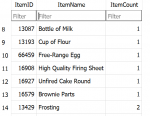
Ended up with

1630359218931.png

Which is what I mostly want, now I just need to squash down duplicate ItemIDs and add the ItemCount sums
 
Last edited:
INSERT INTO Table VALUES (1, 'Hello World', z);

if that doesn't work, look at using a prepared statement and binding the parameters values with whatever sql lib you are using
 
Nothing terribly fancy, but just wanted to show what my pestering has wrought..

What happened.. ran around and simulated buying things from vendors in specific order in specific amounts to prepare to make the stuffs.. all done in the Lua's
 

Attachments

Now Trying to Re-Write buy.inc to buy.Lua

Code:
--local mq = require('mq')
--
-- buy.lua
-- Version 1.0b
--
-- Date: August 30, 2021
-- UPDATED BY JB321
--
--
-- Usage: Buy(ItemToBuy) (Amount Needed)
--
--
-- Disclaimer:
-- Code was used from other programers also from the MQ Forums.
--

--local ForceEnd = function ()
--   mq.exit()
--end

--Force End?

mq.event('Broke1', "#*#You cannot afford#*#", ForceEnd)

mq.event('Broke2', "#*#You can't afford#*#", ForceEnd)

mq.event('BuyFullInv', "#*#Your inventory appears full! How can you buy more?#*#", ForceEnd)


---------------------------------------------------------------------------------------------
--Function: Buy
---------------------------------------------------------------------------------------------
    local function buy(ItemToBuy ,amount)
   
    mq.cmd.echo("here")
--|/echo Buying ${ItemToBuy}!
    local QTY = 0
    --/declare l2 int local
    local l2 = 0
    local LastItemCount = 0
    local CurrentItemCount = 0
   
    ---need to right click vendor..
   
LastItemCount = mq.TLO.Window(Window(MerchantWnd).Child(ItemList).Items)()
---SMALL delay to allow the MERCHANT Window to populate
    --/delay ${Math.Calc[${DelayMult}*2]}s
    FIC = mq.TLO.FindItemCount(ItemToBuy)()
    print (FIC)
   
     QTY = amount- FIC
     print (QTY)
    
::Filling::

    mq.delay(100)
   
    CurrentItemCount = mq.TLO.Window(Window(MerchantWnd).Child(ItemList).Items)()
       
    if (CurrentItemCount ~= LastItemCount) then
         LastItemCount = mq.TLO.Window(Window(MerchantWnd).Child(ItemList).Items)()
        goto Filling end
   
    if (FindItemCount[ItemToBuy] >= amount) then return end
   
    l2 = mq.TLO.Window(Window(MerchantWnd).Child(ItemList).List(ItemToBuy,2))()
   
    --if not l2!!!
    if l2 then
        if mq.TLO.Window(Window(MerchantWnd).Child(MW_UsableButton).Checked) then
            mq.cmd('/notify MerchantWnd MW_UsableButton leftmouseup')
            goto Filling end
           
        mq.cmd.echo("Couldn't find",ItemToBuy)
               
     else
   
        mq.cmd('/nomodkey /notify MerchantWnd ItemList listselect l2')
        mq.cmd('/notify MerchantWnd ItemList leftmouse l2')

--where to put this?
--end
        mq.delay(100)
   
    mq.cmd.echo('Buying ",ItemToBuy," until I get", amount')
    local char = nil
    local InStr = nil
    local loopctr = 0
   
--?   
    end
::Loop::

    if (QTY > mq.TLO.Window(Merchant.Item(ItemToBuy).StackSize))() then
        mq.cmd('/nomodkey /shift /notify MerchantWnd MW_Buy_Button leftmouseup')
        mq.delay(100)
        mq.doevents()
        QTY =  amount- mq.TLO.FindItemCount(ItemToBuy)()
        mq.delay(100)
        goto Loop
     else
    
    
     mwss = mq.TLO.Window(Merchant.Item(ItemToBuy).StackSize)()
        if (QTY > 0 and QTY < mwss) then
        mq.cmd('/notify MerchantWnd MW_Buy_Button leftmouseup')
        mq.delay(100) mq.TLO.Window(Window(QuantityWnd).Open)()
        mq.cmd('/nomodkey /notify QuantityWnd QTYW_SliderInput leftmouseup')
        mq.delay(100)
        mq.cmd('/nomodkey /keypress right chat')
        mq.cmd('/nomodkey /keypress right chat')
        mq.cmd('/nomodkey /keypress right chat')
        mq.cmd('/nomodkey /keypress backspace chat')
        mq.cmd('/nomodkey /keypress backspace chat')
        mq.cmd('/nomodkey /keypress backspace chat')
        InStr = QTY
        --for loopctr 1 to ${InStr.Length}
            --    char = ${InStr.Mid[${loopctr},1]}
            --    /if (!${char.Length}) {
            --        /nomodkey /keypress Space chat
                --} else {
                --    /nomodkey /keypress ${char} chat
            --    }
            --/next loopctr
            --/nomodkey /notify QuantityWnd QTYW_Accept_Button leftmouseup
            --/delay 5s NOT ${Window[QuantityWnd].Open}
            --/doevents
            --/delay 2s
        --}
    --}
    QTY = amount - mq.TLO.FindItemCount(ItemToBuy)()
    if (QTY<=0) then return end
    goto Loop
    return
    end

end
end

----------------------------------------------------------------------------------------------
--SUB: Event_Broke1
----------------------------------------------------------------------------------------------
    --Sub Event_Broke1
    --/echo You are out of money!
    --/beep
    --/end
    --/return


----------------------------------------------------------------------------------------------
-- SUB: Event_Broke2
----------------------------------------------------------------------------------------------
--    Sub Event_Broke2
    --/echo You are out of money!
    --/beep
    --/end
    --/return

----------------------------------------------------------------------------------------------
-- SUB: Event_BuyFullInv
----------------------------------------------------------------------------------------------
    --Sub Event_BuyFullInv
    --/echo Your inventory is full!
    --/beep
    --/end
    --/return

buut when I try to invoke it from the calling code:

local buy = require('buy')
buy("tacos",1)

I get:

1630383646226.png

I also noticed the Window(Merchant - I need to fix those :P
 
Last edited:
Look at DanNet Helpers or Write to see examples returning a reusable function. Also, avoid goto - use a while or for.
 
Look at DanNet Helpers or Write to see examples returning a reusable function. Also, avoid goto - use a while or for.

Taking a look now also took a look at Aquietone's doc, pretty good too..

I would prefer to make things modular, but can slap it all in one long list of code..
 
Last edited:
For my own edification , can these be used in the same manner as an .inc file or is that not quite the intent overall..

They can be, if you check the Write.Lua or DanNet helpers Lua special ed mentioned above, they are good examples of how to do that, also I updated the guide I wrote with a section about includes near the bottom.

In your scenario, you would end up with something like
[CODE lang="Lua" title="buy.Lua"]
local mq = require('mq')

local exports = {}

exports.buy = function(ItemToBuy ,amount)
-- implement the buy function
end

return exports
[/CODE]

which you could then use in your main script:
[CODE lang="Lua" title="main.Lua"]
local helpers = require('buy')

helpers.buy('water flask', 100)
[/CODE]

Some explanation of what is happening here:
- buy.Lua creates a local table called exports, with 1 key in it, "buy". The value for the key "buy" is your function.
- the script returns the exports table

- main.Lua assigns the return value of buy.Lua, which is the table containing the buy function, to the variable "helpers"
- you can then call the buy function by accessing it from the table, using helpers.buy(itemname, count)
 
Does anyone have a snip for parceling items to a character from a list of items? IE I want to send all of a specific type of tradeskill item to X character.
 
They can be, if you check the Write.lua or DanNet helpers lua special ed mentioned above, they are good examples of how to do that, also I updated the guide I wrote with a section about includes near the bottom.

In your scenario, you would end up with something like
[CODE lang="lua" title="buy.lua"]
local mq = require('mq')

local exports = {}

exports.buy = function(ItemToBuy ,amount)
-- implement the buy function
end

return exports
[/CODE]

which you could then use in your main script:
[CODE lang="lua" title="main.lua"]
local helpers = require('buy')

helpers.buy('water flask', 100)
[/CODE]

Some explanation of what is happening here:
- buy.lua creates a local table called exports, with 1 key in it, "buy". The value for the key "buy" is your function.
- the script returns the exports table

- main.lua assigns the return value of buy.lua, which is the table containing the buy function, to the variable "helpers"
- you can then call the buy function by accessing it from the table, using helpers.buy(itemname, count)


I got it figured out, thank you.. :)

I needed to add the sub={} ,the return sub and the sub.task function in the required file..
 
This is what I got so far.. instead of converting buy.inc I am totally re-writing it..

Code:
function buy.item(ItemToBuy,ItemAmount)
--add NPC to right click on automagically?

print ("\ayItem Name:",ItemToBuy," Buy Amount:",ItemAmount)

--conditions..

--uncheck only usuable items
    if mq.TLO.Window(MerchantWnd).Child(MW_UsableButton).Checked() then
            mq.cmd('/notify MerchantWnd MW_UsableButton leftmouseup')
            --put in while delay
        end
         
    --Select Item From Merchant
    mq.TLO.Merchant.SelectItem(ItemToBuy)()

    mq.delay(100)
    -- Item Not Found
    if (mq.TLO.Merchant.SelectedItem() == nil) then print ("Unable to Find: ",ItemToBuy)  return end
 
    --mq.cmd('/notify MerchantWnd ItemList leftmouse l2')
 
    --get the item # from the list? how to?
    --l2 = mq.TLO.Window(MerchantWnd).Child(ItemList).List("Mandrake Root",2)()
    --print(l2," value item index l2")
     
        --select the item in the window based on index?
        --mq.cmd('/notify MerchantWnd ItemList leftmouse l2')
        --mq.cmd('/nomodkey /notify MerchantWnd ItemList listselect l2')
 
        --select quantity
 
        --calcs
    --    QTY =  mq.TLO.FindItemCount(ItemToBuy)() - ItemAmount
        --print(QTY)
 
        --Get Stack Size
        StackSize = mq.TLO.Merchant.Item(ItemToBuy).StackSize()
     
        --Click Buy
        mq.cmd('/notify MerchantWnd MW_Buy_Button leftmouseup')
     
     
            --?
                while mq.TLO.Window(QuantityWnd).Open() ~= true do
                mq.delay (10)
                print "not open"
                end
     
        --ItemAmount=1200
     
        if (ItemAmount < StackSize) then
             
        --Use Quantity Slider
        mq.delay(100)
        --select qty..
        mq.cmd('/notify QuantityWnd QTYW_slider newvalue',ItemAmount)
        mq.delay(100)
        --check slider value?
        end
 
         
    --    ItemAmount = ItemAmount - inventory?
         
                --Click Accept
                mq.cmd('/nomodkey /notify QuantityWnd QTYW_Accept_Button leftmouseup')
         
                --?
                while mq.TLO.Window(QuantityWnd).Open() do
                mq.delay (10)
                end

Chugging along..

Are there better ways to do " mq.cmd('/nomodkey /notify QuantityWnd QTYW_Accept_Button leftmouseup')" using mq.TLO or no?

- I am thinking yes, but I would have to dig around in my old code.. I keep thinking about this for some reason:

/notify TradeskillWnd COMBW_ExperimentButton leftmouseup

Not sure if it is an issue or non issue, but I cannot highlight the item because I am unable to get the index.

Well I was feeling good about it until I ran into my old nemesis..

mq.TLO.Merchant.SelectItem("'..ItemToBuy..'")() -- gets the name right but can't buy it
mq.TLO.Merchant.SelectItem(ItemToBuy)() -- loose match
mq.TLO.Merchant.SelectItem(=ItemToBuy)() - dies on the vine
mq.TLO.Merchant.SelectItem("Block Of Clay")() - loose match find small block of clay

I didn't see the replacement for exact matching on the Lua MQNeXt page, but I have been known to be blind.

While I am at it, I can't get this either..

l2 = mq.TLO.Window(MerchantWnd).Child(ItemList).List('"..ItemToBuy.."',2)()
 
Last edited:
Is there exact matching in the mq.TLOs?

Selecting this in merchant windows isn't something i've done before but it looks like
Code:
mq.TLO.Merchant.SelectItem('='..ItemToBuy)
has the same effect as:
Code:
/invoke ${Merchant.SelectItem[=${ItemToBuy}]}
exact match by just prepending = at the front of the item name
 
Selecting this in merchant windows isn't something i've done before but it looks like
Code:
mq.TLO.Merchant.SelectItem('='..ItemToBuy)
has the same effect as:
Code:
/invoke ${Merchant.SelectItem[=${ItemToBuy}]}
exact match by just prepending = at the front of the item name

Yea I was trying different combos with the = and came up short..
That was it.. much thanks.. I didn't know how to put it in there..

I didn't run into this earlier based on my goal of using ID's for crafting. So it didn't manifest, of course.
 
Last edited:
While fooling around.. I found another way to dump everything the vendor has on them..

Code:
    --Amount of Items on Vendor
    a = mq.TLO.Merchant.Items()
        
    for x = 1, a do
    print (mq.TLO.Merchant.Item(x)())
    end
 
Almost Done!

Code:
local buy = {}

function buy.item(ItemToBuy,ItemAmount,ItemID)
--add NPC to right click on automagically????

InvCount = mq.TLO.FindItemCount(ItemID)()

--Don't waste time if we already have enough
if (InvCount >= ItemAmount) then print ("We Have Enough") return end

--flow considerations
--if we out of cash return -- or visit bank or check pp before this routine
--inventory full ... quit or abort?

--uncheck only usuable items
    if mq.TLO.Window(MerchantWnd).Child(MW_UsableButton).Checked() then
            mq.cmd('/notify MerchantWnd MW_UsableButton leftmouseup')
            --put in while delay?
        end   

mq.delay(300)       
       
    --Select Item From Merchant (Exact)
    mq.TLO.Merchant.SelectItem('='..ItemToBuy)()
       
    mq.delay(300)
       
    -- Item Not Found
    if (mq.TLO.Merchant.SelectedItem() == nil) then mq.exit() print ("Unable to Find: ",ItemToBuy)  return end
       
        NeedCount =  ItemAmount  - mq.TLO.FindItemCount(ItemID)()
       
        while (NeedCount > 0) do
       
        mq.delay(100)
        NeedCount =  ItemAmount  - mq.TLO.FindItemCount(ItemID)()
        mq.delay(100)
        if (NeedCount <=0) then return end

        --Get Stack Size
        StackSize = mq.TLO.Merchant.Item('='..ItemToBuy).StackSize()
       
        --Click Buy
        mq.cmd('/notify MerchantWnd MW_Buy_Button leftmouseup')
                       
        --while mq.TLO.Window(QuantityWnd).Open() ~= true do
           
        mq.delay(300)
               
        if (NeedCount < 100) then
                   
        --Use Quantity Slider
        mq.delay(300)
        --select qty..
        mq.cmd('/notify QuantityWnd QTYW_slider newvalue',NeedCount)
        mq.delay(300)
        end
       
                mq.delay(300)
                --Click Accept
                --SIM Buy
            mq.cmd('/nomodkey /notify QuantityWnd QTYW_Accept_Button leftmouseup')
               
            --while mq.TLO.Window(QuantityWnd).Open() do
                                   
        -- Calculate Remaining
        NeedCount =  ItemAmount  - mq.TLO.FindItemCount(ItemID)()
       
mq.delay(300)

end
--end do

end
--end Function

return buy
 
Before I release it I think I have only one other issue..

When you try to buy stuff and you had money it will be caught by mq.events(), but if you start with no money, the buy button is greyed out, so no events..

So I thought .. print (mq.TLO.Window(MerchantWnd).Child(MW_Buy_Button).Enabled()) to check status.

I thought wrong..

This should operate in the same manner as the original buy.inc.
 
Last edited:
and now for unknown reasons.. this don't work now...

agh!

Code:
    if mq.TLO.Window(MerchantWnd).Child(MW_UsableButton).Checked() then
        mq.cmd('/notify MerchantWnd MW_UsableButton leftmouseup')
        mq.delay(2000)
        end
 
So.. if you were wondering how to pick up an item by ID and put it in a static container.. Here is one way...

zz=13069 this is an item ID
ev=1 this is the environment variable for the static container

Code:
mq.cmd('/ctrl /itemnotify "${FindItem["'..zz..'"]}" leftmouseup')
mq.delay(300)
mq.cmd('/nomodkey /itemnotify enviro"'..ev..'" leftmouseup')
 
So.. this works..

mq.cmd('/if (${Window[MerchantWnd].Child[MW_UsableButton].Checked}) /notify MerchantWnd MW_UsableButton leftmouseup ')

But this don't work..

if mq.TLO.Window(MerchantWnd).Child(MW_UsableButton).Checked() then
mq.cmd('/notify MerchantWnd MW_UsableButton leftmouseup')
mq.delay(100)
end

It's not you, it's me, right?
 
It's Alive.. mostly...

mq.TLO.Window values are now working for me :) ...
face item is not working, it has been so long I thought it did work, but now I am having a Mandella..
 

Attachments

Last edited:
So.. this works..

mq.cmd('/if (${Window[MerchantWnd].Child[MW_UsableButton].Checked}) /notify MerchantWnd MW_UsableButton leftmouseup ')

But this don't work..

if mq.TLO.Window(MerchantWnd).Child(MW_UsableButton).Checked() then
mq.cmd('/notify MerchantWnd MW_UsableButton leftmouseup')
mq.delay(100)
end

It's not you, it's me, right?

Have you tried it with ' ' around the values inside ()?
[/CODE]
if mq.TLO.Window('MerchantWnd').Child('MW_UsableButton').Checked() then

end
[/CODE]
Without the quotes, it'd be expecting to find variables named MerchantWnd and MW_UsableButton to plug in there.

If you did want to use variables in the ( ) instead, you might try something more along the lines of this:
Code:
local window_name = 'MerchantWnd'
local child_name = 'MW_UsableButton'
if mq.TLO.Window(window_name).Child(child_name).Checked() then

end
 
Have you tried it with ' ' around the values inside ()?
[/CODE]
if mq.TLO.Window('MerchantWnd').Child('MW_UsableButton').Checked() then

end
[/CODE]
Without the quotes, it'd be expecting to find variables named MerchantWnd and MW_UsableButton to plug in there.

If you did want to use variables in the ( ) instead, you might try something more along the lines of this:
Code:
local window_name = 'MerchantWnd'
local child_name = 'MW_UsableButton'
if mq.TLO.Window(window_name).Child(child_name).Checked() then

end

So, of course that works, but why the heck did it work all darn day yesterday and then poof..? I watched it do it.. over and over using the command without '' .. but hey it works!

My theories:

A) It worked and gremlins got in there and messed it up
B) It never worked and I was fooling myself to believe it did
C) Hallucinations brought on by too much mortar and pestle
D) I had accidently removed the ticks, but don't recall doing that.
E) Notepad++ did some weird format change and messed it up.
F) gremlins
 
Last edited:
math is wonderful.. NOT

Code:
-- Master ID Recipe Calcs ||

local tv_cr = Get_Calling_Recipe_Row_Count(cr_1, sr_1)
local tv_mid = Return_Item_ID(cr_1)
local tv_hc = mq.TLO.FindItemCount(tv_mid)()
local tv_nc = tv_cr * nc_1 - tv_hc     
local tv_yc = Return_Recipe_Yield (cr_1)
local tv_bc = math.ceil(tv_nc/tv_yc)
 
math is wonderful.. NOT

Code:
-- Master ID Recipe Calcs ||

local tv_cr = Get_Calling_Recipe_Row_Count(cr_1, sr_1)
local tv_mid = Return_Item_ID(cr_1)
local tv_hc = mq.TLO.FindItemCount(tv_mid)()
local tv_nc = tv_cr * nc_1 - tv_hc    
local tv_yc = Return_Recipe_Yield (cr_1)
local tv_bc = math.ceil(tv_nc/tv_yc)

and this ain't even hard math..
 
Lua - Lua Snips and discussion

Users who are viewing this thread

Back
Top
Cart