• You've discovered RedGuides, an EverQuest multi-boxing and scripting community 🧙‍♀️⚙️. We want you to play several EQ characters at once, come join us and say hello! 👋

  • A TLP without truebox has thawed (Very Vanilla ready)
    Frostreaver
Resource icon

Release lootnscoot (for emu) (2 Viewers) 05/16/2026

No permission to download
What would that even mean? That the script has so many instructions without a yield that it is being knocked out of the driver's seat?
When I increase to 1500 turbo I also saw the Last check in the Mercs Status go from normally 3-5 sec to 0 -1 sec.
 
When I increase to 1500 turbo I also saw the Last check in the Mercs Status go from normally 3-5 sec to 0 -1 sec.
This has no bearing on the convo my question.
By doing that you are basically starving other scripts.
It isn't free money
(Edit: at least, that is my understanding)

Are you using a lot of Lua scripts? What other scripts are you using, if so?
 
Last edited:
When I increase to 1500 turbo I also saw the Last check in the Mercs Status go from normally 3-5 sec to 0 -1 sec.
Like @Algar said this has very specific implications and will effect the performance of *EVERY Lua* you are running. Further this is likely masking an actual issue in LNS that should actually be solved through code. This setting essentially means LNS will yield to other Lua's left often, making them perform more poorly, and the problem is likely some sort of unchecked object that goes stale in LNS between yields, so you are masking it by just not yielding. It's kinda like saying "my car stalls at red lights so I am just not going to stop at red lights anymore". This is really something that should not be modified unless you are doing it for a well understood and specific reason.
 
meanwhile i tried lowering my turbo after that comment to try and force it to reproduce and i still don't crash. let me just throw my pc in the mail.
 
meanwhile i tried lowering my turbo after that comment to try and force it to reproduce and i still don't crash. let me just throw my pc in the mail.
Would like to bring up that drawthow also had issues with crashes when he put RGMercs into verbose mode (without using the option to filter first, which is the intent) before I moved our actor tables out of verbose to cut down on the data a little bit. I take the frame hit, but I can run that in verbose all day.
A buddy of mine mentioned it may be wise to make sure he has MQ2Log turned off for that, however).

I am asking about other scripts because I'm no longer convinced that this is an LNS issue. At least, maybe not fully.
 
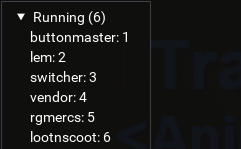
Lua scripts running. Now that I'm playing on Might I'm only running 6 characters. When I was running on Profusion I had 24 characters running. The only time I run MQ2Log is when I'm running debug on LootNScoot.

Screenshot 2026-01-19 112034.png
 
I'm still experiencing the odd exit/crash scenario on Lazarus, but I think I've identified a scenario that increases the chances of it happening. I play with UseAutoRules off and AlwaysAsk off so that each time a new item is looted for the first time I decide what to do with it. I'm also frequently in roaming hunter mode with my tank. If I end up popping new loot items requiring a decision but don't choose a loot option until after the tank has moved the party out of the loot radius area, I tend to see the "LNS does not appear to be running!" in the MQ Chat window from some of the other non-tank party members. It doesn't happen to all of them, but it will usually happen to several of them at once.
 
I'm still experiencing the odd exit/crash scenario on Lazarus, but I think I've identified a scenario that increases the chances of it happening. I play with UseAutoRules off and AlwaysAsk off so that each time a new item is looted for the first time I decide what to do with it. I'm also frequently in roaming hunter mode with my tank. If I end up popping new loot items requiring a decision but don't choose a loot option until after the tank has moved the party out of the loot radius area, I tend to see the "LNS does not appear to be running!" in the MQ Chat window from some of the other non-tank party members. It doesn't happen to all of them, but it will usually happen to several of them at once.
interesting this gives me some things to test.
 
Why am I looting? Set an item to ignore just as soon as I clicked ignore I looted the item. It's not no drop but don't want this to happen on some cool no trade item. Any suggestions on what setting to look at?
 

Attachments

  • Screenshot 2026-01-20 160515.png
    Screenshot 2026-01-20 160515.png
    113.1 KB · Views: 0
You have autorules on, so you'll loot it based off of those rules until you tell it otherwise, guessing the command was sent just before you changed it.

It previously defaulted to off (which changed), and someone told you to turn it on, and you did.
Why am I looting? Set an item to ignore just as soon as I clicked ignore I looted the item. It's not no drop but don't want this to happen on some cool no trade item. Any suggestions on what setting to look at?
 
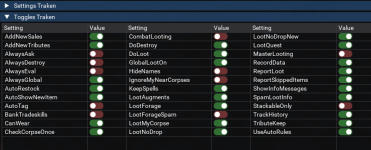
with UseAutoRules enabled, you will let LNS set the initial rule (non no drop items) and it will loot accordingly. If you change the rule after in the new item window you will still have any items you looted along the way if the item was resolved as keep\sell\tribute\bank based on your settings thresholds. If the item was to cheap then it wouldn't loot etc.

This does not pertain to NO DROP \ NO TRADE items unless you enable LootNoDrop and LootNoDropNew both.

Turning off UseAutoRules will make you set every new item rule first and not loot anything without a rule already set. This is great for when you are Actively driving, if you are afk playing then you will never loot new items and just come back to a list of item rules to confirm\set.
 
with UseAutoRules enabled, you will let LNS set the initial rule (non no drop items) and it will loot accordingly. If you change the rule after in the new item window you will still have any items you looted along the way if the item was resolved as keep\sell\tribute\bank based on your settings thresholds. If the item was to cheap then it wouldn't loot etc.

This does not pertain to NO DROP \ NO TRADE items unless you enable LootNoDrop and LootNoDropNew both.

Turning off UseAutoRules will make you set every new item rule first and not loot anything without a rule already set. This is great for when you are Actively driving, if you are afk playing then you will never loot new items and just come back to a list of item rules to confirm\set.
Thank you for clearing this up for me.
 
I've been playing around with the turbo setting and I'm stable at 800. Haven't has LNS exit in over a day.
 
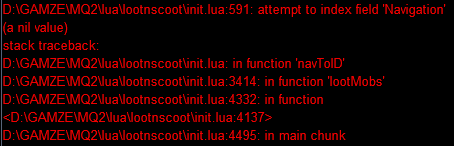
Hello, I am having some trouble today with lns crashing, I'm not sure what other info I may need to report but this is what it does very frequently. Using Very Vanilla and no other luas. Thanks for your work on this!

edit: The server is Perky Crew emu if that matters. Lootnscoot has been working on there fine previously

1769099501397.png
 
Hello, I am having some trouble today with lns crashing, I'm not sure what other info I may need to report but this is what it does very frequently. Using Very Vanilla and no other luas. Thanks for your work on this!

edit: The server is Perky Crew emu if that matters. Lootnscoot has been working on there fine previously

View attachment 74479
sounds like you might not have mq2nav loaded?
 
@grimmier
You now have people like @drawthow blasting discords telling people that to get LNS stable they need to up their Lua turbo value... even when you have people like @Derple trying to tell them how detrimental it can be.

This stuff needs to stop.

Meanwhile, @aquietone is making updates to fix issues... have you tested your "Lua turbo" theory by setting it back to 500 since AQ1 has pushed the last update?
 
Just a quick note (Thank You!) for the devs here working on lootnscoot.
Previously I would have one or more lns instances crashing when I set my team to sellstuff.
I'm lazy and did not put a randomised delay in the broadcast command and would just broadcast restart lns and run it again 'til none of them crashed.

Not sure when it started, (a few days ago ?) there's been so many updates recently (wow! thank you!).
Anyway ... never crashed for me now, like never. Stable as a bunch of horses.

Quick question, When I have a new toon starting, How to I set it so every character does not autoupdate rules by default without going into each separate character and adjusting it.. I've been having to turn that shit off for every new toon, and sometimes when I forget it messes up my rules ... i.e new sk, limited bag space so I sell a bunch of stuff I normally keep - and viola, all my other toons now vendor that stuff and I have to go back and figure out what's changed and fix it.
 
Just a quick note (Thank You!) for the devs here working on lootnscoot.
Previously I would have one or more lns instances crashing when I set my team to sellstuff.
I'm lazy and did not put a randomised delay in the broadcast command and would just broadcast restart lns and run it again 'til none of them crashed.

Not sure when it started, (a few days ago ?) there's been so many updates recently (wow! thank you!).
Anyway ... never crashed for me now, like never. Stable as a bunch of horses.

Quick question, When I have a new toon starting, How to I set it so every character does not autoupdate rules by default without going into each separate character and adjusting it.. I've been having to turn that shit off for every new toon, and sometimes when I forget it messes up my rules ... i.e new sk, limited bag space so I sell a bunch of stuff I normally keep - and viola, all my other toons now vendor that stuff and I have to go back and figure out what's changed and fix it.


personally i put a bunch of /lns set whatever into my ingame.cfg if there's some default i don't want.
there are settings for the autorules (that one just got changed to default on recently), settings for auto-adding sold items, etc. each settable by command line so can broadcast or throw in ingame.cfg like i do or change the defaults in lootnscoot/module/settings.Lua.
UseAutoRules got turned on more reactively as a potential bug fix, maybe be better to leave it defaulting to false.
 
I've been enjoying LNS on emu.

Wondering if:
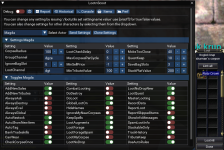
In the looting window where the items/newitems etc tabs are if we can attach the bottom of the list to the bottom of the parent so that resizing the window doesn't cut off the bottom causing me to have to scroll two windows or manually resize the containing box with the list of items. Afaik there is nothing that goes under these lists, so it wouldn't hurt.

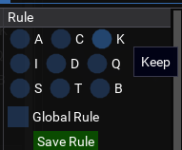
There can be checkboxes instead of a drop down for the various options on what to do with new items - when I get to an area I haven't been before it takes a lot of time to hit a drop down, click the thing I want and then save the option. Even if it was a checkbox for each option followed by hitting the save I'd find it less cumbersome/time consuming. (I did recently find the option to have the newitem list pop up outside of the main window, glad I found that.
 
personally i put a bunch of /lns set whatever into my ingame.cfg if there's some default i don't want.
there are settings for the autorules (that one just got changed to default on recently), settings for auto-adding sold items, etc. each settable by command line so can broadcast or throw in ingame.cfg like i do or change the defaults in lootnscoot/module/settings.lua.
UseAutoRules got turned on more reactively as a potential bug fix, maybe be better to leave it defaulting to false.
Yup - I'll amend the ingame.cfg to set up my defaults.
Cheers
 
I want to make sure I am looting everything I am using rgmercs and notice items being left behind on the corpse> I want to be able to loot everything , everytime. Is there a clear way to do that ? and how? thanks in advance.
 
Not working at all after one of the recent updates. Server is EQ Might and everything was working until yesterday some time. Here's a pic of it leaving a ruby crown (value 200) behind

edit: To be more specific, it does right click the corpses, the money sound can be heard. It does pop up the new items window, it just doesn't loot items any more.
 

Attachments

  • Screenshot 2026-01-27 080511.png
    Screenshot 2026-01-27 080511.png
    318.8 KB · Views: 0
Not working at all after one of the recent updates. Server is EQ Might and everything was working until yesterday some time. Here's a pic of it leaving a ruby crown (value 200) behind

edit: To be more specific, it does right click the corpses, the money sound can be heard. It does pop up the new items window, it just doesn't loot items any more.
last night update might have made it either loot everything or nothing at all it should be fixed this morning tho. misunderstood something about tribute items not being looted
 
I want to echo what @Naturesong said earlier. The current combination of RGMercs + LootNScoot on Project Lazarus has been working perfectly for me the last couple of days. No crashes or exits of any kind. If only I wasn't so obsessive with my looting rules...
 
Just wondering if there is a way to have announce that a item is on a corpse? So doing a quest and one have the tasks is to loot a item. Giving the item to my group member does not count for the task. Can I flag the item so it will send a message to chat saying this item is here? Was also wondering if there was a way to tell a group member to loot this corpse for this item?
 
I've been enjoying LNS on emu.

Wondering if:
In the looting window where the items/newitems etc tabs are if we can attach the bottom of the list to the bottom of the parent so that resizing the window doesn't cut off the bottom causing me to have to scroll two windows or manually resize the containing box with the list of items. Afaik there is nothing that goes under these lists, so it wouldn't hurt.

There can be checkboxes instead of a drop down for the various options on what to do with new items - when I get to an area I haven't been before it takes a lot of time to hit a drop down, click the thing I want and then save the option. Even if it was a checkbox for each option followed by hitting the save I'd find it less cumbersome/time consuming. (I did recently find the option to have the newitem list pop up outside of the main window, glad I found that.
+1 on both of these! The dropdown can be a bit tedious, maybe a toggle for dropdown vs checkboxes?

I'm also experiencing items are often marked 'Keep' yet left on corpses. Console shows an 'Ignore' selection, though I 100% select 'Keep.' Still testing/getting familiar with the awesome tool, so maybe a setting I've missed. I believe these have been mostly 'No Drop'
 
I've been enjoying LNS on emu.

Wondering if:
In the looting window where the items/newitems etc tabs are if we can attach the bottom of the list to the bottom of the parent so that resizing the window doesn't cut off the bottom causing me to have to scroll two windows or manually resize the containing box with the list of items. Afaik there is nothing that goes under these lists, so it wouldn't hurt.

There can be checkboxes instead of a drop down for the various options on what to do with new items - when I get to an area I haven't been before it takes a lot of time to hit a drop down, click the thing I want and then save the option. Even if it was a checkbox for each option followed by hitting the save I'd find it less cumbersome/time consuming. (I did recently find the option to have the newitem list pop up outside of the main window, glad I found that.
1769699386167.png

better or worse than dropdown? clunky as shit but 1 less click at least.
 
Just wondering if there is a way to have announce that a item is on a corpse? So doing a quest and one have the tasks is to loot a item. Giving the item to my group member does not count for the task. Can I flag the item so it will send a message to chat saying this item is here? Was also wondering if there was a way to tell a group member to loot this corpse for this item?

You can tag an item as a Quest item along with the count you need (global default is 10, but you can change it globally or per item). You'll want to see if the rule is set to "all" (all characters) or specific classes (PAL, DRU, etc). If set to "all" your entire team will loot that item that many times. If you set it to specific classes then only those classes will loot it.
 
You can tag an item as a Quest item along with the count you need (global default is 10, but you can change it globally or per item). You'll want to see if the rule is set to "all" (all characters) or specific classes (PAL, DRU, etc). If set to "all" your entire team will loot that item that many times. If you set it to specific classes then only those classes will loot it.

Awesome thanks! So I use RGMercs on all my boxes and I have lootnscoot running on all of them as well but only one has it directed through RgMercs and the rest are standalone. Does this affect how they communicate to eachother? Should all be directed through RGMercs?
 
Awesome thanks! So I use RGMercs on all my boxes and I have lootnscoot running on all of them as well but only one has it directed through RgMercs and the rest are standalone. Does this affect how they communicate to eachother? Should all be directed through RGMercs?
All should be directed if you don't want RGMercs and LNS to have conflicting behavior.
 
Release lootnscoot (for emu)

Users who are viewing this thread

  • Nightmare327
Back
Top
Cart