• You've discovered RedGuides, an EverQuest multi-boxing and scripting community 🧙‍♀️⚙️. We want you to play several EQ characters at once, come join us and say hello! 👋

  • A TLP without truebox has thawed (Very Vanilla ready)
    Frostreaver

Problem - Looting Error

Joined
May 13, 2007
RedCents
9,002¢
Version of KissAssist.mac?
11.004
When did your problem start?
30JUN
Character Role?
  1. Assist
What class is having this issue?
  1. Shaman
How often does this issue occur?
Always
Can you reproduce the issue?
yes, it always does it on loot
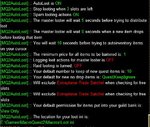
When looting I get the following error and the toon just takes off running:

Capture.JPG
 

Attachments

  • Capture.JPG
    Capture.JPG
    34.9 KB · Views: 1
KA is trying to loot and literally run? Looks like some error in ninjaloot which KA uses if you have LootOn.

Try turning looting off in KA ini:
Code:
[General]
LootOn=0

Then use mq2autoloot to do your looting. You can enter each of these commands in your mq2 window.
Code:
/plugin mq2autoloot
/autoloot turn on
/autoloot status

Maskoi has a good guide to setting it up to replace KA's ninjaloot usage.


Ok cool, I will give that a try! Thank you.
 
Hmm are his bags full?

Do you have EQ's /advloot setup already? Both ninja & autoloot need it running. Check the link above about setting up mq2autoloot too in case some step was turned off or something.
 
Hmm are his bags full?

Do you have EQ's /advloot setup already? Both ninja & autoloot need it running. Check the link above about setting up mq2autoloot too in case some step was turned off or something.

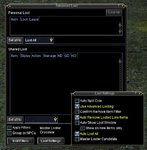
I have never used the autoloot in the game before, I set it up they way it seemed to make sense to have a single looter, does these settings look right?

Capture.JPG
 
Oh wow! Im an idiot! I did't realize this literally AUTO loots without you moving whatsoever. He is looting, I just didn't realize you could do it without even touching the corpse. That is a pretty neat feature!
 
Heh yeah I still ran to corpses when I came back from a decade long break. Turn on "auto show loot window" & "show on new items only" and you'll get a window update when they are looting, you'll see it grab the items and close the window. Or if stuff is staying on corpse for some reason, it won't close the window right away.

You can look into the mq2autoloot setting and faq, then tell it to destroy certain trash items or give armor/weaps to certain classes. Also nice to open a vendor and type "/autoloot sell" anything marked sell in your loot.ini will be auto-sold.

Some more info on looting options here and a Loot.ini example for autoloot.
 
Heh yeah I still ran to corpses when I came back from a decade long break. Turn on "auto show loot window" & "show on new items only" and you'll get a window update when they are looting, you'll see it grab the items and close the window. Or if stuff is staying on corpse for some reason, it won't close the window right away.

You can look into the mq2autoloot setting and faq, then tell it to destroy certain trash items or give armor/weaps to certain classes. Also nice to open a vendor and type "/autoloot sell" anything marked sell in your loot.ini will be auto-sold.

Some more info on looting options here and a Loot.ini example for autoloot.

Wow, this is really something else, I vaguely knew there was a new loot feature since I came back to the game but I had no idea about this. Thank you for the info.
 
MQ2Autoloot is probably the best plugin to come around in a while. It should be a staple for everyone.
 
Problem - Looting Error

Users who are viewing this thread

Back
Top
Cart