• You've discovered RedGuides, an EverQuest multi-boxing and scripting community 🧙‍♀️⚙️. We want you to play several EQ characters at once, come join us and say hello! 👋

  • A TLP without truebox has thawed (Very Vanilla ready)
    Frostreaver

Question - Looking for layout help/Advice (Is-Boxer)

dezeran

Active member
Joined
Feb 14, 2013
RedCents
49¢
Returning player looking for some advice/help.

So talked my son and wife into playing EQ again. They each will be 6 boxing leaving the remaining 42 for myself.

I do not have the setup I used to have given that to my 16-year-old who I swear I have not seen in over a year now.

currently running an I9-9700k with 64 gigs of ram with rtx 2080 8 gigs. Pretty sure once set up properly it will be fine. Here is the rub I'm playing on a tv now. Old and blind. So i can not spread my toons
across multiple monitors. (If this is not doable, please stop me before I dig a hole further.)

I like using is Boxer. but now it's not working as I would like. sadly, it does not appear the support is keen on helping when you mention what you are trying to do. So, hoping someone here has had the same problem and may have a solution or just to bounce ideas off.

In a perfect world what i would like is each group tiled swap leave hole avoid task bar. (Easy enough to do with 6). Inset wrinkle here. I would like to repeat this 7 times using a different swap group for each of 7 groups. and isolate them on different desktops. in windows. mainly to help keep group formation and organization.

I have recently learned you can only ever have a single instance of is Boxer and profile loaded that nixes the idea of creating a profile for a single group and using autologin to change accounts. (it simply reloads the first groups is Boxer) Due to repeating slots and regions. I think.

So, I created a profile with 42 set up how I wanted. It works as long as i time the new desktop creation perfectly. i missed one and it played hell with location and resolutions. there is a hotkey to create a new desktop wnd ctrl d. Is there a way in ISboxer to activate the
key bind after it loads the 6th toon but before loading the next?

Or does anyone have another idea short of me reclaiming my monitors and desktop from my son?
 
I do not use ISBoxer, used to, but with framelimiter, toned down settings, resource usage "used" to get pretty low until these new UI changes. I am honestly not quite sure you can even run that many with your system specs. Memory is an issue. Whereas I used to be able to run all instances at 350-400mb, now they are 1.1gb even with toned down settings because of this UI. I never did try and go back and adjust again though, I only run 18, so I didn't really care.

I might revisit this when MQ is back up on Test.
 
Sounds like maybe you can implement more than one "swap group". This will allow you to have multiple groups, but not forced to swap to only one active window. I think this is what you are asking for anyway.

EDIT: You will have to create your 42 man group, then in Windows Layout, configure your swap groups manually. It's a little bit of a pain, and sometimes ISBoxer shits itself in the process. But it can be done I think the way you want it to. I do this myself when I want separate groups going to different swap windows. Instead of them all going to the same swap window. Hope this helps.
 
I have a similar problem with the attempt to load 2 groups I want to be able to load in a similar manner. So please report if you find a solution.
 
I don't use ISBoxer anymore, I used to. Pretty much whatever toon I'm driving takes my full screen and the others run in the background doing their thing. With a frame limiter built in no reason for it. Then use MQ2Dannet. to broadcast commands to other toons through hotkeys. MQ once you have profiles set can also switch to toons using a hotkey if needed.

I've run as many as 18 toons doing this and no issue. Don't quite run 42 though.
 
I have a similar problem with the attempt to load 2 groups I want to be able to load in a similar manner. So please report if you find a solution.
I addressed this by creating 2 profiles

Maingroup1 6 profiles main group

maingroup2 12 profiles main group and group 2

when i only want to load my main group use profile 1
When i decide to load the 2nd group i load profile 2 this will reload group one and the proceed to load the second group as expected. continuing to place the 2nd group after the first.

the assumption i made are

your monitor resolution allows for all 12 windows to be loaded along the bottom without it auto adjusting the screen size. and screwing up your in game window placements.

that you are not always loading all 12 all the time. If you are simply create your 12 man profile and only use it.
 
I addressed this by creating 2 profiles

Maingroup1 6 profiles main group

maingroup2 12 profiles main group and group 2

when i only want to load my main group use profile 1
When i decide to load the 2nd group i load profile 2 this will reload group one and the proceed to load the second group as expected. continuing to place the 2nd group after the first.

the assumption i made are

your monitor resolution allows for all 12 windows to be loaded along the bottom without it auto adjusting the screen size. and screwing up your in game window placements.

that you are not always loading all 12 all the time. If you are simply create your 12 man profile and only use it.
You can also create one group and only run the characters you want with the character slots function in the tray.
 
I addressed this by creating 2 profiles

Maingroup1 6 profiles main group

maingroup2 12 profiles main group and group 2

when i only want to load my main group use profile 1
When i decide to load the 2nd group i load profile 2 this will reload group one and the proceed to load the second group as expected. continuing to place the 2nd group after the first.

the assumption i made are

your monitor resolution allows for all 12 windows to be loaded along the bottom without it auto adjusting the screen size. and screwing up your in game window placements.

that you are not always loading all 12 all the time. If you are simply create your 12 man profile and only use it.
That's how I do it as well. But sometimes running my main group I would like to log in the second group maybe do do an old raid, after I have done a couple of ours of farming. Actually I have to /camp desktop and start new. Would be great to be able to just launch the second group whenever you feel like. Not really a problem, but more like a qol issue.

Ohh, as I wrote I understood you launch the second profile without logging out the first group.
When running just one team, I have them spread over the 2 main monitors, while the 2-group setting dedicates 1 monitor per team. Wonder if launching the second profile while group 1 is logged in, will rearrange group 1. Never thought it could be successfully and feared, the settings could get disrupted.
As you do it already, I think now it's worth to give it a try. Thank you.
 
Or does anyone have another idea short of me reclaiming my monitors and desktop from my son?

I've used ISBoxer for years but never load more than 6 characters. I also have never messed around with virtual desktops from Task View.

I don't see anything in the ISBoxer Toolkit to deal with virtual desktops although I don't truly understand how all the different Swap Groups work. So forgive me if I'm not understanding the problem well enough.

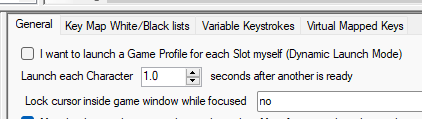
The only thing I see that might help is the setting which allows you to change the delay between loading characters. The default is 1 second but you could make that 2 or 3 to give you time to create the new Desktop manually. I have to admit it would be incredibly tedious to sit there for 3 or 4 minutes trying to catch the proper transitions!

1689265664094.png
 
Thank you all for the comments work has been a nightmare so have not been able to test more until tonight/tomorrow.
 
Question - Looking for layout help/Advice (Is-Boxer)

Users who are viewing this thread

Back
Top
Cart