• You've discovered RedGuides, an EverQuest multi-boxing and scripting community 🧙‍♀️⚙️. We want you to play several EQ characters at once, come join us and say hello! 👋

  • A TLP without truebox has thawed (Very Vanilla ready)
    Frostreaver

Problem - Launcher issue we can't figure out: "Unable to bind to the underlying transport for 127.0.0.1:62897"

Redbot

💻❤️
Moderator
Joined
Oct 15, 2004
RedCents
104,068¢
Pronouns
He/Him
@Crelen has discovered a bug on their Windows 7 box that we haven't seen before.

This the error showing up in the Windows Event Logger,
Rich (BB code):
Unable to bind to the underlying transport for 127.0.0.1:62897. The IP Listen-Only list may contain a reference to an interface which may not exist on this machine.  The data field contains the error number.

Things that have been tried with no success
  • Disable windows firewall
  • Remove/disable virus scanner (mcafee)
  • try different browser
Any other ideas?
 
We tried Chrome, Firefox, and IE.
Completely removed McAfee using the mcafee product removal tool.
Completely disabled Windows Defender and the Windows Firewall.
Tried adding ::, 0.0.0.0, and 127.0.01 to the IP listener list.

I am not network guy or windows expert, so if someone else with a little more expertise in this area wouldn't mind jumping in and trying to help it would be greatly appreciated.
 
You already have something running on that port?

cmd as administrator
netstat -a -b > output.txt
notepad output.txt
ctrl+f 62897
 
Can you go to System Information and get the make/model of that Network Adapter? I'd like to see that whole adapter/protocol page.

Are you using a VPN?

Can you ping 127.0.0.1?
 
Last edited:
  • netsh http add iplisten 127.0.0.1 - r1p tried it
  • uncommenting 127.0.0.1 localhost in the hosts file - r1p tried it
 
Try another app on that port: eqbc or telnet.

Here's how to test with telnet.

1) enable MS's telnet client
Rich (BB code):
Note: In Windows 7 and Vista, the telnet client is not installed by default. To install Telnet for Windows 7 or Vista:

    Click Start, and then click Control Panel.
    From the Control Panel window, click Programs And Features.
    Click Turn Windows features on or off. From the "Windows Features" list that appears, check Telnet Client.

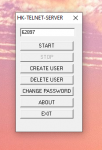
2) Install a telnet server. One is attached to this post, just extract to your desktop.

create a test user, enter 62897 as the port, and hit "start"
1578014759694.png

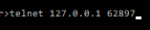
open up a cmd prompt, and type

telnet 127.0.0.1 62897

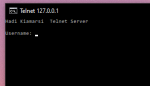
Do you get a screen that looks like this?
1578014896840.png
 

Attachments

Last edited:
Have you tried a "winsock reset"? http://forum.thewindowsclub.com/win...35087-how-reset-winsock-windows-10-8-7-a.html

And/Or do all the network-related fixes using the free tool from https://www.tweaking.com/content/page/windows_repair_all_in_one.html

And/Or do a *still free* Win10 upgrade by using the Media Creation Tool from https://go.microsoft.com/fwlink/?LinkId=691209

And/Or If the machine has ever experienced a malware infection it could have registry permission issues which the Tweaking.Com tool might be able to fix too!

Sorry, just shotgunning ideas here!
 
While not directly applicable to this bug:

I would say that the user should most likely upgrade to Win10. Given Win7 is just about out of support and will not be getting security updates -- I'd update.
 
And by "just about" he means in the next two weeks~

That said, what is the function in the launcher that is triggering this?
 
  • netsh http add iplisten 127.0.0.1 - r1p tried it
  • uncommenting 127.0.0.1 localhost in the hosts file - r1p tried it
the netsh http add iplisten - were we able to verify that it added the entry ListenOnlyList to registry?
 
@Knightly it happens when the launcher attempts to create the httplistener so that it can receive the response from the forums for authentication, only part of the launcher its required for incidentally

@Sic Yeah I went into the registry and made sure it was there. also double checked the ACL list form the command line and it showed as well.
 
For what its worth:

I duplicated this error on my backup work laptop which is Windows 10. Suspected some other app was conflicting, ended up uninstalling various ones that were no longer needed. Not exactly sure which one fixed it as I didn't test after each uninstall, but suspicion was Postman API tool.
 
I also was unable to get the RedGuides launcher to login. My machine had worked properly two days ago, however was not logging in when I tried this morning. I attempted everything in this post and in a separate post, to no avail.

What resolved the issue for me was manually starting MQ2 and EQBCS-eqmule without starting the launcher. (Both are what I had been running previously without issue.) After both fired up, I started the RedGuides launcher and clicked the Login button. At this point the launcher properly received the login information from the browser and proceeded to function normally.

Thank you,

JT
 
Problem - Launcher issue we can't figure out: "Unable to bind to the underlying transport for 127.0.0.1:62897"

Users who are viewing this thread

Back
Top
Cart