
just got back updated everything, log in have 49 fps by gforce , as soon as i load macroquest its 9 8 7 6 0 then hover's around 4 tried the eqclient file somone had posted tried whole new fresh install of eq and mq2 also tried default mq2 ini as well as my own , at this point i am stumped

-
 Hail, we're RedGuides. We want you to play six (yes, 6!) EverQuest characters at once. We have scripts and a friendly community to help, please join our playstyle and say hello! 👋
 -
 We've added LLM sections to our Terms & Rules and Resource Rules, for everyone's sanity & in-game safety.
Read more
a. Do not replace your voice with an LLM. This goes for your posts and your scripts. Drafting and editing with a tool is fine, but don't take you out of what you share.
b. Do not replace your EQ character's voice with an LLM. We don't want scripts that speak over/ooc,/shoutor other public channels. This has been an unwritten rule that's kept casino scripts off the site for decades, but we're now compelled to make it clear: keep automated communication private.
Why Does RG Review Scripts?
Nearly every LLM-written Lua script we see is making your character do impossible things, and rarely in a way that's beneficial to you. We've seen heavy server hammering,/targetover impossible distances when/nav spawnwould passively accomplish the same thing, a spawn search that fires 20+ times per second, and other pointless actions that are likely annoying GMs.
You are welcome to use LLMs as a tool to structure, draft, and edit your work, but please read critically before hitting/lua run
You are using an out of date browser. It may not display this or other websites correctly.
You should upgrade or use an alternative browser.
You should upgrade or use an alternative browser.
lag
- Thread starter mroutlaw
- Start date
ok so when i start up a brand new mq2install and eq install i removed every plugin nothing changed, then i loaded cpu load and fps nothing changed , wierd part is if i click on the reset box on windows frame up top it goes back to 50 +fps , its almost like it is seeing all the boxes as running in background and or it isn't recognising when they arent, also frame rates shouldn't be that low in background , i also moved the background cpu items in eq and that didint effect it , i unloaded cpu and fps and that helped for a moment or 2 but eventually it is like its still seeing those windows as background and slowly the fps dies

here is the thing, idont use that launcher but its not a daybreak issue because atm i have windows stacked and cpu load in background at 35 and regular at 60 and without mq2 all of them are reading exactly that with just eq, cant understand why mq2 with no plugins installed would cause frame rates to slowly drop like this why would mq2 just running have any effect on frame rates?
ok i def think mq2 for whatever reason is thinking that all windows are in background and lowering frame rates because as soon as i turn it on all of the instances start dropping something in mq2 is throttling the frame rates when i have no plugins installed? anotherthing when i do /unload it hangs or crashes when unloading mq2
Yeah I saw this last night with another user, @Chanticleer . After starting MQ2 framerates drop. I'm still unable to replicate it on my PC, but on his he claims it was fixed by bypassing the launcher.
His toons have been running for ~9 hours now with no framerate issues.
What happens when you use autologin instead? Just give it a try and report back please. It takes 3 clicks to set up.
His toons have been running for ~9 hours now with no framerate issues.
What happens when you use autologin instead? Just give it a try and report back please. It takes 3 clicks to set up.
Last edited:
Alright, looks like we still haven't found the cause.
Another thing you can try:
Install a fresh EverQuest to another folder. That way you can see if it's an issue with EQ settings. This fixed @Chanticleer's issue, even though we weren't able to find the exact setting or file.
Another thing you can try:
Install a fresh EverQuest to another folder. That way you can see if it's an issue with EQ settings. This fixed @Chanticleer's issue, even though we weren't able to find the exact setting or file.


------------------
System Information
------------------
Time of this report: 10/4/2018, 18:37:10
Machine name: DESKTOP
Machine Id: {C6A701AA-FE84-4D0F-B885-7E9B9153A430}
Operating System: Windows 10 Pro 64-bit (10.0, Build 17134) (17134.rs4_release.180410-1804)
Language: English (Regional Setting: English)
System Manufacturer: System manufacturer
System Model: System Product Name
BIOS: 1101 (type: UEFI)
Processor: Intel(R) Core(TM) i7-8700K CPU @ 3.70GHz (12 CPUs), ~3.7GHz
Memory: 16384MB RAM
Available OS Memory: 16318MB RAM
Page File: 12760MB used, 5990MB available
Windows Dir: C:\WINDOWS
DirectX Version: DirectX 12
DX Setup Parameters: Not found
User DPI Setting: 168 DPI (175 percent)
System DPI Setting: 288 DPI (300 percent)
DWM DPI Scaling: Enabled
Miracast: Available, with HDCP
Microsoft Graphics Hybrid: Not Supported
DxDiag Version: 10.00.17134.0001 64bit Unicode
------------
DxDiag Notes
------------
Display Tab 1: No problems found.
Sound Tab 1: No problems found.
Sound Tab 2: No problems found.
Sound Tab 3: No problems found.
Input Tab: No problems found.
--------------------
DirectX Debug Levels
--------------------
Direct3D: 0/4 (retail)
DirectDraw: 0/4 (retail)
DirectInput: 0/5 (retail)
DirectMusic: 0/5 (retail)
DirectPlay: 0/9 (retail)
DirectSound: 0/5 (retail)
DirectShow: 0/6 (retail)
---------------
Display Devices
---------------
Card name: NVIDIA GeForce GTX 970
Manufacturer: NVIDIA
Chip type: GeForce GTX 970
DAC type: Integrated RAMDAC
Device Type: Full Device (POST)
Device Key: Enum\PCI\VEN_10DE&DEV_13C2&SUBSYS_39793842&REV_A1
Device Status: 0180200A [DN_DRIVER_LOADED|DN_STARTED|DN_DISABLEABLE|DN_NT_ENUMERATOR|DN_NT_DRIVER]
Device Problem Code: No Problem
Driver Problem Code: Unknown
Display Memory: 12202 MB
Dedicated Memory: 4043 MB
Shared Memory: 8159 MB
Current Mode: 3840 x 2160 (32 bit) (30Hz)
HDR Support: Not Supported
Display Topology: Internal
Display Color Space: DXGI_COLOR_SPACE_RGB_FULL_G22_NONE_P709
Color Primaries: Red(0.650891,0.330578), Green(0.290539,0.610852), Blue(0.150891,0.070813), White Point(0.272961,0.275891)
Display Luminance: Min Luminance = 0.500000, Max Luminance = 270.000000, MaxFullFrameLuminance = 270.000000
Monitor Name: Generic PnP Monitor
Monitor Model: SE50UY04
Monitor Id: SEK0000
Native Mode: 3840 x 2160(p) (30.000Hz)
Output Type: HDMI
Monitor Capabilities: HDR Not Supported
Display Pixel Format: DISPLAYCONFIG_PIXELFORMAT_32BPP
Advanced Color: Not Supported
Driver Name: C:\WINDOWS\System32\DriverStore\FileRepository\nv_dispi.inf_amd64_c1a085cc86772d3f\nvldumdx.dll,C:\WINDOWS\System32\DriverStore\FileRepository\nv_dispi.inf_amd64_c1a085cc86772d3f\nvldumdx.dll,C:\WINDOWS\System32\DriverStore\FileRepository\nv_dispi.inf_amd64_c1a085cc86772d3f\nvldumdx.dll,C:\WINDOWS\System32\DriverStore\FileRepository\nv_dispi.inf_amd64_c1a085cc86772d3f\nvldumdx.dll
Driver File Version: 23.21.0013.9135 (English)
Driver Version: 23.21.13.9135
DDI Version: 12
Feature Levels: 12_1,12_0,11_1,11_0,10_1,10_0,9_3,9_2,9_1
Driver Model: WDDM 2.3
Graphics Preemption: DMA
Compute Preemption: DMA
Miracast: Not Supported
Hybrid Graphics GPU: Not Supported
Power P-states: Not Supported
Virtualization: Paravirtualization
Block List: No Blocks
Catalog Attributes: Universal:False Declarative:False
Driver Attributes: Final Retail
Driver Date/Size: 3/22/2018 8:00:00 PM, 949016 bytes
WHQL Logo'd: Yes
WHQL Date Stamp: Unknown
Device Identifier: {D7B71E3E-5082-11CF-5D78-74191BC2DA35}
Vendor ID: 0x10DE
Device ID: 0x13C2
SubSys ID: 0x39793842
Revision ID: 0x00A1
Driver Strong Name: oem23.inf:0f066de3ad0bda5c:Section096:23.21.13.9135:pci\ven_10de&dev_13c2
Rank Of Driver: 00D12001
Video Accel:
DXVA2 Modes: DXVA2_ModeMPEG2_VLD DXVA2_ModeVC1_D2010 DXVA2_ModeVC1_VLD DXVA2_ModeH264_VLD_Stereo_Progressive_NoFGT DXVA2_ModeH264_VLD_Stereo_NoFGT DXVA2_ModeH264_VLD_NoFGT DXVA2_ModeHEVC_VLD_Main DXVA2_ModeMPEG4pt2_VLD_Simple DXVA2_ModeMPEG4pt2_VLD_AdvSimple_NoGMC
Deinterlace Caps: {6CB69578-7617-4637-91E5-1C02DB810285}: Format(In/Out)=(YUY2,YUY2) Frames(Prev/Fwd/Back)=(0,0,0) Caps=VideoProcess_YUV2RGB VideoProcess_StretchX VideoProcess_StretchY DeinterlaceTech_PixelAdaptive
{F9F19DA5-3B09-4B2F-9D89-C64753E3EAAB}: Format(In/Out)=(YUY2,YUY2) Frames(Prev/Fwd/Back)=(0,0,0) Caps=VideoProcess_YUV2RGB VideoProcess_StretchX VideoProcess_StretchY
{5A54A0C9-C7EC-4BD9-8EDE-F3C75DC4393B}: Format(In/Out)=(YUY2,YUY2) Frames(Prev/Fwd/Back)=(0,0,0) Caps=VideoProcess_YUV2RGB VideoProcess_StretchX VideoProcess_StretchY
{335AA36E-7884-43A4-9C91-7F87FAF3E37E}: Format(In/Out)=(YUY2,YUY2) Frames(Prev/Fwd/Back)=(0,0,0) Caps=VideoProcess_YUV2RGB VideoProcess_StretchX VideoProcess_StretchY DeinterlaceTech_BOBVerticalStretch
{6CB69578-7617-4637-91E5-1C02DB810285}: Format(In/Out)=(UYVY,UYVY) Frames(Prev/Fwd/Back)=(0,0,0) Caps=VideoProcess_YUV2RGB VideoProcess_StretchX VideoProcess_StretchY DeinterlaceTech_PixelAdaptive
{F9F19DA5-3B09-4B2F-9D89-C64753E3EAAB}: Format(In/Out)=(UYVY,UYVY) Frames(Prev/Fwd/Back)=(0,0,0) Caps=VideoProcess_YUV2RGB VideoProcess_StretchX VideoProcess_StretchY
{5A54A0C9-C7EC-4BD9-8EDE-F3C75DC4393B}: Format(In/Out)=(UYVY,UYVY) Frames(Prev/Fwd/Back)=(0,0,0) Caps=VideoProcess_YUV2RGB VideoProcess_StretchX VideoProcess_StretchY
{335AA36E-7884-43A4-9C91-7F87FAF3E37E}: Format(In/Out)=(UYVY,UYVY) Frames(Prev/Fwd/Back)=(0,0,0) Caps=VideoProcess_YUV2RGB VideoProcess_StretchX VideoProcess_StretchY DeinterlaceTech_BOBVerticalStretch
{6CB69578-7617-4637-91E5-1C02DB810285}: Format(In/Out)=(YV12,0x32315659) Frames(Prev/Fwd/Back)=(0,0,0) Caps=VideoProcess_YUV2RGB VideoProcess_StretchX VideoProcess_StretchY DeinterlaceTech_PixelAdaptive
{F9F19DA5-3B09-4B2F-9D89-C64753E3EAAB}: Format(In/Out)=(YV12,0x32315659) Frames(Prev/Fwd/Back)=(0,0,0) Caps=VideoProcess_YUV2RGB VideoProcess_StretchX VideoProcess_StretchY
{5A54A0C9-C7EC-4BD9-8EDE-F3C75DC4393B}: Format(In/Out)=(YV12,0x32315659) Frames(Prev/Fwd/Back)=(0,0,0) Caps=VideoProcess_YUV2RGB VideoProcess_StretchX VideoProcess_StretchY
{335AA36E-7884-43A4-9C91-7F87FAF3E37E}: Format(In/Out)=(YV12,0x32315659) Frames(Prev/Fwd/Back)=(0,0,0) Caps=VideoProcess_YUV2RGB VideoProcess_StretchX VideoProcess_StretchY DeinterlaceTech_BOBVerticalStretch
{6CB69578-7617-4637-91E5-1C02DB810285}: Format(In/Out)=(NV12,0x3231564e) Frames(Prev/Fwd/Back)=(0,0,0) Caps=VideoProcess_YUV2RGB VideoProcess_StretchX VideoProcess_StretchY DeinterlaceTech_PixelAdaptive
{F9F19DA5-3B09-4B2F-9D89-C64753E3EAAB}: Format(In/Out)=(NV12,0x3231564e) Frames(Prev/Fwd/Back)=(0,0,0) Caps=VideoProcess_YUV2RGB VideoProcess_StretchX VideoProcess_StretchY
{5A54A0C9-C7EC-4BD9-8EDE-F3C75DC4393B}: Format(In/Out)=(NV12,0x3231564e) Frames(Prev/Fwd/Back)=(0,0,0) Caps=VideoProcess_YUV2RGB VideoProcess_StretchX VideoProcess_StretchY
{335AA36E-7884-43A4-9C91-7F87FAF3E37E}: Format(In/Out)=(NV12,0x3231564e) Frames(Prev/Fwd/Back)=(0,0,0) Caps=VideoProcess_YUV2RGB VideoProcess_StretchX VideoProcess_StretchY DeinterlaceTech_BOBVerticalStretch
{6CB69578-7617-4637-91E5-1C02DB810285}: Format(In/Out)=(IMC1,UNKNOWN) Frames(Prev/Fwd/Back)=(0,0,0) Caps=
{F9F19DA5-3B09-4B2F-9D89-C64753E3EAAB}: Format(In/Out)=(IMC1,UNKNOWN) Frames(Prev/Fwd/Back)=(0,0,0) Caps=
{5A54A0C9-C7EC-4BD9-8EDE-F3C75DC4393B}: Format(In/Out)=(IMC1,UNKNOWN) Frames(Prev/Fwd/Back)=(0,0,0) Caps=
{335AA36E-7884-43A4-9C91-7F87FAF3E37E}: Format(In/Out)=(IMC1,UNKNOWN) Frames(Prev/Fwd/Back)=(0,0,0) Caps=
{6CB69578-7617-4637-91E5-1C02DB810285}: Format(In/Out)=(IMC2,UNKNOWN) Frames(Prev/Fwd/Back)=(0,0,0) Caps=
{F9F19DA5-3B09-4B2F-9D89-C64753E3EAAB}: Format(In/Out)=(IMC2,UNKNOWN) Frames(Prev/Fwd/Back)=(0,0,0) Caps=
{5A54A0C9-C7EC-4BD9-8EDE-F3C75DC4393B}: Format(In/Out)=(IMC2,UNKNOWN) Frames(Prev/Fwd/Back)=(0,0,0) Caps=
{335AA36E-7884-43A4-9C91-7F87FAF3E37E}: Format(In/Out)=(IMC2,UNKNOWN) Frames(Prev/Fwd/Back)=(0,0,0) Caps=
{6CB69578-7617-4637-91E5-1C02DB810285}: Format(In/Out)=(IMC3,UNKNOWN) Frames(Prev/Fwd/Back)=(0,0,0) Caps=
{F9F19DA5-3B09-4B2F-9D89-C64753E3EAAB}: Format(In/Out)=(IMC3,UNKNOWN) Frames(Prev/Fwd/Back)=(0,0,0) Caps=
{5A54A0C9-C7EC-4BD9-8EDE-F3C75DC4393B}: Format(In/Out)=(IMC3,UNKNOWN) Frames(Prev/Fwd/Back)=(0,0,0) Caps=
{335AA36E-7884-43A4-9C91-7F87FAF3E37E}: Format(In/Out)=(IMC3,UNKNOWN) Frames(Prev/Fwd/Back)=(0,0,0) Caps=
{6CB69578-7617-4637-91E5-1C02DB810285}: Format(In/Out)=(IMC4,UNKNOWN) Frames(Prev/Fwd/Back)=(0,0,0) Caps=
{F9F19DA5-3B09-4B2F-9D89-C64753E3EAAB}: Format(In/Out)=(IMC4,UNKNOWN) Frames(Prev/Fwd/Back)=(0,0,0) Caps=
{5A54A0C9-C7EC-4BD9-8EDE-F3C75DC4393B}: Format(In/Out)=(IMC4,UNKNOWN) Frames(Prev/Fwd/Back)=(0,0,0) Caps=
{335AA36E-7884-43A4-9C91-7F87FAF3E37E}: Format(In/Out)=(IMC4,UNKNOWN) Frames(Prev/Fwd/Back)=(0,0,0) Caps=
{6CB69578-7617-4637-91E5-1C02DB810285}: Format(In/Out)=(S340,UNKNOWN) Frames(Prev/Fwd/Back)=(0,0,0) Caps=
{F9F19DA5-3B09-4B2F-9D89-C64753E3EAAB}: Format(In/Out)=(S340,UNKNOWN) Frames(Prev/Fwd/Back)=(0,0,0) Caps=
{5A54A0C9-C7EC-4BD9-8EDE-F3C75DC4393B}: Format(In/Out)=(S340,UNKNOWN) Frames(Prev/Fwd/Back)=(0,0,0) Caps=
{335AA36E-7884-43A4-9C91-7F87FAF3E37E}: Format(In/Out)=(S340,UNKNOWN) Frames(Prev/Fwd/Back)=(0,0,0) Caps=
{6CB69578-7617-4637-91E5-1C02DB810285}: Format(In/Out)=(S342,UNKNOWN) Frames(Prev/Fwd/Back)=(0,0,0) Caps=
{F9F19DA5-3B09-4B2F-9D89-C64753E3EAAB}: Format(In/Out)=(S342,UNKNOWN) Frames(Prev/Fwd/Back)=(0,0,0) Caps=
{5A54A0C9-C7EC-4BD9-8EDE-F3C75DC4393B}: Format(In/Out)=(S342,UNKNOWN) Frames(Prev/Fwd/Back)=(0,0,0) Caps=
{335AA36E-7884-43A4-9C91-7F87FAF3E37E}: Format(In/Out)=(S342,UNKNOWN) Frames(Prev/Fwd/Back)=(0,0,0) Caps=
D3D9 Overlay: Supported
DXVA-HD: Supported
DDraw Status: Enabled
D3D Status: Enabled
AGP Status: Enabled
MPO MaxPlanes: 1
MPO Caps: Not Supported
MPO Stretch: Not Supported
MPO Media Hints: Not Supported
MPO Formats: Not Supported
PanelFitter Caps: Not Supported
PanelFitter Stretch: Not Supported
System Information
------------------
Time of this report: 10/4/2018, 18:37:10
Machine name: DESKTOP
Machine Id: {C6A701AA-FE84-4D0F-B885-7E9B9153A430}
Operating System: Windows 10 Pro 64-bit (10.0, Build 17134) (17134.rs4_release.180410-1804)
Language: English (Regional Setting: English)
System Manufacturer: System manufacturer
System Model: System Product Name
BIOS: 1101 (type: UEFI)
Processor: Intel(R) Core(TM) i7-8700K CPU @ 3.70GHz (12 CPUs), ~3.7GHz
Memory: 16384MB RAM
Available OS Memory: 16318MB RAM
Page File: 12760MB used, 5990MB available
Windows Dir: C:\WINDOWS
DirectX Version: DirectX 12
DX Setup Parameters: Not found
User DPI Setting: 168 DPI (175 percent)
System DPI Setting: 288 DPI (300 percent)
DWM DPI Scaling: Enabled
Miracast: Available, with HDCP
Microsoft Graphics Hybrid: Not Supported
DxDiag Version: 10.00.17134.0001 64bit Unicode
------------
DxDiag Notes
------------
Display Tab 1: No problems found.
Sound Tab 1: No problems found.
Sound Tab 2: No problems found.
Sound Tab 3: No problems found.
Input Tab: No problems found.
--------------------
DirectX Debug Levels
--------------------
Direct3D: 0/4 (retail)
DirectDraw: 0/4 (retail)
DirectInput: 0/5 (retail)
DirectMusic: 0/5 (retail)
DirectPlay: 0/9 (retail)
DirectSound: 0/5 (retail)
DirectShow: 0/6 (retail)
---------------
Display Devices
---------------
Card name: NVIDIA GeForce GTX 970
Manufacturer: NVIDIA
Chip type: GeForce GTX 970
DAC type: Integrated RAMDAC
Device Type: Full Device (POST)
Device Key: Enum\PCI\VEN_10DE&DEV_13C2&SUBSYS_39793842&REV_A1
Device Status: 0180200A [DN_DRIVER_LOADED|DN_STARTED|DN_DISABLEABLE|DN_NT_ENUMERATOR|DN_NT_DRIVER]
Device Problem Code: No Problem
Driver Problem Code: Unknown
Display Memory: 12202 MB
Dedicated Memory: 4043 MB
Shared Memory: 8159 MB
Current Mode: 3840 x 2160 (32 bit) (30Hz)
HDR Support: Not Supported
Display Topology: Internal
Display Color Space: DXGI_COLOR_SPACE_RGB_FULL_G22_NONE_P709
Color Primaries: Red(0.650891,0.330578), Green(0.290539,0.610852), Blue(0.150891,0.070813), White Point(0.272961,0.275891)
Display Luminance: Min Luminance = 0.500000, Max Luminance = 270.000000, MaxFullFrameLuminance = 270.000000
Monitor Name: Generic PnP Monitor
Monitor Model: SE50UY04
Monitor Id: SEK0000
Native Mode: 3840 x 2160(p) (30.000Hz)
Output Type: HDMI
Monitor Capabilities: HDR Not Supported
Display Pixel Format: DISPLAYCONFIG_PIXELFORMAT_32BPP
Advanced Color: Not Supported
Driver Name: C:\WINDOWS\System32\DriverStore\FileRepository\nv_dispi.inf_amd64_c1a085cc86772d3f\nvldumdx.dll,C:\WINDOWS\System32\DriverStore\FileRepository\nv_dispi.inf_amd64_c1a085cc86772d3f\nvldumdx.dll,C:\WINDOWS\System32\DriverStore\FileRepository\nv_dispi.inf_amd64_c1a085cc86772d3f\nvldumdx.dll,C:\WINDOWS\System32\DriverStore\FileRepository\nv_dispi.inf_amd64_c1a085cc86772d3f\nvldumdx.dll
Driver File Version: 23.21.0013.9135 (English)
Driver Version: 23.21.13.9135
DDI Version: 12
Feature Levels: 12_1,12_0,11_1,11_0,10_1,10_0,9_3,9_2,9_1
Driver Model: WDDM 2.3
Graphics Preemption: DMA
Compute Preemption: DMA
Miracast: Not Supported
Hybrid Graphics GPU: Not Supported
Power P-states: Not Supported
Virtualization: Paravirtualization
Block List: No Blocks
Catalog Attributes: Universal:False Declarative:False
Driver Attributes: Final Retail
Driver Date/Size: 3/22/2018 8:00:00 PM, 949016 bytes
WHQL Logo'd: Yes
WHQL Date Stamp: Unknown
Device Identifier: {D7B71E3E-5082-11CF-5D78-74191BC2DA35}
Vendor ID: 0x10DE
Device ID: 0x13C2
SubSys ID: 0x39793842
Revision ID: 0x00A1
Driver Strong Name: oem23.inf:0f066de3ad0bda5c:Section096:23.21.13.9135:pci\ven_10de&dev_13c2
Rank Of Driver: 00D12001
Video Accel:
DXVA2 Modes: DXVA2_ModeMPEG2_VLD DXVA2_ModeVC1_D2010 DXVA2_ModeVC1_VLD DXVA2_ModeH264_VLD_Stereo_Progressive_NoFGT DXVA2_ModeH264_VLD_Stereo_NoFGT DXVA2_ModeH264_VLD_NoFGT DXVA2_ModeHEVC_VLD_Main DXVA2_ModeMPEG4pt2_VLD_Simple DXVA2_ModeMPEG4pt2_VLD_AdvSimple_NoGMC
Deinterlace Caps: {6CB69578-7617-4637-91E5-1C02DB810285}: Format(In/Out)=(YUY2,YUY2) Frames(Prev/Fwd/Back)=(0,0,0) Caps=VideoProcess_YUV2RGB VideoProcess_StretchX VideoProcess_StretchY DeinterlaceTech_PixelAdaptive
{F9F19DA5-3B09-4B2F-9D89-C64753E3EAAB}: Format(In/Out)=(YUY2,YUY2) Frames(Prev/Fwd/Back)=(0,0,0) Caps=VideoProcess_YUV2RGB VideoProcess_StretchX VideoProcess_StretchY
{5A54A0C9-C7EC-4BD9-8EDE-F3C75DC4393B}: Format(In/Out)=(YUY2,YUY2) Frames(Prev/Fwd/Back)=(0,0,0) Caps=VideoProcess_YUV2RGB VideoProcess_StretchX VideoProcess_StretchY
{335AA36E-7884-43A4-9C91-7F87FAF3E37E}: Format(In/Out)=(YUY2,YUY2) Frames(Prev/Fwd/Back)=(0,0,0) Caps=VideoProcess_YUV2RGB VideoProcess_StretchX VideoProcess_StretchY DeinterlaceTech_BOBVerticalStretch
{6CB69578-7617-4637-91E5-1C02DB810285}: Format(In/Out)=(UYVY,UYVY) Frames(Prev/Fwd/Back)=(0,0,0) Caps=VideoProcess_YUV2RGB VideoProcess_StretchX VideoProcess_StretchY DeinterlaceTech_PixelAdaptive
{F9F19DA5-3B09-4B2F-9D89-C64753E3EAAB}: Format(In/Out)=(UYVY,UYVY) Frames(Prev/Fwd/Back)=(0,0,0) Caps=VideoProcess_YUV2RGB VideoProcess_StretchX VideoProcess_StretchY
{5A54A0C9-C7EC-4BD9-8EDE-F3C75DC4393B}: Format(In/Out)=(UYVY,UYVY) Frames(Prev/Fwd/Back)=(0,0,0) Caps=VideoProcess_YUV2RGB VideoProcess_StretchX VideoProcess_StretchY
{335AA36E-7884-43A4-9C91-7F87FAF3E37E}: Format(In/Out)=(UYVY,UYVY) Frames(Prev/Fwd/Back)=(0,0,0) Caps=VideoProcess_YUV2RGB VideoProcess_StretchX VideoProcess_StretchY DeinterlaceTech_BOBVerticalStretch
{6CB69578-7617-4637-91E5-1C02DB810285}: Format(In/Out)=(YV12,0x32315659) Frames(Prev/Fwd/Back)=(0,0,0) Caps=VideoProcess_YUV2RGB VideoProcess_StretchX VideoProcess_StretchY DeinterlaceTech_PixelAdaptive
{F9F19DA5-3B09-4B2F-9D89-C64753E3EAAB}: Format(In/Out)=(YV12,0x32315659) Frames(Prev/Fwd/Back)=(0,0,0) Caps=VideoProcess_YUV2RGB VideoProcess_StretchX VideoProcess_StretchY
{5A54A0C9-C7EC-4BD9-8EDE-F3C75DC4393B}: Format(In/Out)=(YV12,0x32315659) Frames(Prev/Fwd/Back)=(0,0,0) Caps=VideoProcess_YUV2RGB VideoProcess_StretchX VideoProcess_StretchY
{335AA36E-7884-43A4-9C91-7F87FAF3E37E}: Format(In/Out)=(YV12,0x32315659) Frames(Prev/Fwd/Back)=(0,0,0) Caps=VideoProcess_YUV2RGB VideoProcess_StretchX VideoProcess_StretchY DeinterlaceTech_BOBVerticalStretch
{6CB69578-7617-4637-91E5-1C02DB810285}: Format(In/Out)=(NV12,0x3231564e) Frames(Prev/Fwd/Back)=(0,0,0) Caps=VideoProcess_YUV2RGB VideoProcess_StretchX VideoProcess_StretchY DeinterlaceTech_PixelAdaptive
{F9F19DA5-3B09-4B2F-9D89-C64753E3EAAB}: Format(In/Out)=(NV12,0x3231564e) Frames(Prev/Fwd/Back)=(0,0,0) Caps=VideoProcess_YUV2RGB VideoProcess_StretchX VideoProcess_StretchY
{5A54A0C9-C7EC-4BD9-8EDE-F3C75DC4393B}: Format(In/Out)=(NV12,0x3231564e) Frames(Prev/Fwd/Back)=(0,0,0) Caps=VideoProcess_YUV2RGB VideoProcess_StretchX VideoProcess_StretchY
{335AA36E-7884-43A4-9C91-7F87FAF3E37E}: Format(In/Out)=(NV12,0x3231564e) Frames(Prev/Fwd/Back)=(0,0,0) Caps=VideoProcess_YUV2RGB VideoProcess_StretchX VideoProcess_StretchY DeinterlaceTech_BOBVerticalStretch
{6CB69578-7617-4637-91E5-1C02DB810285}: Format(In/Out)=(IMC1,UNKNOWN) Frames(Prev/Fwd/Back)=(0,0,0) Caps=
{F9F19DA5-3B09-4B2F-9D89-C64753E3EAAB}: Format(In/Out)=(IMC1,UNKNOWN) Frames(Prev/Fwd/Back)=(0,0,0) Caps=
{5A54A0C9-C7EC-4BD9-8EDE-F3C75DC4393B}: Format(In/Out)=(IMC1,UNKNOWN) Frames(Prev/Fwd/Back)=(0,0,0) Caps=
{335AA36E-7884-43A4-9C91-7F87FAF3E37E}: Format(In/Out)=(IMC1,UNKNOWN) Frames(Prev/Fwd/Back)=(0,0,0) Caps=
{6CB69578-7617-4637-91E5-1C02DB810285}: Format(In/Out)=(IMC2,UNKNOWN) Frames(Prev/Fwd/Back)=(0,0,0) Caps=
{F9F19DA5-3B09-4B2F-9D89-C64753E3EAAB}: Format(In/Out)=(IMC2,UNKNOWN) Frames(Prev/Fwd/Back)=(0,0,0) Caps=
{5A54A0C9-C7EC-4BD9-8EDE-F3C75DC4393B}: Format(In/Out)=(IMC2,UNKNOWN) Frames(Prev/Fwd/Back)=(0,0,0) Caps=
{335AA36E-7884-43A4-9C91-7F87FAF3E37E}: Format(In/Out)=(IMC2,UNKNOWN) Frames(Prev/Fwd/Back)=(0,0,0) Caps=
{6CB69578-7617-4637-91E5-1C02DB810285}: Format(In/Out)=(IMC3,UNKNOWN) Frames(Prev/Fwd/Back)=(0,0,0) Caps=
{F9F19DA5-3B09-4B2F-9D89-C64753E3EAAB}: Format(In/Out)=(IMC3,UNKNOWN) Frames(Prev/Fwd/Back)=(0,0,0) Caps=
{5A54A0C9-C7EC-4BD9-8EDE-F3C75DC4393B}: Format(In/Out)=(IMC3,UNKNOWN) Frames(Prev/Fwd/Back)=(0,0,0) Caps=
{335AA36E-7884-43A4-9C91-7F87FAF3E37E}: Format(In/Out)=(IMC3,UNKNOWN) Frames(Prev/Fwd/Back)=(0,0,0) Caps=
{6CB69578-7617-4637-91E5-1C02DB810285}: Format(In/Out)=(IMC4,UNKNOWN) Frames(Prev/Fwd/Back)=(0,0,0) Caps=
{F9F19DA5-3B09-4B2F-9D89-C64753E3EAAB}: Format(In/Out)=(IMC4,UNKNOWN) Frames(Prev/Fwd/Back)=(0,0,0) Caps=
{5A54A0C9-C7EC-4BD9-8EDE-F3C75DC4393B}: Format(In/Out)=(IMC4,UNKNOWN) Frames(Prev/Fwd/Back)=(0,0,0) Caps=
{335AA36E-7884-43A4-9C91-7F87FAF3E37E}: Format(In/Out)=(IMC4,UNKNOWN) Frames(Prev/Fwd/Back)=(0,0,0) Caps=
{6CB69578-7617-4637-91E5-1C02DB810285}: Format(In/Out)=(S340,UNKNOWN) Frames(Prev/Fwd/Back)=(0,0,0) Caps=
{F9F19DA5-3B09-4B2F-9D89-C64753E3EAAB}: Format(In/Out)=(S340,UNKNOWN) Frames(Prev/Fwd/Back)=(0,0,0) Caps=
{5A54A0C9-C7EC-4BD9-8EDE-F3C75DC4393B}: Format(In/Out)=(S340,UNKNOWN) Frames(Prev/Fwd/Back)=(0,0,0) Caps=
{335AA36E-7884-43A4-9C91-7F87FAF3E37E}: Format(In/Out)=(S340,UNKNOWN) Frames(Prev/Fwd/Back)=(0,0,0) Caps=
{6CB69578-7617-4637-91E5-1C02DB810285}: Format(In/Out)=(S342,UNKNOWN) Frames(Prev/Fwd/Back)=(0,0,0) Caps=
{F9F19DA5-3B09-4B2F-9D89-C64753E3EAAB}: Format(In/Out)=(S342,UNKNOWN) Frames(Prev/Fwd/Back)=(0,0,0) Caps=
{5A54A0C9-C7EC-4BD9-8EDE-F3C75DC4393B}: Format(In/Out)=(S342,UNKNOWN) Frames(Prev/Fwd/Back)=(0,0,0) Caps=
{335AA36E-7884-43A4-9C91-7F87FAF3E37E}: Format(In/Out)=(S342,UNKNOWN) Frames(Prev/Fwd/Back)=(0,0,0) Caps=
D3D9 Overlay: Supported
DXVA-HD: Supported
DDraw Status: Enabled
D3D Status: Enabled
AGP Status: Enabled
MPO MaxPlanes: 1
MPO Caps: Not Supported
MPO Stretch: Not Supported
MPO Media Hints: Not Supported
MPO Formats: Not Supported
PanelFitter Caps: Not Supported
PanelFitter Stretch: Not Supported
VeteranAssling
Member
It’s the same issue I’m having and have been unable to resolve and that’s with my 1500x—1070ti but my old laptop with an R5 gpu and amd10 Cpu or whatever it is runs 5 accounts using mq2 np


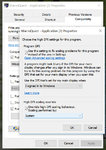
Tried this with high hopes! No dice though, mine still starts cutting my frame rate progressively until I'm basically playing on a flip-book with no thumbs. Only other info I have to offer is that if I swap to fullscreen it seems to restart the frame-rate decay process.
Checked and double checked with 2 full shutdown/restarts and no dice =(
ha! i figured this out! i have a 40" monitor and i guess windows was doing something with macroquest and making it lag so i put this on as a last ditch effort and it worked it no longer splits my framerates in half upon starting.
View attachment 15072
IF I COULD REACH THROUGH THIS DAMN SCREEN I WOULD MAN HUG YOU TO DEATH !!!!!!!!!!!!!!!!!!!!!!!!!!!!!!!!!!!!!!!!!!!!!!!!!!!
I applied this to Macroquest, Launchpad and eqgame.exe. MY LAG IS GONE! Side note, to too have a 36" widescreen monitor (3440 x 1440). This is like a new freaking game.
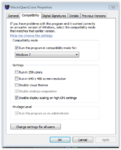
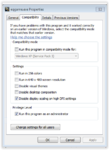
this is a dx9 related issue with the dpi if you update the dx9 it will help you if this dont relove fully i tried it on my laptop it didnt work. deleting the launchpad reinstalling launchpad and new dx9 helped me
also FYI , updating launchpad and dx9 has resolved the reset device failed issue for me
mroutlaw sending you a pm
Users who are viewing this thread
Total: 1 (members: 0, guests: 1)
Share: