



In regards to RedGuides updating our Vanilla compiles or officially supported macro systems like KissAssist:
we make it a policy to post an updated posting to the thread to announce updates/patch notes/fixes.
In fact it is a common practice among the community contributers of macros and strategies to add a new post to the thread indicating change notes or simply alerting people they have made updates.
If you subscribe to that thread, and have your settings for "that" thread's posting to notify you of new posts, you can rest assured you'll get notified when your favorite Macros or items get updates or are stirring up some conversation.
To set this up:
1) Navigate to the thread you want subscribed alerts setup on. For this example we will use KissAssist macro.
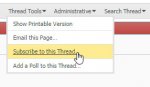
2) On the top of the thread itself is an option for "Thread Tools", select "Subscribe to this Thread".
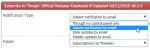
3) Once selected you are brought to your Thead Management page to add this new thread subscription. Here you select you want to receive instant email updates when new posts are made to the thread.
4) Bam, you're done.
we make it a policy to post an updated posting to the thread to announce updates/patch notes/fixes.
In fact it is a common practice among the community contributers of macros and strategies to add a new post to the thread indicating change notes or simply alerting people they have made updates.
If you subscribe to that thread, and have your settings for "that" thread's posting to notify you of new posts, you can rest assured you'll get notified when your favorite Macros or items get updates or are stirring up some conversation.
To set this up:
1) Navigate to the thread you want subscribed alerts setup on. For this example we will use KissAssist macro.
2) On the top of the thread itself is an option for "Thread Tools", select "Subscribe to this Thread".
3) Once selected you are brought to your Thead Management page to add this new thread subscription. Here you select you want to receive instant email updates when new posts are made to the thread.
4) Bam, you're done.