• You've discovered RedGuides, an EverQuest multi-boxing and scripting community 🧙‍♀️⚙️. We want you to play several EQ characters at once, come join us and say hello! 👋

  • A TLP without truebox has thawed (Very Vanilla ready)
    Frostreaver

Problem - KA or MQ2nav issue?

Joined
Dec 2, 2017
RedCents
54¢
No clue what is causing this.. ive restarted pc, restarted toons, loaded and unloaded mq2nav, deleted mesh, rebuilt mesh (have never made a "start point") just open, build, save. the only way ive managed to get rid of this is to completely uninstall the compile and download it fresh and rebuild my puller's ini. if i use the one from before uninstalling it just does this same thing..

- - - Updated - - -

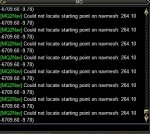
sorry.. it didnt post the pic of what its spamming.. still trying to learn how lol havent ever needed to post a picture or ini before

- - - Updated - - -

EQ000005.jpg
 
currently the beach in morell's castle.. but it started doin this in neriak 4th gate and in the hive and in deadhills (regular zone not the instance)

- - - Updated - - -

this is the ini for my SK i use for pulls

[General]
KissAssistVer=10.2.2
Role=Pullertank
CampRadius=75
CampRadiusExceed=400
ReturnToCamp=1
ChaseAssist=0
ChaseDistance=15
MedOn=1
MedStart=25
MedCombat=0
LootOn=1
RezAcceptOn=1
AcceptInvitesOn=1
GroupWatchOn=1
EQBCOn=1
IRCOn=0
MiscGem=10
HoTTOn=0
CampfireOn=0
CastingInterruptOn=0
MiscGemLW=0
MiscGemRemem=1
CharInfo=Shadow Knight|102|GOLD
DefaultUI=TRUE
DPSMeter=1
ScatterOn=0
ConditionsOn=0
[Buffs]
BuffsOn=1
Buffs1=Drape of the Fallen
Buffs2=Shroud of the Darksworn
Buffs3=Grelleth's Horror
Buffs4=Remorseless Demeanor
Buffs5=Banshee Aura
Buffs6=Voice of Thule|Me
Buffs7=Zombie Skin
Buffs8=Grelleth's Skin
Buffs9=Call of Gloomhaze
Buffs10=Steadfast Stance
Buffs11=NULL
Buffs12=NULL
Buffs13=NULL
Buffs14=NULL
Buffs15=NULL
Buffs16=NULL
Buffs17=NULL
Buffs18=NULL
Buffs19=NULL
Buffs20=NULL
RebuffOn=1
ChecKBuffsTimer=20
BuffsCOn=0
BuffsSize=20
PowerSource=NULL
[Melee]
AssistAt=100
MeleeOn=1
FaceMobOn=1
MeleeDistance=75
StickHow=loose
AutoFireOn=0
UseMQ2Melee=1
[GoM]
GoMSHelp=Format - Spell|Target, MA Me or Mob, i.e. Rampaging Servant Rk. II|Mob
GoMSpell=Dire Insination|Mob
GoMCOn=0
GoMSize=3
GoMSpell1=NULL
GoMSpell2=NULL
GoMSpell3=NULL
[AE]
AEOn=1
AERadius=50
AE1=Explosion of Spite|2|Me
AE2=Explosion of Hatred|3|Me
AE3=Projection of Doom|3|Mob
AE4=Visage of Death|3|Me
AE5=Fundament: First Spire of the Reavers|3|Me
AECOn=0
AESize=10
AE6=NULL
AE7=NULL
AE8=NULL
AE9=NULL
AE10=NULL
[DPS]
DPSOn=1
DPSSkip=20
DPSInterval=2
DPS1=Touch of Klonda|100
DPS2=Dire Stricture|95
DPS3=Surreptitious Blight|90
DPS4=Blood of Ralstok|85
DPS5=Vicious Bite of Chaos|80
DPS6=Helix of the Undying|75
DPS7=Smoldering Darkness|70
DPS8=Banestrike|65
DPS9=NULL
DPS10=NULL
DPSCOn=0
DPSSize=20
DPS11=NULL
DPS12=NULL
DPS13=NULL
DPS14=NULL
DPS15=NULL
DPS16=NULL
DPS17=NULL
DPS18=NULL
DPS19=NULL
DPS20=NULL
DebuffAllOn=0
[Aggro]
AggroOn=1
Aggro1=Demand for Power|90|<|Mob
Aggro2=NULL
Aggro3=NULL
AggroSize=10
Aggro4=NULL
Aggro5=NULL
Aggro6=NULL
Aggro7=NULL
Aggro8=NULL
Aggro9=NULL
Aggro10=NULL
[Heals]
Help=Format Spell|% to heal at i.e. Devout Light Rk. II|50
HealsOn=1
Heals1=Innoruuk's Dark Blessing|50|Tap
Heals2=Touch of Falsin|80|Tap
Heals3=Dire Insinuation|70|Tap
Heals4=Leech Touch|30|Tap
Heals5=NULL
XTarHeal=0
HealsCOn=0
HealsSize=5
XTarHeal2=0
HealGroupPetsOn=0
[Cures]
CuresOn=1
Cures1=Purity of Death
Cures2=NULL
Cures3=NULL
CuresSize=5
Cures4=NULL
Cures5=NULL
[Pet]
PetOn=0
PetSpell=Minion of Grelleth
PetShrinkOn=0
PetShrinkSpell=Tiny Companion
PetBuffsOn=1
PetBuffs1=Gift of Falsin
PetBuffs2=NULL
PetBuffs3=NULL
PetBuffs4=NULL
PetBuffs5=NULL
PetBuffs6=NULL
PetBuffs7=NULL
PetBuffs8=NULL
PetToysGave=
PetBuffsSize=8
PetCombatOn=1
PetAssistAt=95
PetToysSize=6
PetBreakMezSpell=NULL
PetRampPullWait=0
PetSuspend=0
MoveWhenHit=0
PetHoldOn=1
PetForceHealOnMed=0
[Burn]
BurnText=Decepticons Attack
Burn1=NULL
Burn2=NULL
Burn3=NULL
Burn4=NULL
Burn5=NULL
Burn6=NULL
BurnCOn=0
BurnSize=15
BurnAllNamed=0
Burn7=NULL
Burn8=NULL
Burn9=NULL
Burn10=NULL
Burn11=NULL
Burn12=NULL
Burn13=NULL
Burn14=NULL
Burn15=NULL
UseTribute=0
[Pull]
PullWith=Demand for Power
MaxRadius=1000
MaxZRange=1000
PullWait=0
PullMeleeStick=0
UseWayPointZ=0
PullRadiusToUse=90
PullRoleToggle=0
ChainPull=0
ChainPullHP=90
ChainPullPause=30|2
PullLevel=0|0
[AFKTools]
AFKHelp=AFKGMAction=0 Off, 1 Pause Macro, 2 End Macro, 3 Unload MQ2, 4 Quit Game
AFKToolsOn=0
AFKGMAction=1
AFKPCRadius=150
CampOnDeath=0
ClickBacktoCamp=0
[Merc]
Help=To use: Turn off Auto Assist in Manage Mercenary Window
MercOn=1
MercAssistAt=100
[SpellSet]
LoadSpellSet=0
SpellSetName=KissAssist
[GMail]
GMailHelp=Events currently support - Dead,Drag,GM,Level,Named,Leftgroup
GMailOn=0
GMailSize=5
GMail1=NULL
GMail2=NULL
GMail3=NULL
GMail4=NULL
GMail5=NULL

- - - Updated - - -

ran perfectly fine for about 18 hours the other day/night.. been coming here cause nobody ever comes to this place cause its annoying to get to.. never had a problem with it till now.. i saw where someone else was having problems with this same zone.. but its not the zone.. this was working perfectly fine earlier.. i left to go work for a couple hours and come back and noticed she wasnt running and casting.. she was face pulling mobs.. i shut everything down and rebooted and started getting that spam
 
when you at that loc reload your mq2nav plugin, the do /nav ui and turn on show navmesh and check to see if there is a mesh there.

then if there is you might need to rerender your nav mesh
 
when i do /nav ui and click show nav.. isnt it suppose to put a grid on the ground?

- - - Updated - - -

when i do /nav ui and click show nav.. isnt it suppose to put a grid on the ground?

err show nav mesh.. sorry

- - - Updated - - -

just decided to rebuild a mesh again just for giggles.. i noticed the tiles are turning black UNDER what the beige color ground is.. could that be the issue? its trying to make me literally go under the ground to get to the "starting point"? if so.. is there a way to raise that black tiling area up to the top where its on the ground and not underneath it?

- - - Updated - - -

ok.. i figured out the issue.. i dont know why or how.. ill leave that for smarter people than myself.. i kept clicking and raising the "Cell Height" until i noticed it blacking out tiles on the actually ground itself.. i have no idea why it was originally mapping out the area under the ground but that was the problem.. its working np atm.. its showing the nav mesh in game now too.. so for anybody in the future having this problem.. delete the mesh u are currently having issues with.. open the mesh generator and make it start building. look at where the black tiles are being built.. if the ground in the default mesh does NOT start turning black look and see if they are being built below or above.. if so all u should have to do is change the cell height and keep clicking on tiles until ur tiles on the ground start turning black.. at that point just click remove all and click build mesh.. entire ground should start changing =) at that point u will be good to go and ready to pwn ur desired zone u previously couldnt =) hoping my stupidity and my scattered explanation might help someone else with this same problem.. thank u to taylor and kaen for responding.. btw i got the idea to tinker with the height from a previous post u helped someone with ctaylor
 
Morell's Castle has a plane below the zone which "steals" all the navmesh geometry.. set the bounding box min y to something like -300 and you won't have this problem
 
Mr. Brainiac, i wonder if you could answer a question or two for me.

Tilesize 128
Cell Size 0.600
Cell Height 0.300

what is tilesize and cell size and cell height, and what is their function for having a path mathed out, is it better to have a low tilesize or cell size or? could oyu explain what these things are like i am dumb dog?
 
but it started doin this in neriak 4th gate

Neriak Fourth Gate is a terrible zone with MQ2 nav - the mesh doesn't recognize the buildings or walls in a lot of different parts of the zone so it just runs into them trying to pull mobs it cant. I've tried a bunch of different things but found it's easier to just play without MQ2 nav in that zone.

Dunno about the other problems though - sorry!
 
Mr. Brainiac, i wonder if you could answer a question or two for me.

Tilesize 128
Cell Size 0.600
Cell Height 0.300

what is tilesize and cell size and cell height, and what is their function for having a path mathed out, is it better to have a low tilesize or cell size or? could oyu explain what these things are like i am dumb dog?

cells are the individual units of geometry in the mesh. Smaller cells give you more resolution in your mesh. The cells are the small lines in the grid you see on everything in the mesh generator. The tradeoff is that smaller cells = more cells. The more cells, the more complex the mesh and the more complex the navigation as a result. So you want to pick a cell size that gives you good accurate meshes that aren't too large as to cause the navmeshes to be too big or take too long to generate paths for.

Tile size is the number of cells in a tile. tiles are used mostly for organizational purposes in memory and don't have much impact on the actual mesh. The mesh generator can generate multiple tiles in parallel, to speed things up.
 
i found a good setup for me personally is 0.300 and 0.150 for the cell size and height, and depending on the amount of cells i lower the tilesize to 96 or 64. and i fell that works nicely, i do experience some problems where it iwll try and pull through walls specifically recently got that problem in crystal caveerns if i blocked a poath to a tunnel as my character wouldnt fit under the iceblock it wanted to run under, it just started to try pulling through a wall even if there was a good distance to the other wall still need to figure out what i would do there.
 
Problem - KA or MQ2nav issue?

Users who are viewing this thread

Back
Top
Cart