• You've discovered RedGuides, an EverQuest multi-boxing and scripting community 🧙‍♀️⚙️. We want you to play several EQ characters at once, come join us and say hello! 👋

  • A TLP without truebox has thawed (Very Vanilla ready)
    Frostreaver

Question - KA Giving a /pet stop command when mob Enrages

Joined
Apr 2, 2020
RedCents
434¢
Hello guys,

Another question but I promise I will stop spamming questions after that one, it is my KissAssist learning day, I think my KA config file is almost perfect now :)

When I play manually, I will use the /pet stop command when a mob Enrages (I am on an emu server where every mob and his mother Enrages, so it is critical to watch it) and reuse it when Enrages wears off., as it is a toggle, reusing it "unstops" pet which resumes fighting. I prefer /pet stop for Enrage over other solutions (as in /pet guard here + /pet hold + /pet back off) but this is not the topic.

Browsing the forum to understand how to issue commands, I would probably add in my KA config file :

DPSn=command:/pet stop|condN
CondN=${Mob.Enrages}
But how do I retoggle /pet stop when Enrage is off so my pet resumes fighting ?
 
Last edited by a moderator:
The combat routine should turn your pet back on. The combat routine will loop through the code until the mob you are attacking is dead. So you may want to think about also setting PetCombatOn=0 when turning off attack(/pet stop) then just have an entry that turns PetCombatOn=1 back on. Use a condition like !${Mob.Enrages}.
 
The combat routine should turn your pet back on. The combat routine will loop through the code until the mob you are attacking is dead. So you may want to think about also setting PetCombatOn=0 when turning off attack(/pet stop) then just have an entry that turns PetCombatOn=1 back on. Use a condition like !${Mob.Enrages}.
Thanks a lot for your explanation, would this be the correct way to write it :

DPS8=command:/pet stop && command:/PetCombatOn=0|cond6
DPS9=command:/PetCombatOn=1|cond7
Conbd6=${Mob.Enrages}
Cond7=!{Mob.Enrages}

I am uncertain if toggling PetCombatOn is obtained via a command:/ order and if I can write "command:/PetCombatOn=0/1"

Sorry for the noobness...
 
yea for multilines you would want:

DPS8=command: /multiline ; /pet stop ; /PetCombatOn=0 ; |Cond6
Something went wrong when modifying the KA ini file

This what I did :

DPS8=command: /multiline ; /pet stop ; /PetCombatOn=0 ; |Cond5
DPS9=command: /PetCombatOn=1|Cond6
Cond5=${Target.Enrages}
Cond6=!${Target.Enrages}

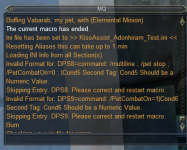
And I got an error message when restarting the KA macro :

Enrage 1.png

I think we forgot that the DPS section requires to include the tag with the mob's health, that's why KA asked for a numerical value. So I added |11 to have this (modified also order of DPS section to reflect that |11), thinking the idea is to ask KA to "watch" what happens under 11% of the mob's health (Enrage and Enrage off), hoping that 11 will be enough considering lag etc. but that is easily tweakable. Which gives us (I suprressed some spaces too) :

DPS section :
DPS4=command: /multiline ; /pet stop; /PetCombatOn=0; |11|Cond5
DPS5=command: /PetCombatOn=1|11|Cond6
DPS6=Vulthrix, The Warden's Whip (Tier 8)|10|weave
DPS7=Immaculate Fishbone Earring (Tier 8)|10|weave
DPS8=Ornament of Immaculate Fire|10|weave|cond4
DPS9=Molten Orb|10|weave
Conditions section:
Cond5=${Target.Enrages}
Cond6=!${Target.Enrages}
This fixed the KA loading issue at least and I don't get the error message anymore. Now I'll need to test if it works, will let you know of course, as you were so kind to give me patient guidance :)
 
yea you're correct, needs a health percentage, I typically put it to 100
Thanks ! So, just tested, it doesn't work I get KA error white spam and red messages "No such 'target' member 'Enrages'" and "DoCommand - Couldn't parse /PetCombatOn=1". I did on nameds like Ayonar in ToV where I knew they would enrage and have sufficient hps for the fight not to be too fast. But I hadn't read your message yet, I am reconfiguring my KA ini file to set the mob% at 100. Trying again.
 
Last edited:
DPS4=command: /multiline ; /pet stop; /varset PetCombatOn 0; |100|Cond5
DPS5=command: /varset PetCombatOn 1|100|Cond6

Cond5=${Target.Enrages} && ${PetCombatOn}
Cond6=!${Target.Enrages} && !${PetCombatOn}
 
Last edited:
DPS4=command: /multiline ; /pet stop; /varset PetCombatOn 0; |100|Cond5
DPS5=command: /varset PetCombatOn 1|100|Cond6

Cond5=${Target.Enrages} && ${PetCombatOn}
Cond6=!${Target.Enrages} && !${PetCombatOn}
I am so sorry to insist, but it doesn't work apparently, however I can confirm that pressing manually the Stop button during fight is immediately overridden by the fight routine (except when there is no fight or I am KA Manual mode).
Just to be sure I didn't misspell, here my DPS and KCond :
DPS2=command: /multiline ; /pet stop; /varset PetCombatOn 0; |100|Cond5
DPS3=command: /varset PetCombatOn 1|100|Cond6
Cond5=${Target.Enrages} && ${PetCombatOn}
Cond6=!${Target.Enrages} && !${PetCombatOn}
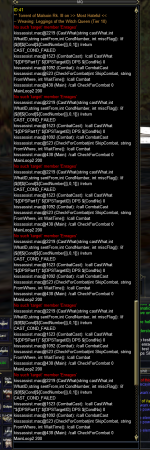
And here the error loop KA slides into the whole fight (it didn't stop the macro though, I just kept getting these warnings) :
KAerrorLoopEnrage.png
Compared to yesterday, there are no more errors related to "cannot parse PetCombatOn", so the use of /varset seems a good idea, but something is still wrong with the Enrage condition. Should I try {Mob.Enrages} instead of {Target.Enrages} ?
 
mq2melee has an enrage member, but spawn does not, there is no target.enrage(s) that i can find
Ah so it is in the code itself that KA cannot identify whether a mob enrages or not, if I understand you correctly I have read your post in another thread where you explained how to enable enrage in MQ2Melee with /melee enrage=1 /melee save. However this won't affect pets or is there a way to tweak the pet behavior on enrage via MQ2Melee if I cannot do it with KA?
 
Last edited by a moderator:
the melee.enrage is a tlo/member in mq2melee that works off an internal event

you can also /enrage on and /enrage off to toggle mq2melee's usage of enrage detection and behavior.

I personally don't recommend mq2melee for anything
 
the melee.enrage is a tlo/member in mq2melee that works off an internal event

you can also /enrage on and /enrage off to toggle mq2melee's usage of enrage detection and behavior.

I personally don't recommend mq2melee for anything
Seems there is no satisfying solution then and I'll have to handle that manually. Thank you for your time
 
To reply to your question, I'll have first to dig deeper into TLOs, how to configure MQ2Melee and to understand if KA will conflict with it, you know things which seem crystal clear to you because of your deep experience seem utterly complicated to me :)
 
To reply to your question, I'll have first to dig deeper into TLOs, how to configure MQ2Melee and to understand if KA will conflict with it, you know things which seem crystal clear to you because of your deep experience seem utterly complicated to me :)
a cool thing about language and words is the ability to say "hey do you mind explaining that one bit as it doesn't make sense to me". You seem to be doing the thing where you jump to conclusions where folks are just trying to help out. I absolutely don't mind helping you, but so far you've thrown your arms up coming to the conclusion everything is impossible (and there are likely multiple ways to get you what you need), and you've not implied that I'm making things more confusing or worse for you. Help me help you. It is hard to gauge people on the internet, I talk and help people in the MQ community every single day, and some folks get super turbo bent of shape when you try and explain things from the step1 part - and some folks throw their arms up in the air if you don't. So just let me know where you need help and I'm happy to modify the approach to fit how best things work for you.

${Target.Engages} does not exist, so it doesn't work because it doesn't exist
${Melee.Enrage} does exist, so you should check if this meets your needs.

For ${Melee} - the TLO and .Enrage (the member of the Melee TLO) you need mq2melee loaded

doing this in kiss you need UseMQ2Melee=1, otherwise kill will unload mq2melee

I would spend time on the mq2melee page to get it configured and setup how you want (as you suggested you would do), mq2melee is an older system and has a few "gotchas" and a few "man, i sure wish it worked a different way", which is why many folks, myself included, suggest not using it if at all possible.

the other alternatives outside mq2melee for what you need are mq2events and LEM
 
a cool thing about language and words is the ability to say "hey do you mind explaining that one bit as it doesn't make sense to me"

${Target.Engages} does not exist, so it doesn't work because it doesn't exist
${Melee.Enrage} does exist, so you should check if this meets your needs.

For ${Melee} - the TLO and .Enrage (the member of the Melee TLO) you need mq2melee loaded
This was what I was trying to say without looking too dumb in regard of your high level of knowledge :angel: Many thanks, I'll try that ! And understood,MQ2melee should be loaded.
 
This was what I was trying to say without looking too dumb in regard of your high level of knowledge :angel: Many thanks, I'll try that ! And understood,MQ2melee should be loaded.
you are making assumptions that are causing you to not communicate with me in the ways you should, which is going to make you not get the help and information you need to thrive. don't :p

MQ is complicated, it takes a bit of time to get your feet firm underneath you - and we're all still learning here. you're gonna be alright, i promise.
 
And how should I communicate with you ? It would help if you would be kind enough to give me the protocol.
lol.

if something is unclear say so (like you did above).
if a working example is a better starting point for you - say so.
if a "dont tell me the answer, but can you point me to some documentation to read" is the right answer for you say so.

I'm just trying to offer some "try not to jump to conclusions at people trying to offer help/care"

we have no issues here :p

Ctaylor is the kiss person, who knows kiss the best - and there may even be a better in-kiss solution that he might have some insight to that i don't know / didn't think of.
 
There we go, I agree 100% with these simple guidelines, I am sorry if you thought I was implying something. I suppose I got a bit frightened by the tech language, that's all :) There is no problem for me either, and again, thanks for your time :)
 
The only way to handle this in kiss, would be the same way MQ2Melee does, and use an event. Not sure what the best way to structure the event would be, would have to think about that.
Ok, many thanks CTaylor, funny that the issue seems not to be a common one raised by zillions of boxing pet classes. I suppose the question is from the table because live servers don't really have Enrage in its older form anymore. Well, if you have time and find a solution, it would be awesome, I'll follow this thread.
 
What I would do in this case, is add this event/code to the kissmycmds.inc file, so it could be used by those needing the event/code. No reason to add the code to the main macro if not going to be used by all. I will have to look at the mq2melee code and see if I can find the Filter being used to trap for the Enraged event.
 
What I would do in this case, is add this event/code to the kissmycmds.inc file, so it could be used by those needing the event/code. No reason to add the code to the main macro if not going to be used by all. I will have to look at the mq2melee cade and see if I can find the Filter being used to trap for the Enraged event.
Thank you so much, that's very kind of you.
 
Question - KA Giving a /pet stop command when mob Enrages

Users who are viewing this thread

Back
Top
Cart