• You've discovered RedGuides, an EverQuest multi-boxing and scripting community 🧙‍♀️⚙️. We want you to play several EQ characters at once, come join us and say hello! 👋

  • A TLP without truebox has thawed (Very Vanilla ready)
    Frostreaver

Issue launching MQ with elevated permissions

Sic

Administrator
Moderator
Joined
May 5, 2016
RedCents
49,476¢
Pronouns
He/Him
if you're having issues with autologin/mq "connecting/injecting" to everquest, you can toggle on the debug console

1739497662652.png

if after you turn that on and try and launch eq - and you get either of these, it means something is having an issue with running as administrator

1739497694983.png
or
1739497761262.png

you don't want eq run as administrator.

if you're just launching EQ / MQ through MQ loader then you need to check your eqgame.exe isn't set to "Run as Administrator"
if you launch eq/mq through something else, like isboxer you want to disable that in the settings for that program.


how to check if eqgame.exe is set to being launched as admin:
- open your everquest directory
- find eqgame.exe

1739452306747.png

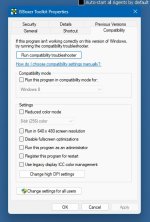
Right click and click "Properties" - if you don't see properties click "Show more options" and then click "Properties"
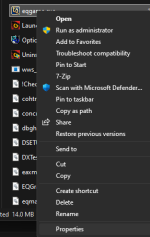
1739452349307.png

You do not want the "Run this program as an administrator" checked.
You also do NOT want compatibility mode
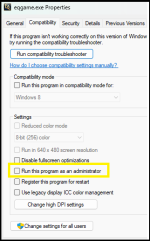
1739452435365.png


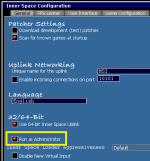
If you are using ISBoxer
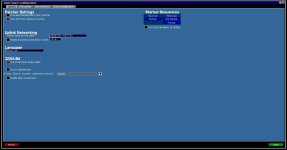
you want to open your Inner Space Configuration, and under the General Tab you want to have deselected "Run as Administrator"
in this screenshot it is selected, you don't want the red dot on that option.

Make sure to hit save after making this change
1739452502500.png

If you are being PROMPTED asking for elevated permission - like using Joeboxer - you also don't want to give it, because that is also doing the elevated administrator permission.
 
Last edited:

i have read all the posted threads and none of the eqgame.exe files are running as admins, redguides isn't runnning as admin, still not getting anywhere for the autologin to work or any mq windows/plugins loaded in game
Turn on the MQ debug, and show us what the error is.

1739497613631.png

If it says an elevation issue, it is something trying to run eq as admin.

I updated this post with a few more images, hopefully it helps explain


show us a snip of your debug console and what it says and we can go from there
 
[2025-02-13 20:57:29.918] [MQ] [debug] [MacroQuest.cpp:316] Logging Initialized
[2025-02-13 20:57:29.919] [MQ] [info] [MacroQuest.cpp:1436] Starting MacroQuest Loader. Built Sat Oct 19 00:41:06 2024
[2025-02-13 20:57:29.919] [MQ] [info] [Crashpad.cpp:100] Initializing crashpad handler
[2025-02-13 20:57:29.919] [MQ] [debug] [Crashpad.cpp:101] Handler Path: C:\Redguides\crashpad_handler.exe
[2025-02-13 20:57:29.920] [MQ] [info] [Crashpad.cpp:106] Crash report submission is: enabled
[2025-02-13 20:57:29.921] [MQ] [info] [Crashpad.cpp:110] Crash report guid: 2ff6d446-786e-43ab-bea1-f1cb5c24a266
[2025-02-13 20:57:29.922] [MQ] [info] [Crashpad.cpp:120] Using shared crash reporter for all MacroQuest instances
[2025-02-13 20:57:29.938] [MQ] [info] [MacroQuest.cpp:1475] I am a spawned process
[2025-02-13 20:57:29.940] [MQ] [info] [MacroQuest.cpp:1390] MQ2Main Path: C:\Redguides\MQ2Main.dll
[2025-02-13 20:57:29.944] [MQ] [info] [MacroQuest.cpp:1410] Build: MacroQuest [May 10 2013 (Emu)]
[2025-02-13 20:57:29.945] [MQ] [info] [NamedPipes.cpp:610] Starting NamedPipeServer thread for \\.\pipe\mqpipe
[2025-02-13 20:57:29.953] [MQ] [info] [Login.cpp:2554] AutoLogin Opening database at C:\Redguides\Config\login.db
[2025-02-13 20:57:29.964] [MQ] [info] [ProcessMonitor.cpp:432] Process monitor using ToolHelp started
[2025-02-13 20:57:29.964] [MQ] [debug] [ProcessList.cpp:1163] Initializing injector
[2025-02-13 20:57:29.973] [MQ] [info] [ProcessList.cpp:711] Performing injections on any existing eqgame.exe processes
[2025-02-13 20:57:29.973] [MQ] [debug] [ProcessList.cpp:1056] Injector thread started
[2025-02-13 20:57:29.982] [MQ] [info] [MacroQuest.cpp:1652] Waiting for events...
[2025-02-13 20:57:30.174] [MQ] [info] [MacroQuest.cpp:244] Performing log file cleanup, found 0 files to remove.
[2025-02-13 20:57:55.055] [MQ] [info] [MacroQuest.cpp:1376] New process detected: 17040
[2025-02-13 20:57:55.083] [MQ] [info] [ProcessList.cpp:694] Requesting injection into process id 17040
[2025-02-13 20:57:55.083] [MQ] [debug] [ProcessList.cpp:920] Injecting MQ into eqgame.exe: pid=17040
[2025-02-13 20:57:55.083] [MQ] [error] [ProcessList.cpp:961] Failed to get eqgame.exe base address. pid=17040
[2025-02-13 20:57:55.084] [MQ] [info] [ProcessList.cpp:1103] Scheduling injection for retry: pid=17040 retriesLeft=9
[2025-02-13 20:58:00.088] [MQ] [debug] [ProcessList.cpp:920] Injecting MQ into eqgame.exe: pid=17040
[2025-02-13 20:58:00.088] [MQ] [error] [ProcessList.cpp:961] Failed to get eqgame.exe base address. pid=17040
[2025-02-13 20:58:00.089] [MQ] [info] [ProcessList.cpp:1103] Scheduling injection for retry: pid=17040 retriesLeft=8
[2025-02-13 20:58:05.090] [MQ] [debug] [ProcessList.cpp:920] Injecting MQ into eqgame.exe: pid=17040
[2025-02-13 20:58:05.091] [MQ] [error] [ProcessList.cpp:961] Failed to get eqgame.exe base address. pid=17040
[2025-02-13 20:58:05.091] [MQ] [info] [ProcessList.cpp:1103] Scheduling injection for retry: pid=17040 retriesLeft=7
[2025-02-13 20:58:09.903] [MQ] [debug] [MacroQuest.cpp:1382] Process closed: 17040
[2025-02-13 20:58:10.097] [MQ] [debug] [ProcessList.cpp:920] Injecting MQ into eqgame.exe: pid=17040
[2025-02-13 20:58:10.097] [MQ] [error] [ProcessList.cpp:930] Failed to open eqgame.exe with pid 17040: The parameter is incorrect.
 
sorry it took me so long,
thanks ok dude, we just want you fixed

@brainiac ideas?
[2025-02-13 20:58:10.097] [MQ] [debug] [ProcessList.cpp:920] Injecting MQ into eqgame.exe: pid=17040
[2025-02-13 20:58:10.097] [MQ] [error] [ProcessList.cpp:930] Failed to open eqgame.exe with pid 17040: The parameter is incorrect.
 
look at task manager in the details tab and check the following values:
- User name
- Elevated
- UAC virtualization

for eqgame.exe and the macroquest process (will be a randomized .exe name)

Why are we in the autologin thread?
 
Hello

I tried running MQ today and it is not injecting, I didn't change or try anything new.

I'm using launcher v1.0.94 (latest) and did my update of launcher " Last Installed: 2/15/2025 1:48:30 PM" It's green

I press Launch MQ and little Icon goes bottom right hand corner yet nothing comes up on my EQ screen

Macroquest set on Live as well

Can anyone help please , I am stuck

thanks


Search is your friend dude
 
I have read every thread I can find, read this complete thread, and tried every suggestions offered and still have an issue.
I have searched and read but cannot figure out what the correct places to post issues are to attempt not post in the wrong thread, this is the only place I can find that seems to be having issues related to mine so I hope I am posting in the correct space this time.

I had a rough set up trying to figure out how to get very vanilla to work for me. I ended up going back to ISB until I opened ISB with MQ also open and that changed everything. I loved the overlay and being able to use what I was used to with the added bonus of very vanilla add on buttons and kiss. I started working with this over the last few weeks and really liked the way it worked.

Then the patch and now none of it works together anymore. Here are the details if anyone can help it would be greatly appreciated.

After the patch, MQ runs fine, it will launch fine, and shows no issues. EQ is the same. ISB is the same. When I open EQ, MQ overlay works great, auto-login shows up, buttons are in game, kiss works. If I open the game with MQ, same results, all works fine. When I open the character sets in ISB inner space however, MQ does not show up. No overlay, no auto-login, no buttons, no kiss assist, nothing. It is like MQ is not open at all.

I spent a lot of hours trying everything I could to avoid having to ask here, but I had no luck with any of the following:
Uninstall/reinstall of ISB, RG, and MQ, multiple times, both using windows uninstall, and deleting all installation folders the last few times as some settings seem to remain after doing so. Nothing, RG, MQ, ISB/IS, EQ, is set to run as admin. I have run the MQ debug console over and over, it shows me nothing, literally nothing appears in the window when I run ISB, EQ or MQ to login.

All of this is exactly the same on both Windows 11 primary game systems. Out of desperation I decided to install everything on a 3rd Windows 11 game system and everything works fine. Comparing the settings in the systems all are set the same way, there is no different. The third system is identical in specs to the first with the exception of extra hard drives and ram. This led me back to uninstalling and re-installing over and again on the first two systems all with no luck.

My only idea left to try is something I cannot figure out, I am thinking the uninstall process is leaving things behind that I cannot find to delete as every time I re-install RG and open it, instead of showing MQ as not installed like a clean installation should show, it shows my last installation date, even after I have deleted the very vanilla folder, as well as any RG folders I can find.

None of the options in this thread offered so far helped, I followed every suggestion to the letter multiple times over on both systems, I still see nothing from MQ when I open the game with inner space. I really like the way these work together and do not want to use MQ/RG alone without the ISB.

I am playing on live servers, no EMU or other games if that helps.
 
.

After the patch, MQ runs fine, it will launch fine, and shows no issues. EQ is the same. ISB is the same. When I open EQ, MQ overlay works great, auto-login shows up, buttons are in game, kiss works. If I open the game with MQ, same results, all works fine. When I open the character sets in ISB inner space however, MQ does not show up. No overlay, no auto-login, no buttons, no kiss assist, nothing. It is like MQ is not open at all.
Sorry to hear you're having issues, that sounds frustrating.

Can you show both the inner space configuration page where the "check for admin box" is, as well as the "right click properties" of isb (specifically compatibility and run as admin".

One of the other folks in this thread was accidentally clicking yes to a popup asking "XYZ wants permission" every time they launched Joeboxer lol. Sometimes problems end up being silly.

Well help you get sorted
 
Sorry to hear you're having issues, that sounds frustrating.

Can you show both the inner space configuration page where the "check for admin box" is, as well as the "right click properties" of isb (specifically compatibility and run as admin".

One of the other folks in this thread was accidentally clicking yes to a popup asking "XYZ wants permission" every time they launched Joeboxer lol. Sometimes problems end up being silly.

Well help you get sorted
Screenshots like this is what you are asking for or am I misunderstanding?

I have not gotten any popups and the settings seem to be correct and the same each time I open the configuration screens.

*Update. I may have used the debug incorrectly previously. I am pasting the debug report I got today when opening MQ with Inner space already open.

[2025-02-16 17:28:53.199] [MQ] [debug] [MacroQuest.cpp:324] Logging Initialized
[2025-02-16 17:28:53.199] [MQ] [info] [MacroQuest.cpp:1547] Starting MacroQuest Loader. Built Wed Feb 12 13:23:59 2025
[2025-02-16 17:28:53.199] [MQ] [info] [MacroQuest.cpp:1579] I am a spawned process
[2025-02-16 17:28:53.200] [MQ] [info] [Crashpad.cpp:100] Initializing crashpad handler
[2025-02-16 17:28:53.201] [MQ] [debug] [Crashpad.cpp:101] Handler Path: C:\Users\Owner\AppData\Local\VeryVanilla\MacroQuest\Release\crashpad_handler.exe
[2025-02-16 17:28:53.201] [MQ] [info] [Crashpad.cpp:106] Crash report submission is: enabled
[2025-02-16 17:28:53.202] [MQ] [info] [Crashpad.cpp:110] Crash report guid: 5fbeba1f-d7e7-4d40-844e-a77c081ed64f
[2025-02-16 17:28:53.202] [MQ] [info] [Crashpad.cpp:120] Using shared crash reporter for all MacroQuest instances
[2025-02-16 17:28:53.212] [MQ] [info] [MacroQuest.cpp:1398] MQ2Main Path: C:\Users\Owner\AppData\Local\VeryVanilla\MacroQuest\Release\MQ2Main.dll
[2025-02-16 17:28:53.217] [MQ] [info] [MacroQuest.cpp:1418] Build: MacroQuest [Feb 7 2025 (Live)]
[2025-02-16 17:28:53.217] [MQ] [info] [NamedPipes.cpp:610] Starting NamedPipeServer thread for \\.\pipe\mqpipe
[2025-02-16 17:28:53.230] [MQ] [info] [Login.cpp:2554] AutoLogin Opening database at C:\Users\Owner\AppData\Local\VeryVanilla\MacroQuest\Release\Config\login.db
[2025-02-16 17:28:53.237] [MQ] [info] [ProcessMonitor.cpp:432] Process monitor using ToolHelp started
[2025-02-16 17:28:53.237] [MQ] [debug] [ProcessList.cpp:1164] Initializing injector
[2025-02-16 17:28:53.241] [MQ] [info] [ProcessList.cpp:711] Performing injections on any existing eqgame.exe processes
[2025-02-16 17:28:53.241] [MQ] [debug] [ProcessList.cpp:1057] Injector thread started
[2025-02-16 17:28:53.248] [MQ] [info] [MacroQuest.cpp:1751] Waiting for events...
[2025-02-16 17:28:53.398] [MQ] [info] [MacroQuest.cpp:252] Performing log file cleanup, found 0 files to remove.
 

Attachments

  • Screenshot 2025-02-15 180350.jpg
    Screenshot 2025-02-15 180350.jpg
    98.6 KB · Views: 0
  • Screenshot 2025-02-15 180455.jpg
    Screenshot 2025-02-15 180455.jpg
    63.2 KB · Views: 0
Last edited:
Go to MySEQ on redguides luancher click reinstall on main application ini file and maps i did this after everything else above didn`t work. then started working again hope this helps.
 
So here is my issue, I click the icon on my desktop for Redguides launcher, click yes for "are you sure you want this program to make changes on your computer" and Nothing - Launcher does not activate.

I have uninstalled Redguides - reinstalled redguides. Heck I have even turned my PC off, since that is the common question from IT departments.

All this started with windows update this week. Dunno if that has anything to do with it.

Any assistance.


I can however back door from my Macroquest folder and start Macroquest to load my toons. I don't get the opportunity for updates from Redguides going this route.
 
So here is my issue, I click the icon on my desktop for Redguides launcher, click yes for "are you sure you want this program to make changes on your computer" and Nothing - Launcher does not activate.

I have uninstalled Redguides - reinstalled redguides. Heck I have even turned my PC off, since that is the common question from IT departments.

All this started with windows update this week. Dunno if that has anything to do with it.

Any assistance.


I can however back door from my Macroquest folder and start Macroquest to load my toons. I don't get the opportunity for updates from Redguides going this route.
Edit: misread, sorry. This sounds like a launcher issue, not a MQ/EQ issue. If you just installed a major update, your UAC stuff may be reset or somesuch. I am not a Windows wiz.
Redguides launcher requires elevation, it does not start MQ elevated. What is your actual issue that you had to worry about this for?
 
So here is my issue, I click the icon on my desktop for Redguides launcher, click yes for "are you sure you want this program to make changes on your computer" and Nothing - Launcher does not activate.

I have uninstalled Redguides - reinstalled redguides. Heck I have even turned my PC off, since that is the common question from IT departments.

All this started with windows update this week. Dunno if that has anything to do with it.

Any assistance.


I can however back door from my Macroquest folder and start Macroquest to load my toons. I don't get the opportunity for updates from Redguides going this route.
If you have continued problems I'd recommend checking out the new redfetch launcher

 
Hello,

I am a returning boxer. I have installed the MQ software as described in the video tutorials but the MQ chat window does not appear for any of my toons or at the character selection screen. I can see MQ is running in my taskbar but it does not appear in game. Any ideas? I dont think the window is outside the screen boundaries since I tried repositioning it in the ini file.

I have uninstalled and re-installed both MQ and EQ but the situation remains unchanged.
 
Hello,

I am a returning boxer. I have installed the MQ software as described in the video tutorials but the MQ chat window does not appear for any of my toons or at the character selection screen. I can see MQ is running in my taskbar but it does not appear in game. Any ideas? I dont think the window is outside the screen boundaries since I tried repositioning it in the ini file.

I have uninstalled and re-installed both MQ and EQ but the situation remains unchanged.
Well, is MQ loaded into the instance of EQ? If you're running Everquest as admin then Macroquest wouldn't inject into it. You would need to remove admin from EQ so that it can inject.

Alternately, if you're wanting to use MQ2ChatWnd you need to ensure it's loaded. Try /plugin mq2Chatwnd load
 
That looks like the eq launcher (which will only lead to pain the first time you update EQ accidentally for an optional patch and MQ stops working until it's updated).

Unless you have a specific reason otherwise, it is suggested that you launch EQ from MQ.

I understand the video guides are somewhat dated.

This has some more recent information on setting that up (Please note this link is to a specific post on the discussion).


Edit: I also wonder why you would get that message in the first place... do you have the launcher set to run elevated? If so, that is just a bad idea in general.
 
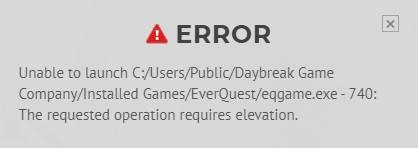
I removed admin from EQ now I get the error below.

View attachment 68691
sounds like it can't launch eqgame.exe process specifically. Which may also be set to require elevation. This is not the same as the launcher which is launchpad.exe
Please find eqgame.exe and remove the launch as admin from it.

I just set my eqgame.exe to require elevation and my launchpad.exe to not use it and got the same error. So this is the reason.
 
It does nothing, click and nothing at all, just thought maybe the path for toons might have been incorrect but the path is fine, made a new team profile and still nothing...
I am having the same problems that you are having after updating red guides launcher today. I have tried everything i could think of and nothing works. Have not had problems before the update and this is on 2 computers now. I updated my EQ client and there are no admin privs . so idk. i even tried going to the release folder and turning off read only (multiple times) and it keeps reverting back
 
I am having the same problems that you are having after updating red guides launcher today. I have tried everything i could think of and nothing works. Have not had problems before the update and this is on 2 computers now. I updated my EQ client and there are no admin privs . so idk. i even tried going to the release folder and turning off read only (multiple times) and it keeps reverting back
getting the same issue today after patch on both my computers, neither have eq game or launchpad set to run as admin.
 
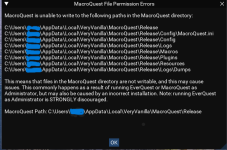
Brainiac reverted the de-elevation behavior so macroquest.exe will not de-elevate itself. However this won’t fix permission problems in all cases because eq is still launched de-elevated.
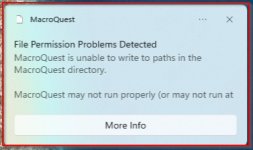
So brainiac added a warning message of "permission problems are detected".

Some people are reporting false positives.

You can disable the file permissions check in your macroquest.ini file in your config folder if you wanted to disable this check
INI:
[MacroQuest]
DisableFilePermissionsCheck=1
 
Brainiac reverted the de-elevation behavior so macroquest.exe will not de-elevate itself. However this won’t fix permission problems in all cases because eq is still launched de-elevated.
So brainiac added a warning message of "permission problems are detected".

Some people are reporting false positives.

You can disable the file permissions check in your macroquest.ini file in your config folder if you wanted to disable this check
INI:
[MacroQuest]
DisableFilePermissionsCheck=1
How do we know if it's a false positive? I'm getting this error now, but I'm not sure how to tell if it's an issue I need to address or not. I didn't change anything since the patch and it was fine before that. MacroQuest is now listed as "elevated" in the icon tray.
 
How do we know if it's a false positive? I'm getting this error now, but I'm not sure how to tell if it's an issue I need to address or not. I didn't change anything since the patch and it was fine before that. MacroQuest is now listed as "elevated" in the icon tray.

I came here to say the same thing. I get a warning when I launch MQ but nothing appears to be running with admin privileges and the game seems to work fine. MQ does show "elevated" in the icon tray though.
 
Untitled.jpg

Tried everything I can image. I'm logged in as admin etc. Any help will be greatly appreciated.
 
Also having an issue where MQ2 disappears from the icon tray and I can't right click it to load toons, etc. Not sure if that's related to this issue, though.
 
I am having the same issue. So far it still seems to run ok, but I still get that error message
 
I realize this might be a rare scenario regarding the running elevated issue, but I thought it might still be beneficial to share the scenario with the "knowledge base".

Normally when you set "Run as Administrator" in an .exe or shortcut, you typically receive a warning message at launch telling you are going to run at an elevated state and do you want to continue. However, there is a configuration where you could setup a task in Task Scheduler and check "Run with highest privileges", similar to "Run as Administrator" ... but ... you will not receive a warning message from Task Scheduler asking you to proceed with the elevation (where would it send the message anyway), so you will end up with the problem in this thread.

I experienced the problem in this thread about a month ago. I setup some autorun on boot tasks two years ago in Task Scheduler to launch MQ, EQ, etc., and of course, I checked "Run with highest privileges". I was going fucking nuts trying to figure out the problem. I stared at all my .exe and shortcut properties, not a single one had Run as Administrator checked. Then some smart folks in the MQ forum said, do you have any startup tasks running. That was it, I immediately remembered what I setup years ago and it solved the issue.
 
Last edited:
Go to MySEQ on redguides luancher click reinstall on main application ini file and maps i did this after everything else above didn`t work. then started working again hope this helps.
Thank you!!! This worked for me as well!!

Below is what my box was showing me.
 

Attachments

  • Screenshot (113).png
    Screenshot (113).png
    57.2 KB · Views: 0
Issue launching MQ with elevated permissions

Users who are viewing this thread

Back
Top
Cart