• Hail, we're RedGuides. We want you to play six (yes, 6!) EverQuest characters at once. We have scripts and a friendly community to help, please join our playstyle and say hello! 👋
  • We've added LLM sections to our Terms & Rules and Resource Rules, for everyone's sanity & in-game safety.
    Read more
    a. Do not replace your voice with an LLM. This goes for your posts and your scripts. Drafting and editing with a tool is fine, but don't take you out of what you share.
    b. Do not replace your EQ character's voice with an LLM. We don't want scripts that speak over /ooc, /shout or other public channels. This has been an unwritten rule that's kept casino scripts off the site for decades, but we're now compelled to make it clear: keep automated communication private.

    Why Does RG Review Scripts?
    Nearly every LLM-written Lua script we see is making your character do impossible things, and rarely in a way that's beneficial to you. We've seen heavy server hammering, /target over impossible distances when /nav spawn would passively accomplish the same thing, a spawn search that fires 20+ times per second, and other pointless actions that are likely annoying GMs.

    You are welcome to use LLMs as a tool to structure, draft, and edit your work, but please read critically before hitting /lua run

Question - is there item turn in troubles?

Commits
6
Hi Redguides

A quick question - is anyone else experiencing some item turn in troubles?


I have been using the tutorial macro a couple of times recently. I think a month ago, it was looting and turning in the items to npc ok. This week however, it seems to have problems.

It would pick up ground spawn, or loot a mob and i can see the quest items in the top inventory or in a bag. The character runs back to the quest npc, tries to interact, but does not complete the turn in.

When I say try, I mean the character is standing by the npc for several seconds. The inventory window appears, and in some cases an empty bag opens. i do not recall seeing a trade window with the npc. instead, a few more seconds pass and the character runs on as if has completed.

Examples of what remained in the inventory, not turned in include - 4x cocoon silks, the violet flower and the arrow. (dont recall exact items names)


The macro hasnt changed from a month ago. I have updated VV at least twice. The mandatory post patch day, and again this week.

I dont think this is the macro itself as issue as it did these turn ins previously.


I figured a plan would be to ask the community, if others are experiencing trouble, with picking items up from inventory and turning into npcs. Perhaps in their own macros. This then to lead to investigate what is going on, if its more than "just me".


Regards and Best Wishes.
 
Thank sic

There are couple of things noticed.

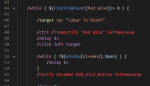
First, and this is the utter luck, was the script i pulled together for the Neriak Wines macro last year.
1622802278107.png​

When I read that script now, I whince a little, but it worked. By luck, i must have read that approach on picking up items from inventory somewhere else. Either in forum or a macro.


I found some change log comment by EQMule from 2016.

15 Dec 2016 by eqmule
- Fix: double timestamps in the eqlog is no longer happening so you can turn on /timestamp again.
- Fixed a bug in FindItem and its derivatives where it needed signed parameters.
- Fixed the EQINVSLOTWND struct, it was off by a few bytes.
Yes that means .InvSlot will once again "work" (dont effing use it. in your macros, use ItemSlot and ItemSlot2)


.... suggests this has been broken before. Although does come with some guidance to use ItemSlot as oppose InvSlot.


I was having a look over the macro scripts Ive got downloaded with VV, filter for Finditem and then either the use of InvSlot or ItemSlot.
The Ninjadvloot.inc script jumped out as having a mix of both in use.

extract from Ninjadvloot.inc
Code:
| Top level inv has its own loop since ${FindItem[=${ItemToSell}].InvSlot} looks at top lev inv slots first in Sub SellToVendor for the item to sell.
     /if (${InvSlot[pack${Select[${FindItem[=${ItemToSell}].ItemSlot},23,24,25,26,27,28,29,30,31,32]}].Item.Container}) {
         /nomodkey /itemnotify in Pack${Math.Calc[${FindItem[=${ItemToSell}].ItemSlot}-22]} ${Math.Calc[${FindItem[=${ItemToSell}].ItemSlot2}+1]} leftmouseup
         /nomodkey /itemnotify ${FindItem[=${ItemToSell}].InvSlot} leftmouseup
         /if (${FindItem[=${ItemToDeposit}].InvSlot}<=22) /return
         /if (!${InvSlot[pack${Float[${Math.Calc[${Select[${FindItem[=${ItemToDeposit}].ItemSlot},22,23,24,25,26,27,28,29,30,31,32]}-1]}].Int}].Item.Container}) {
             /nomodkey /shift /itemnotify ${FindItem[=${ItemToDeposit}].InvSlot} leftmouseup
             /nomodkey /shift /itemnotify in Pack${Math.Calc[${FindItem[=${ItemToDeposit}].ItemSlot}-22]} ${Math.Calc[${FindItem[=${ItemToDeposit}].ItemSlot2}+1]} leftmouseup
     /if (${FindItem[=${ItemToDeposit}].InvSlot}) /goto :deposit


Of the extract, I found lines 7 & 8 to be most informative.
 
Question - is there item turn in troubles?

Users who are viewing this thread

Back
Top
Cart