• You've discovered RedGuides, an EverQuest multi-boxing and scripting community 🧙‍♀️⚙️. We want you to play several EQ characters at once, come join us and say hello! 👋

  • A TLP without truebox has thawed (Very Vanilla ready)
    Frostreaver

Question - How to tweak nav mesh to avoid getting stuck in certain doors (Plane of Innovation)

RoboClaptrap4

Member
Joined
Feb 14, 2018
RedCents
181¢
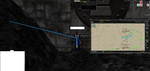
I'm having an issue trying to use nav in Plane of Innovation. It's a bit hard to tell from this screenshot, but basically, my character is trying to nav through the left hand corner of a door that doesn't fully open. Even when the door slides open fully, the part my toon is running into is always in the way, which means he just runs into the wall forever. The green arrow shows the path he tries to take, the blue arrow shows the path I wish he would take.

Is there a way to modify a navmesh so that your characters don't try to hug walls and edges quite so much? This is a perfect example of a time it's problematic. It's also a huge issue in dreadspire, where there are lots of extremely high cliffs that my characters skirt the very edge of every time they move. Is there a way to tweak the mesh so your toons aim for the "center" of a valid path instead of always hugging an edge like this?
 

Attachments

  • nav issue.png
    nav issue.png
    1.9 MB · Views: 18
Yes, you can use the mark area tool, to create non walkable areas, so create a block that covers the non opening door area
1550585726588.png

like this, then he will effectively not move in that area, this is a very helpfull tool to fix little areas where things not quite right.
 
Nice. I was trying to use the Mark Area tool, but was having trouble figuring it out. I'll take another look at it

That will fix the specific issue of the plane of innovation doors. For the other thing I mentioned (the fact that my guys often choose to nav by running right next to the edges of walls/cliffs), is there any way to fix that without manually marking large portions of entire zones? In Dreadspire for example, I would have to manually edit the nav mesh for basically half the zone, and given that some of those spaces are 3d with ramps that spiral above themselves multiple times, I doubt I would even be able to. I don't know whether the decision to run right next to the edge of cliffs all the time is something controlled by MeshGenerator or something controlled by in-game nav settings, but do you know of a way to modify that without manually editing thousands of cells in the mesh?
 
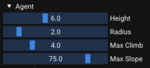
you can change the agent radius to something like 3 or 5, that leaves some big gaps towards edges, i usually go with 3

but yeah marking problem areas is the best way to fix them.
 
@ChatWithThisName made a great video on the basics of how to edit the mesh. I couldnt find it with my quick search.

I most of the time just right click the mesh box and delete the mesh for that square all together. Its the quick easy way, but if its a doorway u may not be able to.
 
@kaen01 Is agent radius a MeshGenerator setting or an in-game MQ2Nav setting?

@Darb How do you delete a square in the mesh? I used to do it with some of my meshes, but I forgot how lol. When I highlight squares in the mesh and press delete, nothing happens
 
you should not delete meshes, use the area mark tool to make unwanted areas non walkable.

agent radius is a meshgenerator setting
1550591797327.png
 
@kaen01 Is agent radius a MeshGenerator setting or an in-game MQ2Nav setting?

@Darb How do you delete a square in the mesh? I used to do it with some of my meshes, but I forgot how lol. When I highlight squares in the mesh and press delete, nothing happens

I think you simply right click, may be left click.
 
the video is okay, but there are some things that are wrong in it, like deleteing meshes, big no no, but yeah it covers the basics for sure.
 
in the next version of nav it gets a lot easier where you can use the connection tool between that and adding non walkable areas
 
Out of curiosity why is deleting cells bad?

Yeah im not sure either. I know the main place i use nav at, i deleted a square and my puller will not pull the mob on the square "no navigation found"
Im completely ok with this, it keeps my puller from getting stuck.

Also i deleted the mesh leading to a raid encounter, so i can pull all around it without ever pulling it. No need to add it to ignore (can never get it to work).
 
It's not a "big no no" just wasn't the intended purpose of the feature. I advised based on my experience with meshes at the time the video was made.

As far the the initial example given by Kaen, don't use "Not Walkable" create a custom area for avoiding things or use water. That way he can still nav in that area but will intentionally avoid walking there if possible.
 
I see how I can make an area Not Walkable and it works well, however, how can I make an area that is walkable (like over a bush), walkable. The tool does not seem to make it that way at least looking at the in game mesh.
1550618533958.png
 
Out of curiosity why is deleting cells bad?

Because it forces you to use tiny tiles. You definitely do not want to use tiny tiles. It causes issues. You generally don't want tiles any smaller than the default size. (they should be larger for bigger zones actually)

issues = problems calculating and following paths
 
Because it forces you to use tiny tiles. You definitely do not want to use tiny tiles. It causes issues. You generally don't want tiles any smaller than the default size. (they should be larger for bigger zones actually)

issues = problems calculating and following paths

Shoot, that’s good to know lol
 
its bad cause it breaks the math!

breaking math is bad! then you get your windango borked and it gets wonky
 
Question - How to tweak nav mesh to avoid getting stuck in certain doors (Plane of Innovation)

Users who are viewing this thread

Back
Top
Cart