
• You've discovered RedGuides, an EverQuest multi-boxing and scripting community 🧙‍♀️⚙️. We want you to play several EQ characters at once, come join us and say hello! 👋

  • A TLP without truebox has thawed (Very Vanilla ready)
    Frostreaver

Question - How to set frame limiter correctly

Joined
Jun 16, 2017
RedCents
140¢
Looking to set my frame limiter correctly. I believe i need to change the Target FPS on the top section from .001 to 30 or 60, correct? If so, is there a way i can do this for all my toons at once or do i have to go in each individual toon to do this? Is there a file i can edit instead of using the bar and dragging?
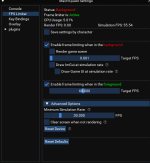
1649774680633.png
 
Looking to set my frame limiter correctly. I believe i need to change the Target FPS on the top section from .001 to 30 or 60, correct? If so, is there a way i can do this for all my toons at once or do i have to go in each individual toon to do this? Is there a file i can edit instead of using the bar and dragging?

View attachment 39271

You can either log everyone out and make changes, or you can use the slash commands and broadcast the commands.

> Framelimiter < demo vid < explains some of this

If you had selected for individual settings you would have to set them all individually, but because you are not you only need to set it on one character and log the rest in or broadcast the command to everyone that is logged in.
 
Question - How to set frame limiter correctly

Users who are viewing this thread

Back
Top
Cart