• You've discovered RedGuides, an EverQuest multi-boxing and scripting community 🧙‍♀️⚙️. We want you to play several EQ characters at once, come join us and say hello! 👋

  • A TLP without truebox has thawed (Very Vanilla ready)
    Frostreaver

How to Install the Redguides Launcher in Crossover on Mac

Cybris

Old Timer
Joined
Jun 23, 2005
RedCents
8,681¢


Alright here it is the long awaited How to install Redguides Launcher Crossover on a Mac running Apple Silicon.

Just a quick note the first half of the video is trying to get the .Net 4.8 Crosstie installed I had to do it three times because it froze up the first two so skip ahead if you want if it works smoothly for you.

Basic Steps:
  1. Create Wiindows 7 64 bit bottle. (In the Video I make a windows 10 bottle. This will not work with DXVK enabled which is required due to the DX11 Update)
  2. Install .Net 4.8 using Crosstie
  3. Install Visual c++ 2015-2022 64-bit Crosstie
  4. Using Wine Configuration add DXGI as an override Library and set to disable.
  5. Install Everquest using crosstie by changing install option to download installer
  6. Download RedGuides Launcher
  7. Install Redguides Launcher as a custom application
  8. Run it twice after install
  9. Open Wine Configuration
  10. On the application tab add your custom .exe make sure it is highlighted after adding
  11. Click Libraries add d3d9 and set to disable this will only be for your custom .exe
  12. Install MQ through the Launcher
  13. Install Plugins, Macro's, Lua's, and MYSEQ as desired.
  14. Select run command and type in regedit.
  15. Using regedit add the following two registry keys
  16. HKEY_CURRENT_USER\Software\Microsoft\WindowsNT\CurrentVersion\AppCompatFlags\Layers
  17. HKEY_LOCAL_MACHINE\Software\Microsoft\WindowsNT\CurrentVersion\AppCompatFlags\Layers
  18. Launch MQ through the Redguides Launcher
  19. Edit Macroquest ini and change MQ2Dannet =1 to MQ2Danet = 0

Additional steps but not required:
Add Profiles maually​

Launch Everquest and enjoy!!!

Notes:
DanNet will not work it will freeze Everquest instead use EQBCS​
Autologin Profiles will not import from PC to Mac. You will need to setup profiles manually.​
Any Lua that relies on Dannet will not work.​
Some Lua scripts require additional script installs using Lua Rocks Package Manager this is not working. Looking into this issue.​

UPDATES:
Work around for the Lua issue: Copy the module folder from the release folder on PC to the release folder in the crossover bottle c: drive.​
DX11 is now on LIVE as of 1/17/2024 Patch.​
Do not use D3DMetal option this will result in shaders not working. This will not affect MQ.​
Make a Windows 7 64-bit bottle not a Windows 10 or Windows 11 bottle. The Crosstie will automatically do this if you install EQ first.​
If your old bottle is Windows 10 or 11 open Winecfg and change from Windows 10 or 11 to Windows 7.​
Crosstie was updated for Everquest and DXVK is no longer required to run Everquest. This requires you to create a new bottle with a fresh install of Everquest using the crosstie.​
 
Last edited:
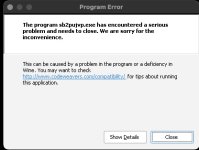
@Cybris Thank you for this!! I know we are a minority but playing on a mac is handy sometimes. I have had everything running great....except I get an occasional freeze up error and of course no Launcher. I have followed your instructions but may have fat fingered something...Launcher runs correctly but when I hit "Launch MQ" I get this error message. Any idea but looking at it what I did? I can launch MQ by going into the folder and double clicking macroquest.exe with no error...it is only when I launch it from Launcher that it pops up.
 

Attachments

  • Image 9-1-23 at 4.13 AM.jpg
    Image 9-1-23 at 4.13 AM.jpg
    36.2 KB · Views: 5
DanNet will not work it will freeze Everquest instead use EQBCS
This is the one thing that makes me sad using Crossover. All the new stuff uses Dannet, but I'm not smart enough to figure out how to debug, let alone fix
 
So I am trying to copy what your doing, but instead of using the EQ Client, I am trying to use the Project Lazarus one. It uses the RoF client and is an EQEMU.

I just followed everything up to installing EQ and I just had it skip that step.

I launch the Project Laz client and it boots up super quick and I can get into the log in screen. Once I get here, it is DOG SLOW. Its so slow I cannot run anything. I am wondering if its because the RoF client is x32? I would think it would not matter....

Everything runs great in Parallels, but since its an M2 Pro it wont run MQ2...I am hopeful that I can come up with a solution.
 
So I am trying to copy what your doing, but instead of using the EQ Client, I am trying to use the Project Lazarus one. It uses the RoF client and is an EQEMU.

I just followed everything up to installing EQ and I just had it skip that step.

I launch the Project Laz client and it boots up super quick and I can get into the log in screen. Once I get here, it is DOG SLOW. Its so slow I cannot run anything. I am wondering if its because the RoF client is x32? I would think it would not matter....

Everything runs great in Parallels, but since its an M2 Pro it wont run MQ2...I am hopeful that I can come up with a solution.

This will not work running EQ in Parallels and then running MQ in a Crossover bottle the processes will not see each other as Parallels is it's own encapsulated environment. The same with Bottles in Crossover. One bottle will not see the processes of another bottle.

You need to run both EQ and MQ from the same bottle in Crossover or Run both EQ and MQ in parallels and last I checked MQ will not run in Parallels.

and to answer your question you are correct If Project Laz is using a 32 bit client it will run extremely slow on Apple Silicon Mac had the same problem with EQ Live when it was 32 bit once it switched to 64 bit it ran just fine.
 
Last edited:
So I am trying to copy what your doing, but instead of using the EQ Client, I am trying to use the Project Lazarus one. It uses the RoF client and is an EQEMU.

I just followed everything up to installing EQ and I just had it skip that step.

I launch the Project Laz client and it boots up super quick and I can get into the log in screen. Once I get here, it is DOG SLOW. Its so slow I cannot run anything. I am wondering if its because the RoF client is x32? I would think it would not matter....

Everything runs great in Parallels, but since its an M2 Pro it wont run MQ2...I am hopeful that I can come up with a solution.
It’s been awhile since I’ve used CrossOver, but is there still an option to make older windows bottles that are 32-bit? Something like Windows 7 32-bit? If so, that may fix some of your issues with slow running Project Laz.
 
Ugh. So basically to be able to play Project Laz.. with MQ2 seems like its not possible....

the 32-bit is just impossibly slow in Crossover, and it runs great in Parallels but parallels does not support MQ2...

I guess its time to dumpster dive a computer...
 
It’s been awhile since I’ve used CrossOver, but is there still an option to make older windows bottles that are 32-bit? Something like Windows 7 32-bit? If so, that may fix some of your issues with slow running Project Laz.
You can but that won't solve the issue frame rate is still horrendous.
 
@Cybris I am using 22.1.1 it looks like. Should I archive the bottle, upgrade CrossOver to the new version and then import the bottle back in?
 
And I can confirm, EQ will run under parallels and MQ will run under parallels, but they can't be run together. Unless I have missed a fix posted here somewhere.
 
I would try 23 see if it makes a difference.
Crossover forums has a lot of complaints about 23. I’m one of them. EQ live ran great in 22.1, but 23 it’s laggy. Some other posters make it seem like 32 bit is impossible in 23, so emu may be worse 😞

Edit: I see you are in a win 10 bottle. Going to try that today
Edit2: Those overrides 🙏 that's exactly what I was missing for making the win10 version work. I would recommend telling people to log in with the launcher the first time -- it asked for permissions that without approving first wouldn't allow profiles to finish loading.
Edit3: Any secret to getting Lua stuff to run? It keeps giving me a message wanting to install stuff, but then just crashes the install.
 
Last edited:
Crossover forums has a lot of complaints about 23. I’m one of them. EQ live ran great in 22.1, but 23 it’s laggy. Some other posters make it seem like 32 bit is impossible in 23, so emu may be worse 😞

Edit: I see you are in a win 10 bottle. Going to try that today
Edit2: Those overrides 🙏 that's exactly what I was missing for making the win10 version work. I would recommend telling people to log in with the launcher the first time -- it asked for permissions that without approving first wouldn't allow profiles to finish loading.
Edit3: Any secret to getting Lua stuff to run? It keeps giving me a message wanting to install stuff, but then just crashes the install.
For the Lua's several rely on Dannet so they will not work.
Looking into the Lua issue.
added these to the top post
 
I am right now kind of holding out for GPTK.... ive been playing with Whisky alot, and there is a couple of good PRs out there that will make running programs in Whisky with GPTK better than crossover.

@Nikkoli - I am one of those people. Crossover 23 , the EMU is impossible to use. i think its the 32bit format. however i tried to downgrade to 22 and it did not do any better to be honest...
 
@Cybris just a data point for you....I archived my EQ bottle using version 22 and then installed version 23 and restored the bottle from the archive. When I tried to launch RG Launcher or EQ directly, the icons for either one of them would show up in the dock and just "bounce" so looks like that doesn't work for whatever reason.
 
I never archived I just installed and had 22 and 23 in my app folder each version sees and can access the same bottles.

23 did get wonky with some of my other games so I just rolled back to 22 and had to reinstall some games but it didn’t affect EQ.
 
I am right now kind of holding out for GPTK.... ive been playing with Whisky alot, and there is a couple of good PRs out there that will make running programs in Whisky with GPTK better than crossover.

@Nikkoli - I am one of those people. Crossover 23 , the EMU is impossible to use. i think its the 32bit format. however i tried to downgrade to 22 and it did not do any better to be honest...
GPTK actually breaks EQ due to Apples custom dx9.DLL EQ will not find a video card. GPTK uses Apples D3Dmetal for DX11 and DX12 and is supposed to fall back to wine for DX9 and DX10 but in EQ’s case it fails. Hopefully when EQ moves to DX11 in the future this will be resolved.
 
I have a very nice and very successful run finally using Whisky which uses GPTK. It runs super smooth.. i had to do a ton of tweaking. But I have it working finally...I am working on seeing if i can get it to work now with MQ...
 
Desperately waiting for updated Test Server instructions

Following your video the current situation is "Failed to load graphics DLL"
 
Last edited:
That’s due to test using dx11 it’s going to change how to install and run EQ in Crossover.
I tried playing around with various wine configs and reading the eq forum on the crossover site, but nothing has worked. DX11 should work in Crossover using their DXVK thing but I've had no luck with it.
 
I tried playing around with various wine configs and reading the eq forum on the crossover site, but nothing has worked. DX11 should work in Crossover using their DXVK thing but I've had no luck with it.
correct, using the DXVK switch in Crossover on a Mac will force a program to use MoltenVK or if you use CXPatcher to patch Crossover with GPTK then turn off the DXVK switch and it uses D3DMetal for DX11. First option does not work with the GPTK patched version of crossover I was able to load in Test but no shaders were working only names, particles, and the UI worked.
 
Last edited:
I have a very nice and very successful run finally using Whisky which uses GPTK. It runs super smooth.. i had to do a ton of tweaking. But I have it working finally...I am working on seeing if i can get it to work now with MQ...
Would you mind listing out what you did? I'd really like to get just the base game running.

I couldn't even get the DX9 setup to run. Any help would be appreciated.

One other thing I'd love to figure out if either Whiskey supports it or Cross over is change the network and MAC of individual bottles. Parallels supports it, but haven't found a way to do it in Crossover or Whiskey.

I got cross over to work finally doing this:
- Use the Win7 bottle
- Install EQ from inside Crossover using Daybreak site
- Install all dependencies through the installer ( just the native crap )
- Let the DX9 try to install and error
- When the launcher starts but is a black box, just right click and close or click in upper right
- Do NOT TURN on DXVK or ESync
- Download DX9 from https://www.microsoft.com/en-us/download/details.aspx?id=8109
- Copy and paste the dxsetup.exe that downloaded into the bottle c_drive
- Run command - browse to where you put the dxsetup.exe
- Run launcher

If for some reason you still get a black box launcher, I also did one where I copied the everquest folder from another comp and it worked after installing DX9.

Crossover seems to run about a million times faster than parallels. I wish I could get individual network addressing to work though.
 
New Crossover 23.5.0 just came out.

This release offers an alternate way to run DirectX 11 and DirectX 12 games through CrossOver, using components from the Apple game porting toolkit. It can be enabled by toggling on “D3DMetal” in the right bottle sidebar.

We are happy to report that this new D3DMetal option improves quality, compatibility, and performance for many games on Macs with the M1 chip or later, including Elden Ring, Hogwarts Legacy, Cyberpunk 2077, Armored Core VI Fires of Rubicon, Mortal Kombat 1, Deep Rock Galactic, Satisfactory, Monster Hunter Rise, God of War and Batman Arkham Knight. Note that Elden Ring and Armored Core VI Fires of Rubicon default to launching with Easy Anti-Cheat disabled.

The excitement does not stop there! We are also happy to report that Baldur’s Gate 3 is working out of the box, and we recommend enabling D3DMetal or DXVK for the best experience. Denuvo games are now playable, and this release also includes support for GStreamer for multimedia decoding.

CrossOver 23.5 is the first CrossOver release with support for macOS Sonoma with optimizations from thorough compatibility testing.

Maybe it will work on test?
 
I couldn't even get the DX9 setup to run. Any help would be appreciated.
Tbat's one of the reasons to use the Crosstie in Crossover to install Everquest. You can't install the Microsoft version of DX9 in a 64bit bottle it crashes. If you want to do it manually you have to use the DirectX 9 crosstie in Crossover by going to install and searching for DirectX 9., I highly recommend as I show in the video using the Crosstie for Everquuest as it installs all required dependencies.
 
New Crossover 23.5.0 just came out.


Maybe it will work on test?
Came to talk about this very topic!
I can say, it still doesn't support Dannnet (which is much sad)
but d3d metal does seem to make the game smoother -- esp when zoning
 
Just tested again for the test server DX11 with D3D/metal and still no shaders are loading.
further than I got. I am getting the infamous "can't load graphics DLL" after patching for test. I did see that the d3dmetal only works with Sonoma and if you are on Ventura it does nothing. Just bringing that up in case you don't have a machine setup with the beta OS
 
further than I got. I am getting the infamous "can't load graphics DLL" after patching for test. I did see that the d3dmetal only works with Sonoma and if you are on Ventura it does nothing. Just bringing that up in case you don't have a machine setup with the beta OS
My steps to get it to load without the shaders and stuff was pretty simple.
1) Make a Win10 64bit bottle, CrossOver 23.5.0
2) Use CrossOver to install Everquest, download the EQ_setup.exe from daybreak
3) Disable dxgi
4) Run the launcher, download EQ, switch to Test
5) Delete the dxgi entry
6) Download the DX9 install and run it in your Bottle
7) Toggle D3DMetal on
8) Run the launcher, it will be blank but it will load EQ and you'll get all the way in but will only see particle effects etc.

I hope they fix it or someone figures out how to make it work.
 
I have some hope the dx11 issue will get sorted because d3dmetal is still in beta and dx11 for EQ is still in testing. Crosses fingers.
 
Okay so some good news just did a fresh bottle using the built in crosstie using a windows 7 64 bit bottle and using the DXVK option I was able to load into test with shaders working, however using old models no textures will load just the model. Shields and weapon textures do not load either only the model, but everything else works.
 
Okay so some good news just did a fresh bottle using the built in crosstie using a windows 7 64 bit bottle and using the DXVK option I was able to load into test with shaders working, however using old models no textures will load just the model. Shields and weapon textures do not load either only the model, but everything else works.
Thanks Cybris, that method worked for me as well. When using new models my shield and weapon textures loaded and looked good.
 
Mine consistently crashes. Am I missing a step?

1) Make new win7 x64 bottle
2) Use eq installer
3) Let EQ fail to install DX
4) Install eq and set to Test
5) close launcher, toggle on DXVK
6) open launcher (window is blank)
7) eq loads lets me connect to test
8) crashes just before char select screen
 
How to Install the Redguides Launcher in Crossover on Mac

Users who are viewing this thread

Back
Top
Cart