


I'm sure they're out there, but I've never found a guide on how to find the warp offset. And if I do find one it won't be a 1337 Cade guide :p
Anything inside {'s is a button I want you to push (ie {Enter})
First thing's first. You'll need XVI32 (attached). Download it and extract to your desktop (to make things easy).
Run XVI32
Go to File -> New
In the window that open, navigate to eqgame.exe (default path is C:\Program Files\Sony\EverQuest\eqgame.exe).
Go to Search -> Find
Check the box that says
and in the little box to the right of it replace whatever's there with
Like this:
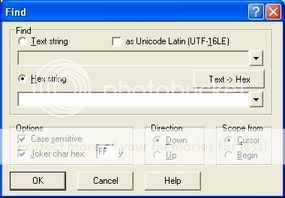
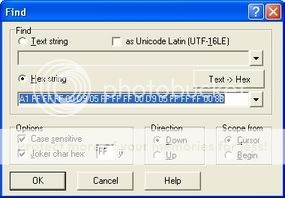
Above that, make sure "Hex String" is selected and in the search box type
(just c/p it :p)
Like this:
Once it gets to the first match, write down the address:
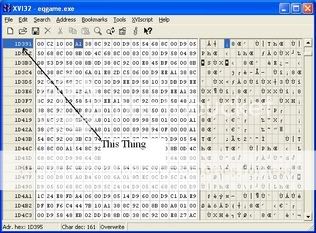
Get it written down yet? Ok, I'll wait....
Dum Dee Doo Doo Doo Dee Doo
Ok now that it's done, go to Start -> Run -> Type Calc {enter}
In the calculator, go to View -> Scientific
Now go back to XVI32 and count the squares after the adress untill you get to the function start (A1)
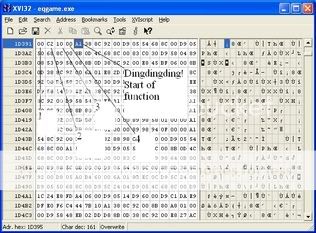
As you see, in this case there's 4 squares before you get to A1, so set your calculator to Hex
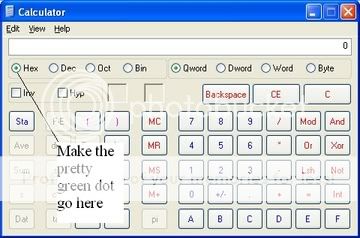
And type the adress you wrote down.
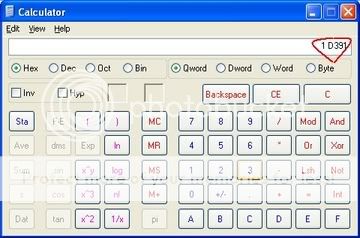
Now remember there were 4 squared before A1, so add 4 to that.
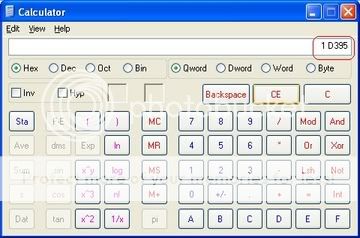
Then add 0x004 to the front of the number you come up with....and you have your warp offset.
Anything inside {'s is a button I want you to push (ie {Enter})
First thing's first. You'll need XVI32 (attached). Download it and extract to your desktop (to make things easy).
Run XVI32
Go to File -> New
In the window that open, navigate to eqgame.exe (default path is C:\Program Files\Sony\EverQuest\eqgame.exe).
Go to Search -> Find
Check the box that says
Rich (BB code):
Joker char hex
Rich (BB code):
FFLike this:
Above that, make sure "Hex String" is selected and in the search box type
Rich (BB code):
A1 FF FF FF 00 D9 05 FF FF FF 00 D9 05 FF FF FF 00 8BLike this:
Once it gets to the first match, write down the address:
Get it written down yet? Ok, I'll wait....
Dum Dee Doo Doo Doo Dee Doo
Ok now that it's done, go to Start -> Run -> Type Calc {enter}
In the calculator, go to View -> Scientific
Now go back to XVI32 and count the squares after the adress untill you get to the function start (A1)
As you see, in this case there's 4 squares before you get to A1, so set your calculator to Hex
And type the adress you wrote down.
Now remember there were 4 squared before A1, so add 4 to that.
Then add 0x004 to the front of the number you come up with....and you have your warp offset.


 Nicely Done


 ... if you look on your screenshot. you will see the offset. which is 1d395....

