Seems like everyone wants to set up houses lately! So I thought I would post this beginning guide on how to get started. Remember there are a lot of ins and outs so not everything will get covered yet. This is just the basics and is based on you already being in a guild and putting your house in that guild neighborhood. It would be slightly different if your not in a guild or if your making a custom guild hall. Sorry its so long.
First find the neighborhood zone called Sunrise Hills. This is down the north side area of the Lobby (to the left when your facing the Magus and past the bill boards) and looks like a big gate. Left click on the gate and a window pops up listing all the hoods. So scroll down the list until you find your guild name. Click it and up the top click the green "go" This will port you into your guild's hood.
First thing is to find a plot you like. This is the land you will be putting your house on. You can bring up your map to see the sections, or just wander around until you find one you like. At each plot there is a corner stone. Left click that and a window pops up telling you which guild neighborhood your in, who if anyone already owns that plot and if its for sale then how much it costs to buy it (one time cost) and the upkeep. You will always pay lot rent/upkeep. Unless you own one of the special houses, like Bixie or the Ship, Tree etc. They erase all rent charges on the land. Make sure you pay some rent for a few days at least so you can place your house.
If you buy any of the houses listed on the Loyalty Merchants or from the Marketplace they will not charge additional rent. Loyalty merchant only has Manors and these are the best as they hold 500/300. The ones in the marketplace are ok but only hold 300 but are rent free. The ones from the NPC in Sunrise Hills, in the hut, will charge rent. But sometimes it the only way you can go. Do not bother with any of the one room houses on the merchant named Indy or the little hut you can get thru the quest - they are just too small. Right next to him is Ragthar who sells Domiciles that hold 500/300 - good size like the loyalty ones but will charge rent. You will see many variations in stone, wood, plaster etc. None of that matters as its just the look. You will also see residences, huts, houses but those do not hold as much as the Domiciles.
So take your house, go to your rent paid up plot, stand in the middle holding your house on your cursor till it turns green. When its green then you can drop it and you have placed your house!!!
To place stuff like swords on the walls, or beds, chairs etc like that you will need to go into the house, hold the item on your cursor and move it around till its green then let go. If your placing trees or fountains, pets etc outside then just stand on your plot holding the item until it turns green then drop it.
There is a window that will pop up when placing your house and the placeable items that will show you how to fine tune your placements.
If you want to use the house to store matts then you do not need to enter the house. Stand on the plot, click shift i or go to eq button then real estate then show items. There are a couple ways to get this screen up. The screen that pops up shows what is in your house. If you have something in your inventory you want to put in the house then left click the item, look at the bottom of the screen where "closet" lit up and click closet. That will put the item into the house .To take it out bring up the window, click the item in the window and click inventory on the bottom.
Tip for cheap upkeep. The loyalty merchant sells bags of doubloons for 11 loyalty tokens. Each bag holds 100 dubs. Each house/plot takes about 7 dub a week upkeep. You would need about 3 bags or 33 loyalty tokens for a years worth of dubs. You likely paid a bunch of plat up front when you bought the plot but thats ok - you can withdraw it and switch to dubs or whatever by clicking the little arrow in the escrow window.
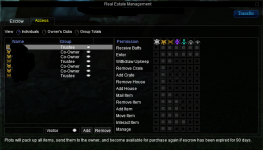
You can also assign permissions for someone to enter or add etc to your house. EQ button, real estate, manage.
Finally don't worry about making a mistake or bad neighbors, you can always withdrawal all your rent, pack up your house and move. No realtor fees.
First find the neighborhood zone called Sunrise Hills. This is down the north side area of the Lobby (to the left when your facing the Magus and past the bill boards) and looks like a big gate. Left click on the gate and a window pops up listing all the hoods. So scroll down the list until you find your guild name. Click it and up the top click the green "go" This will port you into your guild's hood.
First thing is to find a plot you like. This is the land you will be putting your house on. You can bring up your map to see the sections, or just wander around until you find one you like. At each plot there is a corner stone. Left click that and a window pops up telling you which guild neighborhood your in, who if anyone already owns that plot and if its for sale then how much it costs to buy it (one time cost) and the upkeep. You will always pay lot rent/upkeep. Unless you own one of the special houses, like Bixie or the Ship, Tree etc. They erase all rent charges on the land. Make sure you pay some rent for a few days at least so you can place your house.
If you buy any of the houses listed on the Loyalty Merchants or from the Marketplace they will not charge additional rent. Loyalty merchant only has Manors and these are the best as they hold 500/300. The ones in the marketplace are ok but only hold 300 but are rent free. The ones from the NPC in Sunrise Hills, in the hut, will charge rent. But sometimes it the only way you can go. Do not bother with any of the one room houses on the merchant named Indy or the little hut you can get thru the quest - they are just too small. Right next to him is Ragthar who sells Domiciles that hold 500/300 - good size like the loyalty ones but will charge rent. You will see many variations in stone, wood, plaster etc. None of that matters as its just the look. You will also see residences, huts, houses but those do not hold as much as the Domiciles.
So take your house, go to your rent paid up plot, stand in the middle holding your house on your cursor till it turns green. When its green then you can drop it and you have placed your house!!!
To place stuff like swords on the walls, or beds, chairs etc like that you will need to go into the house, hold the item on your cursor and move it around till its green then let go. If your placing trees or fountains, pets etc outside then just stand on your plot holding the item until it turns green then drop it.
There is a window that will pop up when placing your house and the placeable items that will show you how to fine tune your placements.
If you want to use the house to store matts then you do not need to enter the house. Stand on the plot, click shift i or go to eq button then real estate then show items. There are a couple ways to get this screen up. The screen that pops up shows what is in your house. If you have something in your inventory you want to put in the house then left click the item, look at the bottom of the screen where "closet" lit up and click closet. That will put the item into the house .To take it out bring up the window, click the item in the window and click inventory on the bottom.
Tip for cheap upkeep. The loyalty merchant sells bags of doubloons for 11 loyalty tokens. Each bag holds 100 dubs. Each house/plot takes about 7 dub a week upkeep. You would need about 3 bags or 33 loyalty tokens for a years worth of dubs. You likely paid a bunch of plat up front when you bought the plot but thats ok - you can withdraw it and switch to dubs or whatever by clicking the little arrow in the escrow window.
You can also assign permissions for someone to enter or add etc to your house. EQ button, real estate, manage.
Finally don't worry about making a mistake or bad neighbors, you can always withdrawal all your rent, pack up your house and move. No realtor fees.