
When trying to play EQ on a Surface Pro, the High-DPS scaling makes the windows and fonts scaled to unreadable size (tiny). I've tried changing the eqgame.exe properties and everything on this page but it doesn't seem to be working. I've even updated the eqclient.ini to try and force a screen resolution. It's just not making any change at all. Anyone else have this issue or a fix?

Install the app
How to install the app on iOS
Follow along with the video below to see how to install our site as a web app on your home screen.
Note: This feature may not be available in some browsers.
-
 You've discovered RedGuides, an EverQuest multi-boxing and scripting community 🧙♀️⚙️. We want you to play several EQ characters at once, come join us and say hello! 👋
You are using an out of date browser. It may not display this or other websites correctly.
You should upgrade or use an alternative browser.
You should upgrade or use an alternative browser.
Discussion - High-DPI scaling in Windows 10
- Thread starter eqgeek
- Start date

I assume you're running in windowed mode.
As that page probably recommends, you can change the per application properties and disable scaling for EQ, but that just means EQ is now taking full advantage of your resolution. You can then use /chatfontsize and /mqfont to adjust sizes of chat but it doesn't help with title windows. I believe kaen had a UI he posted to help with that.
Outside of that, tricking EQ into thinking it is running full screen will allow you to set resolutions that change the size of the window, but you need to play with scaling to see what works best. Programs like IsBoxer and Borderless windows can help here.
The easiest way, however, is to turn off display scaling completely (set it to 100% in display settings) and then adjust your resolution (still in display settings) to something that looks reasonable and then launch EQ. This will make it function more like a "normal" computer than a high density display and has the added advantage of using less system resources to handle scaling while you're playing. The downside is, of course, you don't get the full benefit of that high resolution display. It's also a bit tedious to switch it back and forth before and after you're done playing. But it is by far the easiest way to get exactly what you want.
As that page probably recommends, you can change the per application properties and disable scaling for EQ, but that just means EQ is now taking full advantage of your resolution. You can then use /chatfontsize and /mqfont to adjust sizes of chat but it doesn't help with title windows. I believe kaen had a UI he posted to help with that.
Outside of that, tricking EQ into thinking it is running full screen will allow you to set resolutions that change the size of the window, but you need to play with scaling to see what works best. Programs like IsBoxer and Borderless windows can help here.
The easiest way, however, is to turn off display scaling completely (set it to 100% in display settings) and then adjust your resolution (still in display settings) to something that looks reasonable and then launch EQ. This will make it function more like a "normal" computer than a high density display and has the added advantage of using less system resources to handle scaling while you're playing. The downside is, of course, you don't get the full benefit of that high resolution display. It's also a bit tedious to switch it back and forth before and after you're done playing. But it is by far the easiest way to get exactly what you want.
Last edited:

- Joined
- May 17, 2015
- RedCents
- 6,068¢
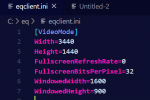
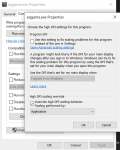
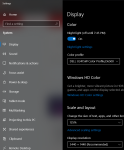
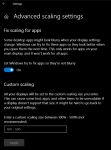
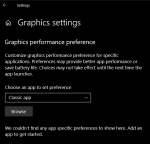
This is my setup documented in case it helps....
- Joined
- May 17, 2015
- RedCents
- 6,068¢
btw I went rounds and rounds with this, I think your issue is probably your eqclient.ini settings
If setting your TRUE desktop resolution in there (Width= Height=) and then the desired windowed mode (if you play windowed) doesnt fix you may have to delete a few eq files so it resets everything.
Let me know here or in discord if ya need more help.
If setting your TRUE desktop resolution in there (Width= Height=) and then the desired windowed mode (if you play windowed) doesnt fix you may have to delete a few eq files so it resets everything.
Let me know here or in discord if ya need more help.
I have this issue, running at 4k.. I did kind of like Lama but here's my notes of what worked for me:
in the EQ folder right click eqgame.exe and go to properties -
Compatibility tab
change high DPI settings
-Check Override High DPI scaling behavior.
and set drop down to system.
Hope that helps, it took me forever to figure out and occasionaly when eqgame.exe gets patched I'll have to reset it.
in the EQ folder right click eqgame.exe and go to properties -
Compatibility tab
change high DPI settings
-Check Override High DPI scaling behavior.
and set drop down to system.
Hope that helps, it took me forever to figure out and occasionaly when eqgame.exe gets patched I'll have to reset it.
Thanks for all the information. I knew you guys would have some ideas! I will be able to check my settings tomorrow. I know that checking the "Override High DPI scaling behavior" box does nothing. I'll correct the eqclient.ini and see what happens!
Well, nothing seems to be working... I wonder if I need to force the numbers larger in my eqclient.ini
Setting the drop down to "System" finally fixed it! Thanks soooooo much!!!
I have this issue, running at 4k.. I did kind of like Lama but here's my notes of what worked for me:
in the EQ folder right click eqgame.exe and go to properties -
Compatibility tab
change high DPI settings
-Check Override High DPI scaling behavior.
and set drop down to system.
Hope that helps, it took me forever to figure out and occasionaly when eqgame.exe gets patched I'll have to reset it.
Setting the drop down to "System" finally fixed it!
Thanks soooooo much!!!
- Joined
- Sep 26, 2012
- RedCents
- 1,623¢
Thanks for these tips! Commenting here, so I can find this again. Move along...

Quichan
Member
- Joined
- Feb 19, 2021
- RedCents
- 94¢
One more key component for me turned out to be the general windows display scale found by right-clicking on the desktop and choosing "Display". Look under "Scale and layout". By default it was set to 200% so I thought EverQuest was defaulting to a low resolution setting. I had 2 windows setups side by side and my new one was just low resolution while the settings were all the same (I even copied some files to be sure). By dropping that general setting down to 175% or 150% it scales everything down. In other words it was a combination of getting EQ to use the system resolution, which made it all larger on my high resolution display, and then setting the system scaling (NOT the system resolution) to make it smaller and sharper. I have it running in bootcamp using native (recommended) display resolutions (which makes things sharper) and I can control the general scale using the Windows scale factor.
Along with everything posted above you can also increase the font size within eq with the "/chatfontsize" command
Default I believe is /chatfontsize 5
Pick a number higher than that
Personally I couldn't get on with 4k EQ on a 32inch, tons of real estate but just too small... so I dropped the resolution to 2560x1440 as well
Default I believe is /chatfontsize 5
Pick a number higher than that
Personally I couldn't get on with 4k EQ on a 32inch, tons of real estate but just too small... so I dropped the resolution to 2560x1440 as well
Users who are viewing this thread
Total: 1 (members: 0, guests: 1)
Share: