• You've discovered RedGuides, an EverQuest multi-boxing and scripting community 🧙‍♀️⚙️. We want you to play several EQ characters at once, come join us and say hello! 👋

  • A TLP without truebox has thawed (Very Vanilla ready)
    Frostreaver

Problem - Hidden Forest Auto Login

Takais

Member
Joined
Feb 19, 2023
RedCents
94¢
I added the shortname, created the profiles, etc... but it seems like every time the account goes to server select screen, it stops the autologin. When I go to hit the join server button on server select screen, it loads to character select, but then instantly reverts back to the server select screen and pauses autologin.

Any ideas?
 
you need the [Servers] section to have shortname=longname
shortname must be the actual server shortname reported in game by /echo ${EverQuest.Server}
I did all of that.

[Servers]
Project Lazarus=[] Project Lazarus
EZ (Linux) x4 Exp=[] EZ Server - Custom Zones, Vendors, Quests, Items, etc
Imperium_EQ=[] Imperium Server - Solo Level/Duo+ Raid
PEQTGC=[] PEQ] The Grand Creation - Omens of War
HiddenForest=[] The Hidden Forest [ www.thehiddenforest.org ]
Haven=[] Wayfarers Haven [wayfarershaven.com]
CWR=[] Clumsy's World [Velious, Semi-Custom, QoL+]
DxBx=[] DreadBox:Re-Dredged BETA
E9 Profusion=[] Enine's ProFusion
EQTitan=[] EQT ) EQTitan [Legit PoP/LDoN/GoD]
The Firiona Vie Project=[] FVP - The Firiona Vie Project (Kunark)
IxiQuest=IxiQuest - (ixiquest.com) Classic to Velious +
KMRA=Raid Atticts (Fully Custom) [Solo/Group/Raid]
The Dark Exile=[] The Dark Exile
Showdowrest=[[R] ] Shadowrest
Alternate Everquest=[[R] ]Alternate
EQ Might=[[R] ] EQ Might

----------------------------

Used this list and added it to the MQ2AutoLogin.ini and made sure to put "thf" as my server on the profiles I created.
 
the server on your profiles should be hiddenforest to match the entry under [Servers]
Also, the [Servers] section you copied is the eqemu login server, so if you are using projecteq login server, it would also be different.
 
the server on your profiles should be hiddenforest to match the entry under [Servers]
Also, the [Servers] section you copied is the eqemu login server, so if you are using projecteq login server, it would also be different.
I'm an idiot and can't read. haha. I appreciate you for pointing that out to me about the short name. My old shortname was thf until I copy and pasted that bunch. I just changed the shortname back to thf in the ini and it's working handsomely. Thank you!!
 
New question though. It's loading into character select automatically now, but is still booting me back to server after getting there. Any ideas?
 
Bumping this instead of creating a new thread, hopefully I can get some help.

I’m playing a 6 box on THF, have the shortname correct and auto login gets all my boxes to the server select screen but for the life of me I can’t get the long name right, which I know is what’s causing the server select hang up.

I’ve copied and pasted numerous different long names and keep getting a hang up so I have short name only and I’m cycling through hitting enter on each character for the time being. After that each one is loading in game passed character select.

Anyone have any advice or can just dumb down what I should have on the server input line?

I’m brand new to all this, so it might be something obvious.
 
Last edited:
HiddenForest=[] The Hidden Forest [ www.thehiddenforest.org ]

from a few posts up / on the docs page linked above

This did not work, shortname=longname causes my autologin to hang at the login screen instead of teh server select screen. using only the short name will get me to server select. also tried what was given to me directly from the server discord, slightly different but still no luck.

i opened the .ini file and i see my blob info at the top, but there's no profiles or settings under that.

[Profiles]
NumProfiles=1
Profile1=thf
DefaultEQPath=C:\Users\...
[Settings]
UseMQ2Login=1

That's directly out of my ini, below the blob stuff, but there's nothing under that. that's where it ends. is the .ini file possibly the problem?
 
In t(he individual profiles, you need to write "HiddenForest" as said, this made the trick for me. Here an example of the MQ2AutoLogin file. And yes, don't ask me why, you have to have to toggle Autologin on "disabled" for it to work. I have only one click to do manually, which is at eqemu serverselection screen, the rest goes full automatized; Works even in combination with another software to get the neat pretty aligned windows on two different screens e:mystery:

[Settings]
UseStationNamesInsteadOfSessions=1
KickActiveCharacter=1
KickActiveTrader=1
InstantCamp=0
Debug=0
UseAuth=0
WinTitle=EverQuest -
UseMQ2Login=0

[Servers]
HiddenForest=The Hidden Forest [ www.thehiddenforest.org ]

[Profiles]
DefaultEQPath=C:\everquest_rof2_THF
MinEQPAth=C:\everquest_rof2_THF
NumProfiles=1
Profile1=YYYY

[Login1]
Password=XXXXXXX
Server=HiddenForest
Character=the mage with The pet
EQPath=C:\everquest_rof2_THF

[Login2]
Password=XXXXXXX
Server=HiddenForest
Character=the bitch
EQPath=C:\everquest_rof2_THF

[Login3]
Password=XXXXXXXX
Server=HiddenForest
Character=the useless
EQPath=C:\everquest_rof2_THF
 
Last edited:
In t(he individual profiles, you need to write "HiddenForest" as said, this made the trick for me. Here an example of the MQ2AutoLogin file. And yes, don't ask me why, you have to have to toggle Autologin on "disabled" for it to work. I have only one click to do manually, which is at eqemu serverselection screen, the rest goes full automatized; Works even in combination with another software to get the neat pretty aligned windows on two different screens e:mystery:
See what’s weird is my ini file has none of that for the profiles and stuff. None of the stuff under settings for “usestationname” settings.

Makes me think I’m having ini file issues. I was having auto group issues as well and when I looked at my ini the settings I made in game weren’t there so I had to edit that manually.

Maybe I should copy your ini to mine and edit everything manually. See if that works. I’ll give that a shot tonight.
 
I'm really not an expert with MQ2 VV, but yes I would try that too and see if it works. For /autogroup I had to edit manually too my ini file, once it was done, autogroup worked fine but apparently only at first login. Group doesn't seem to reform automatically if one gets linkdead or has to do something with other guildies and comes back, etc.
 
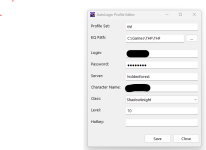
Screenshot of one of my profiles is attached below

This is what works for me:
[BGCOLOR=initial]Autologin is Enabled[/BGCOLOR]

========================================
[Settings]
DefaultEQPath=C:\Games\THF\THF
UseStationNamesInsteadOfSessions=1
KickActiveCharacter=1
KickActiveTrader=1
Debug=0
UseAuth=0
UseMQ2Login=1
NotifyOnServerUP=0
CharSelectDelay=3
[Servers]
HiddenForest=The Hidden Forest [ www.thehiddenforest.org ]
[Profiles]
DefaultEQPath=C:\Games\THF\THF_Bots
NumProfiles=2
Profile1=thf
Profile2=thfbots
[thf]
EQPath=C:\Games\THF\THF
==========================================

A few take aways:

Profile server name is all lowercase, hiddenforest, even though in the .ini file it is 'HiddenForest'
eqhost is pointing to Host=login.thehiddenforest.org:5999 ( whichever login server you are using will determine your long server name, 'The Hidden Forest [ www.thehiddenforest.org ]')
other login servers will have different server long names


Hope this helps!
-Del
 

Attachments

  • Screenshot 2023-05-01 161316.png
    Screenshot 2023-05-01 161316.png
    20.7 KB · Views: 3
Problem - Hidden Forest Auto Login

Users who are viewing this thread

Back
Top
Cart