
Install the app
How to install the app on iOS
Follow along with the video below to see how to install our site as a web app on your home screen.
Note: This feature may not be available in some browsers.
-
 You've discovered RedGuides, an EverQuest multi-boxing and scripting community 🧙♀️⚙️. We want you to play several EQ characters at once, come join us and say hello! 👋
You are using an out of date browser. It may not display this or other websites correctly.
You should upgrade or use an alternative browser.
You should upgrade or use an alternative browser.
Problem - help
- Thread starter Maxflo
- Start date


Maxflo
Well-known member
i tried this obviously, it didn't work. says can't find Lua script matching "rgmercs".The cwtn plugins aren't on emu yet. RGmercs is a lua. /lua run rgmercs.
There is an old RGmercs that wasn't Lua.
Make sure you have the correct one, make sure it is in the Lua folder, and try the RGmercs support forum to get RGmercs help if all else fails.
Make sure you have the correct one, make sure it is in the Lua folder, and try the RGmercs support forum to get RGmercs help if all else fails.

Then you either typed something incorrectly or it is not in your Lua folder.i tried this obviously, it didn't work. says can't find lua script matching "rgmercs".
Are you using redfetch?
You could check to see if the folder is there... right click your macroquest icon, click "Open Folder" near the top... open the MacroQuest Root. Open your Lua folder there, and look for "rgmercs".i did use redfetch to update the files for EMU then using RG launcher like always.
If it isn't there...
RGMercs should be installed by redfetch when you have the resource watched, or you have the "Staff Picks" toggled on the Redfetch settings tab.
If you need help watching a resource, you can check step 9 of the new player guide (make sure you are watching the resource, not the discussion, follow the GIF that Red put there).
If you are sure you have done one of those two things, and still don't see the folder there, then we'll have to try something else.
Maxflo
Well-known member
this is the error i'm getting. i must be doing something wrong. i did a fresh install of mqnext the emu version into a brand new folder mqnext emu. i then ran redfetch, it downloaded all the files into the new directory. the issue is i don't see redguides launcher in that folder anymore. is everything running of just the executables now, no more launcher? also when i downloaded with fetch rgmercs was not in the plugins folder only the macro folder. i had to manually download rgmercs Lua and i put it inside the plugins folder.
Attachments
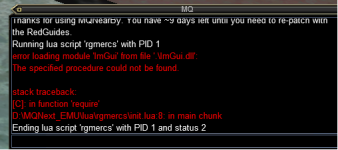

So I think we may be guessing at your setup here, but I will give it a shot. RGMercs folder goes into your Lua folder in the root of your EMU very vanilla install. Here are some pictures.
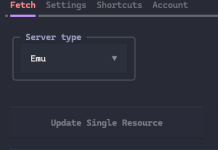
First make sure you have EMU selected
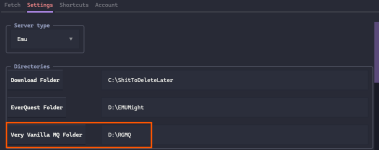
This make sure your settings show the right folders for whatever EMU stuff you are doing, the box I have highlighted is what would be considered your MQ ROOT folder, that should have a Lua folder inside it. Inside that is where you would place RGMERCS, or just let redfetch do it for you by updating the resource.
You have mentioned the plugins folder. RGMERCS is NOT a plugin like the CWTN items are. They are placed in different folders.
First make sure you have EMU selected
This make sure your settings show the right folders for whatever EMU stuff you are doing, the box I have highlighted is what would be considered your MQ ROOT folder, that should have a Lua folder inside it. Inside that is where you would place RGMERCS, or just let redfetch do it for you by updating the resource.
You have mentioned the plugins folder. RGMERCS is NOT a plugin like the CWTN items are. They are placed in different folders.
Maxflo
Well-known member
Hi Debuff. Yes i have done all of these things previously. Everquest folder is my EQ Ascendant folder, very vanilla mQ folder is my MQNext_EMU folder. I checked MQNext_EMU folder and inside the Lua directory there is an rgmercs folder. I appreciate the help but i've done all these steps already, i'm not a total noob to Redguides. lol
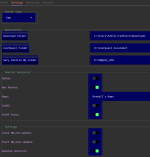
This sounds like you have some MQ files in an EQ directory to me
Do you have an ImGui.dll in your eq folder?
Random guessing cuz I really don't know what else to say.
Edit: are you seeing other imgui windows?
Like the autologin windows as you are logging in, or the /mqsettings window?
Do you have an ImGui.dll in your eq folder?
Random guessing cuz I really don't know what else to say.
Edit: are you seeing other imgui windows?
Like the autologin windows as you are logging in, or the /mqsettings window?
Maxflo
Well-known member
Yes i do have that file in my eq ascendant folder imgui.dll, along with imgui-64.dll. This was a copy of rof client i downloaded from the web i believe. I added ascendant files to that eq version to make it work and the game/server works great. It's just the rgmercs part.This sounds like you have some MQ files in an EQ directory to me
Do you have an ImGui.dll in your eq folder?
Well, that's the issue. I would make sure you don't have any other MQ files there.Yes i do have that file in my eq ascendant folder imgui.dll, along with imgui-64.dll. This was a copy of rof client i downloaded from the web i believe.
Edit: I would find a different rof2 source if I found that in my directory. Who knows what else is there.
Maxflo
Well-known member
Well ya, i'm not a programmer i have no idea what files should be there or not unless the game is not working.Well, that's the issue. I would make sure you don't have any other MQ files there.
Edit: I would find a different rof2 source if I found that in my directory.
See my edit.Well ya, i'm not a programmer i have no idea what files should be there or not unless the game is not working.
Maxflo
Well-known member
Ok ty Algar and everyone else for your help. Let's see if that fixes it or if i can find another copy of the client. Much appreciated!See my edit.
Users who are viewing this thread
Total: 1 (members: 0, guests: 1)
Share: