• You've discovered RedGuides, an EverQuest multi-boxing and scripting community 🧙‍♀️⚙️. We want you to play several EQ characters at once, come join us and say hello! 👋

  • A TLP without truebox has thawed (Very Vanilla ready)
    Frostreaver

Problem - Having some issues, Need help

Joined
Aug 21, 2024
RedCents
40¢
I had everything set up and running. I purchased a mini PC to run my group on and I can't seem to get the plugins to run. On my previous PC, I was able to log in my group and the plugins would load and would work fine. Now, I can log in my group, but none of the plugins are working. I don't understand what I am doing wrong.

Please if anyone can help me understand what I am doing wrong.

Thanks
 
Solution
I had everything set up and running. I purchased a mini PC to run my group on and I can't seem to get the plugins to run. On my previous PC, I was able to log in my group and the plugins would load and would work fine. Now, I can log in my group, but none of the plugins are working. I don't understand what I am doing wrong.

Please if anyone can help me understand what I am doing wrong.

Thanks
Are you asking about the cwtn plugins? You didn't say nor post in an area that would indicate.

What part "is not working"?

Did you patch/update and download them?

Did you load them /plugin <plugin name>

Is it loaded but not doing stuff? Do you have group MA/MT set? Etc
I had everything set up and running. I purchased a mini PC to run my group on and I can't seem to get the plugins to run. On my previous PC, I was able to log in my group and the plugins would load and would work fine. Now, I can log in my group, but none of the plugins are working. I don't understand what I am doing wrong.

Please if anyone can help me understand what I am doing wrong.

Thanks
Are you asking about the cwtn plugins? You didn't say nor post in an area that would indicate.

What part "is not working"?

Did you patch/update and download them?

Did you load them /plugin <plugin name>

Is it loaded but not doing stuff? Do you have group MA/MT set? Etc
 
Solution
I have Redguides launcher, I show the plugins on the plugin option for each of the classes I run. I have it setup to auto login. Which works. The only difference is when I load into the game, the MQ overlay isnt showing and I don't see the indicator showing the plug in running. I am not sure what I missed in the setup. I am very new to using and had a friend help me with the setup before. My buddy isn't available now and was trying to resolve the issue on my own. And after a few hours of trying to figure it out I posted here but wasn't sure where to post.
 
I have Redguides launcher, I show the plugins on the plugin option for each of the classes I run. I have it setup to auto login. Which works. The only difference is when I load into the game, the MQ overlay isnt showing and I don't see the indicator showing the plug in running. I am not sure what I missed in the setup. I am very new to using and had a friend help me with the setup before. My buddy isn't available now and was trying to resolve the issue on my own. And after a few hours of trying to figure it out I posted here but wasn't sure where to post.
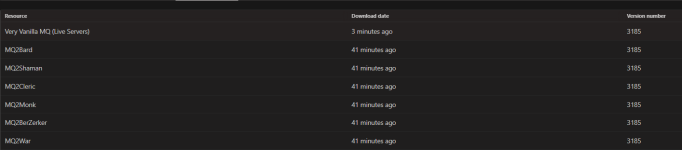
your downloads indicate you just downloaded RG Very Vanilla again a few minutes ago - but downloaded the cwtn class plugins 41 minutes ago

This kinda sounds like "you patched your primary pc 41 minutes ago, and then redownloaded Very Vanilla MQ on your mini pc, but didn't check your plugin tab to ensure you downloaded plugins"
1751240701436.png
Did you load them /plugin <plugin name>

Is it loaded but not doing stuff? Do you have group MA/MT set? Etc

Is it loaded and doing stuff but no window?

Im assuming class plugins - we automatically show them but you can /shw show or /war show to show the UI.

If you copied your whole config folder over, it is also possible you have your imgui overlays able to show off screen - and if your new PC setup doesn't have that, they'd seem like they were missing

you can check if any mqoverlays are working by doing /mqsettings - if a settings panel pops up, then they are working.

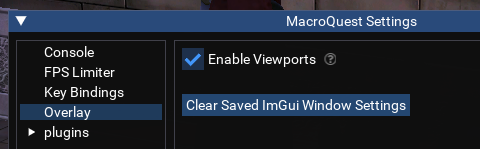
- you can check /mqsettings -> overlay and then uncheck "Enable Viewports" and then click "Clear Saved ImGui Window Settings"
1751240595695.png


if no mq overlay is working then you have something preventing imgui overlays from running like afterburner, Nahimic, afterburner, overwolf, etc
 
See, I told you I was super new at this. I did not use the plugin command... I remember doing that now. But I don't remember having to do it anymore so I was under the mistaken impression I just had to log in and everything would show up... /facepalm
 
See, I told you I was super new at this. I did not use the plugin command... I remember doing that now. But I don't remember having to do it anymore so I was under the mistaken impression I just had to log in and everything would show up... /facepalm
awesome - so loading the plugin now shows everything?

don't forget to spend a little time ensuring you have everything loaded and configured you'd want on your new pc

here's a hotkey from my hotkey guide
INI:
/multiline ; /dga /dga /autoaccept add $\{Me.Name}; /timed 10 /dga /autoaccept save; /timed 15 /rez acceptpct 90; /timed 20 /rez delay 0; /timed 25 /rez accept on; /timed 30 /aaspend order 53214; /timed 35 /aaspend brute on; /timed 35 /aaspend bank 220; /timed 35 /aaspend save

mq2rez
mq2autoaccept
mq2aaspend
mq2easyfind
mq2autogroup (or similar)
have all your nav meshes
looting sorted - lootly, yalm, mq2lootmanager, etc
mq2camera (if you use it, i would hate playing without it)
invisdisplay, guildclicky

etc
 
Problem - Having some issues, Need help

Users who are viewing this thread

Back
Top
Cart
