• You've discovered RedGuides, an EverQuest multi-boxing and scripting community 🧙‍♀️⚙️. We want you to play several EQ characters at once, come join us and say hello! 👋

  • A TLP without truebox has thawed (Very Vanilla ready)
    Frostreaver

Problem - Has something changed in the last 12-14 hours ?

nasaan

Member
Joined
Jan 28, 2015
RedCents
45¢
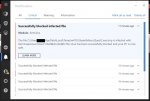
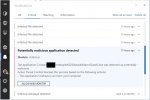
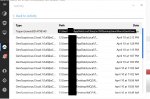
I'm not exactly sure what has happened, but I can't use MQ2 at all now. Bitdefender has it completely locked down. I tried a clean install and it locked down the new install as well. Won't allow me to update it either, I just get the message "access to the path denied."
 

Attachments

  • mqbd1.jpg
    mqbd1.jpg
    76.2 KB · Views: 412
  • mqbd2.jpg
    mqbd2.jpg
    73.3 KB · Views: 408
Last edited:
Looks like a false alarm. BitDefender got a bit too smart/aggressive for its own good.

You need to whitelist MacroQuest2.exe in BitDefender. Did you try Allow and Monitor?

MacroQuest2.exe has always looked and will continue to look "suspicious" to anti-virus programs.

EDIT: I could go on a long rant here how anti-virus often is more annoying than potential threats and does not really protect from the really nasty stuff.

Best would be if you could tell BitDefender to stop checking MQ2 directory.
EDIT2: you need to copy and paste the link as BitDefender put brackets in its URL and I am too lazy to look up escaping brackets in RG forums...
https://www.bitdefender.com/support/how-do-i-exclude-a-folder-from-being-scanned-[bitdefender-windows-8-security]-1067.html
 
Looks like a false alarm. BitDefender got a bit too smart/aggressive for its own good.

You need to whitelist MacroQuest2.exe in BitDefender. Did you try Allow and Monitor?

MacroQuest2.exe has always looked and will continue to look "suspicious" to anti-virus programs.

EDIT: I could go on a long rant here how anti-virus often is more annoying than potential threats and does not really protect from the really nasty stuff.

Best would be if you could tell BitDefender to stop checking MQ2 directory.
EDIT2: you need to copy and paste the link as BitDefender put brackets in its URL and I am too lazy to look up escaping brackets in RG forums...
https://www.bitdefender.com/support/how-do-i-exclude-a-folder-from-being-scanned-[bitdefender-windows-8-security]-1067.html


I did this. I whitelisted the mq2 folder, the very vanilla.exe, and the redguides updater.

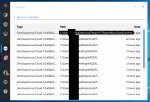
However, there is a tmp file that gets created during the update that causes bitdefender to go off and I haven't found a way around it yet.

The short term fix seems to be to disable the firewall and anti-virus parts of Bitdefender while you run the Redguide update for MQ2. Once updated, everything can be turned back on and it seems to work fine with the folders being whitelisted.

I've always had bitdefender since I started on this site and never had a problem with it until now, I wonder what has changed?
 

Attachments

  • mqbd3.jpg
    mqbd3.jpg
    104.1 KB · Views: 393
Last edited:
nothing in MQ has changed.

Just BitDefender has probably updated.

Have you added the temp folder to the exception list? I generally have better luck adding folder/directories then individual files
 
Last edited:
I'm getting a code signing key which will cut down on all this crap, just waiting on comodo now.
 
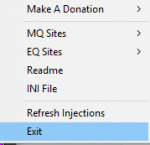
I lost power and this happened to me too, and it nuked all of my login settings from mq2, and i cant even find the profiles thing on my menu again to fricking set it back up after reinstalling veryvanilla.
 

Attachments

  • Screenshot (105).png
    Screenshot (105).png
    3.4 KB · Views: 278
I lost power and this happened to me too, and it nuked all of my login settings from mq2, and i cant even find the profiles thing on my menu again to fricking set it back up after reinstalling veryvanilla.

update first, then try it again. you should still have your profiles
 
Avast recently updated and did the same thing, just to mention incase someone else with that program is freaking out. The annoying part was I was in the middle of fighting... it killed MQ and erased it, and closed all my EQ sessions in the process.

I redid the exceptions for the folder, and re-DLed MQ, then went back to killin.
 
sorry everyone, they're still probing me before they'll give me a cert.

Dude, call the police... you don't have to put up with that. Despite what they say, it's not how they show you they love you!
 
In tonight's update we're signing all the files, which should remove these false positives.

Let me know if anything is still getting borked
 
woot! save on the annoyance of redownloading a few times till all the exceptions are redone, heh.

Thanks again for your (and others) efforts nailing this down.
 
In tonight's update we're signing all the files, which should remove these false positives.

Let me know if anything is still getting borked

This is with Bitdefender Total Security 2017. Happened when using the Redguides update utility. The flag has changed, so we're making progress but we're not quite there yet.
 

Attachments

  • newerror.jpg
    newerror.jpg
    109.9 KB · Views: 78
Disable your firewall and disable your auto protect temporarily while you are playing.
 
Thanks for the report. Our goal is to make it so people don't have to disable anything. If anyone has any tips, please let me know.
 
Thanks for the report. Our goal is to make it so people don't have to disable anything. If anyone has any tips, please let me know.

Quick fix was to put exceptions on the Macroquest folders, and on the temp folder where the files drop during update/install
 
Problem - Has something changed in the last 12-14 hours ?

Users who are viewing this thread

Back
Top
Cart