
• You've discovered RedGuides, an EverQuest multi-boxing and scripting community 🧙‍♀️⚙️. We want you to play several EQ characters at once, come join us and say hello! 👋

  • A TLP without truebox has thawed (Very Vanilla ready)
    Frostreaver

Question - Hardware Question / Linux

Joined
Dec 7, 2018
RedCents
343¢
Greetings.
I am loving rgmercs, but my current old computer is constantly running at 100% CPU usage when running it on 6 accounts simultaneously. As such, I'm constantly having mq crash, my characters stand around not following or interacting with the world for minutes at end, and full party wipes since the characters don't respond to being under attack.

I'm thinking of upgrading to a new PC to alleviate these issues and am tempted to get one from Pop!OS Linux, to also get away from the Windows environment. Searching forum, I don't see many Linux posts newer than 2023.

Q: How well does mq/rgmercs run on multiple accounts simultaneously on Linux? If feedback is it doesn't run well, then I'll look into a Windows PC instead.

Thanks for the feedback and happy Everquesting.
 
In the past I have run EQ on Ubuntu, however within the last year or two I haven't been able to get it to work without using crossover, which has a yearly subscription. Even with that I had some framerate issues. After the 14 day trial I figured it wasn't worth it.
 
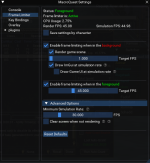
Before jumping to a new PC, I suggest looking into using FrameLimiter with MQ if you have not already. It dramatically reduces CPU and GPU loading. I am currently running 9 instances (6 active, 3 sitting around) and using 17% CPU.

You can set it up in game (EQ button -> MacroQuest -> Settings then pick FrameLimiter. I have mine set like this, but you can change the foreground and simulation rates as desired:

1762630287294.png
 
I recommend the frame limiter background settings found here.
Drawing imGUI at the sim rate should not be necessary unless you have a specific use case.
Probably not strictly necessary. But with two monitors, bringing focus to the second monitor (looking up stuff, doing work, whatever) puts even the front EQ window into the 'background'. I really don't like having everything freeze completely, so I put a minimum rendering rate in there (1fps seems to work, but going lower eventually leads to major lag issues when switching to background characters after a long time, I believe there was some conversation about this before). I also prefer to have my ImGui stuff (invisibility, status, whatnot) updating at a decent rate in this state, so I have it being drawn at the simulation rate. YMMV.
 
Thanks a ton for the replies. I had not heard of Frame Limiter so I'm trying to read up on it now, here at work, so that I can give it a try. It definitely sounds promising, and a lot cheaper than buying a new PC just for EverQuest.
 
Thanks a ton for the replies. I had not heard of Frame Limiter so I'm trying to read up on it now, here at work, so that I can give it a try. It definitely sounds promising, and a lot cheaper than buying a new PC just for EverQuest.
It should do wonders. There's nothing special you need to do or download. It is built in and just needs to be enabled. Look up the link @Algar has in their signature and cool down that CPU.
 
Home from work and wow, what a game changer. I'm running around zones now and am at 25% total cpu usage, whereas before, I was constantly at 100%. I can't thank you guys enough for your advice. Looking forward to trying out some rgmerc combat tonight and see how much of an improvement it is.
 
Home from work and wow, what a game changer. I'm running around zones now and am at 25% total cpu usage, whereas before, I was constantly at 100%. I can't thank you guys enough for your advice. Looking forward to trying out some rgmerc combat tonight and see how much of an improvement it is.
Prepare to be flabbergasted!
 
I was Robban. Tested it out for quite a few hours. Not one crash or hiccup. That one change was a complete game changer. I'm constantly below 30% total cpu usage now and everything works so much better. Extended the life of this old PC and saved me quite a bit of money from not having to upgrade just yet.
 
Question - Hardware Question / Linux

Users who are viewing this thread

Back
Top
Cart