• You've discovered RedGuides, an EverQuest multi-boxing and scripting community 🧙‍♀️⚙️. We want you to play several EQ characters at once, come join us and say hello! 👋

  • A TLP without truebox has thawed (Very Vanilla ready)
    Frostreaver
Resource icon

Release Gyrospire Relocation Device 1.33

No permission to download
howdy Redmarine,

Congratz on your first resource! you should be proud; I'm proud of you

couple of things:

this function - the "if" statement you have parenthesis around it which is more like macro code - I'm not even sure that you *can* slap parens around something
secondly, the if/else is 4 spaces indented and then 3 spaces indented, you should clean that up.

then what got me looking - your variable is_dirty - you set it to false, then check if it is true, but there isn't anywhere it is ever true?
Lua:
local function load_settings()
    local config_path = get_config_filepath()
    if (file_exists(config_path) == false) then
        lip.save(config_path, settings)
   else
        settings = lip.load(config_path)
        -- Version updates
        local is_dirty = false
        if (is_dirty) then lip.save(config_path, settings) end
   end
 end

I was discussing this chunk with @Coldblooded
Lua:
local function file_exists(name)
    local f = io.open(name, "r")
    if f ~= nil then io.close(f) return true else return false end
end
personally - I have a hard time reading those long one-liner lines that are like your if f ~= nil then something return something else return someting end - that's just a personal thing and i was talking about if that is a weird ME thing or not. I'm not a career programmer, and didn't go to school for it, and only been doing it a few years, for > me < i just find it a lot less likely to glaze over mistakes if my lines are
INI:
if this then
    do this cool thing
else
    do this other thing instead
end
Coldblooded mentioned io.close is nil safe, and would return false if nil, so there you can just return io.close(f) instead of that line altogether
INI:
local function file_exists(name)
    local f = io.open(name, "r")
    return io.close(f) 
end
 
This clicky has long been one of my Main's favorites that I still use quite frequently, situationally. Insta-cast evac to an essentially safe location to then take further port action on.

Never repeated for any other character so definitely interested to give this a try and see if it can help share the love.
 
Thanks Phillsphan for being willing to try it, I see why that is happing I'll get a fix out tomorrow, also rewriting a large part of the code to be cleaner. keep an eye out for the update.
 
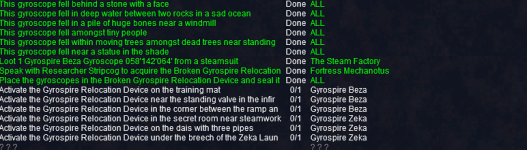
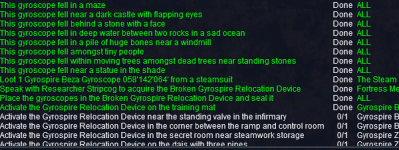
script is great - but so far i tried three toons and it fails to do the activations after the mat on both toons (just does the first one)
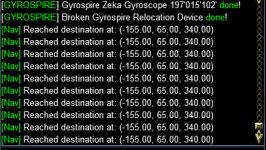
maybe it's the wrong mesh file i am using (cause the movetoloc calls don't get me anywhere)?
 
Last edited:
Vanemon, I'm aware of this issue, the mesh for both the zones aren't great, I'm trying to see if i can get the "standard meshes" updated to solve this. I'll add it as a known bug until I find a work around or I can get the updates that are needed.
 
Vanemon, I'm aware of this issue, the mesh for both the zones aren't great, I'm trying to see if i can get the "standard meshes" updated to solve this. I'll add it as a known bug until I find a work around or I can get the updates that are needed.
great! thank you!
 
worked! though i had some stop and go there. maybe i should have used some kind of lev. anyways: great script - six toons got it until now;-)
 
I downloaded the gyrospire.zip, unzipped it and opened the gyrospire folder. The only file in the folder is init.Lua. What have I done wrong here?
 
I downloaded the gyrospire.zip, unzipped it and opened the gyrospire folder. The only file in the folder is init.lua. What have I done wrong here?
/Lua run gyrospire (as from the instructions)

which will start the Lua (init.Lua from inside the folder named gyrospire)

lesson to be learn:
'watch' the resource
use the launcher
 
Last edited:
It should check where you are at and keep going. for sure it will skip all the pickups.
 
Did it do the combine? so you have the Broken Gyrospire? its looking for items in your inventory and if you did the combine you don't have them anymore. next time I'm in front of my PC I'll post an update.
 
Did it do the combine? so you have the Broken Gyrospire? its looking for items in your inventory and if you did the combine you don't have them anymore. next time I'm in front of my PC I'll post an update.
It did the combine without the pause... maybe I forget now. I got distracted with the ? Lua Epic Laziness. I will update when I can. Ty for the quick response
 
The mesh in Zeka and Beza are both messed up. did you try the meshes i posted?
 
Ok. Will try tomorrow. Ty

edit: There is no change in the behavior after the update. Still stands on the Training Mat and constantly clicks away
 
Last edited:
I ran to the other locs and manually updated to finish the task. Was not hard. On another toon /Lua ran flawless. on 3rd toon it had the same problem as noted above. TY for sharing this. It was way easier than doing it myself and alt tabing all over Allakhazam. Cheers
 
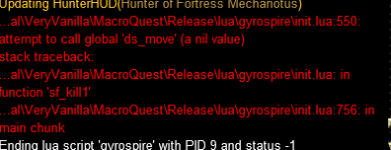
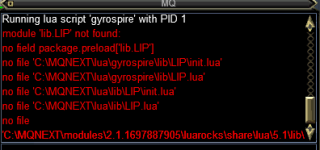
I am "watching" the Lua, installed it, and verified it is in my Lua folder/showing on my launcher. When I do /Lua run gyrospire I get the following message in the MQ window:
1727658574579.png

Any idea how to get those files?

I am looking forward to putting this Lua to work!
 
I am "watching" the lua, installed it, and verified it is in my lua folder/showing on my launcher. When I do /lua run gyrospire I get the following message in the MQ window:
View attachment 65160

Any idea how to get those files?

I am looking forward to putting this lua to work!

You are missing the lib folder/lib.LIP file in Lua and/or the luarocks install. Luarocks is usually push installed by other resources.

Post 25 in this thread discusses it.
 
Release Gyrospire Relocation Device

Users who are viewing this thread

Back
Top
Cart