

Smokeybear72
Only YOU can prevent forest fires !
- Joined
- Jul 3, 2018
- RedCents
- 5,080¢
I had to re-install some files and could not find where this info was, so I am posting this as a thread so members can easily search or learn how to disable or re-enable the "Cool Checkbox Feature" that is on by default.
Original update and post:
20190114

Original update and post:
20190114
Jan 14 2019 by RedGuides
- MQ2Yes (kaen01) updated to a new and better version.
Jan 14 2019 by EqMule
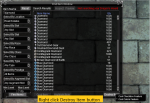
- Added a new column to the Find Item Window which will let you mark items for delete or add them to never loot filter.
Usage: mark some items by checking the ckecboxes, then click the Never Loot button to set their never loot advloot filter.
Usage: mark some items by checking the ckecboxes, then click the Destroy Items button to delete them.
-
- It goes without saying, that if you have no idea what you are doing or if you are a complete imbecile, this feature might
be too dangerous for you to have enabled, in which case you can disable it by right clicking the Destroy Item or the Never Loot button
and then toggle the "Cool Checkbox Feature" on the menu that pops up. Default is ON.