• You've discovered RedGuides, an EverQuest multi-boxing and scripting community 🧙‍♀️⚙️. We want you to play several EQ characters at once, come join us and say hello! 👋

  • A TLP without truebox has thawed (Very Vanilla ready)
    Frostreaver

Problem - Fairly common MQ2 crash

Joined
Oct 18, 2023
RedCents
50¢
Any tips for what would cause this crash? It happens fairly often for me when i'm loading my multiple accounts. I'm only loading 1 group for reference. 6 instances.

---------------------------
EverQuest Crash Detected
---------------------------
MacroQuest caught a crash:

Process ID: 14724
Version: 3.1.0.2540
Location: destroyFinalizer+0 (C:\Windows\System32\DriverStore\FileRepository\nv_dispi.inf_amd64_5cf411dadcb5710d\nvgpucomp64.dll+000000000035E080)

CrashID: c654b4e2-87e8-4c34-a814-c916f39cec17

You can either:
* [RETRY] Continue execution and hope for the best.
* [CANCEL] Write a crash dump and terminate EverQuest.

Copy the contents of this dialog to your clipboard by pressing Ctrl+C

---------------------------
Retry Cancel
---------------------------
 
Yea I always update the drivers but something else seems up with my system then, sigh. I've already had the PC company replace the graphics card once... so abnoxious.
 
Yea I always update the drivers but something else seems up with my system then, sigh. I've already had the PC company replace the graphics card once... so abnoxious.
Make sure to turn off the new ui
 
Evening all - I am getting the same issue (screen snip below) I have updated to newest video driver, I have rolled back to earlier driver, made sure use new UI is off in game settings, have updated the RG launcher and even reinstalled it and still getting the error when trying to log into game, any help would be very appreciated (was working fine couple of days ago).

1717851242925.png
 
Evening all - I am getting the same issue (screen snip below) I have updated to newest video driver, I have rolled back to earlier driver, made sure use new UI is off in game settings, have updated the RG launcher and even reinstalled it and still getting the error when trying to log into game, any help would be very appreciated (was working fine couple of days ago).

View attachment 62261
Please copy the contents to your clipboard and paste it so we don't have to manually type in the super long and complicated crash ID to look at your crash.
1717851787341.png
 
Sorry about that have never had to post a crash ID before lol

---------------------------
EverQuest Crash Detected
---------------------------
MacroQuest caught a crash:

Process ID: 17024
Version: 3.1.0.2540
Location: ImGui::DockNodeEndAmendTabBar+0 (E:\EQ\imgui-64.dll+00000000000326B0)

CrashID: b225a295-0022-4434-8e51-4b78d52959c1

You can either:
* [RETRY] Continue execution and hope for the best.
* [CANCEL] Write a crash dump and terminate EverQuest.

Copy the contents of this dialog to your clipboard by pressing Ctrl+C

---------------------------
Retry Cancel
---------------------------
 
yes, running 6 boxes, the crashes are coming so thick and fast it's unplayable. I just stopped using isboxer, and started to see that crash note, prior to that with isboxer it must have been eating them, I wasn't aware they were happening. Stopped since I thought it might be being caused by isboxer's shenanigans, but seems it's something more core. Test player.
 
I know its mentioned above but make sure you update your video card drivers and or try another video card if possible.
Worked for me
 
Yeah tried the newest updated driver to no effect, even rolled back to previous version just to make sure the new driver was not the problem, still same issue. Don't have another vid card or money to buy a new one :(
 
neither of those crash ids are pulling up a dump I'm afraid. Might be "optimized away" as it's a duplicate of another. The imgui related crashes I'm seeing in the list of crashes around that time are implying imgui_implDX11_SwapBuffer, render platform windows default, draw frame....which all seem to be related to just making the windows in general.
Anything specifically you do to recreate the crash?
 
All I do is start RG Launcher and once it is fully loaded all Lua, Macros & Plugins I go to VV and launch MQ, the open the MQ menu and load a profile or character, that's when the error pops up and closes the window. I will DM you the dump file if you wish CWTN?
 
Make sure to turn off the new ui
I did this now but also went and updated my MB BIOS which removed by OC. I'm leaving it as default steady state. Lost some memory speed but i'd rather not have crashes. Some other games were having issues where they would close or crash too so i'm sure it's all related. Will see how this goes and let everyone know.
 
neither of those crash ids are pulling up a dump I'm afraid. Might be "optimized away" as it's a duplicate of another.

Not "optimized away" -- duplicates are recorded as duplicates. there is a rate limit and if you're constantly crashing and wait until after tons of reports have occured to tell us, then the report id won't be submitted
 
Have removed all Macros & Lua's and still getting the error?
---------------------------
EverQuest Crash Detected
---------------------------
MacroQuest caught a crash:

Process ID: 8408
Version: 3.1.0.2540
Location: ImGui::DockNodeEndAmendTabBar+0 (E:\EQ\imgui-64.dll+00000000000326B0)

CrashID: f2dc10b6-01af-415b-99fe-191863f527e1

You can either:
* [RETRY] Continue execution and hope for the best.
* [CANCEL] Write a crash dump and terminate EverQuest.

Copy the contents of this dialog to your clipboard by pressing Ctrl+C

---------------------------
Retry Cancel
---------------------------
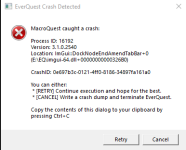
 
Have removed all Macros & LUA's and still getting the error?
---------------------------
EverQuest Crash Detected
---------------------------
MacroQuest caught a crash:

Process ID: 8408
Version: 3.1.0.2540
Location: ImGui::DockNodeEndAmendTabBar+0 (E:\EQ\imgui-64.dll+00000000000326B0)

CrashID: f2dc10b6-01af-415b-99fe-191863f527e1

You can either:
* [RETRY] Continue execution and hope for the best.
* [CANCEL] Write a crash dump and terminate EverQuest.

Copy the contents of this dialog to your clipboard by pressing Ctrl+C

---------------------------
Retry Cancel
---------------------------
Smart people can look, thats a conflicting overlay crash id bet though. look at what its calling (taskbar overlay?? and then imgui poops)
 
Problem - Fairly common MQ2 crash

Users who are viewing this thread

Back
Top
Cart